
1. ഉൽപ്പന്നം കഴിഞ്ഞുview
The DOOGEE V30 PRO is a robust 5G rugged smartphone designed for durability and high performance. It features a powerful MediaTek Dimensity 7050 Octa Core processor, a large 10800mAh battery, and an advanced 200MP AI triple camera system. Built to withstand harsh environments, it meets IP68/IP69K and MIL-STD-810H standards for water, dust, and drop resistance.
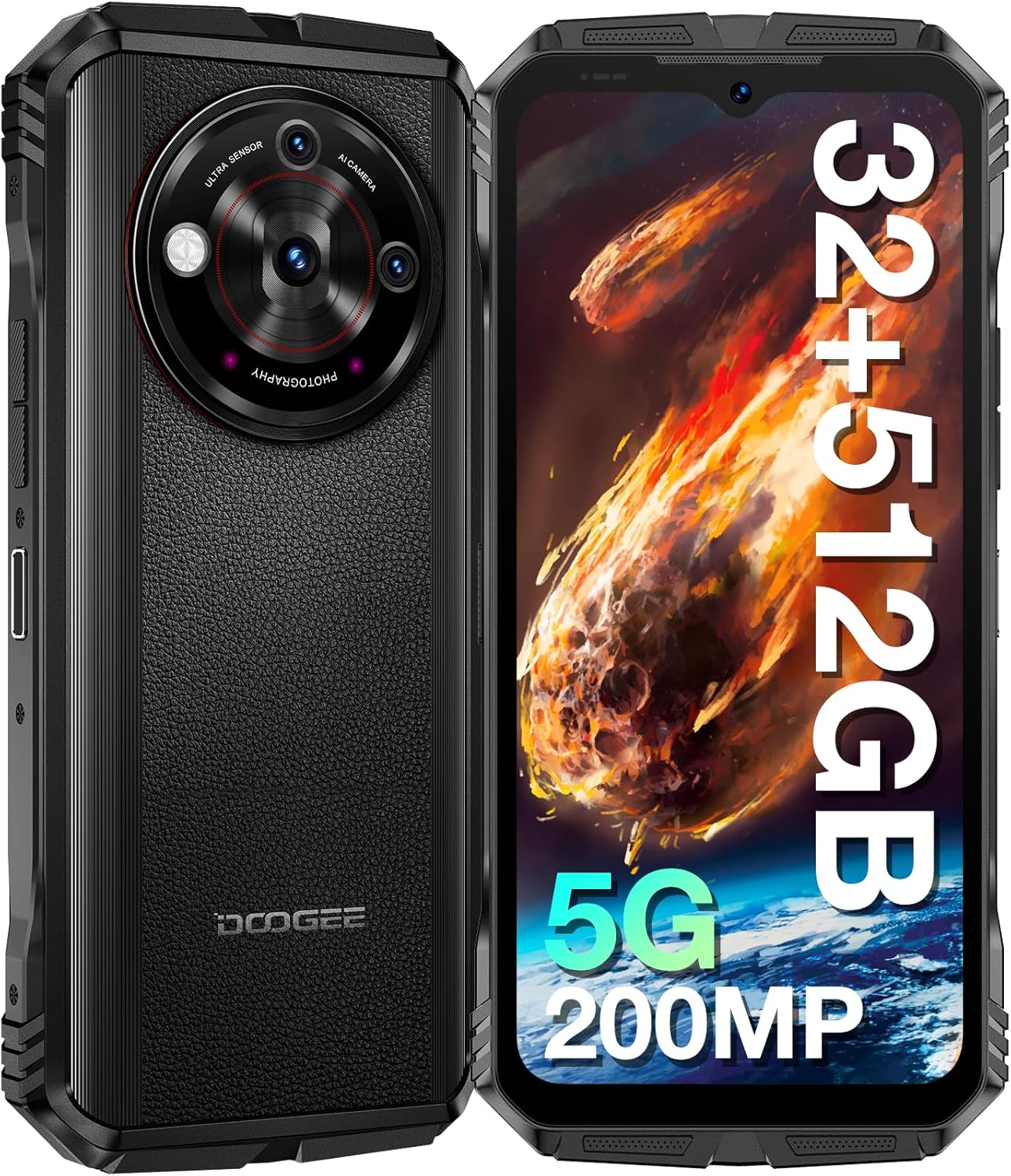
ചിത്രം: മുന്നിലും പിന്നിലും view of the DOOGEE V30 PRO 5G Rugged Smartphone, highlighting its robust design and camera module.

ചിത്രം: ഒരു ഓവർview of the DOOGEE V30 PRO's key features, including its 200MP camera, 120Hz display, Dimensity 7050 processor, and 10800mAh battery.
2. സജ്ജീകരണ ഗൈഡ്
2.1 പാക്കേജ് ഉള്ളടക്കം
Before starting, ensure all items are present in the box:
- DOOGEE V30 PRO Smartphone
- 33W സൂപ്പർ ഫാസ്റ്റ് ചാർജർ
- USB കേബിൾ (ടൈപ്പ്-സി)
- സിം ട്രേ എജക്റ്റർ ടൂൾ
2.2 സിം കാർഡും ടിഎഫ് കാർഡും ഇൻസ്റ്റാൾ ചെയ്യൽ
The DOOGEE V30 PRO supports dual Nano SIM cards or one Nano SIM card and one TF (microSD) card for expanded storage.
- ഉപകരണത്തിന്റെ വശത്ത് സിം കാർഡ് ട്രേ കണ്ടെത്തുക.
- ട്രേയുടെ അടുത്തുള്ള ചെറിയ ദ്വാരത്തിലേക്ക് സിം ട്രേ എജക്റ്റർ ഉപകരണം തിരുകുക, ട്രേ പുറത്തേക്ക് വരുന്നത് വരെ സൌമ്യമായി അമർത്തുക.
- Place your Nano SIM card(s) and/or TF card into the designated slots on the tray, ensuring correct orientation.
- Carefully push the tray back into the slot until it is flush with the device body.

Image: Diagram illustrating the Nano SIM1 and Nano-SIM2/TF card slot for proper installation.
2.3 പ്രാരംഭ ചാർജിംഗും പവർ ഓണും
- Connect the USB cable to the 33W Super Fast Charger and then to the Type-C port on your phone.
- ചാർജർ ഒരു പവർ ഔട്ട്ലെറ്റിലേക്ക് പ്ലഗ് ചെയ്യുക. ആദ്യ ഉപയോഗത്തിന് മുമ്പ് ഉപകരണം പൂർണ്ണമായും ചാർജ് ചെയ്യാൻ ശുപാർശ ചെയ്യുന്നു.
- To power on, press and hold the Power button (usually on the side) until the DOOGEE logo appears on the screen.
- Follow the on-screen prompts to complete the initial Android 13.0 setup, including language selection, Wi-Fi connection, and Google account setup.
3. നിങ്ങളുടെ ഉപകരണം പ്രവർത്തിപ്പിക്കുന്നു
3.1 പ്രദർശനവും ഇടപെടലും
The DOOGEE V30 PRO features a 6.58-inch FHD+ IPS display with a 120Hz refresh rate for smooth visuals and responsiveness.
- ടച്ച്സ്ക്രീൻ നാവിഗേഷൻ: Interact with the device by tapping, swiping, pinching, and long-pressing on the screen.
- ഫിസിക്കൽ ബട്ടണുകൾ: Utilize the Power button for screen lock/unlock and power options, and Volume buttons for audio control.
- Custom Key Button: The device includes a customizable side button that can be programmed for quick access to specific functions or applications.

Image: The 6.58-inch FHD+ IPS display with 120Hz refresh rate, showcasing its vibrant visuals.
3.2 ക്യാമറ സവിശേഷതകൾ
Capture high-quality photos and videos with the versatile camera system.
- 200MP AI പ്രധാന ക്യാമറ: For detailed and high-resolution images.
- 24MP നൈറ്റ് വിഷൻ ക്യാമറ: Enables clear photography in low-light or complete darkness.
- 32MP മുൻ ക്യാമറ: സെൽഫികൾക്കും വീഡിയോ കോളുകൾക്കും അനുയോജ്യം.
- 4K Video Capture: Record high-definition videos.

Image: The AI Triple Camera setup on the DOOGEE V30 PRO, featuring the 200MP main sensor.

Image: A comparison demonstrating the clarity of the 24MP Night Vision Camera in dark conditions.
3.3 കണക്റ്റിവിറ്റി
The device offers advanced connectivity options:
- 5G നെറ്റ്വർക്ക്: Provides fast and stable mobile data connectivity.
- Wi-Fi 6: For high-speed wireless internet access with lower latency.
- ബ്ലൂടൂത്ത് 5.2: For connecting wireless accessories like headphones and speakers.
- NFC (ഫീൽഡ് കമ്മ്യൂണിക്കേഷന് സമീപം): Supports mobile payments and quick pairing with compatible devices.
- നാവിഗേഷൻ: Integrated GPS, GLONASS, Galileo, Beidou, and AGPS for accurate positioning.
3.4 സുരക്ഷാ സവിശേഷതകൾ
Secure your device and data:
- Side Fingerprint Recognition: Unlock your phone quickly and securely using the side-mounted fingerprint sensor.
- മുഖം തിരിച്ചറിയൽ: ഉപകരണം അൺലോക്ക് ചെയ്യാൻ നിങ്ങളുടെ മുഖം ഉപയോഗിക്കുക.
3.5 ബാറ്ററി മാനേജ്മെൻ്റ്
10800mAh ബാറ്ററി കൂടുതൽ ഉപയോഗ സമയം നൽകുന്നു.
- നീണ്ട കാത്തിരിപ്പ് സമയം: 720 മണിക്കൂർ വരെ.
- 33W ഫാസ്റ്റ് ചാർജിംഗ്: Quickly recharge your device using the included charger.
- OTG (On-The-Go) Function: Use your phone to charge other electronic devices in emergencies.

Image: Illustration of the 10800mAh battery capacity and 33W fast charging capability.
3.6 സംഭരണവും പ്രകടനവും
The DOOGEE V30 PRO offers ample storage and smooth performance:
- 32 ജിബി റാം: (12GB physical + 20GB virtual RAM) for seamless multitasking.
- 512 ജിബി റോം: Internal storage for apps and data.
- 2TB TF Card Expansion: Expand storage further using a microSD card.

Image: Visual representation of the Dimensity 7050 Octa Core processor, highlighting its 32GB RAM and 512GB ROM with 2TB expandable storage.
3.7 Rugged Features and Toolbag
Designed for extreme conditions, the V30 PRO is IP68/IP69K and MIL-STD-810H certified, making it resistant to:
- 1.5M Drop-Test: 1.5 മീറ്റർ മുതൽ ഉയരം വരെയുള്ള താഴ്ചകളെ ഇത് പ്രതിരോധിക്കും.
- 1.5M Water Deep: Submersible in water up to 1.5 meters for 30 minutes.
- പൊടി പ്രതിരോധം: പൊടിപടലത്തിൽ നിന്ന് പൂർണ്ണമായും സംരക്ഷിക്കപ്പെടുന്നു.
The device also includes a suite of practical tools:
- പ്രൊട്രാക്റ്റർ
- SoundMeter
- HeightMeasure
- ചിത്രം തൂക്കിയിടൽ
- മാഗ്നിഫയർ
- കോമ്പസ്
- ഗ്രേഡിയന്റർ
- പ്ലംബ് ബോബ്
- കണ്ണാടി

Image: Demonstrates the solid and waterproof structure of the DOOGEE V30 PRO, highlighting its resistance to drops, water, and dust.

Image: Icons representing the various built-in toolbag applications available on the DOOGEE V30 PRO.
3.8 Underwater Mode
The DOOGEE V30 PRO supports an Underwater Mode, allowing you to capture photos and videos while submerged. Ensure the device is properly sealed before entering water.

Image: A person using the DOOGEE V30 PRO in Underwater Mode to capture images beneath the surface.
4. പരിപാലനം
4.1 നിങ്ങളുടെ ഉപകരണം വൃത്തിയാക്കൽ
To maintain the ruggedness and appearance of your DOOGEE V30 PRO:
- സോഫ്റ്റ്, ഡി ഉപയോഗിച്ച് ഉപകരണം തുടയ്ക്കുകamp തുണി.
- കഠിനമായ അഴുക്കിന്, നേരിയ സോപ്പ് ലായനി ഉപയോഗിച്ച് ശുദ്ധജലം ഉപയോഗിച്ച് നന്നായി കഴുകുക.
- Ensure all ports and covers are dry before charging or using in wet conditions.
4.2 ബാറ്ററി കെയർ
ബാറ്ററി ആയുസ്സ് വർദ്ധിപ്പിക്കാൻ:
- തീവ്രമായ താപനിലയിലേക്ക് ഉപകരണം തുറന്നുകാട്ടുന്നത് ഒഴിവാക്കുക.
- Use only the original charger and cable provided.
- ബാറ്ററി പതിവായി പൂർണ്ണമായും ഡിസ്ചാർജ് ചെയ്യരുത്.
4.3 സോഫ്റ്റ്വെയർ അപ്ഡേറ്റുകൾ
Regularly check for and install software updates to ensure optimal performance, security, and access to new features. Updates are typically found in the device's settings menu under 'System' or 'About phone'.
5. പ്രശ്നപരിഹാരം
This section addresses common issues you might encounter with your DOOGEE V30 PRO.
5.1 പൊതുവായ പ്രശ്നങ്ങളും പരിഹാരങ്ങളും
- ഉപകരണം ഓണാക്കുന്നില്ല:
- ബാറ്ററി ചാർജ്ജ് ചെയ്തിട്ടുണ്ടെന്ന് ഉറപ്പാക്കുക. പവർ ഓൺ ചെയ്യാൻ ശ്രമിക്കുന്നതിന് മുമ്പ് കുറഞ്ഞത് 10 മിനിറ്റെങ്കിലും ചാർജറുമായി കണക്റ്റ് ചെയ്യുക.
- റീസ്റ്റാർട്ട് ചെയ്യാൻ പവർ ബട്ടൺ 10-15 സെക്കൻഡ് അമർത്തിപ്പിടിക്കുക.
- Poor network connectivity (calls/data):
- Check if the SIM card is correctly inserted. Re-insert if necessary.
- നിങ്ങൾ നെറ്റ്വർക്ക് കവറേജിൽ ആണെന്ന് ഉറപ്പാക്കുക.
- വിമാന മോഡ് ഓണും ഓഫും ആക്കുക.
- ഉപകരണം പുനരാരംഭിക്കുക.
- ആപ്പുകൾ ക്രാഷാകുകയോ മരവിക്കുകയോ ചെയ്യുന്നു:
- പ്രശ്നമുള്ള ആപ്പിന്റെ കാഷെ മായ്ക്കുക (ക്രമീകരണങ്ങൾ > ആപ്പുകൾ > [ആപ്പ് നാമം] > സംഭരണം > കാഷെ മായ്ക്കുക).
- ആപ്പ് അതിന്റെ ഏറ്റവും പുതിയ പതിപ്പിലേക്ക് അപ്ഡേറ്റ് ചെയ്തിട്ടുണ്ടെന്ന് ഉറപ്പാക്കുക.
- ഉപകരണം പുനരാരംഭിക്കുക.
- ബാറ്ററി വേഗത്തിൽ തീർന്നു:
- സ്ക്രീൻ തെളിച്ചം കുറയ്ക്കുക.
- ഉപയോഗിക്കാത്ത പശ്ചാത്തല ആപ്പുകൾ അടയ്ക്കുക.
- ഉപയോഗത്തിലില്ലാത്തപ്പോൾ വൈഫൈ, ബ്ലൂടൂത്ത് അല്ലെങ്കിൽ ജിപിഎസ് ഓഫാക്കുക.
- പവർ കൂടുതലുള്ള ആപ്പുകൾ തിരിച്ചറിയാൻ ക്രമീകരണങ്ങളിൽ ബാറ്ററി ഉപയോഗം പരിശോധിക്കുക.
- NFC not working (e.g., with CGMs):
- Ensure NFC is enabled in Settings.
- Verify compatibility with the specific NFC device or system you are trying to use. Not all NFC applications are universally supported.
5.2 ഫാക്ടറി റീസെറ്റ്
പ്രശ്നങ്ങൾ നിലനിൽക്കുകയാണെങ്കിൽ, ഫാക്ടറി റീസെറ്റ് ചെയ്യുന്നതിലൂടെ സോഫ്റ്റ്വെയറുമായി ബന്ധപ്പെട്ട നിരവധി പ്രശ്നങ്ങൾ പരിഹരിക്കാൻ കഴിയും. മുന്നറിയിപ്പ്: ഇത് നിങ്ങളുടെ ഫോണിലെ എല്ലാ ഡാറ്റയും മായ്ക്കും. തുടരുന്നതിന് മുമ്പ് പ്രധാനപ്പെട്ട ഡാറ്റയുടെ ബാക്കപ്പ് എടുക്കുക.
- ക്രമീകരണങ്ങൾ > സിസ്റ്റം > റീസെറ്റ് ഓപ്ഷനുകൾ എന്നതിലേക്ക് പോകുക.
- 'എല്ലാ ഡാറ്റയും മായ്ക്കുക (ഫാക്ടറി റീസെറ്റ്)' തിരഞ്ഞെടുക്കുക.
- നിങ്ങളുടെ തീരുമാനം സ്ഥിരീകരിച്ച് ആവശ്യപ്പെടുകയാണെങ്കിൽ നിങ്ങളുടെ പിൻ/പാറ്റേൺ നൽകുക.
6 സ്പെസിഫിക്കേഷനുകൾ
| ഫീച്ചർ | സ്പെസിഫിക്കേഷൻ |
|---|---|
| മോഡലിൻ്റെ പേര് | V30PRO |
| ഓപ്പറേറ്റിംഗ് സിസ്റ്റം | ആൻഡ്രോയിഡ് 13.0 |
| പ്രോസസ്സർ | MediaTek Dimensity 7050 Octa Core (2.6 GHz) |
| റാം | 32 ജിബി (12 ജിബി ഫിസിക്കൽ + 20 ജിബി വെർച്വൽ) |
| ആന്തരിക സംഭരണം (ROM) | 512 ജിബി |
| വികസിപ്പിക്കാവുന്ന സംഭരണം | 2TB വരെ (TF കാർഡ്) |
| ഡിസ്പ്ലേ വലിപ്പം | 6.58 ഇഞ്ച് |
| ഡിസ്പ്ലേ റെസല്യൂഷൻ | 1080 x 2408 (FHD+) |
| പുതുക്കിയ നിരക്ക് | 120 Hz |
| പ്രധാന ക്യാമറ | 200 MP AI Main Camera |
| നൈറ്റ് വിഷൻ ക്യാമറ | 24 എം.പി |
| മുൻ ക്യാമറ | 32 എം.പി |
| ബാറ്ററി ശേഷി | 10800 mAh |
| ചാർജിംഗ് | 33W Super Fast Charge (Type-C) |
| കണക്റ്റിവിറ്റി | 5G, Wi-Fi 6, Bluetooth 5.2, NFC |
| നാവിഗേഷൻ | GPS, GLONASS, Galileo, Beidou, AGPS |
| Durability Standards | IP68 / IP69K / MIL-STD-810H |
| സുരക്ഷ | Side Fingerprint Recognition, Face Recognition |
| അളവുകൾ | 7.48 x 4.06 x 3.27 ഇഞ്ച് |
| ഇനത്തിൻ്റെ ഭാരം | 1.46 പൗണ്ട് |
7. വാറൻ്റിയും പിന്തുണയും
The DOOGEE V30 PRO Rugged Smartphone comes with a two-year quality guarantee.
For technical assistance, warranty claims, or general inquiries, please contact DOOGEE customer service. Our personal customer service provides a friendly and fast response within 24 hours.
You can also visit the official DOOGEE store for more information and support resources: DOOGEE Store on Amazon