
ARCADE1UP 1237971
ARCADE1UP Galaga Deluxe Arcade Machine Instruction Manual
Model: 1237971 | Brand: ARCADE1UP
ആമുഖം
Welcome to the world of classic arcade gaming with your new ARCADE1UP Galaga Deluxe Arcade Machine. This manual provides essential information for setting up, operating, and maintaining your machine to ensure years of nostalgic entertainment.
എന്താണ് ഉൾപ്പെടുത്തിയിരിക്കുന്നത്
- One (1) ARCADE1UP Galaga Deluxe Arcade Machine Cabinet
- പവർ അഡാപ്റ്റർ
- അസംബ്ലി ഹാർഡ്വെയറും ഉപകരണങ്ങളും
- Metal Certificate of Authenticity

Figure 1: Included Parts and Hardware for Assembly
സജ്ജമാക്കുക
അസംബ്ലി നിർദ്ദേശങ്ങൾ
Your Arcade1Up machine comes with pre-assembled components for a straightforward setup. Follow the included detailed instructions for step-by-step assembly. Ensure all connections are secure before powering on the unit.
Warning: Adult assembly required. Keep small parts away from children.

Figure 2: Assembled Galaga Deluxe Arcade Machine
പ്രാരംഭ പവർ-ഓൺ
- Connect the power adapter to the machine's power input and then to a standard AC outlet.
- Locate the On/Off button, typically on the control panel or rear of the machine, and press it to power on.
- The 17-inch BOE Color Monitor will illuminate, and the system will begin loading.
ഓപ്പറേഷൻ
ഗെയിം തിരഞ്ഞെടുക്കൽ
Your Galaga Deluxe Arcade Machine features 14 classic games:
- ഗലാഗ
- ഗാലക്സിയൻ
- Galaga '88
- PAC-Man
- PAC & PAL
- സൂപ്പർ PAC-MAN
- PAC-MAN പ്ലസ്
- PAC-LAND
- PAC-MANIA
- Dig Dug
- Dig Dug II
- റോമ്പേഴ്സ്
- ഉരുളുന്ന ഇടിമുഴക്കം
Use the joystick and buttons on the control panel to navigate the on-screen game selection menu. Select your desired game to begin playing.

ചിത്രം 3: നിയന്ത്രണ പാനൽ ഓവർview
Wi-Fi Leaderboards
This machine supports Wi-Fi Leaderboards, allowing you to post your high scores and compete with players globally. To connect:
- Access the network settings from the main menu.
- Select your Wi-Fi network and enter the password if prompted.
- Once connected, your scores will automatically be uploaded to the online leaderboards.
The machine also features dual speakers for authentic arcade sound effects.
മെയിൻ്റനൻസ്
വൃത്തിയാക്കൽ
To keep your arcade machine in optimal condition:
- Wipe down the cabinet and screen with a soft, dry cloth.
- കഠിനമായ അടയാളങ്ങൾക്ക്, അല്പം d ഉപയോഗിക്കുക.amp cloth with a mild, non-abrasive cleaner. Avoid harsh chemicals.
- Do not spray cleaning solutions directly onto the screen or control panel.
സംഭരണം
When not in use for extended periods, store the machine in a cool, dry place away from direct sunlight and extreme temperatures.
ട്രബിൾഷൂട്ടിംഗ്
പവർ ഇല്ല
- Ensure the power adapter is securely connected to both the machine and a working AC outlet.
- Check if the On/Off button is in the 'On' position.
- ഔട്ട്ലെറ്റിന് പവർ ഉണ്ടെന്ന് ഉറപ്പാക്കാൻ മറ്റൊരു ഉപകരണം ഉപയോഗിച്ച് അത് പരിശോധിക്കുക.
ശബ്ദമില്ല
- Verify the volume settings are not muted or set too low in the system menu.
- Ensure no external audio devices are connected that might override the internal speakers.
Wi-Fi കണക്ഷൻ പ്രശ്നങ്ങൾ
- നിങ്ങളുടെ വൈഫൈ നെറ്റ്വർക്ക് സജീവമാണെന്നും പരിധിക്കുള്ളിലാണെന്നും സ്ഥിരീകരിക്കുക.
- Double-check the Wi-Fi password if you are prompted to re-enter it.
- നിങ്ങളുടെ വൈഫൈ റൂട്ടർ പുനരാരംഭിക്കാൻ ശ്രമിക്കുക.
സ്പെസിഫിക്കേഷനുകൾ
| ഫീച്ചർ | വിശദാംശങ്ങൾ |
|---|---|
| ഉൽപ്പന്നത്തിൻ്റെ പേര് | ARCADE1UP Galaga Deluxe Arcade Machine |
| മോഡൽ നമ്പർ | 1237971 |
| ബ്രാൻഡ് | ARCADE1UP |
| സ്ക്രീൻ വലിപ്പം | 17 Inches (BOE Color Monitor) |
| ഗെയിമുകളുടെ എണ്ണം | 14 Classic Games |
| കണക്റ്റിവിറ്റി | Wi-Fi Leaderboards |
| പവർ ഉറവിടം | എസി പവർ ഉറവിടം |
| മെറ്റീരിയൽ | Metal (cabinet components) |
| ഇനത്തിൻ്റെ ഭാരം | 33 കിലോഗ്രാം (ഏകദേശം 72.6 പൗണ്ട്) |
| ശുപാർശ ചെയ്യുന്ന പ്രായം | 14 വർഷവും അതിൽ കൂടുതലും |
| റിലീസ് തീയതി | നവംബർ 28, 2023 |
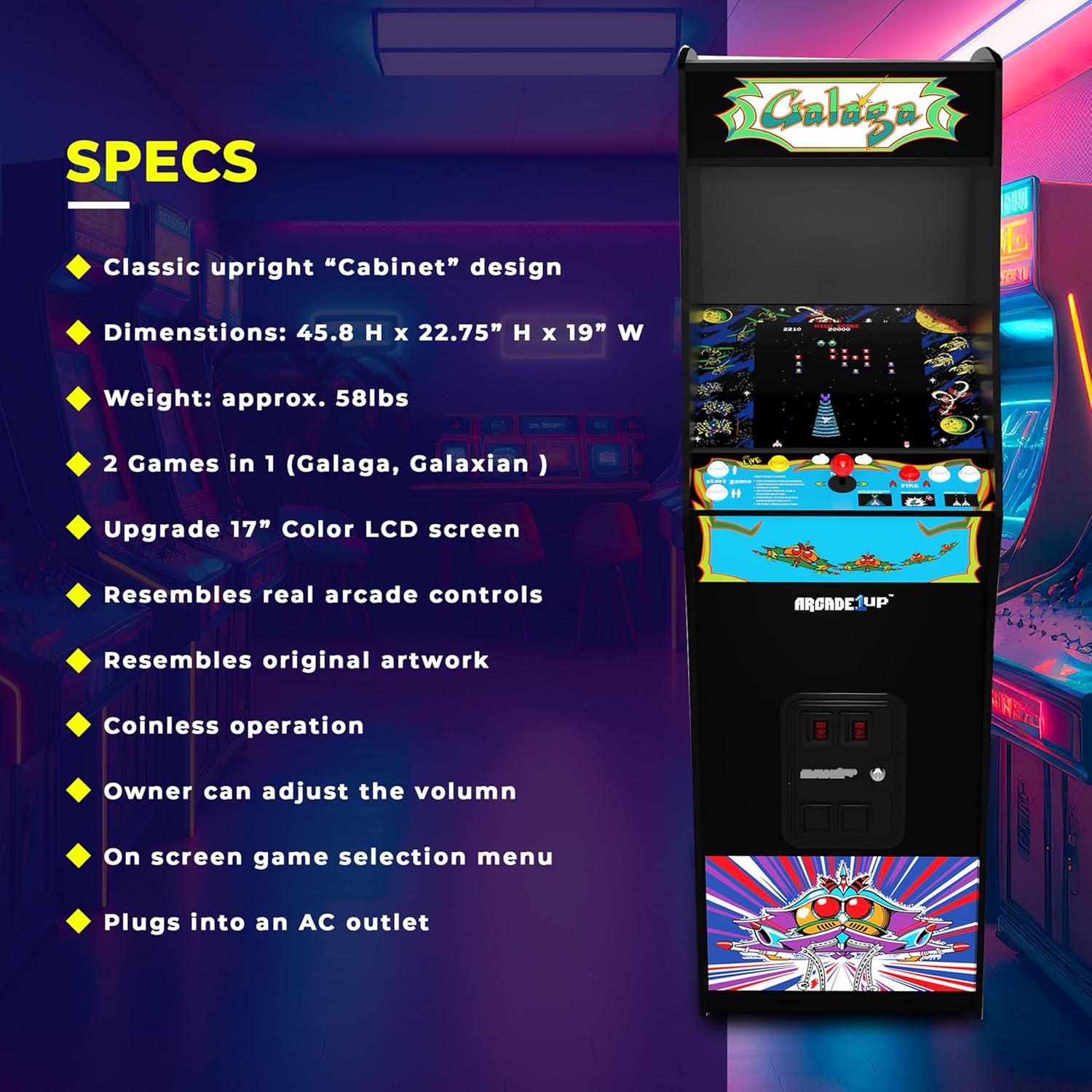
ചിത്രം 4: ഉൽപ്പന്ന സ്പെസിഫിക്കേഷനുകൾ

ചിത്രം 5: മെഷീൻ അളവുകൾ
വാറൻ്റിയും പിന്തുണയും
For warranty information, technical support, or replacement parts, please visit the official ARCADE1UP webസൈറ്റ് ചെയ്യുകയോ അവരുടെ ഉപഭോക്തൃ സേവന വിഭാഗവുമായി ബന്ധപ്പെടുകയോ ചെയ്യുക. വിശദാംശങ്ങൾ സാധാരണയായി ഉൽപ്പന്ന പാക്കേജിംഗിലോ നിർമ്മാതാവിന്റെയോ webസൈറ്റ്.
ARCADE1UP Store: Visit the ARCADE1UP Store on Amazon
ഉപഭോക്തൃ പിന്തുണ
For direct assistance, refer to the contact information provided with your purchase or on the manufacturer's official support channels.
Ask a question about this manual
Ask about setup, troubleshooting, compatibility, parts, safety, or missing instructions. Manuals+ will review the question and use this page’s manual context to help answer it.