1. ആമുഖവും അവസാനവുംview
വാങ്ങിയതിന് നന്ദി.asing the FUZION Digital Scale FS-100. This precision instrument is designed for accurate weighing with a capacity of 100 grams and a readability of 0.01 grams. Its compact design and multiple features make it ideal for various applications requiring precise measurements.
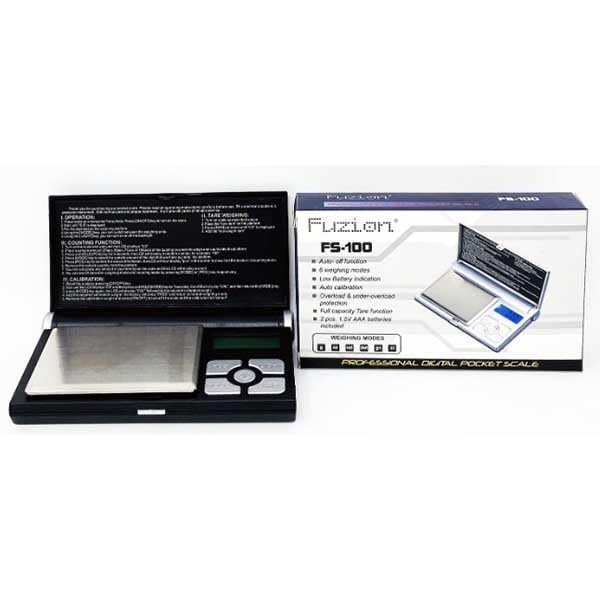
Image: The FUZION Digital Scale FS-100 shown alongside its retail packaging, highlighting its compact size and design.
2. ബോക്സിൽ എന്താണുള്ളത്?
പാക്കേജ് തുറക്കുമ്പോൾ, എല്ലാ ഘടകങ്ങളും ഉണ്ടെന്നും നല്ല നിലയിലാണെന്നും ഉറപ്പാക്കുക:
- 1 x FUZION Digital Scale FS-100
- 2 x 1.5V AAA ബാറ്ററികൾ (ഉൾപ്പെടുത്തിയിരിക്കുന്നു)
- 1 x ഉപയോക്തൃ മാനുവൽ (ഈ പ്രമാണം)
3 സ്പെസിഫിക്കേഷനുകൾ
| ഫീച്ചർ | വിവരണം |
|---|---|
| മോഡൽ | FS-100 |
| ശേഷി | 100 ഗ്രാം |
| വായനാക്ഷമത | 0.01 ഗ്രാം |
| വെയ്റ്റിംഗ് മോഡുകൾ | 4 modes (e.g., g, oz, ct, gn) |
| ശക്തി | 2 x 1.5V AAA ബാറ്ററികൾ |
| ഓട്ടോ-ഓഫ് ഫംഗ്ഷൻ | അതെ |
| ടെയർ ഫംഗ്ഷൻ | പൂർണ്ണ ശേഷി |
| കാലിബ്രേഷൻ | യാന്ത്രിക കാലിബ്രേഷൻ |
| സംരക്ഷണം | Overload & Under-overloaded protection |
| കുറഞ്ഞ ബാറ്ററി സൂചന | അതെ |
| അളവുകൾ | ഏകദേശം 4.92 x 3.03 x 0.87 ഇഞ്ച് |
| ഭാരം | ഏകദേശം 3.92 ഔൺസ് |
4. സജ്ജീകരണം
4.1. ബാറ്ററി ഇൻസ്റ്റാളേഷൻ
- സ്കെയിലിൻ്റെ അടിഭാഗത്ത് ബാറ്ററി കമ്പാർട്ട്മെൻ്റ് കണ്ടെത്തുക.
- ബാറ്ററി കമ്പാർട്ട്മെൻ്റ് കവർ തുറക്കുക.
- രണ്ട് 1.5V AAA ബാറ്ററികൾ ഇടുക, ശരിയായ പോളാരിറ്റി ഉറപ്പാക്കുക (+/-).
- ബാറ്ററി കമ്പാർട്ട്മെൻ്റ് കവർ സുരക്ഷിതമായി അടയ്ക്കുക.
4.2. പ്ലേസ്മെന്റ്
Place the scale on a hard, flat, and stable surface. Avoid placing it on soft or uneven surfaces, as this can affect accuracy. Keep it away from strong electromagnetic fields, vibrations, and extreme temperature changes.
5. പ്രവർത്തന നിർദ്ദേശങ്ങൾ
5.1. ഓൺ/ഓഫ് ചെയ്യുന്നു
- ഓൺ ചെയ്യാൻ: അമർത്തുക [ഓൺ/ഓഫ്] button. The display will show "88888" then "0.00" or "0.0".
- ഓഫാക്കാൻ: അമർത്തിപ്പിടിക്കുക [ഓൺ/ഓഫ്] button for a few seconds until the display turns off. The scale also features an auto-off function to conserve battery life.
5.2. തൂക്കം
- സ്കെയിൽ ഓണാക്കുക.
- Ensure the display shows "0.00" or "0.0". If not, press the [TARE] button to zero it.
- തൂക്കാനുള്ള സാധനം തൂക്ക പ്ലാറ്റ്ഫോമിന്റെ മധ്യഭാഗത്ത് സൌമ്യമായി വയ്ക്കുക.
- Read the stable weight displayed on the screen.
5.3. Changing Weighing Modes (Units)
The scale supports 4 weighing modes. To change the unit:
- സ്കെയിൽ ഓണായിരിക്കുമ്പോൾ, അമർത്തുക [മോഡ്] button repeatedly to cycle through the available units (e.g., grams (g), ounces (oz), carats (ct), grains (gn)).
- തിരഞ്ഞെടുത്ത യൂണിറ്റ് സ്ക്രീനിൽ പ്രദർശിപ്പിക്കും.
5.4. Tare Function (Zeroing)
The tare function allows you to subtract the weight of a container or add-on items to get the net weight of the contents.
- വെയ്സിംഗ് പ്ലാറ്റ്ഫോമിൽ ഒരു ഒഴിഞ്ഞ പാത്രം വയ്ക്കുക. ഡിസ്പ്ലേ അതിന്റെ ഭാരം കാണിക്കും.
- അമർത്തുക [TARE] button. The display will reset to "0.00" or "0.0".
- Now, place the items to be weighed into the container. The display will show only the net weight of the items.
- ടാർ വൃത്തിയാക്കാൻ, പ്ലാറ്റ്ഫോമിൽ നിന്ന് എല്ലാ ഇനങ്ങളും നീക്കം ചെയ്ത് അമർത്തുക [TARE] again, or turn the scale off and on.
5.5. കാലിബ്രേഷൻ
The scale features auto calibration. If you notice inaccuracies, manual calibration may be required. Refer to the specific instructions printed on the scale's lid or packaging for detailed steps, as calibration points can vary.
General Calibration Steps (may vary slightly by model):
- Turn the scale OFF.
- അമർത്തിപ്പിടിക്കുക [മോഡ്] ബട്ടൺ, തുടർന്ന് അമർത്തുക [ഓൺ/ഓഫ്] simultaneously until "CAL" appears. Release both buttons.
- അമർത്തുക [മോഡ്] again. The display will flash the required calibration weight (e.g., "100.00g").
- Place the exact specified calibration weight (e.g., 100g) onto the center of the platform.
- Wait for the display to show "PASS" and then return to normal weighing mode. Calibration is complete.
കുറിപ്പ്: Use a precise calibration weight for best results. Incorrect calibration can lead to inaccurate readings.
6. പരിപാലനം
6.1. വൃത്തിയാക്കൽ
ചെറുതായി ഡി ഉപയോഗിച്ച് സ്കെയിൽ തുടയ്ക്കുകamp cloth. Do not immerse the scale in water or use abrasive cleaners. Avoid getting water inside the scale.
6.2. സംഭരണം
Store the scale in a clean, dry environment at room temperature. If the scale will not be used for an extended period, remove the batteries to prevent leakage and damage.
7. പ്രശ്നപരിഹാരം
| പ്രശ്നം | സാധ്യമായ കാരണം | പരിഹാരം |
|---|---|---|
| ഡിസ്പ്ലേ "ലോ" കാണിക്കുന്നു | കുറഞ്ഞ ബാറ്ററി സൂചന | ബാറ്ററികൾ മാറ്റിസ്ഥാപിക്കുക. |
| Display shows "OUE2" or "EEEE" | Overload or under-overloaded protection triggered | Remove the item from the platform immediately. Do not exceed the maximum capacity (100g). |
| കൃത്യമല്ലാത്ത വായനകൾ | Unstable surface, temperature changes, need for calibration, dirty platform | Place on a stable, flat surface. Allow scale to acclimate to room temperature. Perform calibration (Section 5.5). Clean the weighing platform. |
| സ്കെയിൽ ഓണാക്കുന്നില്ല | മരിച്ചതോ തെറ്റായി ഇൻസ്റ്റാൾ ചെയ്തതോ ആയ ബാറ്ററികൾ | ബാറ്ററി പോളാരിറ്റി പരിശോധിക്കുക അല്ലെങ്കിൽ പുതിയ ബാറ്ററികൾ ഉപയോഗിച്ച് മാറ്റിസ്ഥാപിക്കുക. |
8. വാറൻ്റിയും പിന്തുണയും
This product is covered by a standard manufacturer's warranty against defects in materials and workmanship. For warranty claims or technical support, please contact the retailer or manufacturer directly with your purchase details.
വാറന്റി ആവശ്യങ്ങൾക്കായി നിങ്ങളുടെ വാങ്ങിയതിന്റെ തെളിവ് സൂക്ഷിക്കുക.


