
ആമുഖം
Thank you for choosing the Generic A6S Air Pro 6 TWS Wireless Headphones. This manual provides detailed instructions on how to set up, operate, and maintain your new earphones. Please read this manual carefully before use to ensure optimal performance and longevity of your device.
സുരക്ഷാ വിവരങ്ങൾ
- Do not disassemble or modify the product. This may cause malfunction or damage and will void the warranty.
- ഇയർഫോണുകളും ചാർജിംഗ് കെയ്സും വെള്ളം, ഈർപ്പം, കടുത്ത താപനില എന്നിവയിൽ നിന്ന് അകറ്റി നിർത്തുക.
- കേൾവിക്ക് കേടുപാടുകൾ സംഭവിക്കുന്നത് തടയാൻ, ഉയർന്ന അളവിലുള്ള അളവിൽ ദീർഘനേരം എക്സ്പോഷർ ചെയ്യുന്നത് ഒഴിവാക്കുക.
- മൃദുവായതും ഉണങ്ങിയതുമായ തുണി ഉപയോഗിച്ച് ഇയർഫോണുകൾ വൃത്തിയാക്കുക. കഠിനമായ രാസവസ്തുക്കളോ ഉരച്ചിലുകളോ ഉള്ള വസ്തുക്കൾ ഉപയോഗിക്കരുത്.
- Dispose of the product responsibly according to local regulations. Do not dispose of with household waste.
പാക്കേജ് ഉള്ളടക്കം
പാക്കേജിൽ ഇനിപ്പറയുന്ന ഇനങ്ങൾ ഉണ്ടോ എന്ന് പരിശോധിക്കുക:
- A6S Air Pro 6 TWS Wireless Earbuds (Left and Right)
- ചാർജിംഗ് കേസ്
- യുഎസ്ബി ചാർജിംഗ് കേബിൾ
- ഉപയോക്തൃ മാനുവൽ (ഈ പ്രമാണം)
ഉൽപ്പന്നം കഴിഞ്ഞുview

Individual Earbuds: This image displays the two individual A6S Air Pro 6 TWS wireless earbuds. One earbud shows its smooth, white outer surface with a small indicator light, while the other reveals the inner earpiece designed to fit into the ear canal, along with two small gold charging contacts.
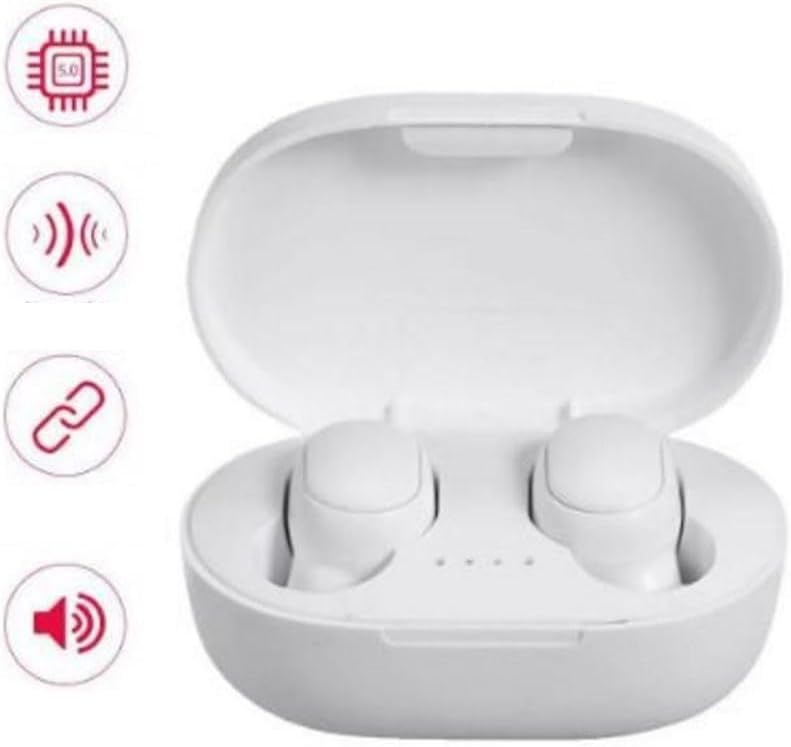
Earbuds in Charging Case: This image shows the white A6S Air Pro 6 TWS charging case opened, with both earbuds securely placed inside. Four small indicator lights are visible on the case, indicating battery status. To the left, four circular icons represent key features: a chip icon (processor), a signal icon (connectivity), a chain link icon (pairing), and a speaker icon (audio).
സജ്ജമാക്കുക
1. ഇയർബഡുകളും കേസും ചാർജ് ചെയ്യുന്നു
- പ്രാരംഭ ചാർജ്: Before first use, fully charge the charging case and earbuds. Place both earbuds into the charging case.
- കേസ് ചാർജ് ചെയ്യുന്നത്: Connect the provided USB charging cable to the charging port on the case and the other end to a USB power adapter (not included) or a computer's USB port. The indicator lights on the case will illuminate to show charging status. A full charge takes approximately 3 hours for the case.
- ഇയർബഡുകൾ ചാർജ് ചെയ്യുന്നു: When placed in the charged case, the earbuds will automatically begin charging. The indicator lights on the earbuds (if present) or case will show their charging status.
2. നിങ്ങളുടെ ഉപകരണവുമായി ജോടിയാക്കുന്നു
- ബ്ലൂടൂത്ത് പ്രവർത്തനക്ഷമമാക്കുക: Ensure Bluetooth is enabled on your smartphone, tablet, or other Bluetooth-enabled device.
- Power On Earbuds: Open the charging case. The earbuds will automatically power on and enter pairing mode. You may see a flashing indicator light on one or both earbuds.
- ഇതിനായി തിരയുക ഉപകരണം: നിങ്ങളുടെ ഉപകരണത്തിൽ, ബ്ലൂടൂത്ത് ക്രമീകരണത്തിലേക്ക് പോയി ലഭ്യമായ ഉപകരണങ്ങൾക്കായി തിരയുക.
- Select "A6S": From the list of found devices, select "A6S" (or similar name like "A6S 5.2").
- ജോടിയാക്കൽ സ്ഥിരീകരിക്കുക: Once connected, the earbud indicator lights will typically stop flashing or turn off. You will hear an audible confirmation.
- വീണ്ടും ബന്ധിപ്പിക്കുക: After initial pairing, the earbuds will automatically reconnect to the last paired device when taken out of the case, provided Bluetooth is enabled on the device.
പ്രവർത്തന നിർദ്ദേശങ്ങൾ
The A6S Air Pro 6 TWS headphones feature touch controls for easy operation. The specific functions may vary slightly based on the exact model and firmware version.
| ആക്ഷൻ | ഫംഗ്ഷൻ |
|---|---|
| ഒറ്റ ടാപ്പ് (ഇടത്/വലത്) | സംഗീതം പ്ലേ ചെയ്യുക/താൽക്കാലികമായി നിർത്തുക, കോൾ ചെയ്യുക/അവസാനിപ്പിക്കുക |
| ഡബിൾ ടാപ്പ് (വലത് ഇയർബഡ്) | അടുത്ത ട്രാക്ക് |
| ഡബിൾ ടാപ്പ് (ഇടത് ഇയർബഡ്) | മുമ്പത്തെ ട്രാക്ക് |
| ട്രിപ്പിൾ ടാപ്പ് (ഇടത്/വലത്) | വോയ്സ് അസിസ്റ്റന്റ് (സിരി, ഗൂഗിൾ അസിസ്റ്റന്റ്) സജീവമാക്കുക |
| ദീർഘനേരം അമർത്തുക (2 സെക്കൻഡ്) | ഇൻകമിംഗ് കോൾ നിരസിക്കുക |
| ദീർഘനേരം അമർത്തുക (5 സെക്കൻഡ്) | Power On/Off (if not in case) |
Note: Ensure earbuds are properly seated in your ears for optimal touch control response.
മെയിൻ്റനൻസ്
- വൃത്തിയാക്കൽ: Regularly clean the earbuds, especially the ear tips and charging contacts, with a soft, dry, lint-free cloth. Do not use liquids or sprays directly on the earbuds.
- സംഭരണം: When not in use, always store the earbuds in their charging case to protect them and keep them charged. Store the case in a cool, dry place away from direct sunlight.
- ബാറ്ററി കെയർ: ബാറ്ററി ലൈഫ് വർദ്ധിപ്പിക്കാൻ, ഇയർബഡുകൾ പൂർണ്ണമായും ഡിസ്ചാർജ് ചെയ്യുന്നതും കേസ് ഇടയ്ക്കിടെ ചാർജ് ചെയ്യുന്നതും ഒഴിവാക്കുക. തുടർച്ചയായ ഉപയോഗത്തിലല്ലെങ്കിൽ പോലും അവ പതിവായി ചാർജ് ചെയ്യുക.
ട്രബിൾഷൂട്ടിംഗ്
| പ്രശ്നം | പരിഹാരം |
|---|---|
| ഇയർബഡുകൾ ഉപകരണവുമായി ജോടിയാക്കുന്നില്ല. |
|
| ഒരു ഇയർബഡ് മാത്രമാണ് പ്രവർത്തിക്കുന്നത്. |
|
| കുറഞ്ഞ വോളിയം അല്ലെങ്കിൽ മോശം ശബ്ദ നിലവാരം. |
|
| ഇയർബഡുകൾ ചാർജ് ചെയ്യുന്നില്ല. |
|
സ്പെസിഫിക്കേഷനുകൾ
| ഫീച്ചർ | വിശദാംശങ്ങൾ |
|---|---|
| മോഡലിൻ്റെ പേര് | A6S 5.2 |
| ബ്ലൂടൂത്ത് പതിപ്പ് | 5.2 |
| ബ്ലൂടൂത്ത് മോഡ് | HFP/HSP/A2DP/AVRCP |
| ബ്ലൂടൂത്ത് ദൂരം | 10 മീറ്റർ (ഏകദേശം 33 അടി) |
| Running Time (Music Playback) | ഏകദേശം 3 മണിക്കൂർ |
| സംസാര സമയം | ഏകദേശം 3.5 മണിക്കൂർ |
| ചാർജിംഗ് സമയം | ഏകദേശം 3 മണിക്കൂർ (ഒരു സാഹചര്യത്തിന്) |
| ഫ്രീക്വൻസി റേഞ്ച് | 20 ഹെർട്സ് - 20,000 ഹെർട്സ് |
| ജല പ്രതിരോധ നില | വെള്ളത്തെ പ്രതിരോധിക്കുന്ന |
| മെറ്റീരിയൽ | അക്രിലോണിട്രൈൽ ബ്യൂട്ടാഡീൻ സ്റ്റൈറൈൻ (എബിഎസ്) |
| നിയന്ത്രണ രീതി | Voice / Touch |
Note: Battery life and performance may vary based on usage, device settings, and environmental factors.
വാറൻ്റിയും പിന്തുണയും
മെറ്റീരിയലുകളിലെയും വർക്ക്മാൻഷിപ്പിലെയും പിഴവുകൾക്കെതിരെ നിർമ്മാതാവിന്റെ ഒരു സ്റ്റാൻഡേർഡ് വാറണ്ടി ഈ ഉൽപ്പന്നത്തിന് ബാധകമാണ്. വാറന്റി കാലയളവ് സാധാരണയായി വാങ്ങിയ തീയതി മുതൽ ആരംഭിക്കുന്നു. വാറന്റി ക്ലെയിമുകൾക്കായി നിങ്ങളുടെ വാങ്ങിയതിന്റെ തെളിവ് സൂക്ഷിക്കുക.
For technical support, warranty inquiries, or further assistance, please contact the retailer or the manufacturer directly through their official support channels. Contact information is usually provided on the product packaging or the retailer's webസൈറ്റ്.
For more information, you may visit the product page on Amazon: ആമസോൺ ഉൽപ്പന്ന പേജ്