
1. ഉൽപ്പന്നം കഴിഞ്ഞുview
This remote control is designed as a replacement for specific Okin electric adjustable base bed models. It provides essential functions for adjusting your bed's position and features.

ചിത്രം 1: മുൻഭാഗം view of the replacement remote control, showing various function buttons for bed adjustments, memory settings, and sleep enhancement.
പ്രധാന സവിശേഷതകൾ:
- Infrared (IR) replacement remote, designed to match the appearance and functionality of the original.
- Controls various bed positions, including head and foot adjustments, zero gravity, and flat positions.
- Includes sleep enhancement features and memory settings.
- 1 AAA ബാറ്ററി ആവശ്യമാണ് (ഉൾപ്പെടുത്തിയിട്ടില്ല).
2. പ്രധാനപ്പെട്ട അനുയോജ്യതാ വിവരങ്ങൾ
This remote control is NOT universal. To ensure compatibility, it is crucial to verify that your existing control box is an OKIN brand and that your old remote control matches the models listed (RF.31.18.03, RF.31.18.02, RF.31.18.11).

Figure 2: Visual guide emphasizing the importance of verifying your control box and old remote for compatibility. It suggests sending clear pictures of your control box and old remote (front & back) to ensure the correct replacement is provided.

Figure 3: Important notes for compatibility. This image highlights that dip switches are not compatible with 'Pair' button models, the need to check if your old remote uses a Dip switch or Pair button, and that the remote needs to be paired before use.
പ്രധാന അനുയോജ്യതാ കുറിപ്പുകൾ:
- മോഡൽ പരിശോധന: If your bed's model number is not explicitly listed in the product title, please contact the seller with your exact model number and clear photos of your old remote (front and back) and control box.
- Dip Switches vs. Pair Button: This remote may not be compatible with systems that use dip switches if your original remote had a 'Pair' button. Carefully inspect your old remote and control box.
- ജോടിയാക്കൽ ആവശ്യമാണ്: This remote requires pairing with your adjustable bed's control box before first use. The specific pairing method is typically found in the original user manual for your adjustable bed.
3. സജ്ജീകരണം
3.1. ബാറ്ററി ഇൻസ്റ്റാളേഷൻ
- റിമോട്ട് കൺട്രോളിന്റെ പിൻഭാഗത്ത് ബാറ്ററി കമ്പാർട്ട്മെന്റ് കണ്ടെത്തുക.
- ബാറ്ററി കവർ തുറക്കാൻ താഴേക്ക് അല്ലെങ്കിൽ പുറത്തേക്ക് സ്ലൈഡ് ചെയ്യുക.
- Insert 1 AAA battery, ensuring the positive (+) and negative (-) terminals align correctly with the indicators inside the compartment.
- സുരക്ഷിതമായി ക്ലിക്ക് ചെയ്യുന്നതുവരെ ബാറ്ററി കവർ തിരികെ അതിന്റെ സ്ഥാനത്തേക്ക് സ്ലൈഡുചെയ്ത് മാറ്റിസ്ഥാപിക്കുക.

Figure 4: Back of the remote control with the battery cover open, illustrating the correct orientation for AAA battery insertion.
3.2. റിമോട്ട് കൺട്രോൾ ജോടിയാക്കുന്നു
This remote control must be paired with your adjustable bed's control box before it can be used. The exact pairing procedure varies by bed model and manufacturer. Please refer to the original user manual that came with your adjustable bed for detailed pairing instructions.
General Pairing Steps (Consult your bed's manual for specifics):
- Ensure the bed is plugged into a power outlet.
- Locate the pairing button on your bed's control box (often a small button labeled 'Pair' or 'Learn').
- Press and hold the pairing button on the control box for a few seconds until an indicator light flashes or a sound is heard.
- Within a short timeframe (usually 5-10 seconds), press and hold a specific button on the new remote control (e.g., 'Flat' or 'Head Up' button) until the bed responds or the indicator light on the control box changes.
- Test the remote's functions to confirm successful pairing.
4. പ്രവർത്തന നിർദ്ദേശങ്ങൾ
Once paired, the remote control allows you to operate your adjustable bed. The buttons are typically labeled with intuitive icons or text indicating their function.
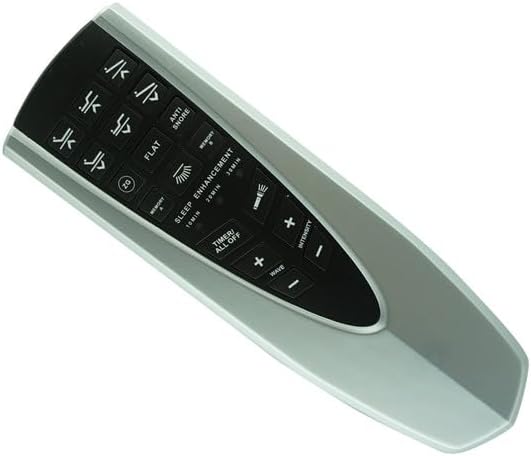
ചിത്രം 5: കോണാകൃതിയിലുള്ളത് view of the remote control, providing a clearer look at the button layout and their respective functions.
Common Button Functions:
- തല മുകളിലേക്കും താഴേക്കും: കിടക്കയുടെ തലഭാഗം ക്രമീകരിക്കുന്നു.
- കാൽ മുകളിലേക്കും താഴേക്കും: കിടക്കയുടെ പാദഭാഗം ക്രമീകരിക്കുന്നു.
- ഫ്ലാറ്റ്: കിടക്ക പൂർണ്ണമായും പരന്ന സ്ഥാനത്തേക്ക് തിരികെ കൊണ്ടുവരുന്നു.
- Zero G / ZG: Moves the bed to a 'zero gravity' position, often elevating the head and feet slightly to relieve pressure.
- Anti Snore: Adjusts the head section to a position that may help reduce snoring.
- Memory 1 / Memory 2: Saves and recalls your preferred bed positions. Consult your bed's manual for programming these.
- Sleep Enhancement / Wave / Intensity: Controls massage functions if your bed is equipped with them.
- Timer / All Off: May control a timer for massage functions or turn off all active features.
Press and hold the desired button until the bed reaches the desired position or function activates. Release the button to stop the movement.
5. പരിപാലനം
5.1. ബാറ്ററി മാറ്റിസ്ഥാപിക്കൽ
When the remote control's range decreases or buttons become unresponsive, it is likely time to replace the battery. Follow the battery installation steps in Section 3.1.
ബാറ്ററി തരം: 1 x AAA ബാറ്ററി.
5.2. വൃത്തിയാക്കൽ
റിമോട്ട് കൺട്രോൾ വൃത്തിയാക്കാൻ, മൃദുവായതും ഉണങ്ങിയതുമായ ഒരു തുണി ഉപയോഗിച്ച് അതിന്റെ പ്രതലം സൌമ്യമായി തുടയ്ക്കുക. കഠിനമായ അഴുക്കിന്, അല്പം ഡി.amp cloth with mild soap can be used, followed by immediate drying. Do not use abrasive cleaners, solvents, or immerse the remote in water.
6. പ്രശ്നപരിഹാരം
നിങ്ങളുടെ റിമോട്ട് കൺട്രോളിൽ പ്രശ്നങ്ങൾ അനുഭവപ്പെടുകയാണെങ്കിൽ, ഇനിപ്പറയുന്ന ട്രബിൾഷൂട്ടിംഗ് ഘട്ടങ്ങൾ പരീക്ഷിക്കുക:
| പ്രശ്നം | സാധ്യമായ പരിഹാരം |
|---|---|
| റിമോട്ട് പ്രതികരിക്കുന്നില്ല. |
|
| Remote functions intermittently. |
|
| Cannot pair the remote. |
|
If the problem persists after attempting these solutions, please contact the seller or manufacturer for further assistance.
7 സ്പെസിഫിക്കേഷനുകൾ
| ഫീച്ചർ | വിശദാംശങ്ങൾ |
|---|---|
| മോഡൽ നമ്പറുകൾ | RF.31.18.03, RF.31.18.02, RF.31.18.11 (Okin Compatible) |
| അനുയോജ്യമായ ഉപകരണങ്ങൾ | Electric Adjustable Base Bed (Okin brand control box required) |
| പിന്തുണയ്ക്കുന്ന ഉപകരണങ്ങളുടെ പരമാവധി എണ്ണം | 1 |
| നിറം | കറുപ്പ് / വെള്ളി |
| ബാറ്ററി തരം | 1 AAA ബാറ്ററി (ഉൾപ്പെടുത്തിയിട്ടില്ല) |
| നിർമ്മാതാവ് | ഈസിട്രി |
| ആദ്യം ലഭ്യമായത് | നവംബർ 27, 2023 |
8. വാറൻ്റിയും പിന്തുണയും
For any questions, technical support, or warranty inquiries regarding this replacement remote control, please contact the seller directly through the platform where the purchase was made. Provide your order details and a clear description of the issue for prompt assistance.
Please note that this is a replacement remote and may not have all the exact same functions as your original remote if your original was a different model or brand. Always refer to your adjustable bed's original manual for comprehensive information on its features and pairing procedures.