
FOREVER GSM169761
FOREVER Smartwatch SW-800 User Manual
Model: SW-800 (GSM169761)
ആമുഖം
This manual provides essential information for the proper use and maintenance of your FOREVER Smartwatch SW-800. Please read it thoroughly before operating the device to ensure optimal performance and longevity. The SW-800 features a 1.3-inch AMOLED display, Bluetooth connectivity, and various fitness tracking capabilities.

Image: The FOREVER Smartwatch SW-800, showcasing its versatile design with both metal and silicone strap options, and various digital watch faces.
സജ്ജമാക്കുക
1. സ്മാർട്ട് വാച്ച് ചാർജ് ചെയ്യുന്നു
Before first use, fully charge your smartwatch. Connect the charging cable to the charging port on the back of the watch and plug the USB end into a power adapter (not included) or a computer's USB port. The watch display will indicate charging status.

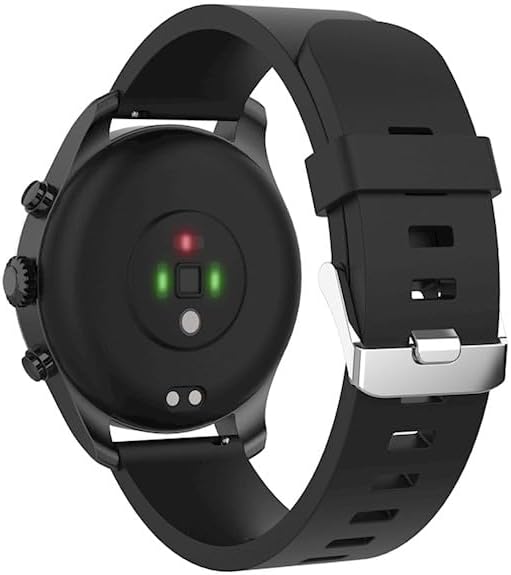
ചിത്രം: പിൻഭാഗം view of the smartwatch, highlighting the magnetic charging pins and the optical heart rate sensors.
2. പവർ ഓൺ/ഓഫ്
- To power on: Press and hold the side button until the FOREVER logo appears.
- To power off: Press and hold the side button, then select "Power Off" on the screen.
3. നിങ്ങളുടെ സ്മാർട്ട്ഫോണുമായി ജോടിയാക്കൽ
- Download the companion application from the App Store (for iOS) or Google Play Store (for Android). ഇതിനായി തിരയുക "FOREVER Smartwatch" or refer to the QR code in the watch's settings.
- നിങ്ങളുടെ സ്മാർട്ട്ഫോണിൽ ബ്ലൂടൂത്ത് പ്രവർത്തനക്ഷമമാക്കിയിട്ടുണ്ടെന്ന് ഉറപ്പാക്കുക.
- ആപ്ലിക്കേഷൻ തുറന്ന് സ്ക്രീനിലെ നിർദ്ദേശങ്ങൾ പാലിച്ച് ഒരു അക്കൗണ്ട് സൃഷ്ടിക്കുക അല്ലെങ്കിൽ ലോഗിൻ ചെയ്യുക.
- Select "Add Device" or "Pair Device" within the app.
- ലഭ്യമായ ഉപകരണങ്ങളുടെ പട്ടികയിൽ നിന്ന് "SW-800" തിരഞ്ഞെടുക്കുക.
- നിങ്ങളുടെ സ്മാർട്ട്ഫോണിലും സ്മാർട്ട് വാച്ചിലും പെയറിംഗ് അഭ്യർത്ഥന സ്ഥിരീകരിക്കുക.

Image: A smartphone displaying the FOREVER companion app interface, with the smartwatch screen prompting the user to "Connect APP" via Bluetooth.
സ്മാർട്ട് വാച്ച് പ്രവർത്തിപ്പിക്കുന്നു
1. അടിസ്ഥാന നാവിഗേഷൻ
- ടച്ച് സ്ക്രീൻ: മെനുകളിലൂടെയും അറിയിപ്പുകളിലൂടെയും നാവിഗേറ്റ് ചെയ്യാൻ ഇടത്തോട്ടോ വലത്തോട്ടോ മുകളിലേക്കോ താഴേക്കോ സ്വൈപ്പ് ചെയ്യുക. ഒരു ഇനം തിരഞ്ഞെടുക്കാൻ ടാപ്പ് ചെയ്യുക.
- സൈഡ് ബട്ടൺ: Press to return to the home screen or wake the display. Long press for power options.
2 പ്രധാന സവിശേഷതകൾ
- ഹൃദയമിടിപ്പ് നിരീക്ഷണം: The smartwatch continuously monitors your heart rate. Access the heart rate widget or app on the watch to view real-time data and historical trends.
- റിട്ടയർമീറ്റർ: നിങ്ങളുടെ ദൈനംദിന ചുവടുകൾ, ദൂരം, കത്തിച്ച കലോറികൾ എന്നിവ ട്രാക്ക് ചെയ്യുന്നു.
- സ്പോർട്സ് മോഡുകൾ: The SW-800 supports 14 different sports modes, including running, cycling, and walking. Select a mode before starting an activity to track specific metrics.
- ഉറക്ക ട്രാക്കിംഗ്: ഗാഢനിദ്ര, ലഘുനിദ്ര, ഉണരുന്ന സമയങ്ങൾ എന്നിവയുൾപ്പെടെ നിങ്ങളുടെ ഉറക്ക രീതികൾ നിരീക്ഷിക്കുന്നു.
- രക്തത്തിലെ ഓക്സിജൻ (SpO2) നിരീക്ഷണം: നിങ്ങളുടെ രക്തത്തിലെ ഓക്സിജൻ സാച്ചുറേഷൻ അളവ് അളക്കുക.
- താപനില നിരീക്ഷണം: Provides body temperature readings.
- സംഗീത നിയന്ത്രണം: വാച്ചിൽ നിന്ന് നേരിട്ട് നിങ്ങളുടെ കണക്റ്റുചെയ്ത സ്മാർട്ട്ഫോണിൽ സംഗീത പ്ലേബാക്ക് നിയന്ത്രിക്കുക.
- അറിയിപ്പുകൾ: Receive call, message, and app notifications from your smartphone.

Image: A collage of watch faces illustrating the various health and fitness tracking features, including heart rate, step count, calorie burn, sleep analysis, body temperature, and blood oxygen levels.

Image: The smartwatch displaying a graph of body temperature measurements over time, indicating current and historical readings.

Image: The smartwatch screen showing a blood oxygen saturation (SpO2) reading of 97%, along with a trend graph.

Image: The smartwatch worn by a runner, actively tracking fitness metrics during an outdoor exercise session.
മെയിൻ്റനൻസ്
1. വൃത്തിയാക്കൽ
Regularly clean your smartwatch and strap to prevent skin irritation and maintain device functionality. Use a soft, lint-free cloth. If necessary, slightly dampതുണിയിൽ വെള്ളം ഒഴിക്കുക. കഠിനമായ രാസവസ്തുക്കളോ ഉരച്ചിലുകളോ ഉള്ള വസ്തുക്കൾ ഉപയോഗിക്കുന്നത് ഒഴിവാക്കുക.
2. ജല പ്രതിരോധം (IP68)
The SW-800 is rated IP68, meaning it is resistant to dust and can withstand immersion in water up to 1.5 meters for up to 30 minutes. It is suitable for daily use, such as hand washing or light rain. However, it is not recommended for swimming, diving, or high-pressure water activities.
3. ബാറ്ററി പരിചരണം
- ബാറ്ററി ഇടയ്ക്കിടെ പൂർണ്ണമായും ഡിസ്ചാർജ് ചെയ്യുന്നത് ഒഴിവാക്കുക.
- ഉപകരണത്തെ അങ്ങേയറ്റത്തെ താപനിലയിൽ തുറന്നുകാട്ടരുത്.
- നൽകിയിരിക്കുന്ന ചാർജിംഗ് കേബിൾ മാത്രം ഉപയോഗിക്കുക.
ട്രബിൾഷൂട്ടിംഗ്
1. വാച്ച് ഓണാകുന്നില്ല
- വാച്ച് പൂർണ്ണമായും ചാർജ് ചെയ്തിട്ടുണ്ടെന്ന് ഉറപ്പാക്കുക. കുറഞ്ഞത് 30 മിനിറ്റെങ്കിലും ചാർജറുമായി ബന്ധിപ്പിക്കുക.
- Try pressing and holding the side button for 10-15 seconds to force a restart.
2. Connectivity Issues (Bluetooth)
- നിങ്ങളുടെ സ്മാർട്ട് വാച്ചിലും സ്മാർട്ട്ഫോണിലും ബ്ലൂടൂത്ത് പ്രവർത്തനക്ഷമമാക്കിയിട്ടുണ്ടെന്ന് ഉറപ്പാക്കുക.
- Make sure the smartwatch is within the Bluetooth range of your phone.
- നിങ്ങളുടെ സ്മാർട്ട് വാച്ചും സ്മാർട്ട്ഫോണും പുനരാരംഭിക്കുക.
- Unpair the device from your phone's Bluetooth settings and re-pair it through the companion app.
3. കൃത്യമല്ലാത്ത ആരോഗ്യ വായനകൾ
- വാച്ച് നിങ്ങളുടെ കൈത്തണ്ടയിൽ നന്നായി ധരിച്ചിട്ടുണ്ടെന്ന് ഉറപ്പാക്കുക, പക്ഷേ വളരെ ഇറുകിയതല്ല.
- വാച്ചിന്റെ പിൻഭാഗത്തുള്ള സെൻസറുകൾ വൃത്തിയാക്കുക.
- അളക്കുമ്പോൾ അമിതമായ ചലനം ഒഴിവാക്കുക.
- Note that these devices are not medical instruments and readings are for reference only.
4. App Not Syncing Data
- നിങ്ങളുടെ സ്മാർട്ട്ഫോണിൽ ഇന്റർനെറ്റ് കണക്ഷൻ പരിശോധിക്കുക.
- Ensure the companion app has all necessary permissions enabled in your phone's settings.
- ആപ്പ് അടച്ച് വീണ്ടും തുറക്കുക, അല്ലെങ്കിൽ നിങ്ങളുടെ ഫോൺ റീസ്റ്റാർട്ട് ചെയ്യുക.
സ്പെസിഫിക്കേഷനുകൾ
| മോഡലിൻ്റെ പേര് | SW-800 (GSM169761) |
| പ്രദർശിപ്പിക്കുക | 1.3-ഇഞ്ച് AMOLED, 360 x 360 പിക്സലുകൾ |
| കണക്റ്റിവിറ്റി | ബ്ലൂടൂത്ത് |
| ജല പ്രതിരോധം | IP68 |
| സെൻസറുകൾ | Heart Rate Monitor, Pedometer, SpO2, Temperature |
| ബാറ്ററി തരം | ലിഥിയം അയോൺ |
| അനുയോജ്യമായ ഉപകരണങ്ങൾ | സ്മാർട്ട്ഫോൺ |
| ഹ്യൂമൻ ഇന്റർഫേസ് ഇൻപുട്ട് | ബട്ടണുകൾ, ടച്ച്സ്ക്രീൻ |
| അളവുകൾ (പാക്കേജ്) | 11.2 x 9.2 x 7.1 സെ.മീ |
| ഭാരം (പാക്കേജ്) | 240 ഗ്രാം |
ചിത്രം: വിശദമായ ഒരു ചിത്രം view of the smartwatch, emphasizing its 1.3-inch display with 360x360 pixel resolution, and the sleek design of the metal band.
വാറൻ്റിയും പിന്തുണയും
Your FOREVER Smartwatch SW-800 comes with a standard manufacturer's warranty. Please refer to the warranty card included in your product packaging for specific terms and conditions, including the warranty period and coverage details.
For technical support, troubleshooting assistance, or warranty claims, please contact FOREVER customer service. Contact information can typically be found on the official FOREVER webസൈറ്റ് അല്ലെങ്കിൽ ഉൽപ്പന്ന പാക്കേജിംഗിൽ.
Ask a question about this manual
Ask about setup, troubleshooting, compatibility, parts, safety, or missing instructions. Manuals+ will review the question and use this page’s manual context to help answer it.