
പ്രധാനപ്പെട്ട സുരക്ഷാ നിർദ്ദേശങ്ങൾ
Please read these instructions carefully before using the device and retain them for future reference. Incorrect use may result in electric shock, fire, or other hazards.
- മഴ, ഈർപ്പം, അല്ലെങ്കിൽ തീവ്രമായ താപനില എന്നിവയിൽ ഉപകരണം തുറന്നുകാട്ടരുത്.
- റേഡിയേറ്ററുകൾ, സ്റ്റൗകൾ അല്ലെങ്കിൽ മറ്റ് ചൂട് ഉൽപ്പാദിപ്പിക്കുന്ന ഉപകരണങ്ങൾ പോലുള്ള താപ സ്രോതസ്സുകൾക്ക് സമീപം ഉപകരണം വയ്ക്കുന്നത് ഒഴിവാക്കുക.
- Use only the power adapter and cables specified by the manufacturer.
- ഉപകരണം തുറക്കരുത് casing. എല്ലാ സേവനങ്ങളും യോഗ്യതയുള്ള ഉദ്യോഗസ്ഥർക്ക് റഫർ ചെയ്യുക.
- ഉപകരണത്തിന് ചുറ്റും ശരിയായ വായുസഞ്ചാരം ഉറപ്പാക്കുക.
- ബാറ്ററി സംരക്ഷണം: To prolong battery life, turn off the device when not in use or before recharging. The CD player automatically shuts off after 15 minutes of inactivity to conserve energy. To restart, turn it off for 5 seconds, then turn it back on.
ഉൽപ്പന്നം കഴിഞ്ഞുview
The TANLANIN CD-001WT is a portable CD player designed with a vintage aesthetic, featuring a white synthetic leather exterior and rose gold hardware. It offers multiple audio playback options and connectivity features.
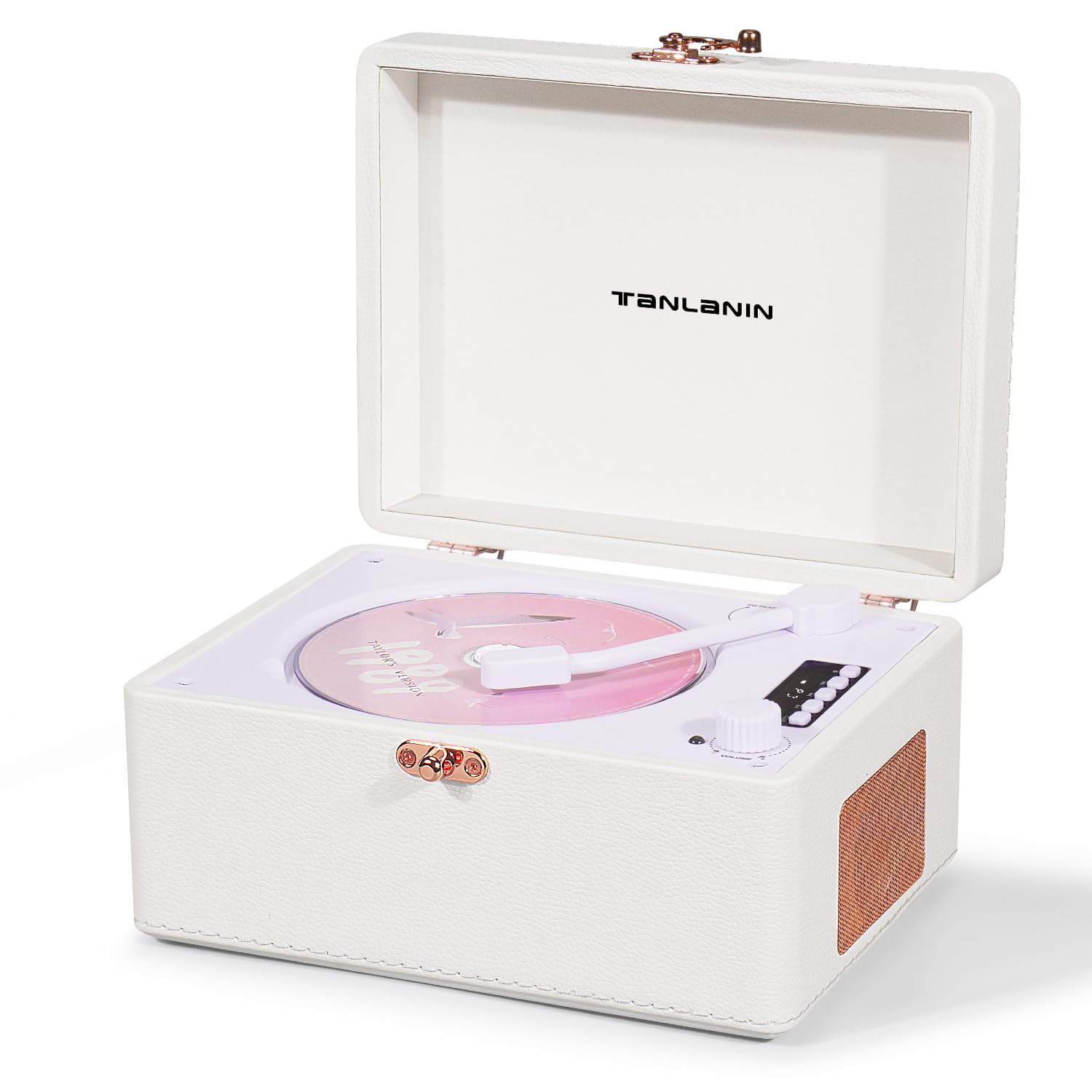
Image: TANLANIN CD-001WT Vintage Desktop CD Player. This image displays the front view of the portable CD player, highlighting its white synthetic leather finish, rose gold hardware, and integrated speakers.
ഉൾപ്പെടുത്തിയ ഘടകങ്ങൾ:
- 1 x TANLANIN CD-001WT Vintage CD Player
- 1 x ടൈപ്പ്-സി ചാർജിംഗ് കേബിൾ
- 1 x റിമോട്ട് കൺട്രോൾ
- 1 x ഉപയോക്തൃ മാനുവൽ
നിയന്ത്രണങ്ങളും തുറമുഖങ്ങളും:
The device features an intuitive LED control panel for playback functions (Play, Pause, Stop, Fast Forward, Rewind). Various ports are located on the unit for connectivity.
- LED ഡിസ്പ്ലേ: നിലവിലെ മോഡും ട്രാക്ക് വിവരങ്ങളും കാണിക്കുന്നു.
- നിയന്ത്രണ ബട്ടണുകൾ: Play/Pause, Stop, Skip Forward, Skip Backward, Mode, Volume.
- സിഡി കമ്പാർട്ട്മെന്റ്: ഓഡിയോ സിഡികൾ ചേർക്കുന്നതിന്.
- USB പോർട്ട്: യുഎസ്ബി പ്ലേബാക്കിനായി.
- AUX Input/Output (3.5mm): For connecting external audio sources or outputting audio.
- ഹെഡ്ഫോൺ ജാക്ക് (3.5 മിമി): സ്വകാര്യ ശ്രവണത്തിനായി.
- ടൈപ്പ്-സി ചാർജിംഗ് പോർട്ട്: ആന്തരിക ബാറ്ററി ചാർജ് ചെയ്യുന്നതിന്.
സജ്ജമാക്കുക
ഉപകരണം ചാർജ് ചെയ്യുന്നു:
- നൽകിയിരിക്കുന്ന ടൈപ്പ്-സി ചാർജിംഗ് കേബിൾ സിഡി പ്ലെയറിലെ ചാർജിംഗ് പോർട്ടുമായി ബന്ധിപ്പിക്കുക.
- കേബിളിന്റെ മറ്റേ അറ്റം അനുയോജ്യമായ ഒരു USB പവർ അഡാപ്റ്ററുമായി (ഉൾപ്പെടുത്തിയിട്ടില്ല) അല്ലെങ്കിൽ കമ്പ്യൂട്ടറിന്റെ USB പോർട്ടുമായി ബന്ധിപ്പിക്കുക.
- The LED indicator will show charging status. A full charge provides approximately 5 to 8 hours of playback.
പ്രാരംഭ പവർ ഓൺ:
- ഉപകരണം ആവശ്യത്തിന് ചാർജ് ചെയ്തിട്ടുണ്ടെന്ന് ഉറപ്പാക്കുക.
- Locate the Power button, typically on the side or back of the unit.
- LED ഡിസ്പ്ലേ പ്രകാശിക്കുന്നത് വരെ പവർ ബട്ടൺ കുറച്ച് സെക്കൻഡ് അമർത്തിപ്പിടിക്കുക.
പ്രവർത്തന നിർദ്ദേശങ്ങൾ
സിഡി പ്ലേബാക്ക്:
- സിഡി കമ്പാർട്ട്മെന്റ് കവർ തുറക്കുക.
- Carefully place a compatible CD (CD/CD-R/CD-RW/MP3/WMA format) onto the spindle, label side up.
- സിഡി കമ്പാർട്ട്മെന്റ് കവർ സുരക്ഷിതമായി അടയ്ക്കുക.
- Press the 'Mode' button to select CD mode if not automatically detected.
- Press the 'Play/Pause' button to begin playback.
- Use the 'Skip Forward' and 'Skip Backward' buttons to navigate tracks.
- Press the 'Stop' button to end playback.
- ആവർത്തന പ്രവർത്തനം: Press the 'Repeat' button to cycle through repeat modes (e.g., repeat one track, repeat all tracks).
Bluetooth Input (Receiving Audio):
- Power on the CD player.
- Press the 'Mode' button to select Bluetooth input mode. The LED display will indicate Bluetooth pairing status.
- On your external device (e.g., smartphone), enable Bluetooth and search for available devices.
- Select 'TANLANIN CD-001WT' from the list to pair.
- Once paired, audio from your external device will play through the CD player's speakers.
Bluetooth Output (Transmitting Audio):
- നിങ്ങളുടെ ബ്ലൂടൂത്ത് ഹെഡ്ഫോണുകളോ സ്പീക്കറോ പെയറിംഗ് മോഡിലാണെന്ന് ഉറപ്പാക്കുക.
- On the CD player, select the desired audio source (CD, USB, AUX).
- Press and hold the 'Bluetooth' button (or specific button for Bluetooth output, refer to device markings) to activate Bluetooth transmission.
- The CD player will search for and connect to nearby Bluetooth audio receivers.
- Once connected, audio will be transmitted to your Bluetooth headphones or speaker.
യുഎസ്ബി പ്ലേബാക്ക്:
- MP3/WMA ഓഡിയോ അടങ്ങിയ ഒരു USB ഫ്ലാഷ് ഡ്രൈവ് ഇടുക. fileയുഎസ്ബി പോർട്ടിലേക്ക് എസ്.
- Press the 'Mode' button to select USB mode.
- Playback will begin automatically or by pressing 'Play/Pause'.
AUX ഇൻപുട്ട്:
- Connect one end of a 3.5mm audio cable (not included) to the AUX IN port on the CD player.
- Connect the other end to the headphone jack or audio output of an external audio device.
- Press the 'Mode' button to select AUX mode.
- നിങ്ങളുടെ ബാഹ്യ ഉപകരണത്തിൽ നിന്ന് പ്ലേബാക്കും ശബ്ദവും നിയന്ത്രിക്കുക.
ഹെഡ്ഫോൺ ഉപയോഗം:
- ഹെഡ്ഫോൺ ജാക്കിലേക്ക് 3.5mm ഹെഡ്ഫോണുകൾ പ്ലഗ് ചെയ്യുക.
- Audio will automatically switch from the internal speakers to the headphones.
റിമോട്ട് കൺട്രോൾ:
The included remote control allows for convenient operation of playback functions, mode selection, and volume adjustment from a distance.
മെയിൻ്റനൻസ്
വൃത്തിയാക്കൽ:
- Before cleaning, ensure the device is powered off and unplugged.
- മൃദുവായതും ഉണങ്ങിയതുമായ തുണി ഉപയോഗിച്ച് പുറംഭാഗം തുടയ്ക്കുക. കഠിനമായ അടയാളങ്ങൾക്ക്, അല്പം ഡി.amp തുണി ഉപയോഗിക്കാം, തുടർന്ന് ഉണങ്ങിയ തുണി ഉപയോഗിക്കാം.
- അബ്രാസീവ് ക്ലീനറുകളോ, ലായകങ്ങളോ, ശക്തമായ രാസവസ്തുക്കളോ ഉപയോഗിക്കരുത്, കാരണം ഇവ ഫിനിഷിന് കേടുവരുത്തും.
- സിഡി ലെൻസിന്, ഒരു പ്രത്യേക സിഡി ലെൻസ് ക്ലീനർ ഡിസ്ക് അല്ലെങ്കിൽ ഒപ്റ്റിക്കൽ ലെൻസുകൾക്കായി രൂപകൽപ്പന ചെയ്ത മൃദുവായ, ലിന്റ്-ഫ്രീ തുണി ഉപയോഗിക്കുക.
ബാറ്ററി കെയർ:
- ബാറ്ററി ഇടയ്ക്കിടെ പൂർണ്ണമായും ഡിസ്ചാർജ് ചെയ്യുന്നത് ഒഴിവാക്കുക.
- ഉപകരണം ദീർഘനേരം സൂക്ഷിക്കുകയാണെങ്കിൽ, ബാറ്ററി ഏകദേശം 50% വരെ ചാർജ് ചെയ്ത് തണുത്തതും വരണ്ടതുമായ സ്ഥലത്ത് സൂക്ഷിക്കുക.
- Recharge the battery every few months to prevent deep discharge.
ട്രബിൾഷൂട്ടിംഗ്
If you encounter issues with your TANLANIN CD-001WT, please refer to the following common solutions:
- ശക്തിയില്ല: Ensure the device is charged. Connect the Type-C cable and charge for at least 30 minutes. Check if the power button is pressed correctly.
- സിഡി പ്ലേ ചെയ്യുന്നില്ല: Ensure the CD is clean and free of scratches. Verify the CD is inserted correctly, label side up. Make sure the CD compartment is fully closed. Check if the device is in CD mode.
- ശബ്ദമില്ല: Check the volume level on the device and any connected external speakers/headphones. Ensure the correct audio mode (CD, Bluetooth, USB, AUX) is selected. If using headphones, ensure they are fully plugged in.
- ബ്ലൂടൂത്ത് ജോടിയാക്കൽ പ്രശ്നങ്ങൾ: Ensure the CD player is in Bluetooth pairing mode. Turn off and on Bluetooth on your external device. Move the devices closer to each other. Disconnect from other Bluetooth devices if necessary.
- USB Playback Not Working: Ensure the USB drive is formatted correctly (FAT32) and contains compatible audio files (MP3/WMA). Try a different USB drive.
- റിമോട്ട് കൺട്രോൾ പ്രതികരിക്കുന്നില്ല: Check the battery in the remote control. Ensure there are no obstructions between the remote and the CD player.
ഈ ഘട്ടങ്ങൾ പരീക്ഷിച്ചതിനുശേഷവും പ്രശ്നം നിലനിൽക്കുകയാണെങ്കിൽ, ദയവായി ഉപഭോക്തൃ പിന്തുണയുമായി ബന്ധപ്പെടുക.
സ്പെസിഫിക്കേഷനുകൾ
| ബ്രാൻഡ് | ടാൻലാനിൻ |
| മോഡൽ നമ്പർ | CD-001WT |
| നിറം | വെള്ള |
| കണക്റ്റിവിറ്റി ടെക്നോളജി | 3.5mm AUX Input/Output, Bluetooth Input/Output, USB |
| പ്രത്യേക സവിശേഷതകൾ | LED Display, CD-R/RW Compatible, Battery Protection Function, Battery Level Indicator, Rechargeable (built-in 2000 mAh battery) |
| പിന്തുണയ്ക്കുന്ന ഓഡിയോ ഫോർമാറ്റുകൾ | MP3, WMA |
| ഡിസ്കുകളുടെ എണ്ണം | 1 |
| ഹെഡ്ഫോൺ ജാക്ക് | 3.5 എംഎം ജാക്ക് |
| ശരാശരി ബാറ്ററി ലൈഫ് | 6 മണിക്കൂർ |
| ബാറ്ററി തരം | 1 ലിഥിയം-അയൺ (ഉൾപ്പെടുത്തിയിരിക്കുന്നു) |
| ഇനത്തിന്റെ അളവുകൾ (L x W x H) | 20.5 x 15.5 x 10.5 സെ.മീ |
| ഇനത്തിൻ്റെ ഭാരം | 2.2 പൗണ്ട് |
വാറൻ്റിയും പിന്തുണയും
This product comes with a standard manufacturer's warranty. For detailed warranty information, please refer to the documentation included in your product packaging or contact TANLANIN customer support.
For technical assistance, troubleshooting, or any other inquiries, please visit the official TANLANIN webനിങ്ങളുടെ വാങ്ങലിനൊപ്പം നൽകിയിരിക്കുന്ന കോൺടാക്റ്റ് വിവരങ്ങൾ ഉപയോഗിച്ച് അവരുടെ ഉപഭോക്തൃ സേവന വിഭാഗത്തെ സൈറ്റിൽ ബന്ധപ്പെടുക അല്ലെങ്കിൽ ബന്ധപ്പെടുക.