
Andoer T64
Andoer T64 Pocket LED Light User Manual
മോഡൽ: T64
ആമുഖം
The Andoer T64 Pocket LED Light is a compact and versatile lighting solution designed for various photography and videography needs, including vlogging, video conferencing, live streaming, and small product photography. It features adjustable color temperature and brightness, ensuring optimal illumination for different scenarios.
പ്രധാന സവിശേഷതകളിൽ ഇവ ഉൾപ്പെടുന്നു:
- Versatile Mounting Capability: Equipped with a threaded screw hole and 3 cold shoe mounts for easy attachment to tripods, stabilizers, and selfie sticks.
- High Quality Beads: Contains 64 LED beads (32 white, 32 yellow) for bright and satisfactory illumination.
- ഒതുക്കമുള്ളതും കൊണ്ടുപോകാൻ എളുപ്പവുമാണ്: Portable design ideal for on-the-go use.
- 95+ High Color Rendering (CRI): Ensures accurate and faithful color representation in images and footage.
- ഒന്നിലധികം വർണ്ണ മോഡുകൾ: Color temperature range of 2500K-9000K±200K with bi-color light modes to create desired moods.
ബോക്സിൽ എന്താണുള്ളത്
അൺബോക്സ് ചെയ്യുമ്പോൾ, എല്ലാ ഘടകങ്ങളും ഉണ്ടെന്ന് ദയവായി പരിശോധിക്കുക:
- 1 x Andoer T64 Photography Lamp
- 1 x ടൈപ്പ്-സി ചാർജിംഗ് കേബിൾ
- 1 x ഉപയോക്തൃ മാനുവൽ

ചിത്രം: മുന്നിലും പിന്നിലും view of the Andoer T64 Pocket LED Light, showing the light panel on one side and control buttons, battery indicator, and cold shoe mount on the other.
സജ്ജമാക്കുക
ഉപകരണം ചാർജ് ചെയ്യുന്നു
Before first use, fully charge the Andoer T64 LED light. The device is equipped with a built-in 1200mAh lithium battery.
- Locate the Type-C charging port on the side of the light.
- Connect the provided Type-C cable to the light and the other end to a compatible USB power adapter (not included) or a computer USB port.
- The battery indicator lights will show the charging progress. A full charge typically takes approximately 2 hours.
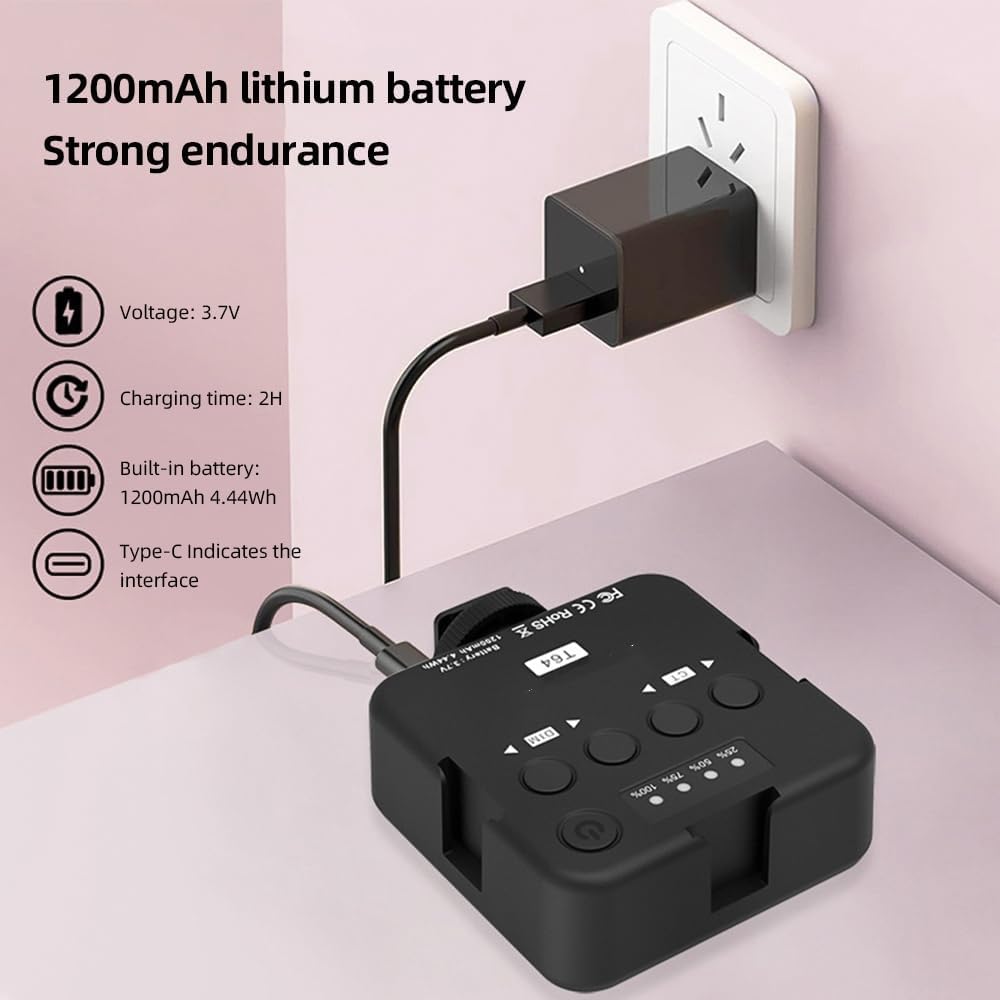
Image: The Andoer T64 LED light being charged via its Type-C port, with an illustration of the 1200mAh lithium battery and 2-hour charging time.
മൗണ്ടിംഗ് ഓപ്ഷനുകൾ
The Andoer T64 offers flexible mounting options:
- തണുത്ത ഷൂ മൗണ്ട്: The light features a standard cold shoe mount at the bottom, allowing it to be attached directly to a camera's hot shoe, a camera cage, or other accessories with a cold shoe receiver.
- 1/4-inch Screw Hole: A 1/4-inch threaded screw hole is located at the bottom, compatible with tripods, light stands, and other photographic equipment.
- Multiple Cold Shoe Mounts: The light also includes three additional cold shoe mounts on its sides, enabling you to connect multiple T64 lights together for increased illumination or attach other accessories like microphones.

Image: Three Andoer T64 LED lights connected to each other and mounted on a DSLR camera, demonstrating the multi-light splicing capability using the cold shoe mounts.
പ്രവർത്തന നിർദ്ദേശങ്ങൾ
Familiarize yourself with the controls of the Andoer T64 LED light:

Image: A detailed diagram of the Andoer T64 LED light's back panel, labeling the power/brightness/color temperature indicator, switch/function button, brightness control buttons (DIM), color temperature control buttons (CT), cold shoe mounts, and Type-C port.
- Power/Brightness/Color Temperature Indicator: Displays the current battery level, brightness level, and color temperature setting.
- Switch/Function Button (Power Button): Press and hold to power the light on or off. Short press to cycle through different display modes or confirm settings.
- Brightness Control (DIM) Buttons: Use the left and right arrow buttons under "DIM" to decrease or increase the brightness level.
- Color Temperature Control (CT) Buttons: Use the left and right arrow buttons under "CT" to adjust the color temperature from 2500K (warm) to 9000K (cool).
തെളിച്ചവും വർണ്ണ താപനിലയും ക്രമീകരിക്കുന്നു
The Andoer T64 allows for precise control over your lighting environment:
- പവർ ഓൺ: Press and hold the power button until the light turns on.
- തെളിച്ചം ക്രമീകരിക്കുക: Use the "DIM" arrow buttons to set the desired brightness level. The indicator will show the current percentage.
- വർണ്ണ താപനില ക്രമീകരിക്കുക: Use the "CT" arrow buttons to change the color temperature. You can select from a range of 2500K (warm, yellowish light) to 9000K (cool, bluish light).

Image: Visual representation of the Andoer T64's dual color temperature adjustment, showing light output at 2500K (warm), 4500K (neutral), and 9000K (cool), with corresponding example portraits.
The compact size and versatile features make the T64 suitable for various applications:

ചിത്രം: ഒരു കൊളാഷ് ഷോasing the Andoer T64 LED light being used for different purposes, including live food photography, conference video calls, video fill light, camera fill light, and selfie fill light.
മെയിൻ്റനൻസ്
To ensure the longevity and optimal performance of your Andoer T64 Pocket LED Light, follow these maintenance guidelines:
- വൃത്തിയാക്കൽ: Use a soft, dry cloth to wipe the surface of the light. Do not use abrasive cleaners or solvents, as they may damage the finish or internal components.
- സംഭരണം: When not in use, store the light in a cool, dry place away from direct sunlight and extreme temperatures.
- ബാറ്ററി കെയർ: To maintain battery health, avoid fully discharging the battery frequently. If storing for an extended period, charge the battery to about 50% capacity.
- ശ്രദ്ധയോടെ കൈകാര്യം ചെയ്യുക: Avoid dropping the light or subjecting it to strong impacts, which could damage the LED beads or internal circuitry.
ട്രബിൾഷൂട്ടിംഗ്
If you encounter issues with your Andoer T64 Pocket LED Light, refer to the following common troubleshooting steps:
- ലൈറ്റ് ഓണാക്കുന്നില്ല:
- Ensure the battery is sufficiently charged. Connect the light to a power source using the Type-C cable and allow it to charge for at least 30 minutes.
- പവർ ബട്ടൺ ഒരു ചെറിയ പ്രസ്സ് മാത്രമാകാതിരിക്കാൻ കുറച്ച് സെക്കൻഡ് അമർത്തിപ്പിടിക്കുക.
- വെളിച്ചം മങ്ങുകയോ മിന്നിമറയുകയോ ചെയ്യുന്നു:
- Check the battery level; a low battery can affect brightness. Recharge the device.
- Ensure the brightness setting is not at its lowest. Adjust using the "DIM" buttons.
- Cannot adjust color temperature:
- ലൈറ്റ് ഓണാക്കിയിട്ടുണ്ടെന്ന് ഉറപ്പാക്കുക.
- Use the "CT" buttons to adjust the color temperature. If the buttons are unresponsive, try powering the device off and on again.
- ഉപകരണം ചാർജ് ചെയ്യുന്നില്ല:
- Verify that the Type-C cable is securely connected to both the light and the power source.
- Try a different Type-C cable or a different USB power adapter to rule out faulty accessories.
- Ensure the power source is active and providing sufficient power.
സ്പെസിഫിക്കേഷനുകൾ
| മോഡൽ | T64 |
| നിറം | കറുപ്പ് |
| മെറ്റീരിയൽ | എബിഎസ് |
| ബാറ്ററി | 1200mAh, 4.44Wh |
| ചാർജിംഗ് സമയം | 2 മണിക്കൂർ |
| വർക്കിംഗ് വോളിയംtage | 3.7V |
| സ്റ്റാൻഡ്ബൈ സമയം | 60 minutes (at maximum brightness) |
| ചാർജിംഗ് പോർട്ട് | ടൈപ്പ്-സി |
| ശക്തി | 3.7W |
| വർണ്ണ താപനില | 2500K-9000K±200K |
| LED മൃഗങ്ങൾ | 64 pieces (32 white light; 32 yellow light) |
| ബീം ആംഗിൾ | 120° |
| സി.ആർ.ഐ | 95Ra |
| ലുമിനൻസ് | 600LUX/0.3മി |
| ഇനത്തിൻ്റെ വലിപ്പം | 8.5 * 7.2 * 2.8 സെ.മീ |
| ഇനത്തിൻ്റെ ഭാരം | 91 ഗ്രാം (3.21 ഔൺസ്) |

Image: An infographic highlighting key product functions and specifications, including High Brightness LED Beads (32 white + 32 yellow), Dual Color Temperature (2500K-9000K±200K), CRI ≥95, Universal Cold Shoe, Portable & Light (8.5*7.2*2.8cm), and Built-in lithium battery (1200mAh 4.44Wh).
സുരക്ഷാ മുൻകരുതലുകൾ
Please read and adhere to the following safety precautions to ensure safe operation and prevent damage to the device or injury:
- ഉപകരണം വെള്ളത്തിലോ അമിതമായ ഈർപ്പത്തിലോ തുറന്നുകാട്ടരുത്.
- Avoid operating the device in extremely high or low temperatures.
- Do not attempt to disassemble or modify the device. Repairs should only be performed by authorized personnel.
- ശക്തമായ കാന്തിക മണ്ഡലങ്ങളിൽ നിന്ന് ഉപകരണം അകറ്റി നിർത്തുക.
- When disposing of the product, follow local regulations for electronic waste.

Image: A warning sign indicating a suffocation hazard. Text advises to keep plastic bags away from babies and children.
വാറൻ്റിയും പിന്തുണയും
For information regarding warranty coverage, technical support, or service inquiries, please refer to the warranty card included with your product or visit the official Andoer website. Contact details for customer support are typically provided in the product packaging or on the manufacturer's webസൈറ്റ്.
Ask a question about this manual
Ask about setup, troubleshooting, compatibility, parts, safety, or missing instructions. Manuals+ will review the question and use this page’s manual context to help answer it.