
Beghelli Salvalavita Phone SLV19 User Manual
Emergency GSM Mobile Phone with SOS Function
1. ആമുഖം
This manual provides detailed instructions for the proper use and maintenance of your Beghelli Salvalavita Phone SLV19. Please read this manual carefully before using the device to ensure safe and optimal performance. Keep this manual for future reference.
2. പാക്കേജ് ഉള്ളടക്കം
പാക്കേജിൽ എല്ലാ ഇനങ്ങളും ഉണ്ടെന്ന് ഉറപ്പാക്കുക:
- Beghelli Salvalavita Phone SLV19
- ബാറ്ററി
- ചാർജർ
- ഉപയോക്തൃ മാനുവൽ (ഈ പ്രമാണം)

ചിത്ര വിവരണം: A black power adapter with a European two-pin plug and an attached black USB-A to Micro-USB charging cable. The charger has "Beghelli" branding.
3. ഡിവൈസ് ഓവർview
The Beghelli Salvalavita Phone SLV19 is a user-friendly flip phone designed for clear communication and emergency assistance. It features large keys, a bright display, and a dedicated SOS button.
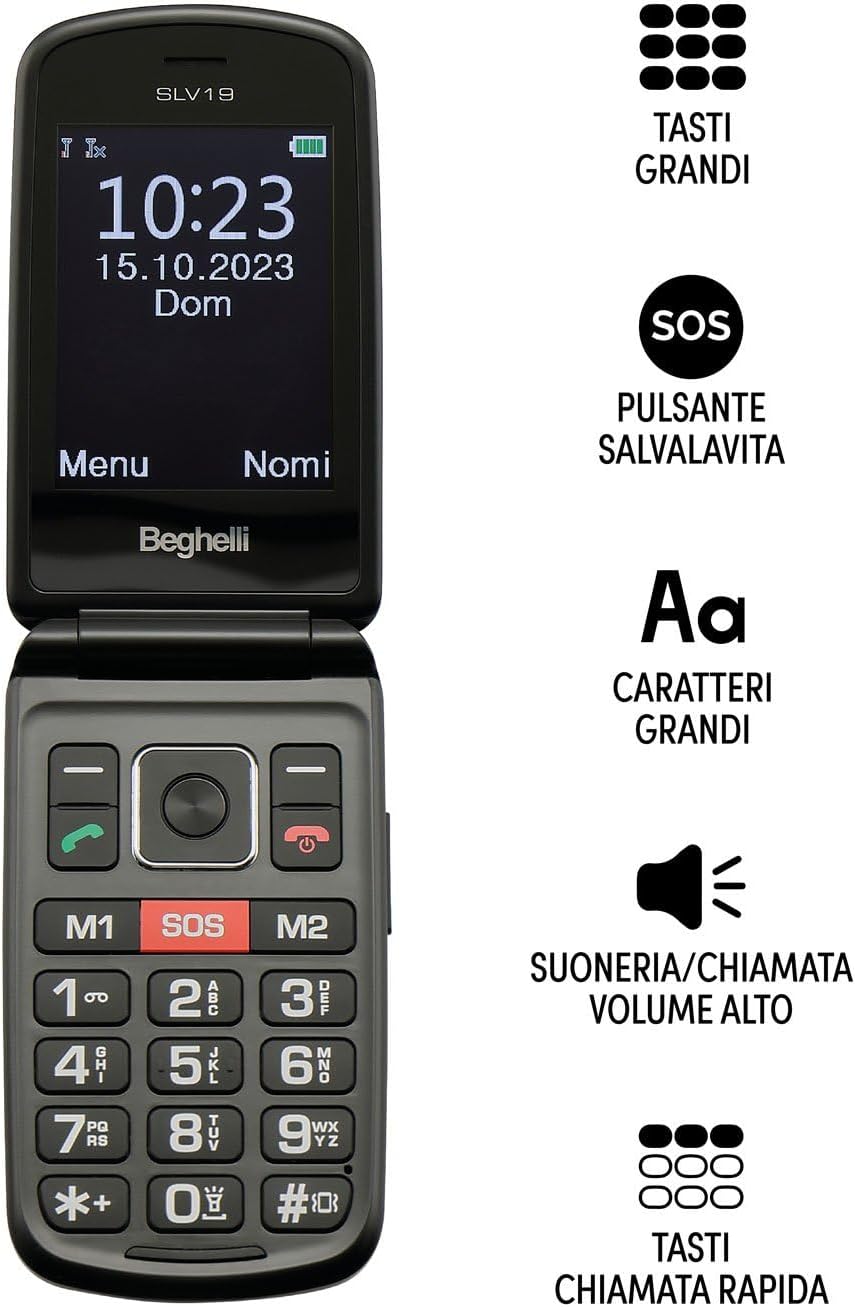
ചിത്ര വിവരണം: The Beghelli Salvalavita Phone SLV19 shown open, displaying the screen and keypad. Key features are highlighted: large keys, SOS button, large characters on screen, high volume ringer, and quick dial keys.

ചിത്ര വിവരണം: The Beghelli Salvalavita Phone SLV19 shown open, revealing its 2.8-inch color display and large, backlit keypad with clearly labeled buttons.

ചിത്ര വിവരണം: The Beghelli Salvalavita Phone SLV19 in its closed, compact flip phone form factor, showing the front casing.

ചിത്ര വിവരണം: ഒരു വശം view of the Beghelli Salvalavita Phone SLV19 when closed, highlighting its slim profile and side buttons/ports.

ചിത്ര വിവരണം: പിൻഭാഗം view of the Beghelli Salvalavita Phone SLV19 when closed, featuring the Beghelli logo and a smooth finish.

ചിത്ര വിവരണം: A composite image showing both the front and back of the Beghelli Salvalavita Phone SLV19 in its closed state, providing a complete view of the device's exterior.
4. സജ്ജീകരണം
4.1. സിം കാർഡ് ഇടുന്നു
The Beghelli Salvalavita Phone SLV19 requires a Nano SIM card (not included). Ensure the SIM card has voice and SMS traffic enabled.
- ഫോണിന്റെ പിൻ കവർ തുറക്കുക.
- Remove the battery if it is already inserted.
- Carefully insert the Nano SIM card into the designated slot, ensuring correct orientation.
- ബാറ്ററി വീണ്ടും തിരുകുക, പിൻ കവർ അടയ്ക്കുക.
കുറിപ്പ്: A Nano SIM card with active voice and SMS services is required for phone functionality. The SIM card is not included in the package.
4.2. ബാറ്ററി ചേർക്കുന്നു
- ഫോണിൻ്റെ പിൻ കവർ നീക്കം ചെയ്യുക.
- Align the battery contacts with the phone's terminals and gently press the battery into place.
- സുരക്ഷിതമായി ക്ലിക്കുചെയ്യുന്നുണ്ടെന്ന് ഉറപ്പാക്കാൻ പിൻ കവർ മാറ്റിസ്ഥാപിക്കുക.
4.3. ഫോൺ ചാർജ് ചെയ്യുന്നു
ആദ്യ ഉപയോഗത്തിന് മുമ്പ്, ഫോണിന്റെ ബാറ്ററി പൂർണ്ണമായും ചാർജ് ചെയ്യുക.
- Connect the Micro-USB end of the charging cable to the charging port on the phone.
- ഒരു മതിൽ ഔട്ട്ലെറ്റിലേക്ക് പവർ അഡാപ്റ്റർ പ്ലഗ് ചെയ്യുക.
- The charging indicator on the phone will illuminate. Once fully charged, the indicator may change color or turn off.
- ചാർജിംഗ് പൂർത്തിയായിക്കഴിഞ്ഞാൽ ചാർജർ വിച്ഛേദിക്കുക.
5. പ്രവർത്തന നിർദ്ദേശങ്ങൾ
5.1. പവർ ഓൺ/ഓഫ്
- പവർ ഓൺ ചെയ്യാൻ: അമർത്തിപ്പിടിക്കുക Red Call End/Power സ്ക്രീൻ പ്രകാശിക്കുന്നത് വരെ ബട്ടൺ.
- പവർ ഓഫ് ചെയ്യാൻ: അമർത്തിപ്പിടിക്കുക Red Call End/Power button until the power-off options appear, then confirm.
5.2. കോളുകൾ ചെയ്യലും സ്വീകരിക്കലും
- ഒരു കോൾ ചെയ്യാൻ: കീപാഡ് ഉപയോഗിച്ച് നമ്പർ ഡയൽ ചെയ്ത് അമർത്തുക ഗ്രീൻ കോൾ ബട്ടൺ.
- ഒരു കോൾ സ്വീകരിക്കാൻ: അമർത്തുക ഗ്രീൻ കോൾ ഫോൺ റിംഗ് ചെയ്യുമ്പോൾ ബട്ടൺ അമർത്തുക.
- ഒരു കോൾ അവസാനിപ്പിക്കാൻ: അമർത്തുക Red Call End/Power ബട്ടൺ.
5.3. SOS Emergency Function
The Salvalavita Phone SLV19 features a dedicated SOS button for emergencies. You can set up to 10 emergency numbers.
- Setting Emergency Numbers: Access the phone's settings menu to configure the emergency contact list. Refer to the "Contacts" section for detailed steps on adding and managing numbers.
- SOS സജീവമാക്കുന്നു: അടിയന്തര സാഹചര്യത്തിൽ, അമർത്തിപ്പിടിക്കുക SOS ബട്ടൺ (typically located on the back or front of the phone, clearly marked) for 2 seconds.
- The phone will automatically dial the emergency numbers in sequence until one is answered. It will also send an emergency SMS to these contacts.
Optional: Beghelli Salvalavita Center Connection
This device can be connected to the Beghelli Salvalavita Center, a 24/7 monitoring service. Activation of this service requires a separate subscription.
കുറിപ്പ്: For details on activating and subscribing to the Beghelli Salvalavita Center service, please refer to the information provided with your device or visit the official Beghelli webസൈറ്റ്.
5.4. Contacts (Phonebook)
Store frequently called numbers in the phonebook for easy access.
- Navigate to the "Contacts" or "Phonebook" menu option.
- Select "Add New Contact" and enter the name and phone number.
- കോൺടാക്റ്റ് സംരക്ഷിക്കുക.
- You can assign quick dial numbers (M1, M2) to important contacts for one-touch dialing.
5.5. മൾട്ടിമീഡിയ പ്രവർത്തനങ്ങൾ
The phone includes basic multimedia features. A TF memory card (up to 32GB, not included) is required for storing media files.
- ക്യാമറ: Access the camera from the main menu to take photos.
- വീഡിയോ പ്ലെയർ: Play MP4/AVI/3GP video fileമെമ്മറി കാർഡിൽ സൂക്ഷിച്ചിരിക്കുന്നു.
- എഫ്എം റേഡിയോ: എഫ്എം റേഡിയോ സ്റ്റേഷനുകളിലേക്ക് ട്യൂൺ ചെയ്യുക. ആന്റിനയായി ഹെഡ്ഫോണുകൾ ആവശ്യമായി വന്നേക്കാം.
- ഫ്ലാഷ്ലൈറ്റ്: Activate the built-in flashlight from the shortcuts or menu.
- കാൽക്കുലേറ്റർ: Use the basic calculator function for arithmetic operations.
6. പരിപാലനം
- വൃത്തിയാക്കൽ: Use a soft, dry cloth to clean the phone's exterior. Avoid liquid cleaners.
- ബാറ്ററി കെയർ: ബാറ്ററി ഉയർന്ന താപനിലയിൽ തുറന്നുവിടരുത്. ഫോൺ കൂടുതൽ നേരം ഉപയോഗിക്കില്ലെങ്കിൽ, ബാറ്ററിയുടെ ആരോഗ്യം നിലനിർത്താൻ ഇടയ്ക്കിടെ ചാർജ് ചെയ്യുക.
- സംഭരണം: നേരിട്ട് സൂര്യപ്രകാശം ഏൽക്കാത്തതും ഈർപ്പമുള്ളതുമായ ഒരു തണുത്ത വരണ്ട സ്ഥലത്ത് ഫോൺ സൂക്ഷിക്കുക.
7. പ്രശ്നപരിഹാരം
| പ്രശ്നം | സാധ്യമായ കാരണം | പരിഹാരം |
|---|---|---|
| ഫോൺ ഓണാക്കുന്നില്ല | ബാറ്ററി തീർന്നു അല്ലെങ്കിൽ ശരിയായി ചേർത്തിട്ടില്ല. | ബാറ്ററി ചാർജ് ചെയ്യുക. ബാറ്ററി ശരിയായി ചേർത്തിട്ടുണ്ടെന്ന് ഉറപ്പാക്കുക. |
| കോളുകൾ വിളിക്കാനോ സ്വീകരിക്കാനോ കഴിയില്ല | No SIM card, SIM card not inserted correctly, or no network signal. | Ensure SIM card is inserted correctly and activated. Check for network coverage. |
| SOS ഫംഗ്ഷൻ പ്രവർത്തിക്കുന്നില്ല | Emergency numbers not set, or no credit/signal. | Verify emergency numbers are configured. Ensure phone has network signal and sufficient credit. |
| മോശം ഓഡിയോ നിലവാരം | Low volume setting, obstruction of speaker/microphone, or weak signal. | Adjust volume. Clear any obstructions. Move to an area with better signal. |
8 സ്പെസിഫിക്കേഷനുകൾ
| ഫീച്ചർ | വിശദാംശങ്ങൾ |
|---|---|
| മോഡലിൻ്റെ പേര് | Salvalavita Phone SLV19 |
| ബ്രാൻഡ് | ബെഗെല്ലി |
| ഓപ്പറേറ്റിംഗ് സിസ്റ്റം | ഉടമസ്ഥാവകാശം |
| സെല്ലുലാർ ടെക്നോളജി | 2G (GSM Quadri Band) |
| സിം കാർഡ് തരം | Nano SIM (Dual SIM support) |
| ഡിസ്പ്ലേ വലിപ്പം | 2.8 ഇഞ്ച് |
| ഡിസ്പ്ലേ റെസല്യൂഷൻ | 320 x 240 |
| മെമ്മറി കാർഡ് പിന്തുണ | TF Card, up to 32 GB (not included) |
| ക്യാമറ | Yes (1.3 MP with flash) |
| ബാറ്ററി ശേഷി | 1000 mAh Lithium |
| അളവുകൾ (അടച്ചത്) | 108 x 59 x 19 മിമി |
| ഭാരം | 106 ഗ്രാം |
| അധിക സവിശേഷതകൾ | Large backlit keys, High volume, Vibration, Flashlight, FM Radio, Calculator, Video Player (MP4/AVI/3GP) |

ചിത്ര വിവരണം: The product packaging for the Beghelli Salvalavita Phone SLV19, displaying various features and technical specifications in Italian, including GSM Quadri Band, 2.8-inch display, 1.3 MP camera, 1000mAh battery, and dimensions.
9. വാറൻ്റിയും പിന്തുണയും
For warranty information and technical support, please refer to the official Beghelli webസൈറ്റിൽ ബന്ധപ്പെടുക അല്ലെങ്കിൽ അവരുടെ ഉപഭോക്തൃ സേവനവുമായി ബന്ധപ്പെടുക. വാറന്റി ക്ലെയിമുകൾക്കായി നിങ്ങളുടെ വാങ്ങിയതിന്റെ തെളിവ് സൂക്ഷിക്കുക.
Beghelli Customer Service: ദയവായി സന്ദർശിക്കുക www.beghelli.it ബന്ധപ്പെടാനുള്ള വിവരങ്ങൾക്കും കൂടുതൽ സഹായത്തിനും.