
1. ആമുഖം
വാങ്ങിയതിന് നന്ദി.asing the Sanyo 20W Bluetooth Speaker. This portable speaker is designed to deliver high-quality audio with versatile connectivity options. Please read this manual carefully before using the product to ensure proper operation and to maximize its lifespan. Keep this manual for future reference.
പ്രധാന സവിശേഷതകളിൽ ഇവ ഉൾപ്പെടുന്നു:
- Bluetooth 5.3 for stable wireless connection.
- 20W audio output for clear and powerful sound.
- Multiple connectivity options: Bluetooth, AUX, USB.
- MP3 playback capability.
- Karaoke function.
2 സുരക്ഷാ വിവരങ്ങൾ
സുരക്ഷിതമായ പ്രവർത്തനം ഉറപ്പാക്കുന്നതിനും കേടുപാടുകൾ തടയുന്നതിനും, ദയവായി ഇനിപ്പറയുന്ന സുരക്ഷാ മുൻകരുതലുകൾ പാലിക്കുക:
- സ്പീക്കറിനെ വെള്ളം, ഈർപ്പം അല്ലെങ്കിൽ തീവ്രമായ താപനില എന്നിവയിൽ തുറന്നുകാട്ടരുത്.
- സ്പീക്കർ ഡിസ്അസംബ്ലിംഗ് ചെയ്യാനോ പരിഷ്കരിക്കാനോ ശ്രമിക്കരുത്. ഇത് വാറന്റി അസാധുവാക്കും.
- സ്പീക്കറിനെ താപ സ്രോതസ്സുകൾ, നേരിട്ടുള്ള സൂര്യപ്രകാശം, കത്തുന്ന വസ്തുക്കൾ എന്നിവയിൽ നിന്ന് അകറ്റി നിർത്തുക.
- Use only the specified charging cable and power adapter (if included) to charge the device.
- മൃദുവായതും ഉണങ്ങിയതുമായ തുണി ഉപയോഗിച്ച് സ്പീക്കർ വൃത്തിയാക്കുക. അബ്രസീവ് ക്ലീനറുകളോ ലായകങ്ങളോ ഉപയോഗിക്കരുത്.
- കുട്ടികൾക്ക് ലഭ്യമാകാതെ സൂക്ഷിക്കുക.
3. പാക്കേജ് ഉള്ളടക്കം
പാക്കേജിൽ ഇനിപ്പറയുന്ന ഇനങ്ങൾ ഉണ്ടോ എന്ന് പരിശോധിക്കുക:
- Sanyo 20W Bluetooth Speaker Unit
- യുഎസ്ബി ചാർജിംഗ് കേബിൾ
- AUX ഓഡിയോ കേബിൾ
- ഉപയോക്തൃ മാനുവൽ
4. ഉൽപ്പന്നം കഴിഞ്ഞുview
Familiarize yourself with the speaker's components:
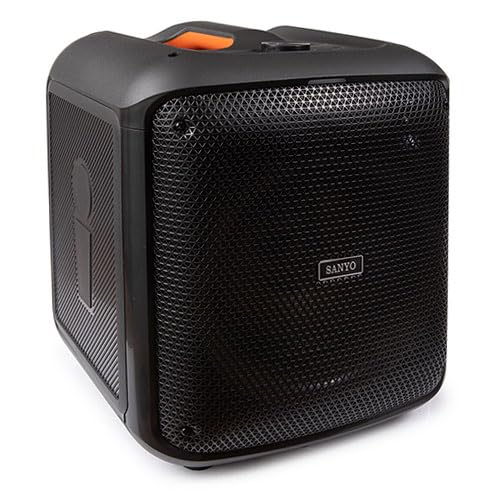
An image showing the front view of the Sanyo 20W Bluetooth Speaker, highlighting its compact design and speaker grille. The speaker appears to have a handle on top for portability.
Note: Specific button layouts and port locations may vary slightly. Refer to the image for general reference.
- പവർ ബട്ടൺ: ഓൺ/ഓഫ് ചെയ്യാൻ അമർത്തിപ്പിടിക്കുക.
- മോഡ് ബട്ടൺ: Switch between Bluetooth, AUX, and USB modes.
- വോളിയം നിയന്ത്രണങ്ങൾ: ശബ്ദം കൂട്ടുകയോ കുറയ്ക്കുകയോ ചെയ്യുക.
- പ്ലേ/താൽക്കാലികമായി നിർത്തുക ബട്ടൺ: ഓഡിയോ പ്ലേബാക്ക് നിയന്ത്രിക്കുക.
- മുമ്പത്തെ/അടുത്ത ട്രാക്ക് ബട്ടണുകൾ: ട്രാക്കുകളിലൂടെ നാവിഗേറ്റ് ചെയ്യുക.
- USB പോർട്ട്: ഒരു USB ഡ്രൈവിൽ നിന്നുള്ള MP3 പ്ലേബാക്കിനായി.
- AUX ഇൻപുട്ട്: 3.5mm ഓഡിയോ കേബിൾ വഴി ബാഹ്യ ഓഡിയോ ഉപകരണങ്ങൾ ബന്ധിപ്പിക്കുന്നതിന്.
- ചാർജിംഗ് പോർട്ട്: യുഎസ്ബി ചാർജിംഗ് കേബിൾ ബന്ധിപ്പിക്കുന്നതിന്.
- മൈക്രോഫോൺ ഇൻപുട്ട്: For karaoke function (if applicable).
5. സജ്ജീകരണം
5.1 സ്പീക്കർ ചാർജ് ചെയ്യുന്നു
- യുഎസ്ബി ചാർജിംഗ് കേബിളിന്റെ ചെറിയ അറ്റം സ്പീക്കറിലെ ചാർജിംഗ് പോർട്ടുമായി ബന്ധിപ്പിക്കുക.
- USB ചാർജിംഗ് കേബിളിന്റെ വലിയ അറ്റം ഒരു USB പവർ അഡാപ്റ്ററുമായി (ഉൾപ്പെടുത്തിയിട്ടില്ല) അല്ലെങ്കിൽ ഒരു കമ്പ്യൂട്ടറിന്റെ USB പോർട്ടുമായി ബന്ധിപ്പിക്കുക.
- സ്പീക്കർ ചാർജ് ചെയ്യുന്നുണ്ടെന്ന് കാണിക്കാൻ ചാർജിംഗ് ഇൻഡിക്കേറ്റർ ലൈറ്റ് പ്രകാശിക്കും (നിറം വ്യത്യാസപ്പെടാം).
- പൂർണ്ണമായി ചാർജ് ചെയ്തുകഴിഞ്ഞാൽ, ഇൻഡിക്കേറ്റർ ലൈറ്റ് നിറം മാറുകയോ ഓഫാകുകയോ ചെയ്യാം. ചാർജിംഗ് കേബിൾ വിച്ഛേദിക്കുക.
5.2 പവർ ഓൺ/ഓഫ്
- പവർ ഓണാക്കാൻ: പവർ ബട്ടൺ ഏകദേശം 3 സെക്കൻഡ് അമർത്തിപ്പിടിക്കുക. കേൾക്കാവുന്ന ഒരു നിർദ്ദേശം നിങ്ങൾ കേൾക്കും.
- പവർ ഓഫ് ചെയ്യാൻ: പവർ ബട്ടൺ ഏകദേശം 3 സെക്കൻഡ് അമർത്തിപ്പിടിക്കുക. കേൾക്കാവുന്ന ഒരു നിർദ്ദേശം നിങ്ങൾ കേൾക്കും.
5.3 ബ്ലൂടൂത്ത് ജോടിയാക്കൽ
- Ensure the speaker is powered on and in Bluetooth mode. If not, press the Mode button until you hear the Bluetooth pairing prompt. The Bluetooth indicator light will flash.
- നിങ്ങളുടെ മൊബൈൽ ഉപകരണത്തിൽ (സ്മാർട്ട്ഫോൺ, ടാബ്ലെറ്റ് മുതലായവ) ബ്ലൂടൂത്ത് പ്രവർത്തനക്ഷമമാക്കുക.
- ഇതിനായി തിരയുക available Bluetooth devices. The speaker will appear as "Sanyo Speaker" or a similar name.
- Select the speaker from the list to pair. Once paired, you will hear a confirmation sound, and the Bluetooth indicator light will stop flashing and remain solid.
- ഇപ്പോൾ നിങ്ങളുടെ ഉപകരണത്തിൽ നിന്ന് സ്പീക്കറിലൂടെ ഓഡിയോ പ്ലേ ചെയ്യാൻ കഴിയും.
Note: The speaker will automatically attempt to reconnect to the last paired device when powered on, if that device's Bluetooth is active and within range.
5.4 ഓക്സ് കണക്ഷൻ
- Connect one end of the 3.5mm AUX audio cable to the AUX input port on the speaker.
- Connect the other end of the AUX audio cable to the headphone jack or audio output port of your external audio device (e.g., MP3 player, computer).
- Press the Mode button on the speaker to switch to AUX mode.
- നിങ്ങളുടെ ബാഹ്യ ഉപകരണത്തിൽ നിന്ന് ഓഡിയോ പ്ലേ ചെയ്യുക.
5.5 യുഎസ്ബി പ്ലേബാക്ക്
- MP3 ഓഡിയോ അടങ്ങിയ ഒരു USB ഫ്ലാഷ് ഡ്രൈവ് ഇടുക. fileസ്പീക്കറിലെ യുഎസ്ബി പോർട്ടിലേക്ക്.
- Press the Mode button on the speaker to switch to USB mode.
- The speaker will automatically begin playing the MP3 fileയുഎസ്ബി ഡ്രൈവിൽ നിന്നുള്ള ങ്ങൾ.
6. പ്രവർത്തന നിർദ്ദേശങ്ങൾ
6.1 വോളിയം നിയന്ത്രണം
- വോളിയം കൂട്ടുക: വോളിയം അപ്പ് ബട്ടൺ അമർത്തുക.
- വോളിയം താഴേക്ക്: വോളിയം ഡൗൺ ബട്ടൺ അമർത്തുക.
6.2 Music Playback (Bluetooth/USB)
- പ്ലേ/താൽക്കാലികമായി നിർത്തുക: Press the Play/Pause button to toggle playback.
- അടുത്ത ട്രാക്ക്: അടുത്ത ട്രാക്ക് ബട്ടൺ അമർത്തുക.
- മുമ്പത്തെ ട്രാക്ക്: മുമ്പത്തെ ട്രാക്ക് ബട്ടൺ അമർത്തുക.
6.3 കരോക്കെ ഫംഗ്ഷൻ
If your speaker model includes a microphone input:
- Connect a compatible microphone (not included) to the microphone input port.
- Ensure music is playing via Bluetooth, AUX, or USB.
- Adjust the microphone volume and echo effects (if available on your speaker) using the dedicated controls.
7. പരിപാലനം
7.1 വൃത്തിയാക്കൽ
- സ്പീക്കറിന്റെ പുറംഭാഗം മൃദുവായതും ഉണങ്ങിയതും ലിന്റ് രഹിതവുമായ ഒരു തുണി ഉപയോഗിച്ച് തുടയ്ക്കുക.
- ലിക്വിഡ് ക്ലീനറുകൾ, എയറോസോളുകൾ, ലായകങ്ങൾ എന്നിവ ഉപയോഗിക്കരുത്.
- ഏതെങ്കിലും ദ്വാരങ്ങളിൽ ഈർപ്പം കയറുന്നത് ഒഴിവാക്കുക.
7.2 സംഭരണം
- നേരിട്ടുള്ള സൂര്യപ്രകാശത്തിൽ നിന്നും കടുത്ത താപനിലയിൽ നിന്നും മാറി തണുത്തതും വരണ്ടതുമായ സ്ഥലത്ത് സ്പീക്കർ സൂക്ഷിക്കുക.
- ദീർഘനേരം ബാറ്ററി സൂക്ഷിക്കുകയാണെങ്കിൽ, അതിന്റെ ആരോഗ്യം നിലനിർത്താൻ ഇടയ്ക്കിടെ ബാറ്ററി ചാർജ് ചെയ്യുക.
7.3 ബാറ്ററി കെയർ
- ബാറ്ററി ഇടയ്ക്കിടെ പൂർണ്ണമായും ഡിസ്ചാർജ് ചെയ്യുന്നത് ഒഴിവാക്കുക.
- Do not leave the speaker connected to power for excessively long periods after it is fully charged.
8. പ്രശ്നപരിഹാരം
| പ്രശ്നം | സാധ്യമായ കാരണം | പരിഹാരം |
|---|---|---|
| സ്പീക്കർ പവർ ഓൺ ചെയ്യുന്നില്ല. | കുറഞ്ഞ ബാറ്ററി. | സ്പീക്കർ പൂർണ്ണമായും ചാർജ് ചെയ്യുക. |
| ശബ്ദമില്ല. | Volume too low; incorrect mode; device not connected properly. | Increase volume; ensure correct mode (Bluetooth, AUX, USB); re-pair Bluetooth or re-connect cables. |
| ബ്ലൂടൂത്ത് ജോടിയാക്കൽ പരാജയപ്പെട്ടു. | സ്പീക്കർ ജോടിയാക്കൽ മോഡിൽ ഇല്ല; ഉപകരണം ബ്ലൂടൂത്ത് ഓഫാണ്; സ്പീക്കറിൽ നിന്ന് വളരെ അകലെയാണ്. | Ensure speaker is in pairing mode; enable Bluetooth on device; move device closer to speaker (within 10 meters). |
| വികലമായ ശബ്ദം. | ശബ്ദം വളരെ കൂടുതലാണ്; സിഗ്നൽ ദുർബലമാണ്; ഓഡിയോ ഉറവിട പ്രശ്നം. | Reduce volume on speaker and device; move device closer; try a different audio source. |
9 സ്പെസിഫിക്കേഷനുകൾ
| ഫീച്ചർ | വിശദാംശങ്ങൾ |
|---|---|
| ബ്രാൻഡ് | സന്യോ |
| മോഡൽ നമ്പർ | 8432068023011 |
| പവർ ഔട്ട്പുട്ട് | 20 വാട്ട്സ് |
| കണക്റ്റിവിറ്റി ടെക്നോളജി | AUX, ബ്ലൂടൂത്ത്, USB |
| ബ്ലൂടൂത്ത് പതിപ്പ് | 5.3 |
| അളവുകൾ (L x W x H) | 30.5 x 33 x 38 സെ.മീ (12 x 13 x 15 ഇഞ്ച് ഏകദേശം.) |
| ഇനത്തിൻ്റെ ഭാരം | 5.46 കിലോഗ്രാം (ഏകദേശം 12.04 പൗണ്ട്) |
| നിറം | ബഹുവർണ്ണം |
| ചാനലുകളുടെ എണ്ണം | 2 |
| പ്രത്യേക സവിശേഷതകൾ | Karaoke, MP3 Playback |
10. വാറൻ്റിയും പിന്തുണയും
Sanyo products are manufactured to the highest quality standards. This product is covered by a limited warranty from the date of purchase. Please refer to the warranty card included in your package for specific terms and conditions.
For technical support, warranty claims, or further assistance, please contact Sanyo customer service through their official webസൈറ്റ് അല്ലെങ്കിൽ നിങ്ങളുടെ വാങ്ങൽ ഡോക്യുമെന്റേഷനോടൊപ്പം നൽകിയിരിക്കുന്ന ബന്ധപ്പെടാനുള്ള വിവരങ്ങൾ.
വാറന്റി ആവശ്യങ്ങൾക്കായി നിങ്ങളുടെ വാങ്ങിയതിന്റെ തെളിവ് സൂക്ഷിക്കുക.