
SwanScout 701AC
SwanScout Fast Charging Station 701AC User Manual
മോഡൽ: 701AC
1. ആമുഖം
The SwanScout 701AC is a versatile 3-in-1 fast charging station designed to efficiently charge your iPhone, Apple Watch, and AirPods simultaneously. This compact and foldable device also features an integrated digital clock, making it an ideal solution for organizing your charging needs at home or while traveling.
2. പാക്കേജ് ഉള്ളടക്കം
പാക്കേജിൽ എല്ലാ ഇനങ്ങളും ഉണ്ടെന്ന് ദയവായി പരിശോധിക്കുക:
- 1 x SwanScout 701AC Charging Station
- 1 x Charging Cable (Type C to Type C)
- 1 x 25W Charging Brick
- 1 x ഉപയോക്തൃ മാനുവൽ (ഈ പ്രമാണം)
3. ഉൽപ്പന്നം കഴിഞ്ഞുview
The SwanScout 701AC charging station integrates multiple charging points and a digital display into a single unit.

Image 1: The SwanScout 701AC charging station in its upright position, charging an iPhone, Apple Watch, and AirPods. The digital clock displays the time.
പ്രധാന ഘടകങ്ങൾ:
- ഫോൺ ചാർജിംഗ് പോർട്ട്: USB-C port for iPhone charging.
- Earbuds Charging Port: USB-C port for AirPods charging.
- Apple Watch Charging Pad: Integrated wireless charging area for Apple Watch.
- ഡിജിറ്റൽ ക്ലോക്ക് ഡിസ്പ്ലേ: Shows time in 12H or 24H format.
- തെളിച്ചം ടച്ച് ബട്ടൺ: Adjusts the clock display brightness.
- 12/24H Switch Button: Toggles time format and enters time setting mode.
- Time Setting Buttons (+/-): Adjusts the time displayed on the clock.

ചിത്രം 2: ക്ലോസ്-അപ്പ് view of the control buttons on the SwanScout 701AC, including the 12/24H switch and time adjustment buttons.
4. സജ്ജീകരണ നിർദ്ദേശങ്ങൾ
- അൺപാക്ക്: പാക്കേജിംഗിൽ നിന്ന് എല്ലാ ഘടകങ്ങളും ശ്രദ്ധാപൂർവ്വം നീക്കം ചെയ്യുക.
- പവർ ബന്ധിപ്പിക്കുക: Connect the provided USB-C to USB-C charging cable to the input port on the SwanScout 701AC. Connect the other end of the cable to the included 25W charging brick.
- പ്ലഗ് ഇൻ: Insert the 25W charging brick into a standard wall power outlet. The digital clock display should illuminate, indicating power is supplied.
- Unfold (if necessary): If the charging station is in its folded, compact state, gently unfold it to the desired upright or horizontal charging position.
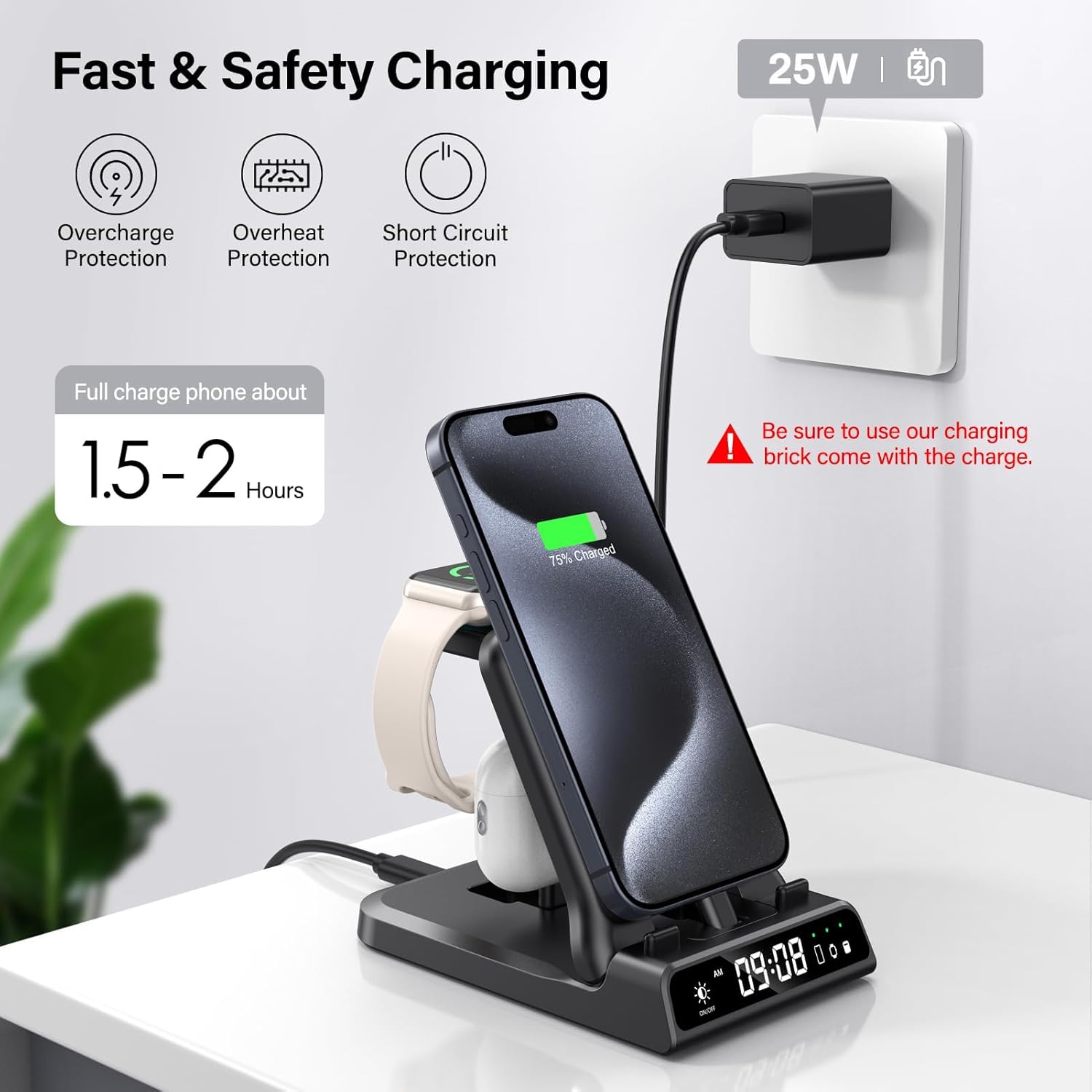
Image 3: The SwanScout 701AC charging station connected to the 25W charging brick and plugged into a wall outlet.
5. പ്രവർത്തന നിർദ്ദേശങ്ങൾ
5.1 ചാർജിംഗ് ഉപകരണങ്ങൾ
The SwanScout 701AC allows for simultaneous charging of three devices:
- ഐഫോൺ ചാർജ് ചെയ്യുന്നു: Insert your iPhone into the dedicated USB-C charging port. Ensure the phone is securely seated. The design is case-friendly, accommodating most phone cases without removal.
- ആപ്പിൾ വാച്ച് ചാർജ് ചെയ്യുന്നു: Place your Apple Watch onto the integrated wireless charging pad. Ensure the watch is centered on the pad for optimal charging.
- എയർപോഡുകൾ ചാർജ് ചെയ്യുന്നു: Insert your AirPods case into the dedicated USB-C charging port.

Image 4: The charging station accommodating an iPhone with a protective case, illustrating its case-friendly design.
5.2 Digital Clock Operation
- ക്രമീകരണ സമയം:
- ഷോർട്ട് അമർത്തുക 12/24H Switch Button once to enter time setting mode. The hour digits will flash.
- ഉപയോഗിക്കുക "+" ഒപ്പം "-" മണിക്കൂർ ക്രമീകരിക്കാനുള്ള ബട്ടണുകൾ.
- ഷോർട്ട് അമർത്തുക 12/24H Switch Button again to switch to minute adjustment. The minute digits will flash.
- ഉപയോഗിക്കുക "+" ഒപ്പം "-" മിനിറ്റ് ക്രമീകരിക്കാൻ ബട്ടണുകൾ.
- ഷോർട്ട് അമർത്തുക 12/24H Switch Button a third time to exit time setting mode.
- Switching 12H/24H Format: ദീർഘനേരം അമർത്തുക 12/24H Switch Button for 3 seconds to toggle between 12-hour and 24-hour time formats.
- തെളിച്ചം ക്രമീകരിക്കൽ: ടാപ്പ് ചെയ്യുക Brightness Touch Button (located near the clock display) to cycle through different brightness levels: 100%, 50%, 20%, and OFF. This feature is designed to be sleep-friendly.

Image 5: The digital clock display showing various brightness settings and the charging status indicators for phone, watch, and earbuds.
5.3 മടക്കാവുന്ന ഡിസൈൻ
The charging station can be folded for portability and to save space. It supports both vertical and horizontal phone charging positions when unfolded.

Image 6: The SwanScout 701AC demonstrating its versatility with vertical charging, horizontal stand mode, and its compact folded state for storage or travel.
6. ഉപകരണ അനുയോജ്യത
The SwanScout 701AC is designed for broad compatibility with various Apple and select Android devices:
- അനുയോജ്യമായ ഫോൺ മോഡലുകൾ:
For iPhone Air/17/17 Pro/17 Pro Max/16/16 Plus/16 Pro/16 Pro Max, 15/15 Plus/15 Pro/15 Pro Max.
Also compatible with Samsung S25/S24/S23/S22 series and Google Pixel 10/9/8/7/6 series (via USB-C ports). - Compatible Apple Watch Models:
For Apple Watch Ultra 2/Ultra/SE/Series 9/8/7/6/5/4/3/2. - അനുയോജ്യമായ ഇയർബഡ്സ് മോഡലുകൾ:
For AirPods 4/Pro 3/Pro 2.
Also compatible with Samsung Galaxy Buds3 Pro/3/2/Pro/2 Pro.
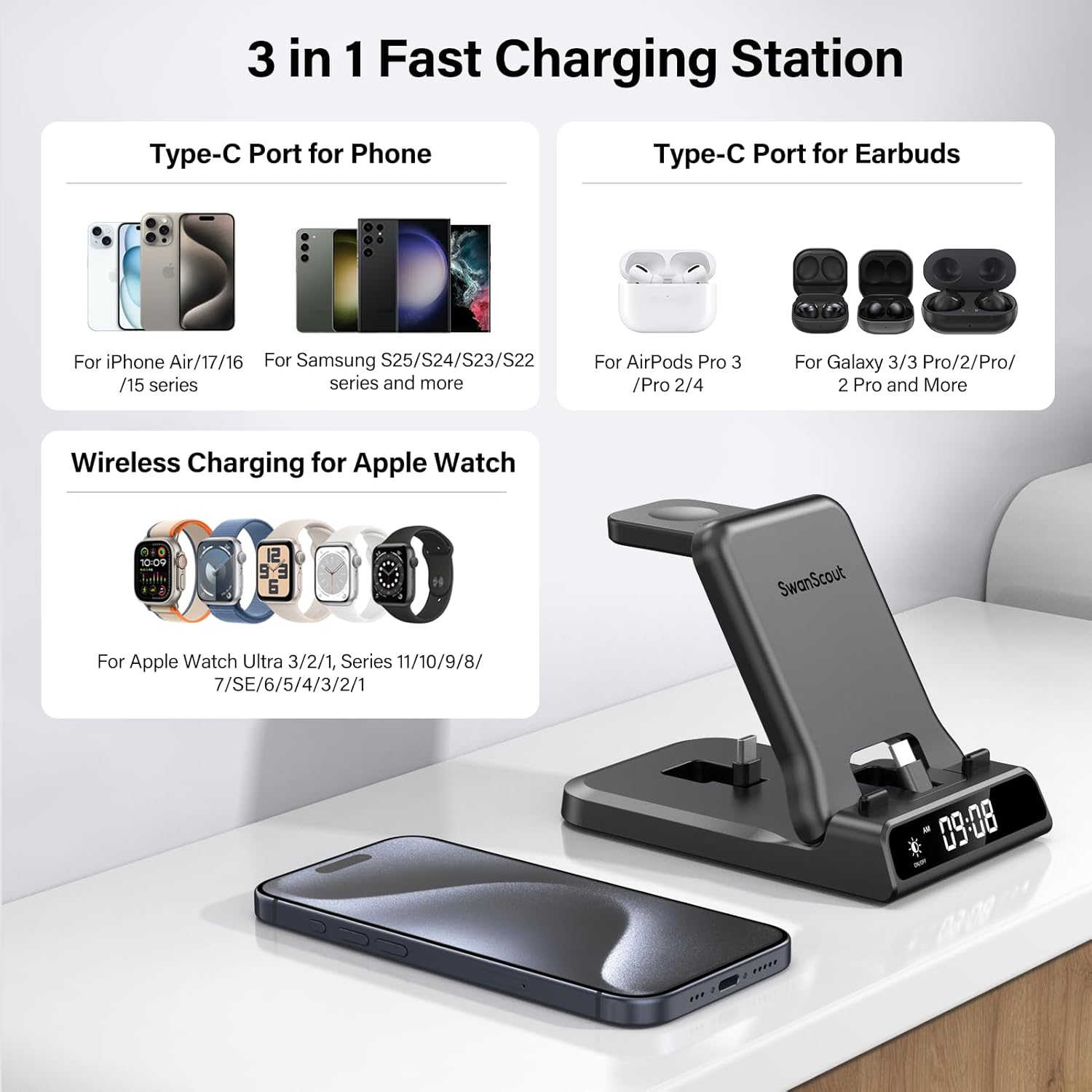
Image 7: A visual guide to the SwanScout 701AC's compatibility with various iPhone, Samsung, Apple Watch, AirPods, and Galaxy Buds models.
7. സുരക്ഷാ സവിശേഷതകൾ
The SwanScout 701AC is equipped with multiple safety protections to ensure secure and reliable charging:
- ഓവർചാർജ് പരിരക്ഷണം: Prevents devices from being overcharged, extending battery life.
- അമിത ചൂടാക്കൽ സംരക്ഷണം: Monitors temperature to prevent overheating during charging.
- ഷോർട്ട് സർക്യൂട്ട് സംരക്ഷണം: Safeguards against electrical short circuits.
8. പരിപാലനം
നിങ്ങളുടെ ചാർജിംഗ് സ്റ്റേഷന്റെ ദീർഘായുസ്സും ഒപ്റ്റിമൽ പ്രകടനവും ഉറപ്പാക്കാൻ, ഈ അറ്റകുറ്റപ്പണി മാർഗ്ഗനിർദ്ദേശങ്ങൾ പാലിക്കുക:
- വൃത്തിയാക്കൽ: Use a soft, dry cloth to wipe the surface of the charging station. Avoid using liquid cleaners, aerosols, or solvents.
- സംഭരണം: When not in use, especially during travel, fold the charging station into its compact form to protect the charging ports and surfaces.
- പരിസ്ഥിതി: തീവ്രമായ താപനില, നേരിട്ടുള്ള സൂര്യപ്രകാശം, ഈർപ്പമുള്ള അന്തരീക്ഷം എന്നിവയിൽ നിന്ന് ഉപകരണം അകറ്റി നിർത്തുക.
9. പ്രശ്നപരിഹാരം
If you encounter issues with your SwanScout 701AC, refer to the following common solutions:
| പ്രശ്നം | സാധ്യമായ കാരണം | പരിഹാരം |
|---|---|---|
| ഉപകരണം ചാർജ് ചെയ്യുന്നില്ല | Loose connection, incompatible power adapter, device not properly seated. | Ensure all cables are securely connected. Use the included 25W charging brick. Re-seat the device firmly on its respective charging area/port. Verify device compatibility. |
| സ്ലോ ചാർജിംഗ് | Using a non-25W power adapter, background apps on device. | Always use the included 25W charging brick for optimal fast charging performance. Close unnecessary apps on your device. |
| Digital clock not displaying or incorrect time | No power, incorrect time setting. | Ensure the charging station is powered on. Refer to Section 5.2 for instructions on setting the time. |
| Clock brightness too high/low | തെളിച്ച ക്രമീകരണം ക്രമീകരിക്കേണ്ടതുണ്ട്. | Tap the Brightness Touch Button to cycle through brightness levels (100%, 50%, 20%, OFF). |
10 സ്പെസിഫിക്കേഷനുകൾ
| ഫീച്ചർ | വിശദാംശങ്ങൾ |
|---|---|
| ബ്രാൻഡ് | സ്വാൻസ്കൗട്ട് |
| മോഡൽ നമ്പർ | S10002 (701AC) |
| കണക്റ്റർ തരം | യുഎസ്ബി ടൈപ്പ് സി |
| ഇൻപുട്ട് വോളിയംtage | 9 വോൾട്ട് |
| Ampഉന്മേഷം | 3 Amps |
| വാട്ട്tage | 25 വാട്ട്സ് |
| ഔട്ട്പുട്ട് കറൻ്റ് | 3 Amps |
| Putട്ട്പുട്ട് വോളിയംtage | 9 വോൾട്ട് |
| മൊത്തം USB പോർട്ടുകൾ | 2 |
| പ്രത്യേക സവിശേഷതകൾ | 3-in-1 Wired Charger, Digital Clock, Fast Charging, Foldable |
| മെറ്റീരിയൽ | അക്രിലോണിട്രൈൽ ബ്യൂട്ടാഡൈൻ സ്റ്റൈറൈൻ |
| ഇനത്തിൻ്റെ ഭാരം | 305 ഗ്രാം |
| പവർ പ്ലഗ് തരം | Type A - 2 pin (North American & Japanese) |
| സർട്ടിഫിക്കേഷൻ | FCC |
11. വാറൻ്റി വിവരങ്ങൾ
The SwanScout 701AC Fast Charging Station comes with a 1 വർഷത്തെ നിർമ്മാതാവിൻ്റെ വാറൻ്റി. സാധാരണ ഉപയോഗത്തിലുള്ള മെറ്റീരിയലുകളിലെയും നിർമ്മാണത്തിലെയും വൈകല്യങ്ങൾ ഈ വാറന്റി ഉൾക്കൊള്ളുന്നു. വാറന്റി ക്ലെയിമുകൾക്കായി നിങ്ങളുടെ വാങ്ങലിന്റെ തെളിവ് സൂക്ഷിക്കുക.
12. ഉപഭോക്തൃ പിന്തുണ
For any questions, concerns, or issues regarding your SwanScout 701AC Fast Charging Station, please do not hesitate to contact our customer service team. We are committed to providing assistance and ensuring your satisfaction.
Please refer to the contact information provided with your purchase or visit the official SwanScout webപിന്തുണാ വിശദാംശങ്ങൾക്കുള്ള സൈറ്റ്.
Ask a question about this manual
Ask about setup, troubleshooting, compatibility, parts, safety, or missing instructions. Manuals+ will review the question and use this page’s manual context to help answer it.