
Geloo B-8415A
Geloo Marine Stereo Radio Nautica B-8415A User Manual
Waterproof AM/FM MP5 Player with 4.1-inch Digital Display
ആമുഖം
This manual provides detailed instructions for the installation, operation, and maintenance of your Geloo Marine Stereo Radio Nautica B-8415A. Please read this manual thoroughly before using the product to ensure proper function and to prevent damage.
The Geloo Marine Stereo Radio Nautica is a versatile and durable audio-visual system designed for marine and various vehicle applications. It features AM/FM radio, MP3/MP5 playback, Bluetooth connectivity, and a 4.1-inch digital display, all within an IPX67 waterproof and dustproof enclosure.
സുരക്ഷാ വിവരങ്ങൾ
- വൈദ്യുതാഘാതം തടയുന്നതിന് ഇൻസ്റ്റാളേഷനോ അറ്റകുറ്റപ്പണിക്കോ മുമ്പ് വൈദ്യുതി വിതരണം വിച്ഛേദിക്കപ്പെട്ടുവെന്ന് ഉറപ്പാക്കുക.
- Install the unit in a location that does not obstruct visibility or interfere with vehicle operation.
- Use appropriate tools and follow wiring diagrams carefully to avoid short circuits or damage.
- This unit is IPX67 waterproof, but avoid submerging it or exposing it to high-pressure water jets.
- Do not attempt to disassemble or modify the unit. This will void the warranty and may cause damage.
- Keep the unit away from extreme temperatures, direct sunlight for prolonged periods, and corrosive substances.
പാക്കേജ് ഉള്ളടക്കം
പാക്കേജിൽ എല്ലാ ഇനങ്ങളും ഉണ്ടെന്ന് ഉറപ്പാക്കുക:
- Marine Stereo Player
- ഇൻസ്ട്രക്ഷൻ മാനുവൽ
- റിമോട്ട് കൺട്രോൾ
- മൌണ്ടിംഗ് ബ്രാക്കറ്റ്
- പവർ കോർഡ്
- Long Screws (for mounting)
- പാക്കിംഗ് ബോക്സ്

ചിത്രം 1: പാക്കേജ് ഉള്ളടക്കം
ഉൽപ്പന്നം കഴിഞ്ഞുview
The Geloo Marine Stereo Radio Nautica B-8415A features a compact design with a 4.1-inch digital display and intuitive controls. Its robust construction ensures durability in marine environments.

ചിത്രം 2: മുൻഭാഗം View of the Marine Stereo Player
പ്രധാന സവിശേഷതകൾ:
- Marine Stereo Radio: Wireless AM/FM radio with automatic search, manual fine-tuning, and automatic channel storage.
- വാട്ടർപ്രൂഫ്, ഡസ്റ്റ് പ്രൂഫ്: IPX67 rated for protection against water and dust.
- MP5 പ്ലെയർ: Supports MP3, MP5, and FM functions, including mobile phone connections, USB disk playback, AUX inputs, RCA outputs, and SUB outputs. Supports FLAC lossless audio.
- 4.1-ഇഞ്ച് LCD സ്ക്രീൻ: High-definition display for MP5 movies and videos.
- വിശാലമായ ആപ്ലിക്കേഷൻ: Suitable for boats, yachts, motorcycles, cars, ATVs, UTVs, SUVs, RVs, golf carts, campers, RZRs, harvesters, and trucks.
ഇൻസ്റ്റലേഷൻ
അളവുകൾ:
Before installation, ensure adequate space is available for the unit. Refer to the dimensions below:

ചിത്രം 3: ഉൽപ്പന്ന അളവുകൾ
വയറിംഗ് ഡയഗ്രം:
Connect the power cord and audio cables according to the diagram. Ensure all connections are secure and properly insulated.

Figure 4: Basic Key Functions and Wiring Introduction
- പവർ കണക്ഷൻ: Connect the yellow wire to the constant 12V power supply, the red wire to the accessory 12V power supply (switched), and the black wire to ground.
- സ്പീക്കർ കണക്ഷനുകൾ: Connect speaker wires to the corresponding positive and negative terminals. Ensure correct polarity.
- ആൻ്റിന: Connect the AM/FM antenna to the designated input.
- AUX ഇൻപുട്ട്: Use the AUX input for external audio devices.
- ആർസിഎ putട്ട്പുട്ട്: ബാഹ്യമായി ബന്ധിപ്പിക്കുക amplifiers for additional speakers.
- സബ് ഔട്ട്പുട്ട്: Connect to a subwoofer for enhanced bass.
പ്രവർത്തന നിർദ്ദേശങ്ങൾ
പൊതുവായ നിയന്ത്രണങ്ങൾ:
- Power/SEL/VOL knob: Press to power on/off, rotate to adjust volume, press to select menu options.
- മോഡ് ബട്ടൺ: Press to cycle through input modes (Radio, Bluetooth, USB, AUX).
- BAND/AV button: In radio mode, press to change radio bands (FM1, FM2, FM3, AM1, AM2). In video mode, press for AV options.
- മെനു ബട്ടൺ: Access system settings and options.
- CH+/CH- buttons: In radio mode, short press to tune to the next/previous preset station; long press to seek. In playback mode, short press for next/previous track.
- പ്ലേ / താൽക്കാലികമായി നിർത്തുക ബട്ടൺ: മീഡിയ പ്ലേബാക്ക് പ്ലേ ചെയ്യുക അല്ലെങ്കിൽ താൽക്കാലികമായി നിർത്തുക.
- AMS ബട്ടൺ: Automatic Memory Store for radio stations.
റേഡിയോ പ്രവർത്തനം (AM/FM):
- അമർത്തുക മോഡ് button to select "Radio" mode.
- അമർത്തുക BAND/AV button to select the desired band (FM1, FM2, FM3, AM1, AM2).
- യാന്ത്രിക തിരയൽ: ദീർഘനേരം അമർത്തുക CH+ or CH- buttons to automatically search for the next or previous strong station.
- സ്വമേധയാലുള്ള ട്യൂണിംഗ്: ഷോർട്ട് അമർത്തുക CH+ or CH- buttons to manually tune the frequency step by step.
- സ്റ്റോർ പ്രീസെറ്റുകൾ: Long press a number button (1-6) to store the current station to that preset. Short press to recall a stored station.
- Automatic Memory Store (AMS): അമർത്തുക എ.എം.എസ് button to automatically scan and store the strongest stations in the current band to presets.
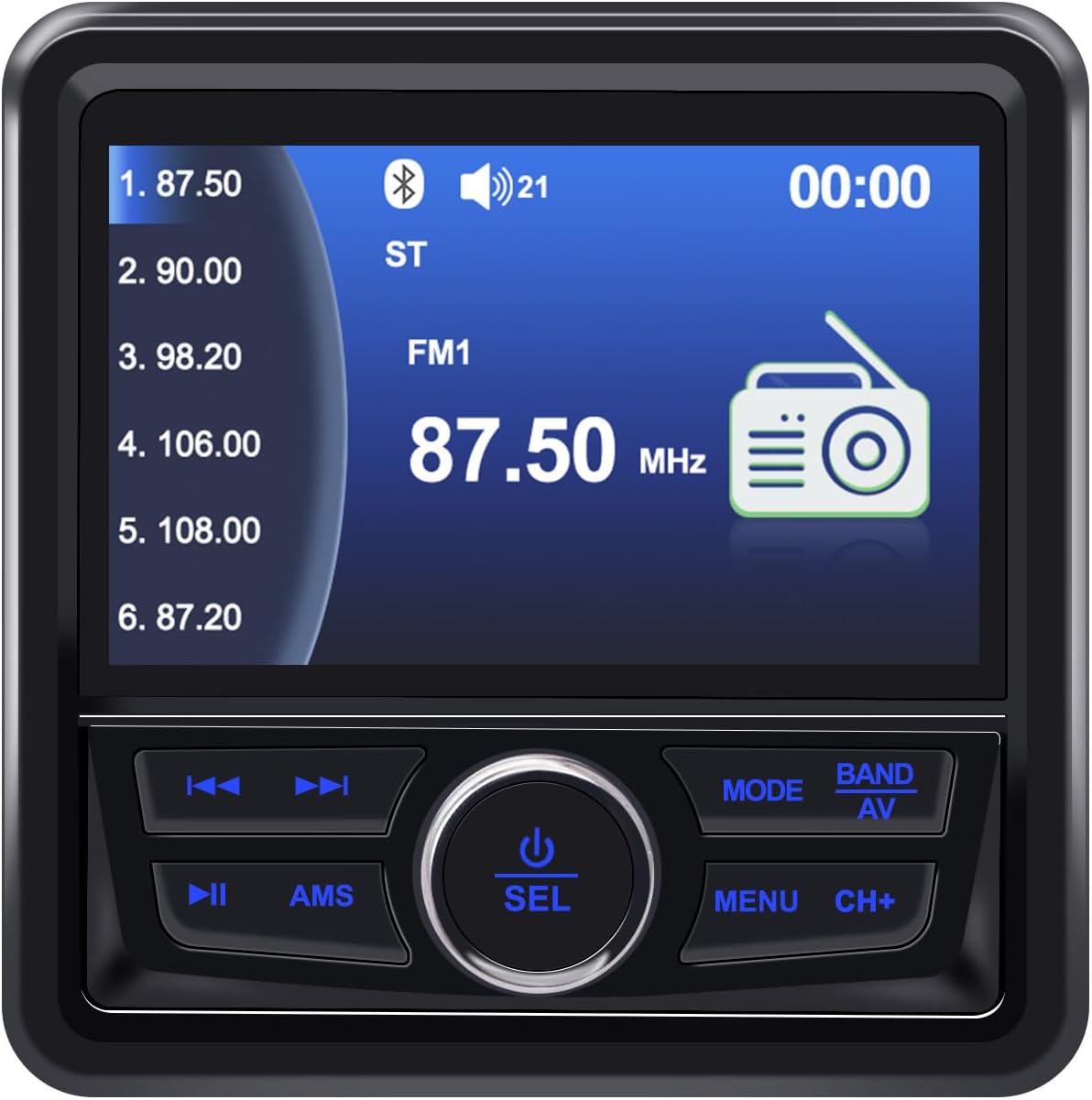
Figure 5: FM Radio Display
ബ്ലൂടൂത്ത് പ്രവർത്തനം:
- അമർത്തുക മോഡ് button to select "BT" (Bluetooth) mode.
- നിങ്ങളുടെ മൊബൈൽ ഉപകരണത്തിൽ, ബ്ലൂടൂത്ത് പ്രവർത്തനക്ഷമമാക്കി ലഭ്യമായ ഉപകരണങ്ങൾക്കായി തിരയുക.
- Select "Geloo Marine Stereo" (or similar name) from the list to pair.
- Once paired, you can play audio from your device through the stereo. Use the CH+, CH-, ഒപ്പം പ്ലേ/താൽക്കാലികമായി നിർത്തുക പ്ലേബാക്ക് നിയന്ത്രിക്കുന്നതിനുള്ള ബട്ടണുകൾ.

Figure 6: Bluetooth Music Playback
USB/MP5 Playback:
- Insert a USB drive containing MP3/MP5 files into the USB port. The unit will automatically switch to USB mode or you can select it using the മോഡ് ബട്ടൺ.
- ഉപയോഗിക്കുക CH+ ഒപ്പം CH- buttons to navigate between tracks or video files.
- അമർത്തുക പ്ലേ/താൽക്കാലികമായി നിർത്തുക പ്ലേബാക്ക് ആരംഭിക്കുന്നതിനോ താൽക്കാലികമായി നിർത്തുന്നതിനോ ഉള്ള ബട്ടൺ.
- The 4.1-inch LCD screen will display video content for MP5 files.

Figure 7: MP5 Video Playback
AUX ഇൻപുട്ട്:
- Connect an external audio device to the AUX input using a 3.5mm audio cable.
- അമർത്തുക മോഡ് "AUX" മോഡ് തിരഞ്ഞെടുക്കാൻ ബട്ടൺ.
- ബന്ധിപ്പിച്ച ബാഹ്യ ഉപകരണത്തിൽ നിന്ന് പ്ലേബാക്ക് നിയന്ത്രിക്കുക.
മെയിൻ്റനൻസ്
- വൃത്തിയാക്കൽ: ഒരു സോഫ്റ്റ് ഉപയോഗിക്കുക, ഡിamp cloth to clean the unit's surface. Do not use abrasive cleaners or solvents.
- സ്ക്രീൻ കെയർ: Wipe the screen gently with a microfiber cloth. Avoid pressing hard on the screen.
- കണക്ഷനുകൾ: Periodically check all wiring connections for corrosion or looseness, especially in marine environments.
- സംഭരണം: If the unit will not be used for an extended period, ensure it is clean and stored in a dry, cool place.
ട്രബിൾഷൂട്ടിംഗ്
| പ്രശ്നം | സാധ്യമായ കാരണം | പരിഹാരം |
|---|---|---|
| ശക്തിയില്ല | തെറ്റായ വയറിംഗ്; ഫ്യൂസ് പൊട്ടി; ബാറ്ററി വോളിയം കുറവാണ്tage. | Check power connections (yellow, red, black wires). Replace fuse if blown. Verify battery voltage. |
| ശബ്ദമില്ല | Volume too low; Mute activated; Speaker wires disconnected; Incorrect input mode. | Increase volume. Deactivate mute. Check speaker connections. Select correct input mode. |
| മോശം റേഡിയോ സ്വീകരണം | ആന്റിന ബന്ധിപ്പിച്ചിട്ടില്ല; ദുർബലമായ സിഗ്നൽ ഏരിയ; കേടായ ആന്റിന. | Ensure antenna is properly connected. Try moving to an area with better signal. Inspect antenna for damage. |
| ബ്ലൂടൂത്ത് കണക്റ്റ് ചെയ്യുന്നില്ല | Bluetooth not enabled on device; Unit not in BT mode; Device too far. | Enable Bluetooth on your device. Switch stereo to BT mode. Ensure device is within range. |
| യുഎസ്ബി പ്ലേ ചെയ്യുന്നില്ല | പിന്തുണയ്ക്കുന്നില്ല file format; USB drive corrupted; USB drive not inserted correctly. | ഉറപ്പാക്കുക files are in supported formats (MP3, MP5, FLAC). Try a different USB drive. Reinsert USB drive. |
| Screen fogging/dust inside | Improper installation; Seal compromised. | Ensure proper sealing during installation. If fogging persists, contact support. |
സ്പെസിഫിക്കേഷനുകൾ
| ഫീച്ചർ | വിശദാംശങ്ങൾ |
|---|---|
| ബ്രാൻഡ് | Geloo |
| മോഡൽ നമ്പർ | ബി-8415എ |
| നിറം | കറുപ്പ് |
| പ്രത്യേക സവിശേഷതകൾ | ARC, FM Tuner |
| കണക്റ്റിവിറ്റി ടെക്നോളജി | Bluetooth (BT), USB |
| ട്യൂണർ ടെക്നോളജി | DAB/DAB+ (Broadcast System) |
| പവർ ഉറവിടം | കോർഡഡ് ഇലക്ട്രിക് |
| പിന്തുണയ്ക്കുന്ന റേഡിയോ ബാൻഡുകൾ | എഎം (522-1620 കിലോ ഹെർട്സ്), എഫ്എം (87.5-108 മെഗാഹെർട്സ്) |
| ഉൾപ്പെടുത്തിയ ഘടകങ്ങൾ | കളിക്കാരൻ |
| അനുയോജ്യമായ ഉപകരണങ്ങൾ | Television (likely refers to video output capability) |
| ഓഡിയോ put ട്ട്പുട്ട് മോഡ് | സ്റ്റീരിയോ |
| സ്ക്രീൻ തരം | എൽസിഡി |
| നിർമ്മാതാവ് | Geloo |
| നിർമ്മാതാവിൻ്റെ ഭാഗം നമ്പർ | ബി-8415 |
അപേക്ഷ എക്സിampകുറവ്:

ചിത്രം 8: ആപ്ലിക്കേഷനുകളുടെ വിശാലമായ ശ്രേണി
വാറൻ്റി വിവരങ്ങൾ
Geloo products are designed for quality and reliability. Specific warranty terms and conditions may vary by region and retailer. Please retain your proof of purchase for warranty claims.
For detailed warranty information, please refer to the warranty card included with your product or contact Geloo customer support.
ഉപഭോക്തൃ പിന്തുണ
If you encounter any issues or have questions regarding your Geloo Marine Stereo Radio Nautica B-8415A that are not covered in this manual, please contact our customer support team.
Contact information can typically be found on the product packaging, the official Geloo webസൈറ്റ്, അല്ലെങ്കിൽ നിങ്ങളുടെ റീട്ടെയിലർ വഴി.
Please have your model number (B-8415A) and purchase details ready when contacting support.
Ask a question about this manual
Ask about setup, troubleshooting, compatibility, parts, safety, or missing instructions. Manuals+ will review the question and use this page’s manual context to help answer it.