
I-SHUNFA WIFI-E27
I-SHUNFA Wi-Fi Smart E27 LED Bulb User Manual
Model: WIFI-E27
1. ഉൽപ്പന്നം കഴിഞ്ഞുview
The I-SHUNFA Wi-Fi Smart E27 LED Bulb offers advanced lighting control for your smart home. Featuring stepless dimming, adjustable color temperature from warm white (2700K) to cool white (6500K), and compatibility with voice assistants like Amazon Alexa, these bulbs provide versatile illumination. Control your lighting remotely via the Smart Life or Tuya Smart app, set schedules, and create custom scenes to enhance your daily life.

ചിത്രം: കഴിഞ്ഞുview of the I-SHUNFA Smart LED Bulbs, showing their design, app control interface on a smartphone, and an icon indicating voice control capability.
പ്രധാന സവിശേഷതകൾ:
- വൈഫൈ കണക്റ്റിവിറ്റി: Connects directly to your 2.4GHz home Wi-Fi network.
- മങ്ങിയത്: 1% മുതൽ 100% വരെ തെളിച്ചം ക്രമീകരിക്കാം.
- ട്യൂണബിൾ വൈറ്റ്: Color temperature adjustable from 2700K (warm white) to 6500K (cool white).
- ശബ്ദ നിയന്ത്രണം: Amazon Alexa, Google Assistant എന്നിവയുമായി പൊരുത്തപ്പെടുന്നു.
- ആപ്പ് നിയന്ത്രണം: Remote control via Smart Life or Tuya Smart app.
- ഷെഡ്യൂളിംഗും ദൃശ്യങ്ങളും: Set timers, schedules, and pre-defined lighting scenes.
2. സജ്ജീകരണ ഗൈഡ്
2.1. ഇൻസ്റ്റലേഷൻ
- ഇൻസ്റ്റാളേഷന് മുമ്പ് ലൈറ്റ് ഫിക്ചറിലേക്കുള്ള പവർ ഓഫ് ചെയ്തിട്ടുണ്ടെന്ന് ഉറപ്പാക്കുക.
- Carefully screw the I-SHUNFA Smart E27 LED Bulb into a standard E27 light socket.
- Turn on the power to the light fixture. The bulb should flash rapidly, indicating it's in pairing mode. If not, turn the bulb off and on 3-5 times until it flashes.
2.2. ആപ്പ് ഡൗൺലോഡ് & ജോടിയാക്കൽ
To control your smart bulb, you need to download the "Smart Life" or "Tuya Smart" app on your smartphone.
- Download the "Smart Life" or "Tuya Smart" app from the App Store (iOS) or Google Play Store (Android).
- നിങ്ങളുടെ അക്കൗണ്ടിലേക്ക് രജിസ്റ്റർ ചെയ്യുക അല്ലെങ്കിൽ ലോഗിൻ ചെയ്യുക.
- Ensure your smartphone is connected to a 2.4GHz Wi-Fi network. The smart bulb only supports 2.4GHz Wi-Fi.
- In the app, tap the "+" icon (usually in the top right corner) to add a device.
- Select "Lighting" or "Light Source (Wi-Fi)" from the device list.
- Confirm that the bulb is flashing rapidly. If it's not, reset it by turning it off and on 3-5 times until it flashes.
- ആവശ്യപ്പെടുമ്പോൾ നിങ്ങളുടെ 2.4GHz വൈഫൈ നെറ്റ്വർക്ക് പാസ്വേഡ് നൽകുക.
- The app will begin pairing with the bulb. Once connected, you can rename the bulb for easier control.

Image: Visual guide to the bulb's features and compatibility, including app logos and Wi-Fi requirements.
3. പ്രവർത്തന നിർദ്ദേശങ്ങൾ
3.1. ആപ്പ് നിയന്ത്രണം
Once paired, you can control your I-SHUNFA Smart LED Bulb using the Smart Life or Tuya Smart app from anywhere with an internet connection.
- ഓൺ/ഓഫ്: ബൾബ് ഓൺ അല്ലെങ്കിൽ ഓഫ് ചെയ്യാൻ അതിന്റെ പേരിന് അടുത്തുള്ള പവർ ഐക്കണിൽ ടാപ്പ് ചെയ്യുക.
- തെളിച്ച ക്രമീകരണം: Slide the brightness bar (1%-100%) to adjust the light intensity.
- വർണ്ണ താപനില ക്രമീകരണം: Slide the color temperature bar to switch between warm white (2700K) and cool white (6500K).
- രംഗങ്ങൾ: Select from pre-defined scenes like "Reading," "Working," "Good Night," or "Relax," or create your own custom scenes.
- ടൈമറും ഷെഡ്യൂളും: Set specific times for the bulb to turn on or off, or to activate certain scenes.

Image: The app interface for adjusting brightness and color temperature, illustrating the range from warm to cool white light.

Image: Setting timers and schedules through the app, allowing automated lighting control for convenience and security.
3.2. ശബ്ദ നിയന്ത്രണം
The I-SHUNFA Smart LED Bulb is compatible with Amazon Alexa and Google Assistant. To enable voice control, link your Smart Life/Tuya Smart account to your voice assistant app (e.g., Alexa app).
- Linking Account: Open your Alexa or Google Home app, navigate to "Skills" or "Works with Google," search for "Smart Life" or "Tuya Smart," and enable the skill. Log in with your app account credentials.
- ഉപകരണങ്ങൾ കണ്ടെത്തുക: After linking, ask your voice assistant to "Discover devices" or manually discover them in the app.
- വോയ്സ് കമാൻഡുകൾ ഉദാampകുറവ്:
- "അലക്സാ, ലിവിംഗ് റൂം ലൈറ്റ് ഓൺ ചെയ്യൂ."
- "ഹേ ഗൂഗിൾ, കിടപ്പുമുറിയിലെ ലൈറ്റ് 50% ആക്കൂ."
- "Alexa, set the kitchen light to warm white."
- "Hey Google, change the office light to cool white."

Image: Demonstrating voice control functionality with Amazon Alexa, allowing hands-free operation of the smart bulbs.
4. പരിപാലനം
The I-SHUNFA Smart E27 LED Bulbs are designed for long-term use with minimal maintenance.
- വൃത്തിയാക്കൽ: Before cleaning, ensure the bulb is off and cool. Wipe the bulb with a soft, dry cloth. Do not use liquid cleaners or abrasive materials.
- സംഭരണം: ബൾബുകൾ സൂക്ഷിക്കുകയാണെങ്കിൽ, നേരിട്ടുള്ള സൂര്യപ്രകാശത്തിൽ നിന്നും കടുത്ത താപനിലയിൽ നിന്നും മാറി തണുത്തതും വരണ്ടതുമായ സ്ഥലത്ത് സൂക്ഷിക്കുക.
- മാറ്റിസ്ഥാപിക്കൽ: These LED bulbs have an average lifespan of 30,000 hours. Replacement is only necessary at the end of their operational life.
5. പ്രശ്നപരിഹാരം
If you encounter issues with your I-SHUNFA Smart E27 LED Bulb, please refer to the following common solutions:
| പ്രശ്നം | സാധ്യമായ കാരണം | പരിഹാരം |
|---|---|---|
| Bulb not pairing/flashing. | Not in pairing mode; power cycle issue. | Turn the bulb off and on 3-5 times until it flashes rapidly. Ensure your Wi-Fi is 2.4GHz. |
| Wi-Fi-ലേക്ക് കണക്റ്റ് ചെയ്യാൻ കഴിയില്ല. | Incorrect Wi-Fi band; weak signal; wrong password. | Ensure your router is broadcasting a 2.4GHz signal. Move the bulb closer to the router. Double-check your Wi-Fi password. |
| ശബ്ദ നിയന്ത്രണം പ്രവർത്തിക്കുന്നില്ല. | Account not linked; device not discovered. | Ensure your Smart Life/Tuya Smart account is correctly linked to Alexa/Google Assistant. Ask your voice assistant to "Discover devices." |
| Bulb unresponsive in app. | Loss of Wi-Fi connection; app glitch. | Check your Wi-Fi connection. Restart the app. Power cycle the bulb. |
| Bulb not dimming or changing color. | Not compatible with external dimmer switches. | These bulbs are controlled via the app or voice assistant. Do not use with traditional dimmer switches. |
6 സ്പെസിഫിക്കേഷനുകൾ
| ഫീച്ചർ | വിശദാംശങ്ങൾ |
|---|---|
| മോഡൽ നമ്പർ | WIFI-E27 |
| അടിസ്ഥാന തരം | E27 |
| വൈദ്യുതി ഉപഭോഗം | 7 വാട്ട്സ് (70W ഇൻകാൻഡസെൻ്റിന് തുല്യം) |
| തിളങ്ങുന്ന ഫ്ലക്സ് | 800 lm |
| വർണ്ണ താപനില | 2700K - 6500K (Warm White to Cool White) |
| ഡിമ്മബിലിറ്റി | 1% - 100% (via app/voice control only) |
| വാല്യംtage | എസി 220-240V |
| വൈഫൈ സ്റ്റാൻഡേർഡ് | 2.4GHz (IEEE 802.11 b/g/n) |
| ജീവിതകാലയളവ് | 30,000 മണിക്കൂർ |
| ബീം ആംഗിൾ | 360 ഡിഗ്രി |
| അളവുകൾ (L x W x H) | 3 x 3 x 8.45 സെ.മീ |
| ഭാരം | 64 ഗ്രാം |
| സർട്ടിഫിക്കേഷൻ | എനർജി എഫിഷ്യൻ്റ് |
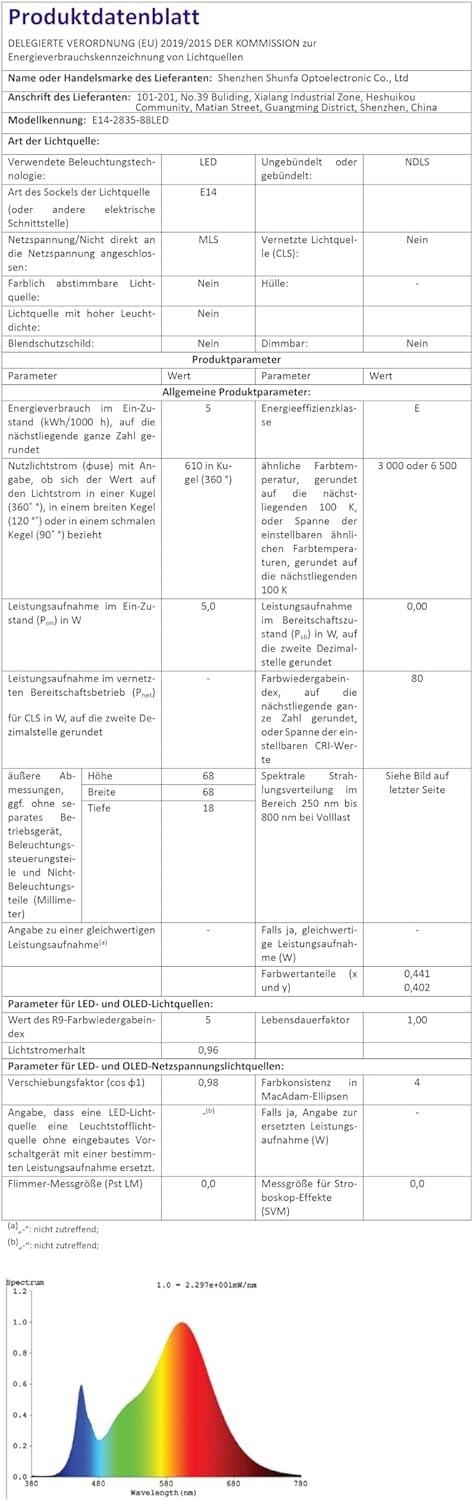
Image: Official product data sheet providing comprehensive technical specifications.
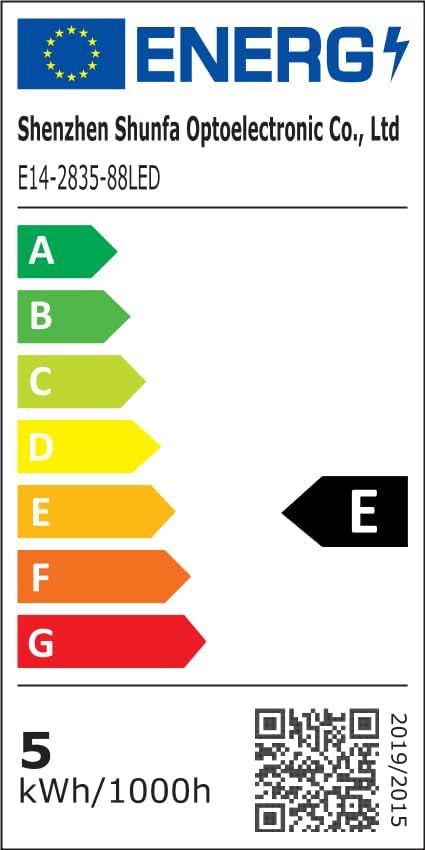
Image: EU Energy Label indicating the bulb's energy efficiency class and consumption. More details can be found via the QR code or by visiting eprel.ec.europa.eu/qr/1250502.
7. വാറൻ്റിയും പിന്തുണയും
I-SHUNFA is committed to providing high-quality products. For any issues or inquiries regarding your smart LED bulbs, please refer to your purchase documentation or contact our customer support.
- വാറൻ്റി: Please refer to your purchase documentation or the retailer's policy for specific warranty details.
- ഉപഭോക്തൃ പിന്തുണ: For technical assistance or product support, please visit the I-SHUNFA brand store on Amazon or contact the seller directly.
- യന്ത്രഭാഗങ്ങൾ: സ്പെയർ പാർട്സുകളുടെ ലഭ്യത സംബന്ധിച്ച വിവരങ്ങൾ നൽകിയിട്ടില്ല.

Image: The official I-SHUNFA brand logo.
Ask a question about this manual
Ask about setup, troubleshooting, compatibility, parts, safety, or missing instructions. Manuals+ will review the question and use this page’s manual context to help answer it.