
awei A897BL
AWEI A897BL Air Conduction Bluetooth Headphones
ഉപയോക്തൃ മാനുവൽ
ആമുഖം
Thank you for choosing the AWEI A897BL Air Conduction Bluetooth Headphones. These headphones are designed to provide a comfortable and safe listening experience, especially during outdoor activities, by allowing you to remain aware of your surroundings. This manual will guide you through the setup, operation, and maintenance of your new headphones.
സുരക്ഷാ വിവരങ്ങൾ
- ഹെഡ്ഫോണുകൾ തീവ്രമായ താപനില, ഈർപ്പം, അല്ലെങ്കിൽ നശിപ്പിക്കുന്ന വസ്തുക്കൾ എന്നിവയ്ക്ക് വിധേയമാക്കരുത്.
- ഹെഡ്ഫോണുകൾ താഴെയിടുകയോ ശക്തമായ ആഘാതങ്ങൾക്ക് വിധേയമാക്കുകയോ ചെയ്യുന്നത് ഒഴിവാക്കുക.
- ഹെഡ്ഫോണുകൾ വേർപെടുത്തുകയോ പരിഷ്ക്കരിക്കുകയോ ചെയ്യരുത്. ഇത് വാറന്റി അസാധുവാക്കും.
- മൃദുവായതും ഉണങ്ങിയതുമായ തുണി ഉപയോഗിച്ച് ഹെഡ്ഫോണുകൾ വൃത്തിയാക്കുക. കഠിനമായ രാസവസ്തുക്കളോ ഉരച്ചിലുകളോ ഉള്ള വസ്തുക്കൾ ഉപയോഗിക്കരുത്.
- കുട്ടികൾക്കും വളർത്തുമൃഗങ്ങൾക്കും ലഭ്യമാകാതെ സൂക്ഷിക്കുക.
- നൽകിയിരിക്കുന്ന ചാർജിംഗ് കേബിളോ സാക്ഷ്യപ്പെടുത്തിയ തത്തുല്യമായതോ മാത്രം ഉപയോഗിക്കുക.
- While air conduction allows for environmental awareness, always exercise caution in traffic or dangerous situations.
പാക്കേജ് ഉള്ളടക്കം
പാക്കേജിൽ ഇനിപ്പറയുന്ന ഇനങ്ങൾ ഉണ്ടോ എന്ന് പരിശോധിക്കുക:
- AWEI A897BL Air Conduction Bluetooth Headphones
- യുഎസ്ബി ചാർജിംഗ് കേബിൾ
- ഉപയോക്തൃ മാനുവൽ (ഈ പ്രമാണം)
ഉൽപ്പന്നം കഴിഞ്ഞുview
Familiarize yourself with the components of your AWEI A897BL headphones.

ചിത്രം: മുൻഭാഗം view of the AWEI A897BL Air Conduction Bluetooth Headphones, showcasing their lightweight, open-ear design with a flexible neckband and integrated controls on the earpieces.
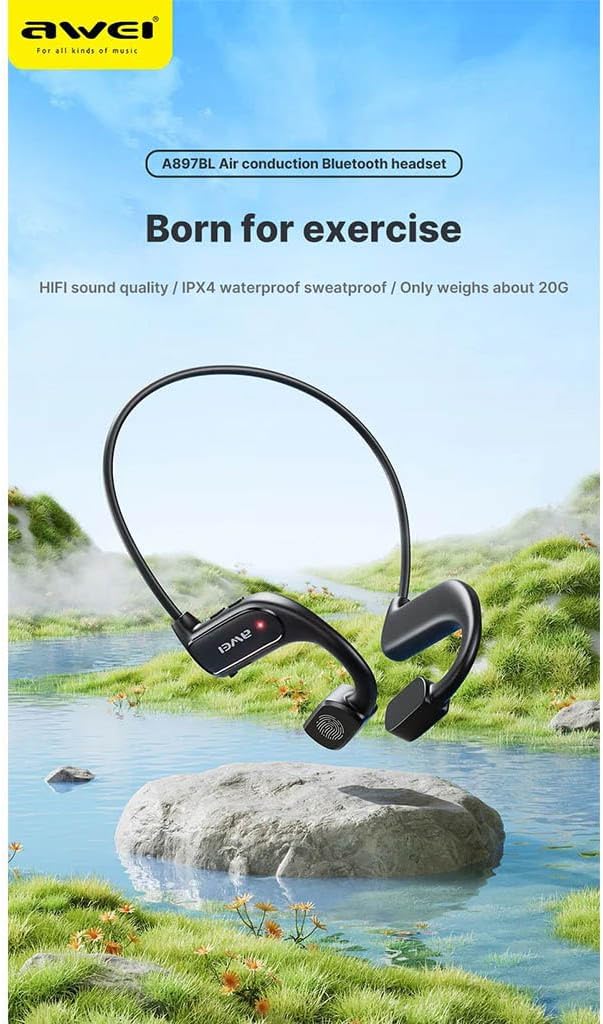
Image: AWEI A897BL headphones displayed in a serene outdoor environment, emphasizing their suitability for exercise and outdoor activities. The image highlights the sleek design and the brand logo.
- Flexible Neckband: Provides a secure and comfortable fit around the back of the head.
- Air Conduction Transducers: Deliver sound without blocking the ear canal.
- നിയന്ത്രണ ബട്ടണുകൾ: (നിർദ്ദിഷ്ട ബട്ടൺ പ്രവർത്തനങ്ങൾ ഓപ്പറേറ്റിംഗ് വിഭാഗത്തിൽ വിശദമായി വിവരിക്കും)
- ചാർജിംഗ് പോർട്ട്: ആന്തരിക ബാറ്ററി റീചാർജ് ചെയ്യുന്നതിന്.
സജ്ജമാക്കുക
1. ഹെഡ്ഫോണുകൾ ചാർജ് ചെയ്യുന്നു
Before first use, fully charge your AWEI A897BL headphones.
- യുഎസ്ബി ചാർജിംഗ് കേബിളിന്റെ ചെറിയ അറ്റം ഹെഡ്ഫോണുകളിലെ ചാർജിംഗ് പോർട്ടുമായി ബന്ധിപ്പിക്കുക.
- USB ചാർജിംഗ് കേബിളിന്റെ വലിയ അറ്റം ഒരു USB പവർ അഡാപ്റ്ററുമായി (ഉൾപ്പെടുത്തിയിട്ടില്ല) അല്ലെങ്കിൽ ഒരു കമ്പ്യൂട്ടറിന്റെ USB പോർട്ടുമായി ബന്ധിപ്പിക്കുക.
- LED ഇൻഡിക്കേറ്റർ ചാർജിംഗ് സ്റ്റാറ്റസ് കാണിക്കും (ഉദാ: ചാർജ് ചെയ്യുന്നതിന് ചുവപ്പ്, പൂർണ്ണമായി ചാർജ് ചെയ്തതിന് നീല/ഓഫ്).
- പൂർണ്ണമായി ചാർജ് ചെയ്യാൻ സാധാരണയായി ഏകദേശം 1.5-2 മണിക്കൂർ എടുക്കും.
2. ബ്ലൂടൂത്ത് ജോടിയാക്കൽ
നിങ്ങളുടെ ബ്ലൂടൂത്ത് പ്രാപ്തമാക്കിയ ഉപകരണവുമായി (സ്മാർട്ട്ഫോൺ, ടാബ്ലെറ്റ്, കമ്പ്യൂട്ടർ) ഹെഡ്ഫോണുകൾ ജോടിയാക്കുക.
- ഹെഡ്ഫോണുകൾ ഓഫാണെന്ന് ഉറപ്പാക്കുക.
- Press and hold the Power button (usually a multi-function button) for approximately 3-5 seconds until the LED indicator flashes red and blue alternately, indicating pairing mode.
- നിങ്ങളുടെ ഉപകരണത്തിൽ, Bluetooth ക്രമീകരണങ്ങളിലേക്ക് പോയി Bluetooth ഓണാക്കുക.
- ഇതിനായി തിരയുക available devices. You should see "AWEI A897BL" or a similar name appear in the list.
- Select "AWEI A897BL" to connect. Once connected, the LED indicator on the headphones will typically turn solid blue or stop flashing.
- പാസ്വേഡ് ആവശ്യപ്പെടുകയാണെങ്കിൽ, "0000" (നാല് പൂജ്യങ്ങൾ) നൽകുക.
The headphones will automatically attempt to reconnect to the last paired device when turned on.

Image: A graphic representation of Bluetooth version 5.3 technology, highlighting its advanced capabilities for stable, low-power, and high-quality wireless audio transmission, ensuring an unimpeded listening experience.
പ്രവർത്തന നിർദ്ദേശങ്ങൾ
ഹെഡ്ഫോണുകൾ ധരിക്കുന്നു
The A897BL headphones are designed for air conduction, meaning they rest outside your ear canal.
- Place the flexible neckband around the back of your head.
- Position the sound transducers (the parts that deliver sound) just in front of your ears, resting on your cheekbones.
- Adjust for a comfortable and secure fit.

Image: A woman wearing the AWEI A897BL headphones while running outdoors, illustrating the open-ear design that allows ambient sounds to be heard, enhancing safety during sports activities.
അടിസ്ഥാന നിയന്ത്രണങ്ങൾ
| ബട്ടൺ/ആക്ഷൻ | ഫംഗ്ഷൻ |
|---|---|
| പവർ ബട്ടൺ (നീണ്ട അമർത്തുക) | പവർ ഓൺ/ഓഫ് |
| പവർ ബട്ടൺ (ഹ്രസ്വ പ്രസ്സ്) | സംഗീതം പ്ലേ ചെയ്യുക/താൽക്കാലികമായി നിർത്തുക, കോൾ സ്വീകരിക്കുക/അവസാനിപ്പിക്കുക |
| വോളിയം + ബട്ടൺ (ഹ്രസ്വ പ്രസ്സ്) | വോളിയം കൂട്ടുക |
| വോളിയം - ബട്ടൺ (ഹ്രസ്വ പ്രസ്സ്) | വോളിയം കുറയ്ക്കുക |
| Volume + Button (Long Press) | അടുത്ത ട്രാക്ക് |
| Volume - Button (Long Press) | മുമ്പത്തെ ട്രാക്ക് |
| Power Button (Double Press) | വോയ്സ് അസിസ്റ്റന്റ് (സിരി, ഗൂഗിൾ അസിസ്റ്റന്റ്) സജീവമാക്കുക |
മെയിൻ്റനൻസ്
- വൃത്തിയാക്കൽ: Wipe the headphones regularly with a soft, slightly damp cloth. Do not use alcohol, benzene, or other chemical cleaners. Ensure the charging port is dry before charging.
- സംഭരണം: നേരിട്ടുള്ള സൂര്യപ്രകാശത്തിൽ നിന്നും കടുത്ത താപനിലയിൽ നിന്നും മാറി തണുത്തതും വരണ്ടതുമായ സ്ഥലത്ത് ഹെഡ്ഫോണുകൾ സൂക്ഷിക്കുക.
- ബാറ്ററി കെയർ: ബാറ്ററി ലൈഫ് വർദ്ധിപ്പിക്കാൻ, ഹെഡ്ഫോണുകൾ ഇടയ്ക്കിടെ പൂർണ്ണമായും ചാർജ് ചെയ്യുന്നത് ഒഴിവാക്കുക. ദീർഘനേരം ഉപയോഗിച്ചിട്ടില്ലെങ്കിൽ പോലും അവ പതിവായി ചാർജ് ചെയ്യുക.
ട്രബിൾഷൂട്ടിംഗ്
| പ്രശ്നം | സാധ്യമായ പരിഹാരം |
|---|---|
| ഹെഡ്ഫോണുകൾ ഓണാകില്ല. | Charge the headphones fully. Ensure the power button is pressed and held long enough. |
| ഉപകരണവുമായി ജോടിയാക്കാൻ കഴിയില്ല. |
|
| ശബ്ദമില്ല അല്ലെങ്കിൽ കുറഞ്ഞ ശബ്ദമില്ല. |
|
| Sound cutting in/out. |
|
സ്പെസിഫിക്കേഷനുകൾ
| ഫീച്ചർ | വിശദാംശങ്ങൾ |
|---|---|
| മോഡൽ നമ്പർ | AWE000159 (A897BL) |
| കണക്റ്റിവിറ്റി ടെക്നോളജി | വയർലെസ് (ബ്ലൂടൂത്ത്) |
| ബ്ലൂടൂത്ത് പതിപ്പ് | V5.3 |
| ഡിസൈൻ തരം | Air Conduction, Open-Ear |
| മെറ്റീരിയൽ | ഫോക്സ് ലെതർ, പ്ലാസ്റ്റിക് |
| ഇനത്തിൻ്റെ ഭാരം | Approx. 20 Grams |
| നിറം | Multicoloured (typically black) |
| പ്രായപരിധി | മുതിർന്നവർ |
വാറൻ്റിയും പിന്തുണയും
AWEI products are manufactured to the highest quality standards. For warranty information, technical support, or customer service inquiries, please refer to the warranty card included with your purchase or visit the official AWEI webസൈറ്റ്. വാറന്റി ക്ലെയിമുകൾക്കായി നിങ്ങളുടെ വാങ്ങലിന്റെ തെളിവ് സൂക്ഷിക്കുക.
Ask a question about this manual
Ask about setup, troubleshooting, compatibility, parts, safety, or missing instructions. Manuals+ will review the question and use this page’s manual context to help answer it.