
ആമുഖം
Welcome to the iRobot Roomba i1 (1152) Robot Vacuum user manual. This guide provides essential information for setting up, operating, maintaining, and troubleshooting your robot vacuum. The Roomba i1 is designed to efficiently clean hard floors and carpets, utilizing Wi-Fi connected mapping technology to navigate your home.
പ്രധാനപ്പെട്ട സുരക്ഷാ വിവരങ്ങൾ
Before using your Roomba i1 robot vacuum, please read all safety instructions carefully. Failure to follow these instructions may result in electric shock, fire, or serious injury.
- 8 വയസ്സും അതിനുമുകളിലും പ്രായമുള്ള കുട്ടികൾക്കും ശാരീരികമോ ഇന്ദ്രിയപരമോ മാനസികമോ ആയ കഴിവുകൾ കുറഞ്ഞവർക്കും അനുഭവപരിചയവും അറിവും ഇല്ലാത്തവർക്കും സുരക്ഷിതമായ രീതിയിൽ ഉപകരണം ഉപയോഗിക്കുന്നതുമായി ബന്ധപ്പെട്ട മേൽനോട്ടമോ നിർദ്ദേശമോ നൽകുകയും അപകടസാധ്യതകൾ മനസ്സിലാക്കുകയും ചെയ്തിട്ടുണ്ടെങ്കിൽ ഈ ഉപകരണം ഉപയോഗിക്കാൻ കഴിയും. .
- Children should not play with the appliance. Cleaning and user maintenance shall not be made by children without supervision.
- ഈ മാനുവലിൽ വിവരിച്ചിരിക്കുന്നതുപോലെ മാത്രം ഉപയോഗിക്കുക.
- പുറത്തോ നനഞ്ഞ പ്രതലങ്ങളിലോ ഉപയോഗിക്കരുത്.
- കളിപ്പാട്ടമായി ഉപയോഗിക്കാൻ അനുവദിക്കരുത്. കുട്ടികൾ അല്ലെങ്കിൽ അടുത്ത് ഉപയോഗിക്കുമ്പോൾ വളരെ ശ്രദ്ധ ആവശ്യമാണ്.
- കേടായ ചരടോ പ്ലഗോ ഉപയോഗിച്ച് ഉപയോഗിക്കരുത്. ഉപകരണം ശരിയായി പ്രവർത്തിക്കുന്നില്ലെങ്കിൽ, അത് താഴെ വീണിട്ടുണ്ടെങ്കിൽ, കേടുപാടുകൾ സംഭവിച്ചിട്ടുണ്ടെങ്കിൽ, പുറത്ത് വച്ചിട്ടുണ്ടെങ്കിൽ, അല്ലെങ്കിൽ വെള്ളത്തിൽ വീണിട്ടുണ്ടെങ്കിൽ, അത് ഒരു സർവീസ് സെന്ററിലേക്ക് തിരികെ നൽകുക.
- ചരട് ഉപയോഗിച്ച് വലിക്കുകയോ കൊണ്ടുപോകുകയോ ചെയ്യരുത്, ചരട് ഒരു ഹാൻഡിലായി ഉപയോഗിക്കുക, ചരടിൽ ഒരു വാതിൽ അടയ്ക്കുക, അല്ലെങ്കിൽ മൂർച്ചയുള്ള അരികുകളിലോ മൂലകളിലോ ചരട് വലിക്കുക. ചരടിന് മുകളിലൂടെ ഉപകരണം പ്രവർത്തിപ്പിക്കരുത്. ചൂടായ പ്രതലങ്ങളിൽ നിന്ന് ചരട് സൂക്ഷിക്കുക.
- ചരട് വലിച്ചുകൊണ്ട് അൺപ്ലഗ് ചെയ്യരുത്. അൺപ്ലഗ് ചെയ്യാൻ, പ്ലഗ് പിടിക്കുക, ചരടല്ല.
- നനഞ്ഞ കൈകളാൽ പ്ലഗ്ഗോ ഉപകരണമോ കൈകാര്യം ചെയ്യരുത്.
- ഒരു വസ്തുവും തുറസ്സുകളിൽ ഇടരുത്. ഒരു ഓപ്പണിംഗും തടഞ്ഞിരിക്കുമ്പോൾ ഉപയോഗിക്കരുത്; പൊടി, ലിൻ്റ്, മുടി, വായുപ്രവാഹം കുറയ്ക്കുന്ന എന്തും എന്നിവ ഒഴിവാക്കുക.
- മുടി, അയഞ്ഞ വസ്ത്രങ്ങൾ, വിരലുകൾ, ശരീരത്തിൻ്റെ എല്ലാ ഭാഗങ്ങളും തുറസ്സുകളിൽ നിന്നും ചലിക്കുന്ന ഭാഗങ്ങളിൽ നിന്നും അകറ്റി നിർത്തുക.
- കത്തുന്നതോ പുകവലിക്കുന്നതോ ആയ സിഗരറ്റ്, തീപ്പെട്ടി, ചൂടുള്ള ചാരം എന്നിവയൊന്നും എടുക്കരുത്.
- ഗ്യാസോലിൻ പോലുള്ള കത്തുന്നതോ കത്തുന്നതോ ആയ ദ്രാവകങ്ങൾ എടുക്കാനോ അവ ഉള്ള സ്ഥലങ്ങളിൽ ഉപയോഗിക്കാനോ ഉപയോഗിക്കരുത്.
- ഡസ്റ്റ് ബാഗ് കൂടാതെ/അല്ലെങ്കിൽ ഫിൽട്ടറുകൾ ഇല്ലാതെ ഉപയോഗിക്കരുത്.
- ബോധപൂർവമല്ലാത്ത തുടക്കം തടയുക. ബാറ്ററി പാക്കിലേക്ക് കണക്റ്റ് ചെയ്യുന്നതിനും ഉപകരണം എടുക്കുന്നതിനും കൊണ്ടുപോകുന്നതിനും മുമ്പ് സ്വിച്ച് ഓഫ് പൊസിഷനിൽ ആണെന്ന് ഉറപ്പാക്കുക.
- നിർമ്മാതാവ് വ്യക്തമാക്കിയ ചാർജർ ഉപയോഗിച്ച് മാത്രം റീചാർജ് ചെയ്യുക. ഒരു തരം ബാറ്ററി പായ്ക്കിന് അനുയോജ്യമായ ഒരു ചാർജർ മറ്റൊരു ബാറ്ററി പാക്കിനൊപ്പം ഉപയോഗിക്കുമ്പോൾ തീപിടിത്തം ഉണ്ടാക്കിയേക്കാം.
- പ്രത്യേകമായി നിയുക്ത ബാറ്ററി പായ്ക്കുകൾ ഉപയോഗിച്ച് മാത്രം വീട്ടുപകരണങ്ങൾ ഉപയോഗിക്കുക. മറ്റേതെങ്കിലും ബാറ്ററി പായ്ക്കുകളുടെ ഉപയോഗം പരിക്കിനും തീപിടുത്തത്തിനും സാധ്യത സൃഷ്ടിച്ചേക്കാം.
- ബാറ്ററി പായ്ക്ക് ഉപയോഗത്തിലല്ലെങ്കിൽ, പേപ്പർ ക്ലിപ്പുകൾ, നാണയങ്ങൾ, കീകൾ, നഖങ്ങൾ, സ്ക്രൂകൾ അല്ലെങ്കിൽ മറ്റ് ചെറിയ ലോഹ വസ്തുക്കൾ എന്നിവ പോലെയുള്ള മറ്റ് ലോഹ വസ്തുക്കളിൽ നിന്ന് ഒരു ടെർമിനലിൽ നിന്ന് മറ്റൊന്നിലേക്ക് കണക്ഷൻ ഉണ്ടാക്കാൻ കഴിയും. ബാറ്ററി ടെർമിനലുകൾ ഒരുമിച്ച് ഷോർട്ട് ചെയ്യുന്നത് പൊള്ളലോ തീയോ ഉണ്ടാക്കിയേക്കാം.
- ദുരുപയോഗ സാഹചര്യങ്ങളിൽ, ബാറ്ററിയിൽ നിന്ന് ദ്രാവകം പുറന്തള്ളപ്പെട്ടേക്കാം; സമ്പർക്കം ഒഴിവാക്കുക. അബദ്ധത്തിൽ സമ്പർക്കം ഉണ്ടായാൽ, വെള്ളത്തിൽ കഴുകുക. ദ്രാവകം കണ്ണുകളുമായി സമ്പർക്കം പുലർത്തുകയാണെങ്കിൽ, അധികമായി വൈദ്യസഹായം തേടുക. ബാറ്ററിയിൽ നിന്ന് പുറന്തള്ളുന്ന ദ്രാവകം പ്രകോപിപ്പിക്കലോ പൊള്ളലോ ഉണ്ടാക്കാം.
- കേടായതോ പരിഷ്കരിച്ചതോ ആയ ബാറ്ററി പായ്ക്കോ ഉപകരണമോ ഉപയോഗിക്കരുത്. കേടായതോ പരിഷ്കരിച്ചതോ ആയ ബാറ്ററികൾ പ്രവചനാതീതമായ സ്വഭാവം പ്രകടമാക്കിയേക്കാം, അതിൻ്റെ ഫലമായി തീ, സ്ഫോടനം അല്ലെങ്കിൽ പരിക്കിൻ്റെ സാധ്യത.
- ഒരു ബാറ്ററി പായ്ക്കോ ഉപകരണമോ തീയിലേക്കോ അമിത താപനിലയിലേക്കോ തുറക്കരുത്. 130 ° C (265 ° F) ന് മുകളിലുള്ള തീയിലോ താപനിലയിലോ ഉള്ള എക്സ്പോഷർ സ്ഫോടനത്തിന് കാരണമായേക്കാം.
- എല്ലാ ചാർജിംഗ് നിർദ്ദേശങ്ങളും പാലിക്കുക, നിർദ്ദേശങ്ങളിൽ വ്യക്തമാക്കിയിട്ടുള്ള താപനില പരിധിക്ക് പുറത്ത് ബാറ്ററി പായ്ക്കോ ഉപകരണമോ ചാർജ് ചെയ്യരുത്. അനുചിതമായി അല്ലെങ്കിൽ നിർദ്ദിഷ്ട പരിധിക്ക് പുറത്തുള്ള താപനിലയിൽ ചാർജ് ചെയ്യുന്നത് ബാറ്ററിയെ നശിപ്പിക്കുകയും തീപിടുത്തത്തിനുള്ള സാധ്യത വർദ്ധിപ്പിക്കുകയും ചെയ്യും.
- സമാനമായ മാറ്റിസ്ഥാപിക്കാനുള്ള ഭാഗങ്ങൾ മാത്രം ഉപയോഗിച്ച് യോഗ്യതയുള്ള ഒരു റിപ്പയർ വ്യക്തിയെക്കൊണ്ട് സർവീസ് നടത്തുക. ഇത് ഉൽപ്പന്നത്തിൻ്റെ സുരക്ഷിതത്വം ഉറപ്പാക്കും.
- ഉപയോഗത്തിനും പരിചരണത്തിനുമുള്ള നിർദ്ദേശങ്ങളിൽ സൂചിപ്പിച്ചിരിക്കുന്നതല്ലാതെ ഉപകരണമോ ബാറ്ററി പായ്ക്കോ (ബാധകമായത്) പരിഷ്കരിക്കുകയോ നന്നാക്കാൻ ശ്രമിക്കുകയോ ചെയ്യരുത്.
പാക്കേജ് ഉള്ളടക്കം
Verify that all original components are included in your package:
- iRobot Roomba i1 റോബോട്ട് വാക്വം ക്ലീനർ
- ഹോം ബേസ് ചാർജിംഗ് സ്റ്റേഷൻ
- ലൈൻ കോർഡ്
- 1 Lithium Ion Battery (pre-installed)
- സൈഡ് ബ്രഷ്
- Filter (Cloth Type)
- Dual Multi-Surface Rubber Brushes
സജ്ജമാക്കുക
Follow these steps to set up your Roomba i1 robot vacuum for first use:
- ഹോം ബേസിനായി ഒരു സ്ഥലം തിരഞ്ഞെടുക്കുക: Place the Home Base charging station against a wall in an open, uncluttered area. Ensure there is at least 1.5 feet (0.5 meters) of clear space on each side of the Home Base and 4 feet (1.2 meters) in front of it.
- പവർ കോർഡ് ബന്ധിപ്പിക്കുക: Plug the line cord into the Home Base and then into a wall outlet. Ensure the Home Base is powered on.
- റോബോട്ടിനെ ചാർജ് ചെയ്യുക: Place your Roomba i1 onto the Home Base. The robot will emit a tone to confirm it is properly docked and charging. Allow the robot to charge for at least 3 hours before its first cleaning mission. The light ring around the CLEAN button will pulse white while charging and turn solid white when fully charged.
- iRobot ഹോം ആപ്പ് ഡൗൺലോഡ് ചെയ്യുക: For full functionality, download the iRobot Home App on your smartphone or tablet. The app will guide you through connecting your robot to your Wi-Fi network and setting up cleaning schedules.
- വൈഫൈയിലേക്ക് കണക്റ്റുചെയ്യുക: Follow the in-app instructions to connect your Roomba i1 to your home Wi-Fi network. This enables smart features like mapping, scheduling, and integration with voice assistants.

Operating Your Roomba i1
Your Roomba i1 is designed for intelligent and efficient cleaning. Here's how to operate it:
ഒരു ക്ലീനിംഗ് ജോലി ആരംഭിക്കുന്നു
- CLEAN ബട്ടൺ ഉപയോഗിച്ച്: Press the large CLEAN button on top of the robot once to wake it up, then press it again to start a cleaning cycle.
- iRobot ഹോം ആപ്പ് ഉപയോഗിക്കുന്നത്: Open the app and tap the "CLEAN" button to start a cleaning job from anywhere. You can also schedule cleaning times and customize cleaning preferences through the app.
- ശബ്ദ നിയന്ത്രണം: The Roomba i1 is compatible with Google Home. Once connected via the iRobot Home App, you can use voice commands like "Hey Google, ask Roomba to start cleaning."
ക്ലീനിംഗ് സവിശേഷതകൾ
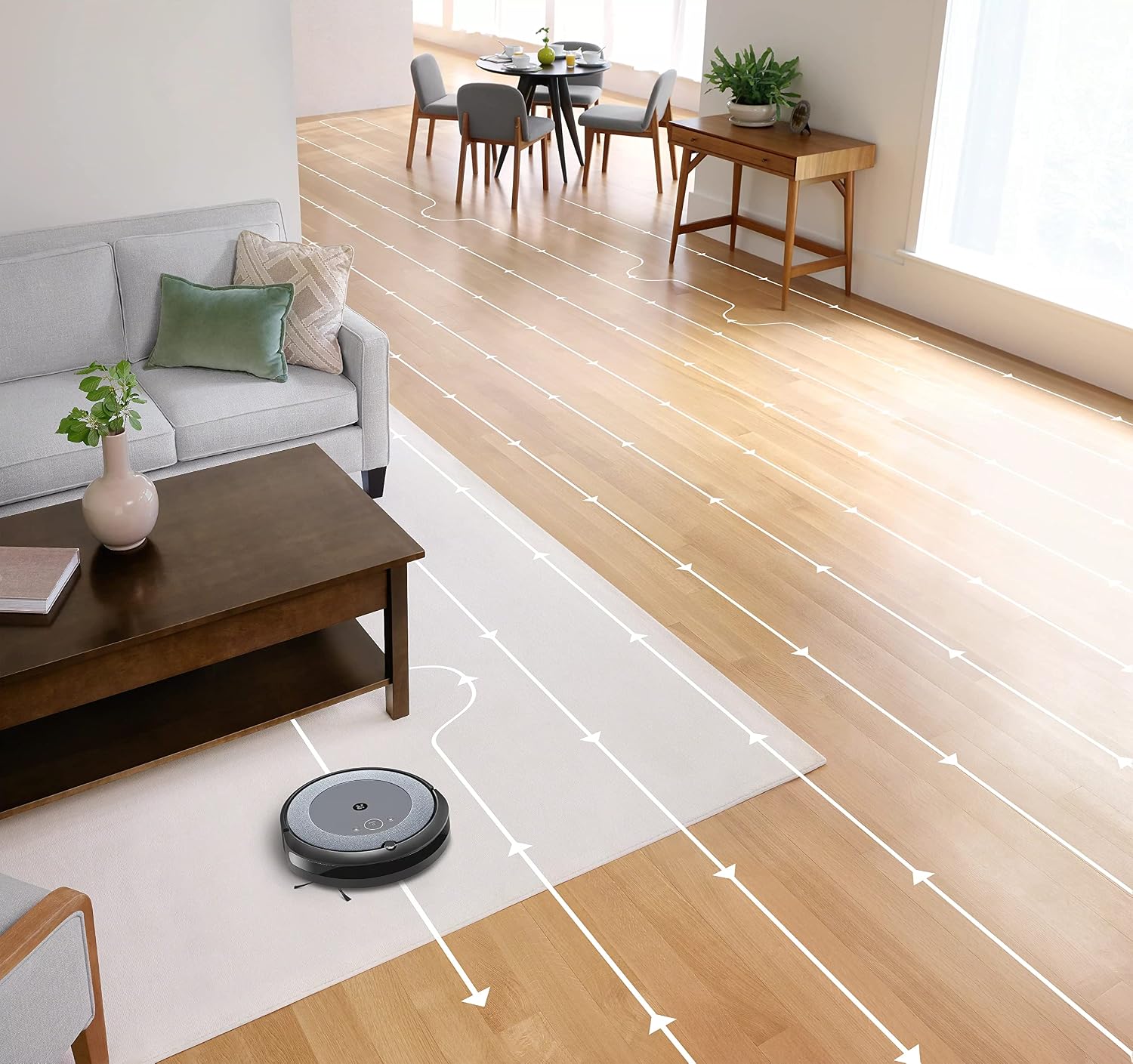
- ഇന്റലിജന്റ് നാവിഗേഷൻ: The robot cleans in neat, efficient rows, adapting to different floor types including carpets and hard floors.
- ഡ്യുവൽ മൾട്ടി-സർഫേസ് റബ്ബർ ബ്രഷുകൾ: These brushes are designed to prevent tangles with pet hair and effectively pick up dirt and debris from various surfaces.
- ഡേർട്ട് ഡിറ്റക്റ്റ്™ സാങ്കേതികവിദ്യ: The robot uses acoustic and optical sensors to find dirtier areas and spends more time cleaning them.
- Automatic Dirt Disposal (with compatible Clean Base): If you have a compatible Clean Base (sold separately), the robot will automatically empty its dustbin into an enclosed bag, allowing for weeks of hands-free cleaning.


മെയിൻ്റനൻസ്
Regular maintenance ensures your Roomba i1 operates at peak performance. Always turn off the robot and disconnect it from the Home Base before performing any maintenance.
ഡസ്റ്റ് ബിൻ ശൂന്യമാക്കുന്നു
- ബിൻ റിലീസ് ബട്ടൺ അമർത്തി ബിൻ പുറത്തെടുക്കുക.
- ബിൻ വാതിൽ തുറന്ന് അവശിഷ്ടങ്ങൾ ഒരു ചവറ്റുകുട്ടയിലേക്ക് ഒഴിക്കുക.
- കുടുങ്ങിക്കിടക്കുന്ന അവശിഷ്ടങ്ങൾ നീക്കം ചെയ്യാൻ ബിൻ ചവറ്റുകുട്ടയുടെ നേരെ അമർത്തുക.
Cleaning the Filter (Cloth Type)
- ഡസ്റ്റ് ബിന്നിൽ നിന്ന് ഫിൽട്ടർ നീക്കം ചെയ്യുക.
- അവശിഷ്ടങ്ങൾ നീക്കം ചെയ്യാൻ ഫിൽട്ടർ ഒരു ചവറ്റുകുട്ടയിൽ അമർത്തുക. ഫിൽട്ടർ കഴുകരുത്.
- Replace the filter every 2 months, or more frequently if you have pets.
ബ്രഷുകൾ വൃത്തിയാക്കുന്നു
- Pinch the yellow brush release tabs to lift the brush frame.
- Remove the brushes and remove any hair or debris wrapped around them or trapped beneath the yellow caps.
- ബ്രഷുകൾ വീണ്ടും ഇൻസ്റ്റാൾ ചെയ്യുക, അവ സ്ഥലത്ത് ക്ലിക്ക് ചെയ്യുന്നുണ്ടെന്ന് ഉറപ്പാക്കുക.
സൈഡ് ബ്രഷ് വൃത്തിയാക്കൽ
- Use a coin or small screwdriver to remove the screw holding the side brush.
- Remove the side brush and clean any hair or debris from the brush and its post.
- സൈഡ് ബ്രഷ് വീണ്ടും ഇൻസ്റ്റാൾ ചെയ്ത് സ്ക്രൂ ശക്തമാക്കുക.
സെൻസറുകൾ വൃത്തിയാക്കുകയും കോൺടാക്റ്റുകൾ ചാർജ് ചെയ്യുകയും ചെയ്യുന്നു
- റോബോട്ടിലെയും ഹോം ബേസിലെയും ചാർജിംഗ് കോൺടാക്റ്റുകൾ വൃത്തിയുള്ളതും ഉണങ്ങിയതുമായ തുണി ഉപയോഗിച്ച് തുടയ്ക്കുക.
- Wipe the cliff sensors (located on the bottom of the robot) and the front bumper sensor window with a clean, dry cloth.
ട്രബിൾഷൂട്ടിംഗ്
If your Roomba i1 encounters an issue, the robot will play an audible alert and the light ring around the CLEAN button will flash. Consult the iRobot Home App for specific error messages and solutions.
പൊതുവായ പ്രശ്നങ്ങളും പരിഹാരങ്ങളും:
- റോബോട്ട് ചാർജ് ചെയ്യുന്നില്ല: Ensure the Home Base is plugged in and the robot is properly docked. Clean the charging contacts on both the robot and Home Base.
- റോബോട്ട് കുടുങ്ങിയോ കുടുങ്ങിയോ: Clear obstacles from the robot's path. If it frequently gets stuck in the same area, consider using Virtual Wall Barriers (sold separately) or adjusting furniture.
- മോശം ക്ലീനിംഗ് പ്രകടനം: Empty the dust bin, clean or replace the filter, and clean the main brushes and side brush. Ensure the robot's sensors are clean.
- റോബോട്ട് വൈഫൈയിലേക്ക് കണക്റ്റ് ചെയ്യുന്നില്ല: Ensure your Wi-Fi router is on and within range. Restart your router and the robot. Follow the Wi-Fi setup instructions in the iRobot Home App again.
- അസാധാരണമായ ശബ്ദമുണ്ടാക്കുന്ന റോബോട്ട്: Check the brushes and wheels for any trapped debris or hair. Clean them thoroughly.
For more detailed troubleshooting, refer to the iRobot Home App or the iRobot support webസൈറ്റ്.
സ്പെസിഫിക്കേഷനുകൾ
| ബ്രാൻഡ് | iRobot |
| മോഡലിൻ്റെ പേര് | Roomba i1 (1152) |
| പ്രത്യേക ഫീച്ചർ | Smart, Wi-Fi Connected Mapping |
| നിറം | കറുപ്പ്/ചാരനിറം |
| ഉൾപ്പെടുത്തിയ ഘടകങ്ങൾ | Robot Vacuum, Home Base, Line Cord, Battery, Side Brush, Filter, Dual Multi-Surface Rubber Brushes |
| ഫിൽട്ടർ തരം | തുണി |
| പവർ ഉറവിടം | ബാറ്ററി പവർ |
| ബാറ്ററികൾ | 1 ലിഥിയം അയോൺ ബാറ്ററി (ഉൾപ്പെടുത്തിയിരിക്കുന്നു) |
| നിയന്ത്രണ രീതി | ആപ്പ് |
| അനുയോജ്യമായ ഉപകരണങ്ങൾ | ഗൂഗിൾ ഹോം |
| ഫോം ഫാക്ടർ | റോബോട്ടിക് |
| ഉൽപ്പന്ന അളവുകൾ | 13.5 x 3.6 x 13.4 ഇഞ്ച് |
| ഇനത്തിൻ്റെ ഭാരം | 13.2 പൗണ്ട് |
| ഉപരിതല ശുപാർശ | പരവതാനികൾ, ഹാർഡ് നിലകൾ |
| യു.പി.സി | 657768820809 |
| ASIN | B0CPQ3RVDK |
വാറൻ്റിയും പിന്തുണയും
This product is sold as a renewed item. Please refer to the specific warranty terms provided by the seller or Amazon Renewed at the time of purchase. For technical support, troubleshooting assistance, or to purchase replacement parts, please visit the official iRobot support website or contact iRobot customer service. You can also find helpful resources within the iRobot Home App.
ഓൺലൈൻ പിന്തുണ: www.irobot.com/support