
1. ആമുഖം
Thank you for choosing the AFMAT Electric Pencil Sharpener. This fully automatic, rechargeable device is designed for convenience and safety, suitable for various environments including classrooms, homes, and offices. It accommodates pencils with diameters from 7mm to 11.5mm and offers multiple sharpness options. Please read this manual carefully to ensure proper use and maintenance of your sharpener.
2. ഉൽപ്പന്നം കഴിഞ്ഞുview
The AFMAT Electric Pencil Sharpener features an automatic feed and eject mechanism, eliminating the need for manual handling during sharpening. Its compact, robot-style design makes it space-saving and portable.
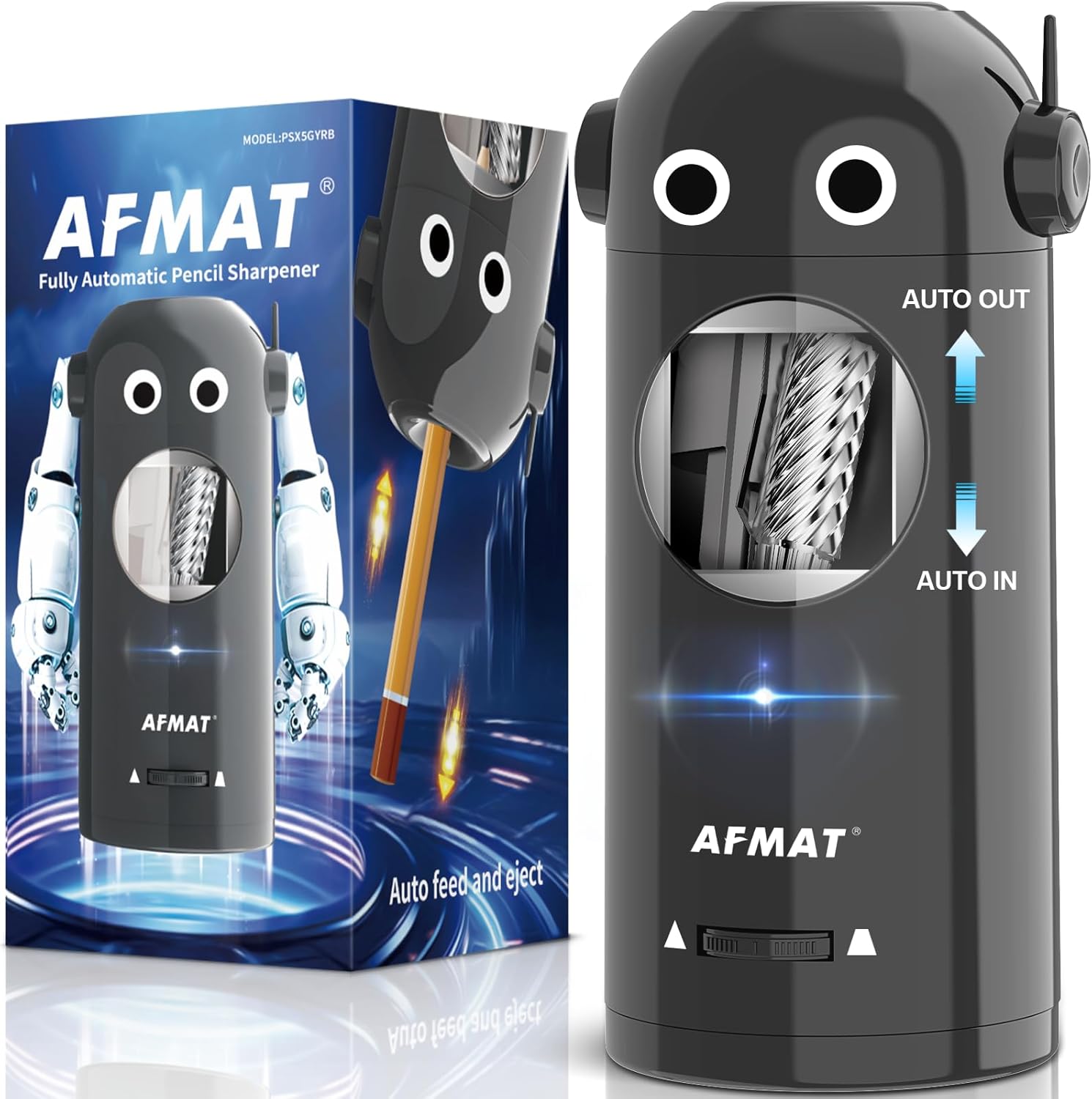
ചിത്രം 2.1: The AFMAT Electric Pencil Sharpener, showcasing its design and packaging. The sharpener is gray with a robot-like face and a clear window revealing the helical blade. The packaging highlights its 'Fully Automatic' and 'Auto feed and eject' features.
3. സജ്ജീകരണവും ചാർജിംഗും
3.1 പ്രാരംഭ സജ്ജീകരണം
- Unpack the sharpener and all accessories from the box.
- Inspect the sharpener for any visible damage.
- Ensure the shaving receptacle is properly seated.
3.2 ഉപകരണം ചാർജ് ചെയ്യുന്നു
The AFMAT Electric Pencil Sharpener is rechargeable and can be used wirelessly. It takes approximately 2 hours to fully charge, providing power for up to 600 sharpening cycles.
- ഉപകരണത്തിൽ ചാർജിംഗ് പോർട്ട് കണ്ടെത്തുക.
- Connect the provided USB cable to the sharpener and a compatible 5V 2A power adapter (not included).
- ചാർജിംഗ് ഇൻഡിക്കേറ്റർ ലൈറ്റ് പ്രകാശിക്കും. പൂർണ്ണമായി ചാർജ് ചെയ്തുകഴിഞ്ഞാൽ, മോഡലിനെ ആശ്രയിച്ച് ലൈറ്റ് നിറം മാറുകയോ ഓഫാകുകയോ ചെയ്യാം.
- The sharpener can be used while charging if needed.
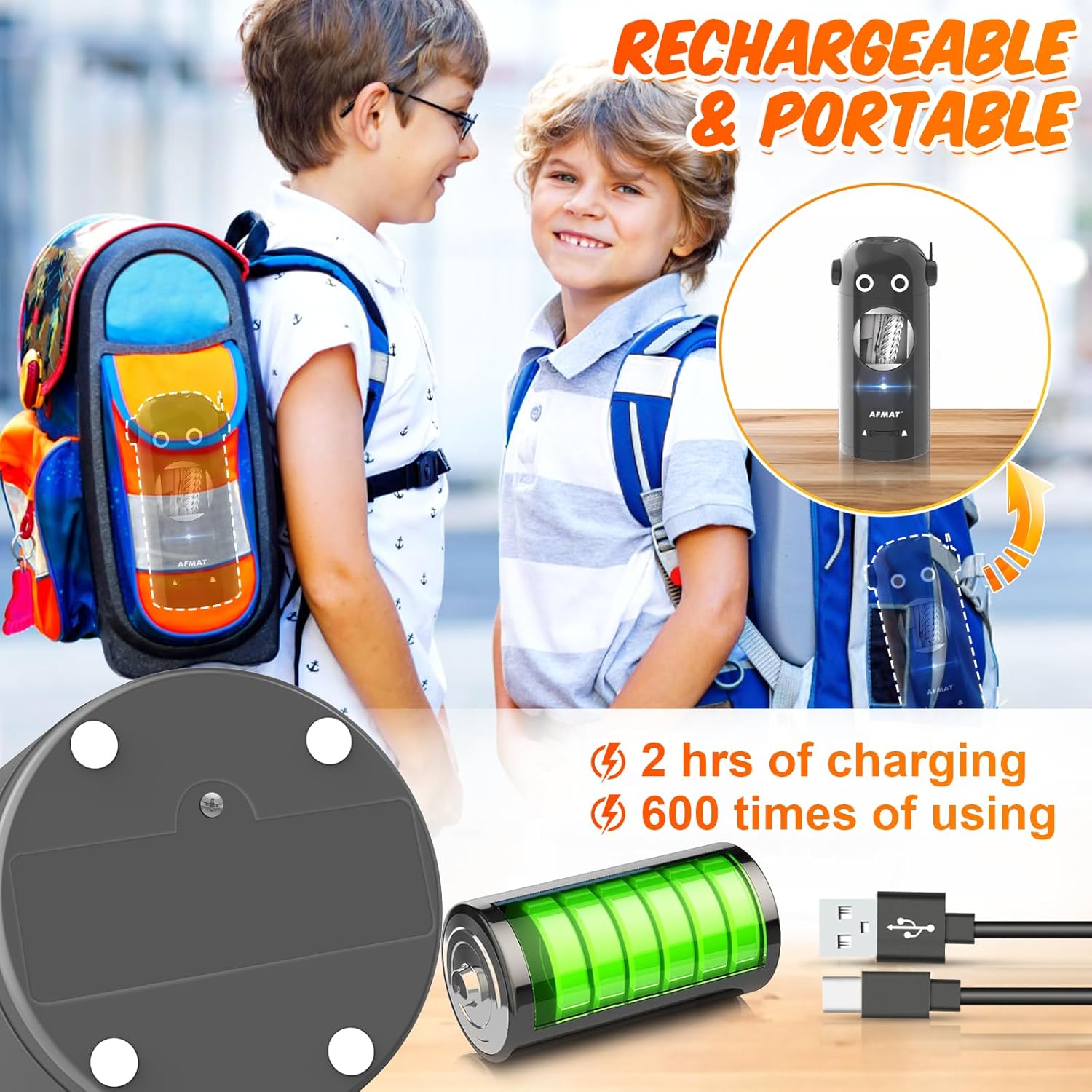
ചിത്രം 3.1: The AFMAT Electric Pencil Sharpener highlighting its rechargeable and portable features. It shows the USB charging cable, a battery icon indicating 2 hours of charging for 600 uses, and children carrying backpacks, suggesting its portability.
4. പ്രവർത്തന നിർദ്ദേശങ്ങൾ
4.1 Sharpening a Pencil
- Ensure the sharpener is charged or connected to a power source.
- Gently insert a pencil into the sharpening hole. The sharpener will automatically detect the pencil and pull it in.
- The sharpening process will begin automatically. The sharpener will stop and eject the pencil once it reaches the selected sharpness.
- Remove the sharpened pencil.

ചിത്രം 4.1: The AFMAT Electric Pencil Sharpener illustrating its fully automatic operation. A pencil is shown being automatically inserted ('AUTO IN') and ejected ('AUTO OUT') after sharpening. A child and adult are shown happily using the sharpener.
4.2 Pencil Compatibility
This sharpener is designed to accommodate a wide range of pencils, including colored pencils, with diameters between 7mm and 11.5mm. It can sharpen pencils of various shapes (round, hexagonal, triangular).
- കുറിപ്പ്: For soft-core pencils, it is recommended to use the medium or blunt tip setting to prevent tip breakage.

ചിത്രം 4.2: The AFMAT Electric Pencil Sharpener demonstrating its compatibility with pencils ranging from 7mm to 11.5mm in diameter and various shapes (round, hexagonal, triangular). The image also shows the internal mechanism centering the pencil.
4.3 Adjusting Sharpness Options
The sharpener offers three sharpness settings: sharp, medium, and blunt. This allows you to choose the ideal tip for different uses, from fine lines to broad shading.
- Locate the sharpness adjustment slider on the front of the sharpener.
- Slide the control to select your desired tip:
- മൂർച്ച: For precise lines and detailed work.
- ഇടത്തരം: A versatile tip for general use.
- ബ്ലണ്ട്: Ideal for shading, coloring, or for younger users who are harder on pencil tips.
- Once the desired setting is selected, proceed with sharpening as described in Section 4.1.
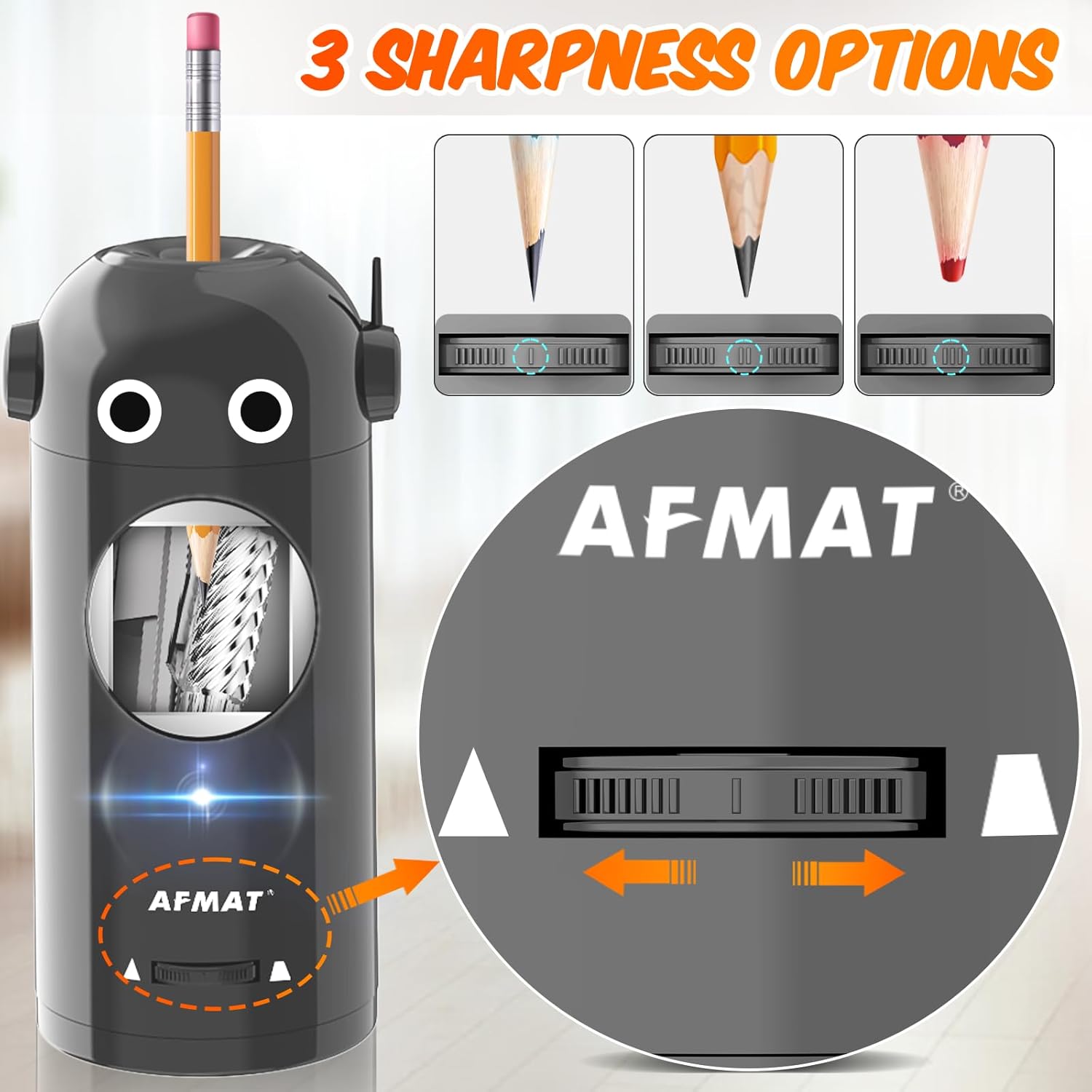
ചിത്രം 4.3: The AFMAT Electric Pencil Sharpener displaying its three sharpness options: sharp, medium, and blunt. The image shows a slider control on the sharpener and visual examples of each pencil tip type.
5. പരിപാലനം
5.1 Emptying Shavings
Regularly empty the shaving receptacle to ensure optimal performance and prevent blockages.
- Turn off the sharpener and disconnect it from any power source if charging.
- Carefully remove the shaving receptacle. Refer to the product diagram for its location.
- Empty the pencil shavings into a waste bin.
- Reinsert the receptacle securely until it clicks into place.
5.2 Cleaning the Blade Area
Occasionally, pencil dust may accumulate around the blade. Use a soft brush or cloth to gently clean this area. Do not use water or harsh chemicals.
5.3 ബ്ലേഡ് മാറ്റിസ്ഥാപിക്കൽ
The blade of your AFMAT Electric Pencil Sharpener is replaceable. If you notice a decrease in sharpening efficiency, consider replacing the blade.
- Replacement blades can be purchased separately. The ASIN for replacement blades is B0CJ8YYSV5.
- Refer to the instructions provided with the replacement blade for proper installation.
6. പ്രശ്നപരിഹാരം
- പ്രശ്നം: The sharpener does not turn on or sharpen.
പരിഹാരം: Ensure the sharpener is sufficiently charged. Connect it to a power source using the USB cable. Check if the shaving receptacle is securely closed; the sharpener may have a safety mechanism preventing operation if it's open. - പ്രശ്നം: Pencil is not sharpening effectively or tip breaks frequently.
പരിഹാരം: Check the sharpness setting; a blunt setting is recommended for soft-core pencils to prevent breakage. Ensure the pencil diameter is within the 7-11.5mm range. The blade might be dull and require replacement (refer to Section 5.3). - പ്രശ്നം: Pencil gets stuck or does not eject.
പരിഹാരം: Do not force the pencil. Gently try to pull it out. Ensure the pencil is inserted straight and not at an angle. Check for any debris or broken lead inside the sharpening mechanism and clean if necessary (refer to Section 5.2). - പ്രശ്നം: Shavings are overflowing.
പരിഹാരം: Empty the shaving receptacle regularly (refer to Section 5.1).
7 സ്പെസിഫിക്കേഷനുകൾ
| ബ്രാൻഡ് | AFMAT |
| മോഡൽ | B0CPSDYBFZ |
| Pencil Diameter Compatibility | 7mm - 11.5mm |
| പവർ ഉറവിടം | ബാറ്ററി പവർഡ് (യുഎസ്ബി വഴി റീചാർജ് ചെയ്യാവുന്നത്) |
| Sharpness Options | Sharp, Medium, Blunt |
| അളവുകൾ (ഏകദേശം) | 7.3 ഇഞ്ച് (ഉയരം) x 3.6 ഇഞ്ച് (വീതി) |
| ടാർഗെറ്റ് പ്രേക്ഷകർ | Unisex Kids |

ചിത്രം 7.1: The AFMAT Electric Pencil Sharpener displayed with its approximate dimensions (7.3 inches height, 3.6 inches width). The image emphasizes its space-saving and adorable design, shown in a setting with a child and adult.
8. വാറൻ്റിയും പിന്തുണയും
8.1 ഉൽപ്പന്ന വാറന്റി
AFMAT products are manufactured with quality and reliability in mind. For specific warranty details regarding your AFMAT Electric Pencil Sharpener, please refer to the warranty card included with your purchase or visit the official AFMAT brand store.
8.2 ഉപഭോക്തൃ പിന്തുണ
If you have any questions, concerns, or require assistance with your AFMAT Electric Pencil Sharpener, please contact AFMAT customer support. You can find contact information and additional resources by visiting the AFMAT Store on Amazon.