
Lorex AZT2KIDPT-E
Lorex 4MP Pan & Tilt Indoor Smart Security Camera User Manual
Model: AZT2KIDPT-E
1. ഉൽപ്പന്നം കഴിഞ്ഞുview
The Lorex 4MP Pan & Tilt Indoor Smart Security Camera (Model: AZT2KIDPT-E) is a wireless 2K Wi-Fi camera designed for indoor surveillance. It features person detection, a privacy mode, two-way talk functionality, and smart home compatibility. With its 360° pan and tilt view, it offers comprehensive coverage for your indoor spaces. The camera includes a 16GB Micro SD card for local storage, eliminating the need for monthly fees.

Figure 1.1: Lorex 4MP Pan & Tilt Indoor Smart Security Camera, including its retail packaging and the bundled 16GB Micro SD card.
2. എന്താണ് ഉൾപ്പെടുത്തിയിരിക്കുന്നത്
താഴെ പട്ടികപ്പെടുത്തിയിരിക്കുന്ന എല്ലാ ഘടകങ്ങളും നിങ്ങളുടെ പാക്കേജിൽ ഉണ്ടെന്ന് ഉറപ്പാക്കുക:
- ഇൻഡോർ വൈഫൈ ക്യാമറ
- 16 ജിബി മൈക്രോ എസ്ഡി കാർഡ്
- Power Cable & Adapter
- Mounting Bracket & Template
- Camera Mounting Kit & Quick Start Guide

Figure 2.1: Contents of the Lorex camera package, showing the camera, power supply, 16GB MicroSD card, mounting hardware, and quick start guide.
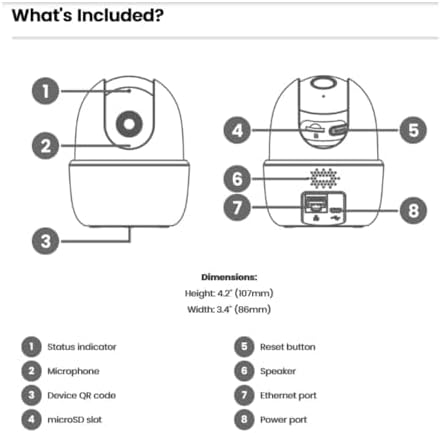
Figure 2.2: Detailed diagram of the camera's components and their functions, including ports and indicators.
3 പ്രധാന സവിശേഷതകൾ
- വ്യക്തി കണ്ടെത്തൽ: Receive notifications when a person is detected, minimizing unnecessary alerts.
- 2-Way Talk: Communicate with individuals near the camera using the Lorex Home app.
- പാൻ ആൻഡ് ടിൽറ്റ്: The camera swivels horizontally and tilts vertically for expanded coverage. Digital zoom is available via the Lorex app. Night vision extends up to 32ft (10m).
- Smart Home Monitoring: Plug and Play setup with compatibility for Alexa and Google Assistant. Operates on 2.4 GHz Wi-Fi networks.
- പ്രാദേശിക സംഭരണം: Secure your footage with the included 16GB MicroSD card (upgradable to 256GB), with no monthly fees.

Figure 3.1: Visual comparison demonstrating the enhanced clarity and detail of 2K Quad HD resolution compared to 1080p.

Figure 3.2: The camera's pan and tilt feature allows for a 360° view, providing extensive coverage of your indoor environment.

Figure 3.3: Smart AI Motion Detection provides instant alerts, such as when a person is detected in the camera's view.

Figure 3.4: Enable Privacy Mode through the Lorex app to temporarily disable recording and live view മെച്ചപ്പെടുത്തിയ സ്വകാര്യതയ്ക്കായി.

Figure 3.5: The camera supports local storage via a MicroSD card, ensuring your footage is kept private and secure without recurring fees.

Figure 3.6: The 2-Way Talk feature allows for instant communication through the camera, enabling you to hear and speak to those on the other end.
4. സജ്ജീകരണ ഗൈഡ്
Follow these steps to set up your Lorex 4MP Pan & Tilt Indoor Smart Security Camera:
- Download the Lorex Home App: ഇതിനായി തിരയുക "Lorex Home" in your smartphone's app store (available for Android and iOS).
- ഒരു അക്കൗണ്ട് സൃഷ്ടിക്കുക: Open the Lorex Home app and follow the on-screen instructions to create a new account or log in to an existing one.
- ക്യാമറ ഓൺ: Connect the provided power cable and adapter to the camera and plug it into a power outlet. The camera will power on and initiate its startup sequence.
- ഉപകരണം ചേർക്കുക: In the Lorex Home app, tap the '+' icon to add a new device. Select your camera model from the list.
- QR കോഡ് സ്കാൻ ചെയ്യുക: Use your phone's camera to scan the QR code located on the bottom of the camera (refer to Figure 2.2).
- വൈഫൈയിലേക്ക് കണക്റ്റുചെയ്യുക: Follow the app's prompts to connect the camera to your home Wi-Fi network. Ensure you are connecting to a 2.4 GHz Wi-Fi band.
- Mount the Camera (Optional): If desired, use the included mounting bracket and kit to securely install the camera in your preferred indoor location.
- സജ്ജീകരണം പൂർത്തിയാക്കുക: Once connected, the app will guide you through any final setup steps, including naming your camera and adjusting initial settings.
5. പ്രവർത്തന നിർദ്ദേശങ്ങൾ
Utilize the Lorex Home app to control and manage your camera:
- തത്സമയം View: Access the live video feed from your camera anytime, anywhere.
- പാൻ & ടിൽറ്റ് നിയന്ത്രണം: ക്യാമറകൾ വിദൂരമായി ക്രമീകരിക്കാൻ ആപ്പിനുള്ളിലെ ദിശാ നിയന്ത്രണങ്ങൾ ഉപയോഗിക്കുക viewing angle (360° pan and tilt).
- ഡിജിറ്റൽ സൂം: Pinch to zoom on the live view to get a closer look at details.
- 2-Way Talk: Tap the microphone icon in the app to speak through the camera's speaker and hear audio from the camera's microphone.
- സ്വകാര്യത മോഡ്: Activate Privacy Mode via the app to temporarily disable video and audio recording for personal moments.
- വ്യക്തി കണ്ടെത്തൽ: Configure motion detection settings to specifically alert you when a person is detected.
- പ്രാദേശിക റെക്കോർഡിംഗ്: ഫൂtage is automatically recorded to the installed 16GB MicroSD card upon event detection. You can review recorded events through the app's timeline.
- രാത്രി കാഴ്ച: The camera automatically switches to night vision in low-light conditions, providing clear black and white video up to 32 feet.
Video 5.1: Demonstration of the Lorex W462 camera's panning capabilities, showcasing its wide field of view.
6. പരിപാലനം
To ensure optimal performance and longevity of your Lorex camera:
- വൃത്തിയാക്കൽ: മൃദുവായതും ഉണങ്ങിയതുമായ തുണി ഉപയോഗിച്ച് ക്യാമറ ലെൻസും ബോഡിയും സൌമ്യമായി തുടയ്ക്കുക. കഠിനമായ രാസവസ്തുക്കളോ അബ്രസിവ് ക്ലീനറുകളോ ഉപയോഗിക്കുന്നത് ഒഴിവാക്കുക.
- ഫേംവെയർ അപ്ഡേറ്റുകൾ: Regularly check the Lorex Home app for available firmware updates. Updates often include performance improvements and security enhancements.
- മൈക്രോ എസ്ഡി കാർഡ് മാനേജ്മെൻ്റ്: Periodically check the storage status of your MicroSD card in the app. While the camera overwrites old footage, you may want to back up important recordings.
- നെറ്റ്വർക്ക് സ്ഥിരത: Ensure your Wi-Fi network is stable and provides a strong signal to the camera for consistent performance.
7. പ്രശ്നപരിഹാരം
If you encounter issues with your Lorex camera, refer to the following common solutions:
| പ്രശ്നം | സാധ്യമായ പരിഹാരം |
|---|---|
| ക്യാമറ വൈഫൈയിലേക്ക് കണക്റ്റ് ചെയ്യുന്നില്ല: |
|
| മോശം ചിത്ര നിലവാരം: |
|
| Two-way talk echo or distortion: |
|
| Camera loses connectivity intermittently: |
|
For further assistance, visit the Lorex support webസൈറ്റ് അല്ലെങ്കിൽ ഉപഭോക്തൃ സേവനവുമായി ബന്ധപ്പെടുക.
8 സ്പെസിഫിക്കേഷനുകൾ
| ഫീച്ചർ | വിശദാംശങ്ങൾ |
|---|---|
| ബ്രാൻഡ് | ലോറെക്സ് |
| മോഡൽ നമ്പർ | AZT2KIDPT-E |
| കണക്റ്റിവിറ്റി ടെക്നോളജി | WiFi (2.4 GHz band only) |
| വീഡിയോ ക്യാപ്ചർ റെസല്യൂഷൻ | 2K |
| പ്രത്യേക സവിശേഷതകൾ | Adjustable, Night Vision, PTZ Control, Two-Way Audio, Person Detection |
| ചാനലുകളുടെ എണ്ണം | 1 |
| മെമ്മറി സ്റ്റോറേജ് കപ്പാസിറ്റി | 16 GB (MicroSD card included, upgradable to 256GB) |
| നിറം | വെള്ള |
| പവർ ഉറവിടം | കോർഡഡ് ഇലക്ട്രിക് |
| ഇനത്തിന്റെ അളവുകൾ (L x W x H) | 5 x 6 x 5 ഇഞ്ച് |
| ഓപ്പറേറ്റിംഗ് സിസ്റ്റം അനുയോജ്യത | ആൻഡ്രോയിഡ്, ഐഒഎസ് |
| ശുപാർശ ചെയ്യുന്ന ഉപയോഗങ്ങൾ | ഇൻഡോർ |
| ഫീൽഡ് View | 125 ° (ഡയഗണൽ) |
| നൈറ്റ് വിഷൻ റേഞ്ച് | Up to 32 Feet (10m) |
| ഫ്രെയിം റേറ്റ് | 30 fps |
| റെക്കോർഡിംഗ് മോഡ് | Event, Manual |
| ഒപ്റ്റിക്കൽ സെൻസർ ടെക്നോളജി | CMOS |
| ഹാർഡ്വെയർ ഇന്റർഫേസ് | 802.11 ac/b/g/n |
| ലെൻസ് തരം | പരിഹരിച്ചു |
| ഇനത്തിൻ്റെ ഭാരം | 1.04 പൗണ്ട് |
9. വാറൻ്റിയും പിന്തുണയും
For detailed warranty information and technical support, please visit the official Lorex website or contact their customer service. You can find more resources and contact options at the Lorex Brand Store on Amazon.
Ask a question about this manual
Ask about setup, troubleshooting, compatibility, parts, safety, or missing instructions. Manuals+ will review the question and use this page’s manual context to help answer it.