
ആമുഖം
Thank you for choosing PureGear PureBoom Wireless Earbuds. These earbuds are designed to provide high-quality audio and convenient hands-free communication. This manual will guide you through the setup, operation, and maintenance of your new earbuds to ensure optimal performance and longevity.
എന്താണ് ഉൾപ്പെടുത്തിയിരിക്കുന്നത്
Your PureGear PureBoom Wireless Earbuds package includes the following items:
- PureBoom True Wireless Earbuds
- വയർലെസ് ചാർജിംഗ് കേസ്
- Adjustable Earbud Ear Tips (S, M, L sizes)
- USB-A മുതൽ USB-C വരെ ചാർജിംഗ് കേബിൾ

Image: All items included in the PureGear PureBoom Wireless Earbuds package.
ഉൽപ്പന്നം കഴിഞ്ഞുview
The PureGear PureBoom Wireless Earbuds offer a compact, lightweight, and ergonomic design for comfortable use. They feature high-quality sound and intuitive touch controls.
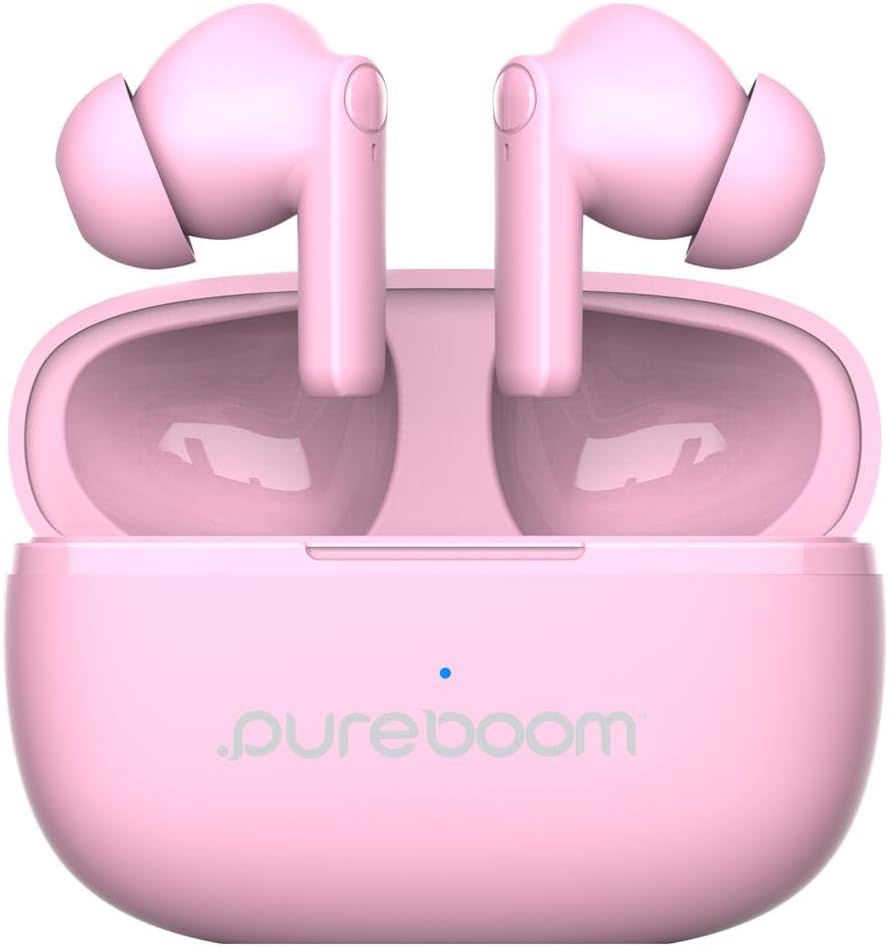
Image: PureGear PureBoom Wireless Earbuds and charging case.

Image: The compact design of the charging case, fitting easily into a pocket.

Image: User enjoying music with PureGear PureBoom Wireless Earbuds.
സജ്ജമാക്കുക
പ്രാരംഭ ചാർജിംഗ്
Before first use, fully charge your earbuds and charging case. Place the earbuds into the charging case and connect the USB-C cable to the case and a power source. The indicator light on the case will show charging status.
ബ്ലൂടൂത്ത് ഉപകരണവുമായി ജോടിയാക്കുന്നു
- ഇയർബഡുകൾ ചാർജിംഗ് കെയ്സിലാണെന്നും കെയ്സ് തുറന്നിട്ടുണ്ടെന്നും ഉറപ്പാക്കുക.
- നിങ്ങളുടെ ഉപകരണത്തിൽ (സ്മാർട്ട്ഫോൺ, ടാബ്ലെറ്റ്, ലാപ്ടോപ്പ്), ബ്ലൂടൂത്ത് ക്രമീകരണങ്ങളിലേക്ക് പോകുക.
- Select "PureBoom" from the list of available devices.
- കണക്റ്റ് ചെയ്തുകഴിഞ്ഞാൽ, ഇയർബഡുകൾ ഉപയോഗത്തിന് തയ്യാറാണ്.
The earbuds are broadly compatible with Bluetooth devices including iOS (iPhone 16, 15, 14, 13, 12 series, SE, 11 series) and Android (Galaxy S25, S24, S23, S22, S21, S20 series, Note 20 series, Google Pixel 9/8/7/6/5) phones, laptops, PCs, tablets, iPads, smart TVs, gaming consoles, and smartwatches.
പ്രവർത്തന നിർദ്ദേശങ്ങൾ
ടച്ച് നിയന്ത്രണങ്ങൾ
The PureBoom earbuds feature convenient touch controls for managing your audio and calls. The touch-sensitive area is located on the outer surface of each earbud.
- പ്ലേ/താൽക്കാലികമായി നിർത്തുക: ഇയർബഡിൽ ഒരിക്കൽ ടാപ്പ് ചെയ്യുക.
- മറുപടി കോൾ: ഇയർബഡിൽ ഒരിക്കൽ ടാപ്പ് ചെയ്യുക.
- കോൾ അവസാനിപ്പിക്കുക: Tap once on either earbud during a call.
- ട്രാക്ക് ഒഴിവാക്കുക: Double-tap the right earbud for next track, double-tap the left earbud for previous track.
- വോളിയം നിയന്ത്രണം: Triple-tap the right earbud to increase volume, triple-tap the left earbud to decrease volume.
- ശബ്ദ സഹായം: Press and hold either earbud for 2 seconds to activate your device's voice assistant.

Image: Visual guide to the touch controls on the earbuds.
ബാറ്ററി ലൈഫും ചാർജിംഗും
The earbuds provide up to 18 hours of listening time with the included charging case. The charging case itself offers additional charges to extend your usage throughout the day.

Image: Demonstrating the extended battery life with the charging case.

Image: Enjoying extended listening time with the earbuds.
ഹാൻഡ്സ് ഫ്രീ കോളിംഗ്
With a built-in microphone, the earbuds allow for clear, hands-free calls within a 32-foot range from your connected device.
വീഡിയോ: ഒരു ഓവർview of the PureGear Wireless Earbuds, showcasing features like high-quality sound, 18 hours of listening time, and tap touch controls for music and phone calls.
മെയിൻ്റനൻസ്
To ensure the longevity and optimal performance of your PureGear PureBoom Wireless Earbuds, follow these maintenance guidelines:
- വൃത്തിയാക്കൽ: ഇയർബഡുകളും ചാർജിംഗ് കെയ്സും മൃദുവായതും ഉണങ്ങിയതും ലിന്റ് രഹിതവുമായ തുണി ഉപയോഗിച്ച് പതിവായി വൃത്തിയാക്കുക. ഉരച്ചിലുകളുള്ള വസ്തുക്കളോ കഠിനമായ രാസവസ്തുക്കളോ ഉപയോഗിക്കുന്നത് ഒഴിവാക്കുക.
- ചെവി ടിപ്പുകൾ: Remove and clean the ear tips periodically. You can gently wash them with water and mild soap, ensuring they are completely dry before reattaching.
- സംഭരണം: ഉപയോഗത്തിലില്ലാത്തപ്പോൾ, പൊടിയിൽ നിന്നും കേടുപാടുകളിൽ നിന്നും സംരക്ഷിക്കാൻ ഇയർബഡുകൾ അവയുടെ ചാർജിംഗ് കേസിൽ സൂക്ഷിക്കുക.
- ജല പ്രതിരോധം: The earbuds are waterproof. However, avoid prolonged submersion in water and ensure they are dry before placing them back in the charging case to prevent damage to the charging contacts.
- താപനില: ഇയർബഡുകൾ അമിതമായ താപനിലയിൽ (ചൂടോ തണുപ്പോ) തുറന്നുകാട്ടുന്നത് ഒഴിവാക്കുക, കാരണം ഇത് ബാറ്ററി ലൈഫിനെയും പ്രകടനത്തെയും ബാധിച്ചേക്കാം.
ട്രബിൾഷൂട്ടിംഗ്
If you encounter issues with your PureGear PureBoom Wireless Earbuds, refer to the following common solutions:
| പ്രശ്നം | പരിഹാരം |
|---|---|
| ഇയർബഡുകൾ ജോടിയാക്കുന്നില്ല | Ensure earbuds are charged. Turn off and on Bluetooth on your device. Forget "PureBoom" from your device's Bluetooth list and re-pair. |
| ഒരു ഇയർബഡിൽ നിന്ന് ശബ്ദമില്ല | Place both earbuds back in the case, close it, then open again. Ensure both are charged. Re-pair with your device. |
| കുറഞ്ഞ വോളിയം | Increase volume using touch controls or your connected device. Ensure ear tips are properly sealed in your ear. |
| ചാർജിംഗ് കേസ് ചാർജുചെയ്യുന്നില്ല | Check the USB-C cable and power adapter connection. Try a different cable or power source. |
| ടച്ച് നിയന്ത്രണങ്ങൾ പ്രതികരിക്കുന്നില്ല | ഇയർബഡുകൾ വൃത്തിയുള്ളതും ഉണങ്ങിയതുമാണെന്ന് ഉറപ്പാക്കുക. ഇയർബഡുകൾ കേസിൽ വച്ച ശേഷം പുറത്തെടുത്ത് പുനരാരംഭിക്കുക. |
If the issue persists, please contact PureGear customer support for further assistance.
സ്പെസിഫിക്കേഷനുകൾ
Detailed technical specifications for the PureGear PureBoom Wireless Earbuds:
- മോഡൽ നമ്പർ: 64719 പി.ജി.
- കണക്റ്റിവിറ്റി: വയർലെസ്സ് (ബ്ലൂടൂത്ത് 5.0)
- ബ്ലൂടൂത്ത് ശ്രേണി: 32 അടി വരെ
- ചെവി സ്ഥാപിക്കൽ: ചെവിയിൽ
- ശബ്ദ നിയന്ത്രണം: സൗണ്ട് ഐസൊലേഷൻ
- നിയന്ത്രണ രീതി: സ്പർശിക്കുക
- ഓഡിയോ ഡ്രൈവർ തരം: ഡൈനാമിക് ഡ്രൈവർ
- ഫ്രീക്വൻസി ശ്രേണി: 20 ഹെർട്സ് - 20,000 ഹെർട്സ്
- Battery Average Life (Earbuds): 18 മണിക്കൂർ വരെ (ചാർജിംഗ് കേസിനൊപ്പം)
- ബാറ്ററി ചാർജ്ജ് സമയം: ഏകദേശം 1.5 മണിക്കൂർ
- ജല പ്രതിരോധ നില: വാട്ടർപ്രൂഫ്
- മെറ്റീരിയൽ: പ്ലാസ്റ്റിക്, സിലിക്കൺ
- ഇനത്തിൻ്റെ ഭാരം: 3.04 ഔൺസ്
- UPC: 810096258236
വാറൻ്റിയും പിന്തുണയും
PureGear PureBoom Wireless Earbuds come with a ആജീവനാന്ത വാറൻ്റി. For warranty claims, technical support, or any inquiries, please visit the official PureGear webസൈറ്റ് അല്ലെങ്കിൽ അവരുടെ ഉപഭോക്തൃ സേവന വിഭാഗവുമായി ബന്ധപ്പെടുക.
കൂടുതൽ വിവരങ്ങളും പിന്തുണാ ഉറവിടങ്ങളും നിങ്ങൾക്ക് ഇവിടെ കണ്ടെത്താനാകും PureGear Store on Amazon.