
1. ആമുഖം
Thank you for choosing the Sofucor 52-inch Smart Ceiling Fan with Lights. This manual provides detailed instructions for safe installation, operation, and maintenance of your new ceiling fan. Please read this manual thoroughly before installation and keep it for future reference.
2 സുരക്ഷാ വിവരങ്ങൾ
തീപിടുത്തം, വൈദ്യുതാഘാതം, വ്യക്തിപരമായ പരിക്കുകൾ എന്നിവ കുറയ്ക്കുന്നതിന് വൈദ്യുത ഉപകരണങ്ങൾ ഇൻസ്റ്റാൾ ചെയ്യുമ്പോഴും പ്രവർത്തിപ്പിക്കുമ്പോഴും എല്ലായ്പ്പോഴും അടിസ്ഥാന സുരക്ഷാ മുൻകരുതലുകൾ പാലിക്കുക.
- ഇൻസ്റ്റാളേഷൻ അല്ലെങ്കിൽ അറ്റകുറ്റപ്പണികൾക്ക് മുമ്പ് സർക്യൂട്ട് ബ്രേക്കറിൽ പവർ ഓഫ് ചെയ്തിട്ടുണ്ടെന്ന് ഉറപ്പാക്കുക.
- എല്ലാ വയറിംഗും ദേശീയ, പ്രാദേശിക ഇലക്ട്രിക്കൽ കോഡുകൾക്ക് അനുസൃതമായിരിക്കണം. നിങ്ങൾക്ക് ഉറപ്പില്ലെങ്കിൽ യോഗ്യതയുള്ള ഒരു ഇലക്ട്രീഷ്യനെ സമീപിക്കുക.
- ഫാനിന്റെ ഭാരം (ഏകദേശം 15.71 പൗണ്ട്) താങ്ങാൻ മൗണ്ടിംഗ് ഘടനയ്ക്ക് കഴിയണം.
- കേടായ ബ്ലേഡുകളോ ഭവനങ്ങളോ ഉപയോഗിച്ച് ഫാൻ പ്രവർത്തിപ്പിക്കരുത്.
- Keep hands, clothing, and other objects away from the fan blades when the fan is in operation.
- This fan is suitable for both indoor and outdoor (covered patio) use. Ensure proper protection from direct water exposure for outdoor installations.
3. പാക്കേജ് ഉള്ളടക്കം
Verify that all components are present before beginning installation. If any parts are missing or damaged, contact Sofucor customer service.
- സീലിംഗ് ഫാൻ മോട്ടോർ ഹൗസിംഗ്
- 5 സോളിഡ് വുഡ് ഫാൻ ബ്ലേഡുകൾ
- ഇന്റഗ്രേറ്റഡ് എൽഇഡി ലൈറ്റ് കിറ്റ്
- റിമോട്ട് കൺട്രോൾ
- ഡൗൺറോഡുകൾ (5-ഇഞ്ച്, 10-ഇഞ്ച്, 24-ഇഞ്ച് ഓപ്ഷനുകൾ)
- മ Bra ണ്ടിംഗ് ബ്രാക്കറ്റും ഹാർഡ്വെയറും
- ഉപയോക്തൃ മാനുവൽ

Figure 3.1: Sofucor 52-inch Smart Ceiling Fan with Lights and various included components, including downrods, remote, and smart home devices for illustration.
4. ഇൻസ്റ്റലേഷൻ നിർദ്ദേശങ്ങൾ
This section outlines the steps for installing your Sofucor ceiling fan. Professional installation is recommended if you are not familiar with electrical wiring.
4.1 പ്രീ-ഇൻസ്റ്റലേഷൻ ചെക്ക്ലിസ്റ്റ്
- പ്രധാന സർക്യൂട്ട് ബ്രേക്കറിൽ പവർ ഓഫ് ചെയ്യുക.
- Ensure the electrical box is securely mounted and capable of supporting the fan.
- ആവശ്യമായ ഉപകരണങ്ങൾ ശേഖരിക്കുക: സ്ക്രൂഡ്രൈവർ, വയർ സ്ട്രിപ്പറുകൾ, ഗോവണി മുതലായവ.
4.2 ഫാൻ ഘടിപ്പിക്കൽ
- Attach the mounting bracket to the ceiling electrical box using the provided screws.
- Select the appropriate downrod (5", 10", or 24") for your ceiling height. The fan supports both flat and sloped ceilings.
- Feed the electrical wires from the fan motor through the chosen downrod.
- ഡൗൺറോഡ് ഫാൻ മോട്ടോർ അസംബ്ലിയിൽ ഉറപ്പിക്കുക.
- ഫാൻ അസംബ്ലി ശ്രദ്ധാപൂർവ്വം ഉയർത്തി മൗണ്ടിംഗ് ബ്രാക്കറ്റിൽ തൂക്കിയിടുക.

Figure 4.1: The Sofucor ceiling fan installed with a 24-inch downrod, showcasing its compatibility with sloped ceilings and modern interior design.
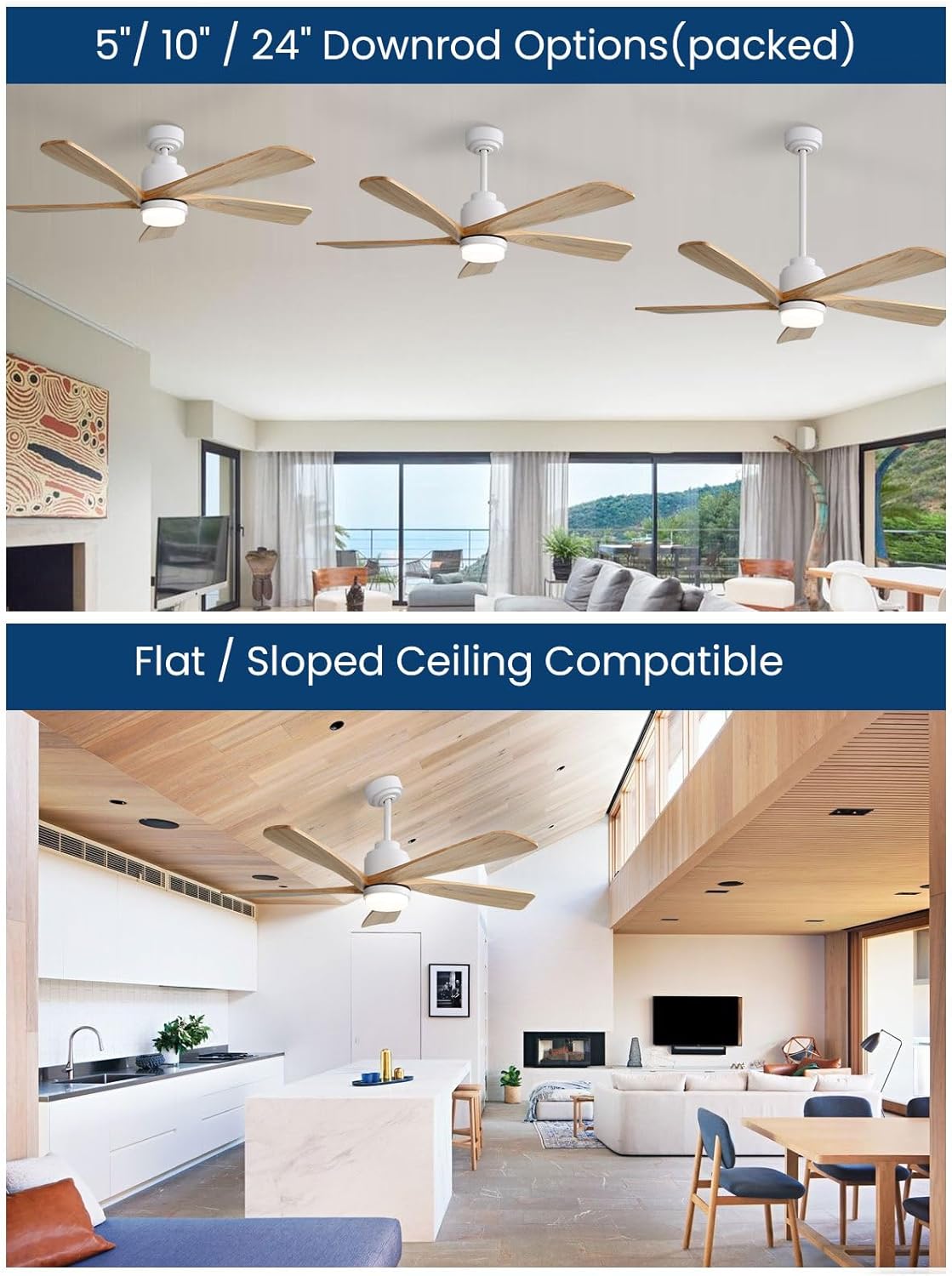
Figure 4.2: Illustration of the three included downrod options (5-inch, 10-inch, 24-inch) and how they appear when installed, suitable for various ceiling heights.
4.3 വയറിംഗ് കണക്ഷനുകൾ
- Connect the fan's electrical wires to the household wiring according to the wiring diagram provided in the separate wiring guide (if applicable) or the general electrical code.
- വയർ നട്ടുകൾ ഉപയോഗിച്ച് എല്ലാ കണക്ഷനുകളും സുരക്ഷിതമാണെന്ന് ഉറപ്പാക്കുക.
- Tuck all wires neatly into the electrical box and secure the canopy.
4.4 Attaching Fan Blades and Light Kit
- Attach the five solid wood fan blades to the motor housing using the provided screws. Ensure they are firmly secured.
- Connect the wires for the integrated LED light kit and attach the light kit to the fan motor housing.
- ലൈറ്റ് ഡിഫ്യൂസർ കവർ ഇൻസ്റ്റാൾ ചെയ്യുക.

Figure 4.3: The Sofucor 52-inch ceiling fan with its five wooden blades and integrated LED light, showcasing its aesthetic appeal in a living room setting.
5. പ്രവർത്തന നിർദ്ദേശങ്ങൾ
Your Sofucor smart ceiling fan offers multiple control methods for convenience.
5.1 റിമോട്ട് കൺട്രോൾ ഓപ്പറേഷൻ
The included remote control allows for direct adjustment of fan speed, light settings, and other functions.
- ഫാൻ വേഗത: Select from 6 speed settings.
- പ്രകാശ നിയന്ത്രണം: Turn the light on/off, adjust brightness (stepless dimming), and change color temperature (3000K warm, 4000K natural, 6000K white).
- ലൈറ്റ് മെമ്മറി: The fan remembers your last light setting.
- ടൈമർ: Set the fan to turn off after 2 or 4 hours.
- വിപരീത പ്രവർത്തനം: Switch between forward (summer cooling) and reverse (winter air circulation) modes.

Figure 5.1: The remote control for the Sofucor ceiling fan, highlighting its various functions including light color temperature settings (3000K, 4000K, 6000K) and light memory feature.

Figure 5.2: Visual representation of the fan's reversible function, illustrating downward airflow for summer cooling and upward airflow for winter air circulation.
5.2 സ്മാർട്ട് നിയന്ത്രണം (ആപ്പും ശബ്ദവും)
The fan is compatible with Alexa, Google Assistant, and a dedicated mobile application.
- ആപ്പ് നിയന്ത്രണം: Download the Sofucor app (or compatible smart home app) to control all fan functions remotely from your smartphone.
- ശബ്ദ നിയന്ത്രണം: Integrate with Amazon Alexa or Google Assistant for hands-free operation. Example commands: "Alexa, turn on the fan," "Hey Google, set fan speed to 3," "Alexa, change fan light to warm white."

Figure 5.3: Demonstrates voice control functionality with Amazon Alexa and Google Assistant, allowing users to operate the fan hands-free.
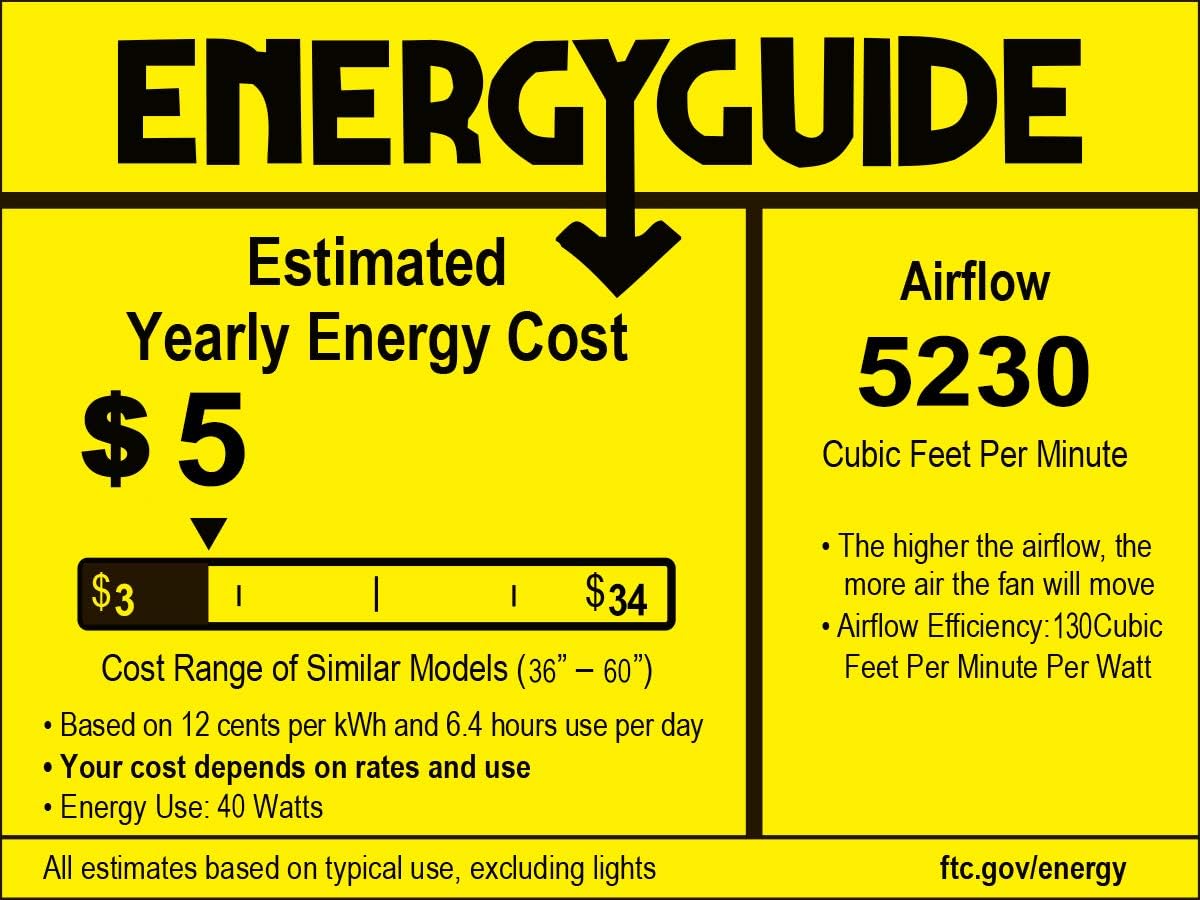
Figure 5.4: Illustrates the convenience of controlling the fan's speed, light color, and brightness through a dedicated mobile application.
6. പരിപാലനം
പതിവ് അറ്റകുറ്റപ്പണികൾ നിങ്ങളുടെ സീലിംഗ് ഫാനിന്റെ മികച്ച പ്രകടനവും ദീർഘായുസ്സും ഉറപ്പാക്കുന്നു.
- വൃത്തിയാക്കൽ: ഇടയ്ക്കിടെ ഫാൻ ബ്ലേഡുകളും മോട്ടോർ ഹൗസിംഗും ഒരു സോഫ്റ്റ്, ഡി ക്ലീനർ ഉപയോഗിച്ച് വൃത്തിയാക്കുക.amp തുണി. ഉരച്ചിലുകളുള്ള ക്ലീനറുകളോ ലായകങ്ങളോ ഉപയോഗിക്കരുത്.
- ബ്ലേഡ് ദൃഢത: Check blade screws annually to ensure they are tight. Loose blades can cause wobbling and noise.
- ലൈറ്റ് കിറ്റ്: ഇന്റഗ്രേറ്റഡ് എൽഇഡി ലൈറ്റ് ദീർഘായുസ്സിനായി രൂപകൽപ്പന ചെയ്തിരിക്കുന്നതിനാൽ സാധാരണയായി അത് മാറ്റിസ്ഥാപിക്കേണ്ട ആവശ്യമില്ല. പ്രശ്നങ്ങൾ ഉണ്ടായാൽ, ഉപഭോക്തൃ പിന്തുണയുമായി ബന്ധപ്പെടുക.
- പവർ ഓഫ്: Always turn off power at the circuit breaker before performing any cleaning or maintenance.
7. പ്രശ്നപരിഹാരം
If you encounter issues with your fan, refer to the following common problems and solutions. If the problem persists, contact customer support.
| പ്രശ്നം | സാധ്യമായ കാരണം | പരിഹാരം |
|---|---|---|
| ഫാൻ ആരംഭിക്കുന്നില്ല | No power to the fan; loose wiring; remote control battery low; fan blades obstructed. | Check circuit breaker. Ensure all wiring connections are secure. Replace remote battery. Verify fan blades are clear and not touching any part of the motor housing. |
| ഫാൻ കുലുങ്ങുന്നു | അയഞ്ഞ ബ്ലേഡ് സ്ക്രൂകൾ; അസന്തുലിതമായ ബ്ലേഡുകൾ; അയഞ്ഞ മൗണ്ടിംഗ് ബ്രാക്കറ്റ്. | Tighten all blade screws. Ensure blades are installed correctly. Check mounting bracket for secure attachment to the ceiling. |
| വെളിച്ചം പ്രവർത്തിക്കുന്നില്ല | Loose wiring to light kit; light kit malfunction. | Check wiring connections to the light kit. If the issue persists, contact customer support for assistance. |
| റിമോട്ട് കൺട്രോൾ പ്രതികരിക്കുന്നില്ല | Low battery; remote not paired. | Replace remote control battery. Refer to the remote pairing instructions in the full manual (if applicable). |
| ഫാൻ മുഴങ്ങുന്നു | Loose screws; motor issue; blades hitting an obstruction. | Check and tighten all screws. Ensure blades are not hitting anything. The DC motor is designed to be quiet (below 35dB); if noise is excessive, contact support. |
8 സ്പെസിഫിക്കേഷനുകൾ
Key technical specifications for the Sofucor 52-inch Smart Ceiling Fan (Model 52K085).
| ഫീച്ചർ | വിശദാംശങ്ങൾ |
|---|---|
| ബ്രാൻഡ് | സോഫുകോർ |
| മോഡലിൻ്റെ പേര് | 52K085 |
| ഉൽപ്പന്ന അളവുകൾ | 52"D x 52"W x 14"H |
| വലിപ്പം | 52 ഇഞ്ച് |
| നിറം | White+Wood |
| ബ്ലേഡുകളുടെ എണ്ണം | 5 |
| പവർ ഉറവിടം | എസി/ഡിസി |
| വാല്യംtage | 240 വോൾട്ട് |
| വാട്ട്tage | 26 വാട്ട് മണിക്കൂർ |
| ശബ്ദ നില | 20 Decibels (DC Motor) |
| എയർ ഫ്ലോ കപ്പാസിറ്റി | മിനിറ്റിന് 4500 ക്യുബിക് അടി |
| സ്പീഡ് ക്രമീകരണങ്ങൾ | 6 |
| നിയന്ത്രണ രീതി | ആപ്പ്, റിമോട്ട്, വോയ്സ് (അലക്സ, ഗൂഗിൾ അസിസ്റ്റന്റ്) |
| പ്രത്യേക സവിശേഷതകൾ | Voice & App Controlled, Smart Home Integration, High-Quality DC Motor, Integrated LED Lights with Adjustable Color Temperature, Reversible Function, Timer |
| ഇൻഡോർ/ഔട്ട്ഡോർ ഉപയോഗം | Indoor, Outdoor (Covered) |
| ഇനത്തിൻ്റെ ഭാരം | 15.71 പൗണ്ട് |
| സർട്ടിഫിക്കേഷൻ | ETL |

Figure 8.1: Energy Guide label for the Sofucor 52-inch ceiling fan, indicating an estimated yearly energy cost of $5 and an airflow capacity of 5230 CFM.
9. വാറൻ്റിയും പിന്തുണയും
Sofucor provides a limited warranty for this product. For specific warranty terms and conditions, please refer to the warranty card included in your package or visit the official Sofucor webസൈറ്റ്.
For technical support, troubleshooting assistance, or to inquire about replacement parts, please contact Sofucor customer service:
- Webസൈറ്റ്: Visit the Sofucor Store on Amazon
- ഇമെയിൽ: Refer to your product packaging or warranty card for contact email.
- ഫോൺ: Refer to your product packaging or warranty card for contact number.
Please have your model number (52K085) and purchase date available when contacting support.