
1. ഉൽപ്പന്നം കഴിഞ്ഞുview
The Raddy RE40 is a versatile 3-in-1 device combining a portable shortwave radio, an emergency radio, and a Bluetooth speaker. It features FM/AM/SW/WB band reception, a 4000mAh rechargeable battery, and multiple charging options including USB-C, hand-crank, and solar power. Additional features include a built-in flashlight, compass, SOS alarm, white noise function, and power bank capability for charging external devices.
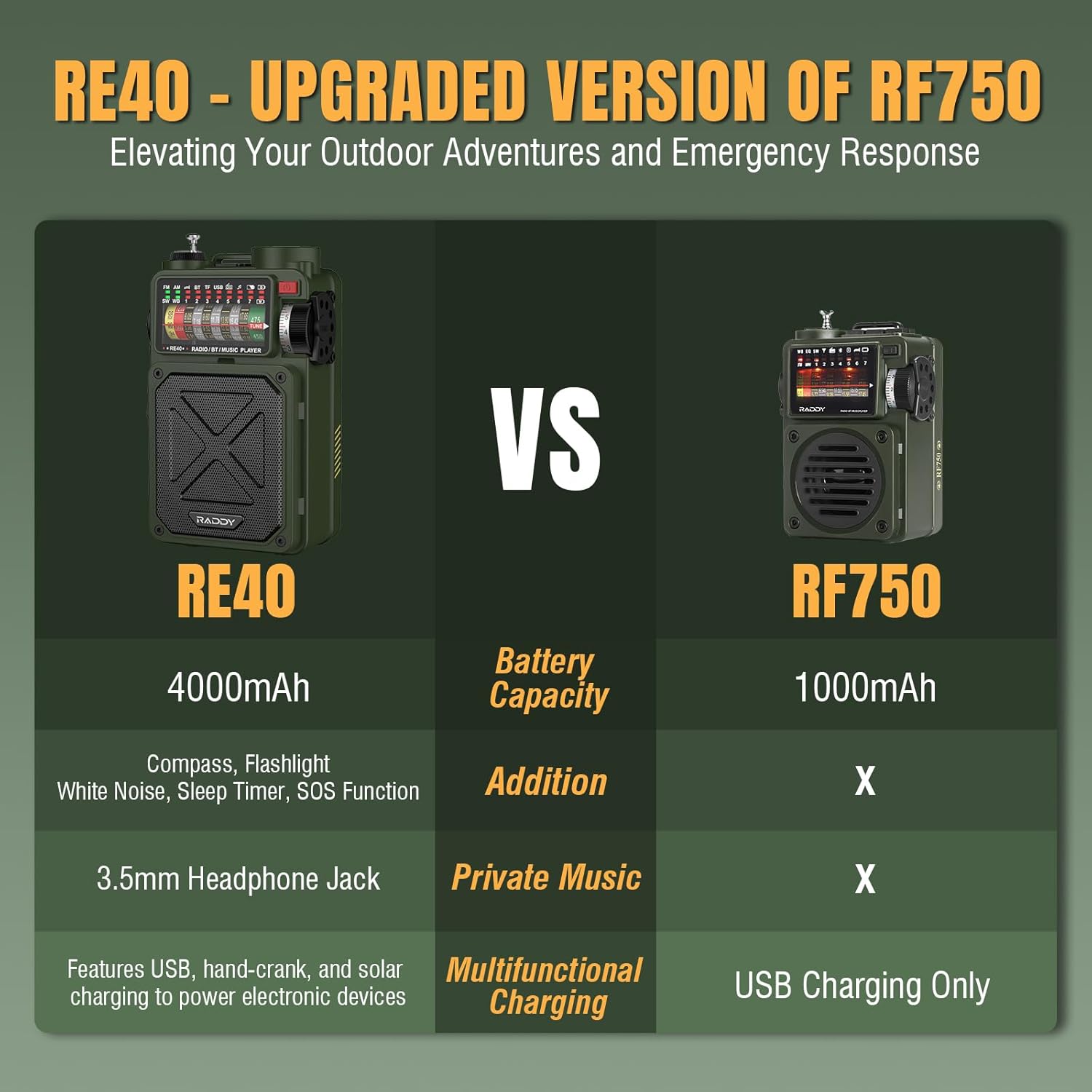
Image 1.1: The Raddy RE40 Portable Shortwave Radio and accompanying SSP4 Solar Panel.
2. ബോക്സിൽ എന്താണുള്ളത്?
- Raddy RE40 Portable Shortwave Radio
- SP4 4W പോർട്ടബിൾ സോളാർ പാനൽ
- USB-C ചാർജിംഗ് കേബിൾ
- ഉപയോക്തൃ മാനുവൽ
3. സജ്ജീകരണം
3.1 പ്രാരംഭ ചാർജിംഗ്
Before first use, fully charge the Raddy RE40 radio. The radio offers three charging methods:
- USB-C ചാർജിംഗ്: Connect the provided USB-C cable to the radio's USB-C input port and a compatible USB power adapter (not included).
- സോളാർ ചാർജിംഗ്: Place the radio or the SP4 solar panel in direct sunlight. The solar panel on the radio's back or the external SP4 panel will convert sunlight into energy to charge the internal battery.
- ഹാൻഡ്-ക്രാങ്ക് ചാർജിംഗ്: Extend the hand-crank handle located on the side of the radio and rotate it clockwise or counter-clockwise to generate power. This method is ideal for emergency situations when other power sources are unavailable.

Image 3.1: Comparison highlighting RE40's enhanced features including 4000mAh battery, compass, flashlight, white noise, sleep timer, SOS function, 3.5mm headphone jack, and multifunctional charging.

Image 3.2: Visual representation of the three charging methods: hand-crank, solar, and USB-C.
3.2 ആന്റിന എക്സ്റ്റൻഷൻ
For optimal radio reception, extend the telescopic antenna fully when operating in FM, SW, or WB modes.
4. പ്രവർത്തന നിർദ്ദേശങ്ങൾ
4.1 പവർ ഓൺ/ഓഫ്
Press and hold the power button (usually located on the side or top) to turn the radio ON or OFF.
4.2 Radio Mode Selection and Tuning
Use the mode switch or button to select between FM, AM, SW, and WB (Weather Band) modes. Rotate the tuning knob to scan for stations. The frequency display will show the current station.

Image 4.1: The Raddy RE40 radio is capable of receiving 7 NOAA weather channels for emergency alerts.
4.3 ബ്ലൂടൂത്ത് സ്പീക്കർ പ്രവർത്തനം
Switch the mode to 'BT' for Bluetooth. The radio will enter pairing mode. On your smartphone or other Bluetooth-enabled device, search for 'RE40' and connect. You can then play audio from your device through the radio's speaker. The radio features control buttons for play/pause, next/previous track.

Image 4.2: The Raddy RE40 can be used as a Bluetooth speaker, allowing audio playback from connected devices.
4.4 Music Playback (USB/TF/SD Card)
Insert a USB drive or TF/SD card (not included) into the respective port. The radio will automatically detect and play audio files. Use the control buttons for navigation.

Image 4.3: The Raddy RE40 features a USB output port, 3.5mm earphone jack, Type-C input port, and a TF card slot for various connectivity and playback options.
4.5 ഫ്ലാഷ്ലൈറ്റും SOS അലാറവും
The RE40 includes a built-in flashlight. Press the dedicated flashlight button to turn it on/off. For emergencies, activate the SOS alarm function. This will emit a loud siren and flash the flashlight in a distress signal pattern.

Image 4.4: The RE40's flashlight provides illumination, and the SOS alarm can be activated for emergency signaling.
4.6 White Noise Function and Sleep Timer
The radio offers a white noise function with 7 soothing sounds to aid relaxation or sleep. Activate this feature and set the sleep timer (10-70 minutes) to automatically turn off the device after a set duration.

Image 4.5: The RE40 provides 7 white noise sounds for relaxation.

Image 4.6: The sleep timer feature allows automatic shutdown after a user-defined period.
4.7 പവർ ബാങ്ക് പ്രവർത്തനം
The RE40 can act as a power bank. Connect your mobile phone or other USB-powered devices to the USB output port on the radio to charge them. This is particularly useful in emergency situations.

Image 4.7: The RE40 can charge external devices like smartphones via its USB output.
4.8 കോമ്പസ്
A small compass is integrated into the radio for basic navigation assistance.

Image 4.8: The RE40 features a built-in compass for navigation and a wrist strap for portability.
5. പരിപാലനം
- വൃത്തിയാക്കൽ: റേഡിയോയുടെ പുറംഭാഗം വൃത്തിയാക്കാൻ മൃദുവായതും ഉണങ്ങിയതുമായ തുണി ഉപയോഗിക്കുക. അബ്രസിവ് ക്ലീനറുകളോ ലായകങ്ങളോ ഉപയോഗിക്കുന്നത് ഒഴിവാക്കുക.
- സംഭരണം: നേരിട്ടുള്ള സൂര്യപ്രകാശത്തിൽ നിന്നും കടുത്ത താപനിലയിൽ നിന്നും അകലെ തണുത്തതും വരണ്ടതുമായ സ്ഥലത്ത് റേഡിയോ സൂക്ഷിക്കുക.
- ബാറ്ററി കെയർ: To prolong battery life, fully charge the radio at least once every three months if not in regular use. Avoid completely draining the battery frequently.
- സോളാർ പാനൽ: Keep the solar panel clean and free of obstructions for efficient charging.
6. പ്രശ്നപരിഹാരം
- ശക്തിയില്ല: Ensure the battery is charged. Try charging via USB-C, solar, or hand-crank.
- മോശം റേഡിയോ സ്വീകരണം: Fully extend the telescopic antenna. Try repositioning the radio. In SW mode, external antenna connection might improve reception.
- ബ്ലൂടൂത്ത് കണക്ഷൻ പ്രശ്നങ്ങൾ: Ensure the radio is in Bluetooth mode and your device's Bluetooth is enabled. Move your device closer to the radio. Disconnect and re-pair if necessary.
- ശബ്ദമില്ല: Check the volume level. Ensure the correct mode (Radio, BT, USB/TF) is selected.
- ഫ്ലാഷ്ലൈറ്റ് പ്രവർത്തിക്കുന്നില്ല: Check if the radio is powered on and the flashlight button is pressed correctly.
7 സ്പെസിഫിക്കേഷനുകൾ
| ഫീച്ചർ | സ്പെസിഫിക്കേഷൻ |
|---|---|
| മോഡൽ നമ്പർ | RE40 |
| റേഡിയോ ബാൻഡുകൾ പിന്തുണയ്ക്കുന്നു | AM, FM, SW, WB (NOAA) |
| ബാറ്ററി ശേഷി | 4000mAh |
| പവർ സ്രോതസ്സുകൾ | USB-C, Solar, Hand-Crank |
| കണക്റ്റിവിറ്റി | Bluetooth, USB, TF/SD Card |
| പ്രത്യേക സവിശേഷതകൾ | Built-In Flashlight, Compass, SOS Alarm, White Noise Function, Power Bank |
| ഉൾപ്പെടുത്തിയ ഘടകങ്ങൾ | Raddy RE40 Portable Shortwave Radio, SP4 4W Portable Solar Panel |
8. വാറൻ്റിയും പിന്തുണയും
For warranty information or technical support, please refer to the documentation provided with your purchase or contact the manufacturer directly. Keep your proof of purchase for warranty claims.