
Beetel X75_Blue
ബീറ്റൽ X75 2.4Ghz കോർഡ്ലെസ് ലാൻഡ്ലൈൻ ഫോൺ യൂസർ മാനുവൽ
Model: X75_Blue
ആമുഖം
Welcome to the user manual for your new Beetel X75 2.4Ghz Cordless Landline Phone. This manual provides detailed instructions on how to set up, operate, and maintain your phone, ensuring you get the most out of its features. The Beetel X75 combines the reliability of a landline with the convenience of cordless technology, offering clear communication and a range of useful functions.
ഉൽപ്പന്നം കഴിഞ്ഞുview ഫീച്ചറുകളും
പ്രധാന സവിശേഷതകൾ
- 2.4GHz Digital Technology Cordless for clear communication.
- Dual Mode DTMF / FSK caller ID system compatible.
- 1 Line DOT Matrix and 1 Line 7 Segment LCD Display with Blue White Backlit.
- Illuminated Keypad for easy dialing in low light.
- 50 Incoming Calls Memory and ability to Store 100 Contacts with Name.
- Two-Way Speakerphone with Adjustable volume.
- 5 Step in-call volume control and 6 step ringer volume control.
- 5 Ringtones and 5 Polyphonic Ringtones at handset with Volume adjustment.
- Handset ON/Off, Auto Answer, Handset Keypad Lock / Unlock, Alarm Function, Handset Locator, Tone / Pulse dialing Mode, Redial, Mute.
- Out of Range Warning, Low battery warning, Battery charging level indicator on Handset.
- Baby call function.
ഘടകങ്ങൾ
The Beetel X75 package includes the cordless handset, the base unit, a power adapter for the base unit, a telephone line cord, and rechargeable AAA batteries.

Image showing the Beetel X75 cordless handset docked in its base unit, ready for use.
സജ്ജമാക്കുക
പാക്കേജ് ഉള്ളടക്കം
ആരംഭിക്കുന്നതിന് മുമ്പ്, എല്ലാ ഇനങ്ങളും ബോക്സിൽ ഉണ്ടെന്ന് ഉറപ്പാക്കുക:
- Beetel X75 Landline Phone (Handset and Base Unit)
- പവർ അഡാപ്റ്റർ
- ടെലിഫോൺ ലൈൻ കോർഡ്
- 2 AAA റീചാർജ് ചെയ്യാവുന്ന ബാറ്ററികൾ
- ഉപയോക്തൃ മാനുവൽ
ബാറ്ററി ഇൻസ്റ്റാളേഷൻ
- കോർഡ്ലെസ് ഹാൻഡ്സെറ്റിന്റെ പിൻഭാഗത്തുള്ള ബാറ്ററി കമ്പാർട്ട്മെന്റ് കവർ തുറക്കുക.
- ശരിയായ പോളാരിറ്റി (+ ഉം - ഉം) നിരീക്ഷിച്ചുകൊണ്ട് രണ്ട് AAA റീചാർജ് ചെയ്യാവുന്ന ബാറ്ററികൾ ഇടുക.
- ബാറ്ററി കമ്പാർട്ട്മെൻ്റ് കവർ സുരക്ഷിതമായി അടയ്ക്കുക.

Illustration of the handset displaying a battery charging level indicator, indicating proper battery function.
അടിസ്ഥാന യൂണിറ്റ് ബന്ധിപ്പിക്കുന്നു
- ടെലിഫോൺ ലൈൻ കോഡിന്റെ ഒരറ്റം ബേസ് യൂണിറ്റിലെ LINE ജാക്കുമായി ബന്ധിപ്പിക്കുക.
- ടെലിഫോൺ ലൈൻ കോഡിന്റെ മറ്റേ അറ്റം നിങ്ങളുടെ ടെലിഫോൺ വാൾ ജാക്കുമായി ബന്ധിപ്പിക്കുക.
- Plug the small end of the power adapter into the DC IN 6V jack on the base unit.
- പവർ അഡാപ്റ്ററിന്റെ വലിയ അറ്റം ഒരു സാധാരണ ഇലക്ട്രിക്കൽ ഔട്ട്ലെറ്റിലേക്ക് പ്ലഗ് ചെയ്യുക.
പ്രാരംഭ ചാർജ്
Place the cordless handset on the base unit. The handset should begin charging. For optimal battery performance, allow the handset to charge for at least 12-15 hours before its first use.
പ്രവർത്തന നിർദ്ദേശങ്ങൾ
കോളുകൾ ചെയ്യുന്നു
- To make a call, pick up the handset or press the സംസാരിക്കുക ബട്ടൺ.
- കീപാഡ് ഉപയോഗിച്ച് ആവശ്യമുള്ള ഫോൺ നമ്പർ ഡയൽ ചെയ്യുക.
- അമർത്തുക അവസാനിക്കുന്നു കോൾ അവസാനിപ്പിക്കാനുള്ള ബട്ടൺ.
കോളുകൾക്ക് മറുപടി നൽകുന്നു
- ഫോൺ റിംഗ് ചെയ്യുമ്പോൾ, അമർത്തുക സംസാരിക്കുക കോളിന് മറുപടി നൽകാനുള്ള ബട്ടൺ.
- Alternatively, if Auto Answer is enabled, simply pick up the handset from the base unit.
സ്പീക്കർഫോൺ പ്രവർത്തനം
The Beetel X75 features a convenient two-way speakerphone. During a call, press the സ്പീക്കർ button to activate the speakerphone. Press it again to switch back to the handset earpiece. The speakerphone volume can be adjusted using the volume control buttons.
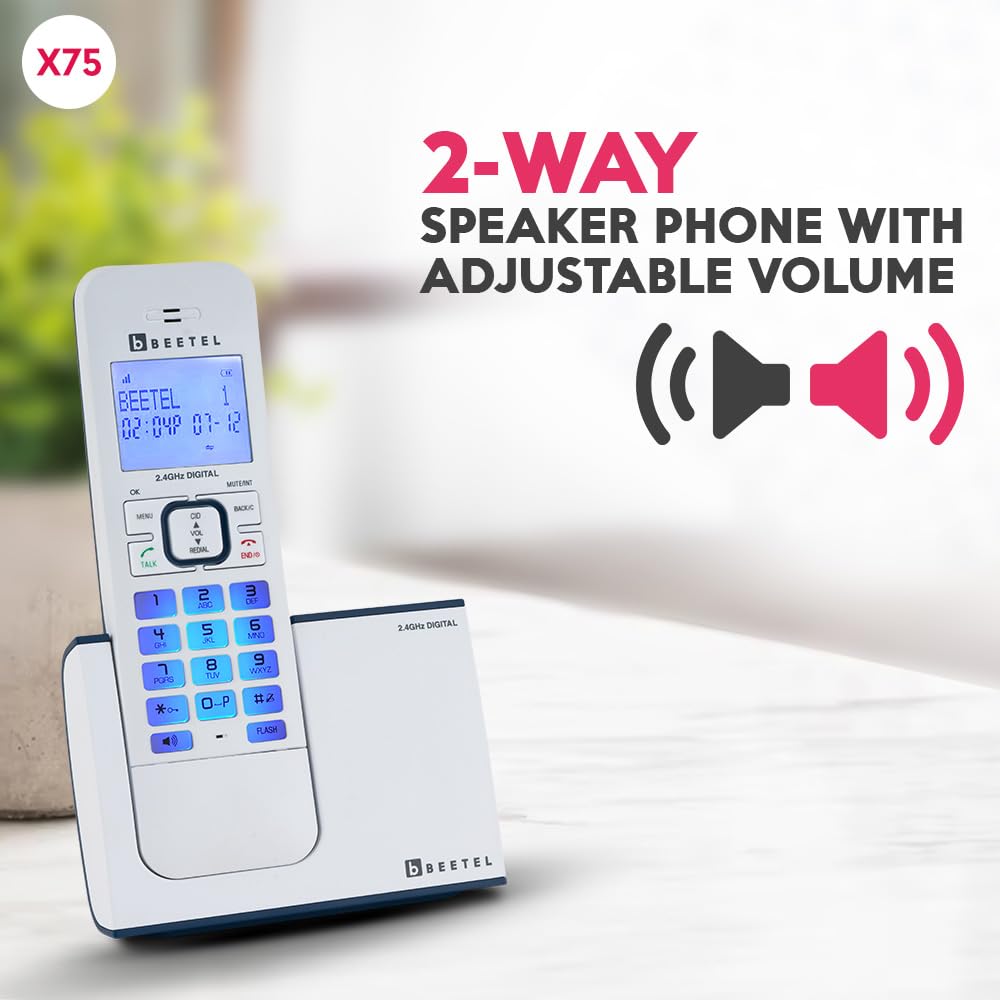
Image highlighting the speakerphone function on the Beetel X75 handset, indicating adjustable volume.
കോളർ ഐഡി
The phone supports both DTMF and FSK caller ID systems. When a call comes in, the caller's number (and name, if available and stored) will be displayed on the LCD screen.

ക്ലോസ് അപ്പ് view of the Beetel X75 handset's LCD display with blue backlight and illuminated keypad.
Phonebook and Call Memory
You can store up to 100 contacts with names in the phonebook. The phone also keeps a memory of the last 50 incoming calls, allowing you to easily review and redial numbers.
Ringer and In-Call Volume Control
Adjust the ringer volume to one of 6 steps to suit your environment. During a call, you can adjust the in-call volume to one of 5 steps for comfortable listening.
അധിക പ്രവർത്തനങ്ങൾ
- Handset ON/Off: Power the handset on or off to conserve battery.
- യാന്ത്രിക ഉത്തരം: Enable or disable automatic call answering when lifting the handset from the base.
- Keypad Lock/Unlock: Prevent accidental dialing by locking the keypad.
- അലാറം പ്രവർത്തനം: Set an alarm to remind you of important events.
- ഹാൻഡ്സെറ്റ് ലൊക്കേറ്റർ: Press the PAGE button on the base unit to make the handset ring, helping you locate it.
- Tone/Pulse Dialing Mode: Select the appropriate dialing mode for your telephone line.
- വീണ്ടും ഡയൽ ചെയ്യുക: Quickly redial the last number called.
- നിശബ്ദമാക്കുക: Mute your microphone during a call for privacy.
- Baby Call Function: A pre-programmed number can be dialed automatically by pressing any key.

A circular diagram illustrating various features of the Beetel X75 phone, such as Caller ID, Alarm, and Handset Locator.
മെയിൻ്റനൻസ്
Proper care and maintenance will extend the life of your Beetel X75 phone.
- വൃത്തിയാക്കൽ: ഫോണും ബേസ് യൂണിറ്റും ഒരു സോഫ്റ്റ്, ഡി ക്ലീനർ ഉപയോഗിച്ച് തുടയ്ക്കുക.amp തുണി. ഉരച്ചിലുകളുള്ള ക്ലീനറുകളോ ലായകങ്ങളോ ഉപയോഗിക്കരുത്.
- ബാറ്ററി കെയർ: Always use the provided rechargeable batteries. If the phone will not be used for an extended period, remove the batteries from the handset.
- സംഭരണം: നേരിട്ടുള്ള സൂര്യപ്രകാശവും കടുത്ത താപനിലയും ഏൽക്കാത്ത തണുത്തതും വരണ്ടതുമായ സ്ഥലത്ത് ഫോൺ സൂക്ഷിക്കുക.

Image showing the handset with a visual indicator for low battery warning, prompting for recharge.
ട്രബിൾഷൂട്ടിംഗ്
If you encounter any issues with your Beetel X75 phone, refer to the table below for common problems and their solutions.
| പ്രശ്നം | സാധ്യമായ കാരണം | പരിഹാരം |
|---|---|---|
| ഡയൽ ടോൺ ഇല്ല | ടെലിഫോൺ ലൈൻ കോർഡ് ശരിയായി ബന്ധിപ്പിച്ചിട്ടില്ല. | ടെലിഫോൺ ലൈൻ കോർഡ് ബേസ് യൂണിറ്റിലും വാൾ ജാക്കിലും സുരക്ഷിതമായി പ്ലഗ് ചെയ്തിട്ടുണ്ടെന്ന് ഉറപ്പാക്കുക. |
| ഹാൻഡ്സെറ്റ് ഡിസ്പ്ലേ ശൂന്യമാണ് | ബാറ്ററികൾ കുറവാണ് അല്ലെങ്കിൽ ശരിയായി ഇൻസ്റ്റാൾ ചെയ്തിട്ടില്ല. | Place the handset on the base unit to charge. Check battery polarity. |
| കോളുകൾ വിളിക്കാനോ സ്വീകരിക്കാനോ കഴിയില്ല | പവർ അഡാപ്റ്റർ വിച്ഛേദിക്കപ്പെട്ടു അല്ലെങ്കിൽ വൈദ്യുതി നിലച്ചുtage. | Ensure the power adapter is securely plugged into the base unit and a working electrical outlet. Note: Cordless handset requires base unit power to operate. |
| പരിധിക്ക് പുറത്തുള്ള മുന്നറിയിപ്പ് | ഹാൻഡ്സെറ്റ് ബേസ് യൂണിറ്റിൽ നിന്ന് വളരെ അകലെയാണ്. | അടിസ്ഥാന യൂണിറ്റിന് അടുത്തേക്ക് ഹാൻഡ്സെറ്റ് നീക്കുക. |

Image depicting the handset with an 'out of range' warning icon, indicating loss of connection to the base unit.
സ്പെസിഫിക്കേഷനുകൾ
| ഫീച്ചർ | വിശദാംശങ്ങൾ |
|---|---|
| ഉൽപ്പന്ന അളവുകൾ | 12 x 8.5 x 19.5 സെ.മീ |
| ഇനത്തിൻ്റെ ഭാരം | 360 ഗ്രാം |
| ബാറ്ററികൾ ആവശ്യമാണ് | 2 AAA batteries (rechargeable) |
| മോഡൽ നമ്പർ | X75_Blue |
| കോൾ കോൺഫറൻസ് | 3 വഴി |
| ഡിസ്പ്ലേ സവിശേഷതകൾ | Wireless, Blue LED Backlit, 1 Line 7 Segment LCD |
| ഫോൺ സ്റ്റാൻഡ്ബൈ സമയം | 180 മണിക്കൂർ |
| മെറ്റീരിയൽ | പ്ലാസ്റ്റിക് |
| മാതൃരാജ്യം | ഇന്ത്യ |
വാറൻ്റിയും പിന്തുണയും
For warranty information and details regarding your Beetel X75 Cordless Landline Phone, please refer to the warranty card included in your product packaging or visit the official Beetel webസൈറ്റ്. ഏതെങ്കിലും വാറന്റി ക്ലെയിമുകൾക്ക് വാങ്ങിയതിന്റെ തെളിവായി നിങ്ങളുടെ വാങ്ങൽ രസീത് സൂക്ഷിക്കുക.
For technical support or further assistance, please contact Beetel customer service through the contact details provided in your product documentation or on the official Beetel support page.