
1. സജ്ജീകരണം
1.1 പാക്കേജ് ഉള്ളടക്കം
ആരംഭിക്കുന്നതിന് മുമ്പ്, പാക്കേജിൽ എല്ലാ ഇനങ്ങളും ഉണ്ടെന്ന് ഉറപ്പാക്കുക:
- 1 x BusoTh Pocket Digital Inclinometer
- 1 x USB കേബിൾ
1.2 പ്രാരംഭ ചാർജിംഗ്
The inclinometer is powered by a built-in 3.7V lithium battery (260mAh). For optimal performance, fully charge the device before first use.
- Locate the USB Type-C charging port on the side of the inclinometer.
- Connect the provided USB cable to the inclinometer and a suitable USB power source (e.g., computer, wall adapter).
- ഡിസ്പ്ലേയിലെ ബാറ്ററി ഇൻഡിക്കേറ്റർ ചാർജിംഗ് സ്റ്റാറ്റസ് കാണിക്കും.
- പൂർണ്ണമായി ചാർജ് ചെയ്തുകഴിഞ്ഞാൽ, യുഎസ്ബി കേബിൾ വിച്ഛേദിക്കുക.

ചിത്രം 1.1: The inclinometer connected to a USB Type-C charging cable.
വീഡിയോ 1.1: Demonstrates charging the inclinometer and initial power-on. This video shows the device being charged and then turned on, displaying an "Err" message which is then cleared.
1.3 Powering On and Screen Protection
To power on the device, press the power button located on the top surface. Remove the protective film from the display screen before use for clear visibility.

ചിത്രം 1.2: The inclinometer and its USB charging cable. Note the protective film on the display.
2. പ്രവർത്തന നിർദ്ദേശങ്ങൾ
2.1 അടിസ്ഥാന പ്രവർത്തനം
- പവർ ഓൺ/ഓഫ്: Press the power button (usually the left button on top) to turn the device on or off.
- യാന്ത്രിക ഷട്ട്ഡൗൺ: The inclinometer features an energy-saving function. The backlight automatically turns off after 30 seconds of inactivity, and the device automatically shuts down after 3 minutes without response.

ചിത്രം 2.1: The inclinometer's display showing the intelligent power-saving feature.
2.2 Measurement Modes: Absolute and Relative
The inclinometer supports two measurement modes:
- Absolute Measurement: Measures the angle relative to a true horizontal plane. This is the default mode when the device is powered on.
- ആപേക്ഷിക അളവ്: Allows you to set any surface as a temporary "zero" reference. To switch to relative measurement, place the inclinometer on your desired reference surface and press the "ZERO" button (usually the right button on top). The display will show "0.00°" and "REF" to indicate relative mode.

ചിത്രം 2.2: Illustration of Absolute and Relative Measurement Modes. The top row shows absolute angles, while the bottom row demonstrates setting a reference point for relative measurement.
2.3 Angle and Slope Conversion
The device can display measurements in both degrees (°) and slope percentage (%). Press the "UNIT" button (often the same as the power button, or a dedicated button) to toggle between these units.

ചിത്രം 2.3: The inclinometer displaying measurements in degrees and slope percentage.
2.4 Data Lock Function
To hold a measurement on the display for easier reading, press the "HOLD" button (if available, or a long press on another button might activate it). Press it again to release the data lock.
2.5 കാന്തിക അഡോർപ്ഷൻ
The base of the inclinometer features strong magnets, allowing it to be securely attached to ferromagnetic surfaces for hands-free measurement. This is particularly useful in woodworking and metalworking applications.

ചിത്രം 2.4: The inclinometer's magnetic base for secure attachment.
വീഡിയോ 2.1: This video highlights the magnetic measurement capability, long-lasting battery life, and professional-grade accuracy of the inclinometer.
2.6 Automatic Display Turnover
The display automatically rotates to remain upright when the inclinometer is inverted, ensuring easy readability in various orientations. The measuring range is 4 x 90 degrees.

ചിത്രം 2.5: The display automatically inverts for readability.
3. പരിപാലനം
- വൃത്തിയാക്കൽ: Use a soft, dry cloth to clean the device. Do not use abrasive cleaners or solvents, as these may damage the display or casing.
- സംഭരണം: Store the inclinometer in a dry place, away from direct sunlight and extreme temperatures.
- ബാറ്ററി കെയർ: To prolong battery life, avoid fully discharging the battery frequently. Recharge the device when the battery indicator shows low power.
- ആഘാതം ഒഴിവാക്കുക: While durable, avoid dropping the device or subjecting it to strong impacts, which can affect its accuracy.
4. പ്രശ്നപരിഹാരം
| പ്രശ്നം | സാധ്യമായ കാരണം | പരിഹാരം |
|---|---|---|
| ഉപകരണം പവർ ഓണാക്കുന്നില്ല. | കുറഞ്ഞതോ തീർന്നതോ ആയ ബാറ്ററി. | നൽകിയിരിക്കുന്ന USB കേബിൾ ഉപയോഗിച്ച് ഉപകരണം ചാർജ് ചെയ്യുക. |
| ഡിസ്പ്ലേ "പിശക്" കാണിക്കുന്നു. | Internal sensor error or unstable measurement. | Turn the device off and on again. Ensure the device is stable and not subjected to excessive vibration during measurement. If the error persists, contact customer support. |
| കൃത്യമല്ലാത്തതോ ചാഞ്ചാട്ടമുള്ളതോ ആയ വായനകൾ. |
|
|
| ഡിസ്പ്ലേ മങ്ങിയതോ പ്രതികരിക്കാത്തതോ ആണ്. | Low battery or device in sleep mode. | Charge the device. Press any button to wake it from sleep mode. |
5 സ്പെസിഫിക്കേഷനുകൾ
| ഫീച്ചർ | വിശദാംശങ്ങൾ |
|---|---|
| ഇനം തരം | Pocket Digital Inclinometer |
| മെറ്റീരിയൽ | എബിഎസ് |
| പരിധി അളക്കുന്നു | 4 x 90° |
| ഡിസ്പ്ലേ റെസല്യൂഷൻ | 0.05° |
| കൃത്യത | ±0.2° |
| ആവർത്തനക്ഷമത | 0.1° |
| വൈദ്യുതി വിതരണം | 3.7V Lithium Battery, 260mAh |
| പ്രവർത്തന താപനില | -10°C മുതൽ 50°C വരെ (14°F മുതൽ 122°F വരെ) |
| ഉൽപ്പന്ന വലുപ്പം | Approx. 36 x 36 x 20mm (1.42 x 1.42 x 0.79in) |
| പാക്കേജ് അളവുകൾ | 3.94 x 3.15 x 1.18 ഇഞ്ച് |
| മോഡൽ നമ്പർ | BusoThnkuw0sv7qg |
| നിർമ്മാതാവ് | BusoTh |
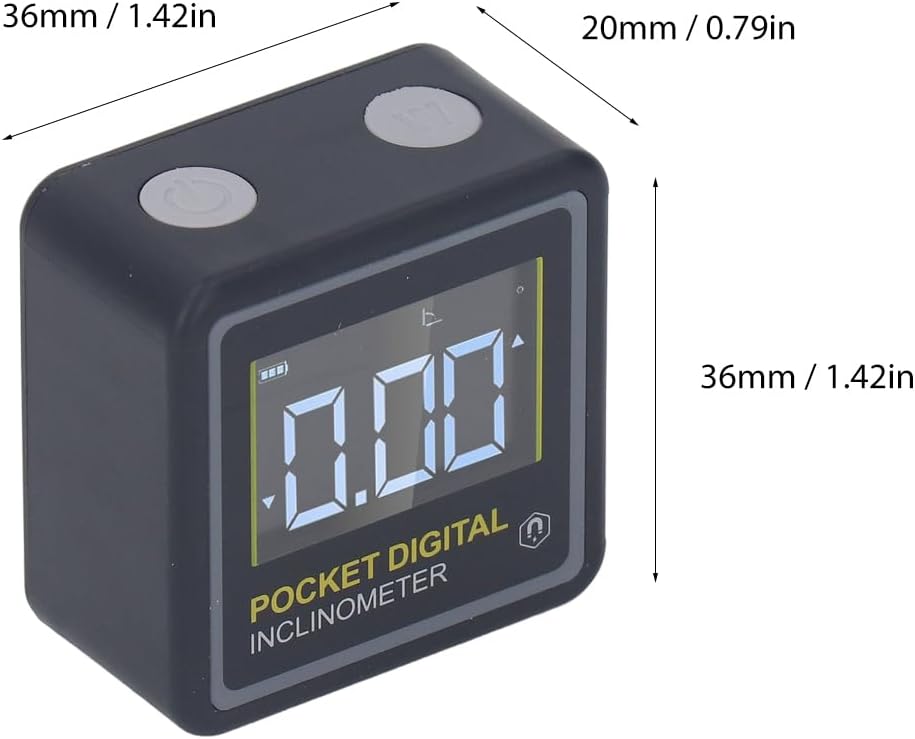
ചിത്രം 5.1: Physical dimensions of the BusoTh Pocket Digital Inclinometer.
6. വാറൻ്റിയും പിന്തുണയും
Specific warranty information for the BusoTh Pocket Digital Inclinometer is not provided in the product details. For warranty claims, technical support, or service inquiries, please contact the seller or manufacturer directly through your purchase platform.
നിർമ്മാതാവ്: BusoTh