
1. ആമുഖം
Thank you for choosing the ATTACK SHARK Ajazz AK820 Mechanical Keyboard. This 75% TKL keyboard is designed for gaming and productivity, featuring hot-swappable switches, customizable RGB backlighting, and a convenient multi-function knob. This manual provides detailed instructions for setup, operation, maintenance, and troubleshooting to ensure optimal performance and longevity of your keyboard.
2 പ്രധാന സവിശേഷതകൾ
- 75% Layout (82 Keys): Compact design retaining essential arrow and function keys, optimizing desk space. Features N-key rollover for simultaneous key presses.
- Multi-Function Metal Knob: Allows independent control of volume level and mute function. Compatible with Mac and Windows operating systems.
- ഗാസ്കറ്റ് മൗണ്ടഡ് ഡിസൈൻ: Coupled with a Flex-cut PC plate and 5 layers of sound insulation (Poron sandwich cotton, IXPE under-axis pad, PET premium sound pad, bottom cotton, bottom silicone) to maximally reduce noise and provide a softer, more elastic typing feel.
- Hot-Swappable Mechanical Sea Salt Switches: High-quality PCB supports 3/5-pin hot-swap, allowing easy switch replacement without soldering. Pre-lubed Sea Salt Linear switches offer a smooth and pleasing typing experience with a 50 million keystroke lifespan.
- RGB ബാക്ക്ലൈറ്റിംഗ്: South-facing LEDs with 1.6M RGB. Offers 20 lighting effects changeable via "FN+|" and customizable via driver software. Double-shot PBT keycaps provide superior shine-through.
3. പാക്കേജ് ഉള്ളടക്കം
- ATTACK SHARK Ajazz AK820 Mechanical Keyboard
- യുഎസ്ബി-സി കേബിൾ
- 2-in-1 Keycap/Switch Puller

Image 1: The ATTACK SHARK Ajazz AK820 Mechanical Keyboard and its included USB-C cable.

ചിത്രം 2: ഒരു ഓവർview highlighting the 82-key layout and key features like Knob Design, Gasket Mount, PBT Keycaps, RGB, 75% Layout, and Hot Swap capability.
4. സജ്ജീകരണ ഗൈഡ്
4.1 കീബോർഡ് ബന്ധിപ്പിക്കുന്നു
- Locate the USB-C port on the back or side of the keyboard.
- നൽകിയിരിക്കുന്ന USB-C കേബിളിന്റെ ഒരറ്റം കീബോർഡുമായി ബന്ധിപ്പിക്കുക.
- Connect the other end of the USB-C cable to an available USB port on your computer (Laptop or PC).
- The keyboard is plug-and-play and should be automatically recognized by your operating system (Windows/Mac).

Image 3: The keyboard displaying its RGB backlighting, illustrating the 16.8 million colors and FN key combinations for controlling lighting modes.
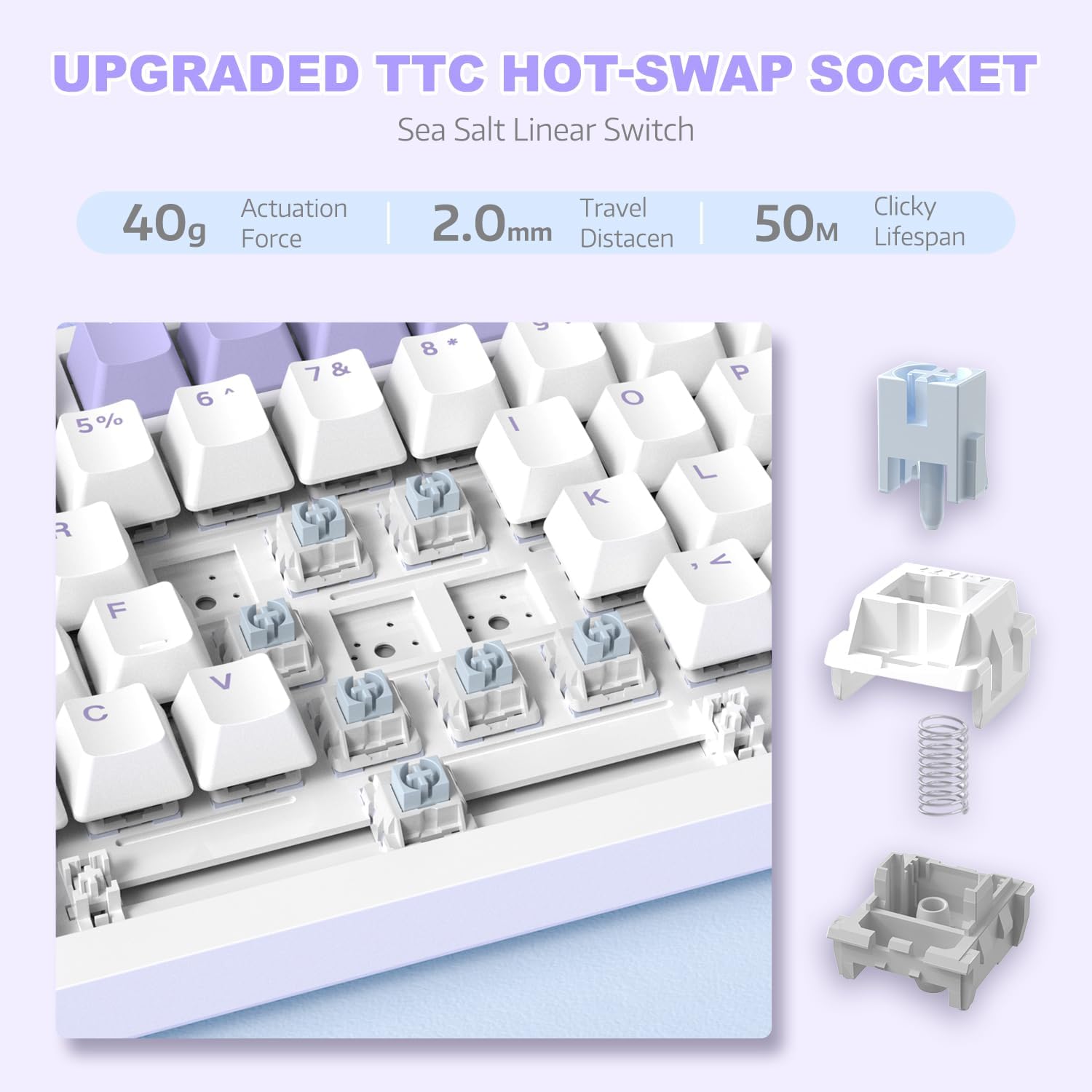
ചിത്രം 4: വിശദമായ view of the hot-swappable switch socket, demonstrating how switches can be easily removed and replaced.
5. പ്രവർത്തന നിർദ്ദേശങ്ങൾ
5.1 Multi-Function Knob Control
The metal knob located on the top right of the keyboard provides convenient multimedia control:
- Turn Clockwise: വോളിയം കൂട്ടുക.
- Turn Counter-clockwise: വോളിയം കുറയ്ക്കുക.
- അമർത്തി പിടിക്കുക: ഓഡിയോ മ്യൂട്ട് ചെയ്യുക/അൺമ്യൂട്ട് ചെയ്യുക.

Image 5: The multimedia knob, illustrating its functions for adjusting volume and muting audio.
5.2 RGB ബാക്ക്ലൈറ്റിംഗ് നിയന്ത്രണം
ഒന്നിലധികം ഇഫക്റ്റുകളുള്ള ഊർജ്ജസ്വലമായ RGB ബാക്ക്ലൈറ്റിംഗാണ് കീബോർഡിന്റെ സവിശേഷത. ലൈറ്റിംഗ് നിയന്ത്രിക്കാൻ ഇനിപ്പറയുന്ന കീ കോമ്പിനേഷനുകൾ ഉപയോഗിക്കുക:
- FN + | (Backslash): Cycle through 20 different lighting effects.
- എഫ്എൻ + എക്സ്: Turn RGB backlighting ON/OFF.
- Refer to the included quick guide for additional lighting customization options or download the dedicated driver software for advanced control.
5.3 ഹോട്ട്-സ്വാപ്പിംഗ് സ്വിച്ചുകളും കീക്യാപ്പുകളും
The AK820 supports hot-swapping, allowing you to change mechanical switches and keycaps without soldering.
- കീക്യാപ്പുകൾ നീക്കംചെയ്യുന്നു: Use the keycap puller tool to gently grip the keycap and pull upwards until it detaches from the switch.
- സ്വിച്ചുകൾ നീക്കംചെയ്യുന്നു: Use the switch puller (the other end of the 2-in-1 tool) to grip the top and bottom clips of the switch. Gently pull upwards until the switch detaches from the PCB.
- സ്വിച്ചുകൾ ഇൻസ്റ്റാൾ ചെയ്യുന്നു: Align the pins of the new 3-pin or 5-pin mechanical switch with the holes on the PCB. Press down firmly until the switch clicks into place. Ensure pins are not bent.
- കീക്യാപ്പുകൾ ഇൻസ്റ്റാൾ ചെയ്യുന്നു: Align the cross-stem of the keycap with the stem of the switch and press down firmly until it is seated.

Image 6: Highlighting the durable PBT keycaps, known for their oil and wear resistance.
5.4 ഓപ്പറേറ്റിംഗ് സിസ്റ്റം അനുയോജ്യത
The keyboard is compatible with both Windows and Mac operating systems. No special drivers are typically required for basic functionality.

Image 7: Visual representation of the keyboard's compatibility with both Mac and Windows operating systems.
6. പരിപാലനം
6.1 കീബോർഡ് വൃത്തിയാക്കൽ
- വൃത്തിയാക്കുന്നതിനുമുമ്പ് നിങ്ങളുടെ കമ്പ്യൂട്ടറിൽ നിന്ന് കീബോർഡ് വിച്ഛേദിക്കുക.
- കീക്യാപ്പുകൾക്കിടയിൽ നിന്ന് പൊടിയും അവശിഷ്ടങ്ങളും ഊതിക്കെടുത്താൻ ഒരു കംപ്രസ് ചെയ്ത വായു ക്യാൻ ഉപയോഗിക്കുക.
- ഉപരിതല വൃത്തിയാക്കലിന്, മൃദുവായ, ലിന്റ് രഹിത തുണി ഉപയോഗിച്ച് നേരിയ തോതിൽ വൃത്തിയാക്കുക d.ampവെള്ളം അല്ലെങ്കിൽ നേരിയ ക്ലീനിംഗ് ലായനി ഉപയോഗിച്ച് നനയ്ക്കുക. അമിതമായ ഈർപ്പം ഒഴിവാക്കുക.
- ക്ലീനിംഗ് ലായനികൾ നേരിട്ട് കീബോർഡിൽ തളിക്കരുത്.
6.2 കീക്യാപ്പ്, സ്വിച്ച് കെയർ
- When removing keycaps or switches, do so gently to avoid damaging the components.
- Store spare keycaps and switches in a clean, dry place.

Image 8: An exploded diagram illustrating the multi-layer noise reduction installation, including PORON sandwich cotton, IXPE switch pads, PET voice actor pdd, bottom cotton, and bottom silicone.
7. പ്രശ്നപരിഹാരം
7.1 കീബോർഡ് പ്രതികരിക്കുന്നില്ല
- USB-C കേബിൾ കീബോർഡിലേക്കും കമ്പ്യൂട്ടറിലേക്കും സുരക്ഷിതമായി ബന്ധിപ്പിച്ചിട്ടുണ്ടെന്ന് ഉറപ്പാക്കുക.
- നിങ്ങളുടെ കമ്പ്യൂട്ടറിലെ മറ്റൊരു USB പോർട്ടിലേക്ക് കീബോർഡ് ബന്ധിപ്പിക്കാൻ ശ്രമിക്കുക.
- ഒരു കമ്പ്യൂട്ടർ-നിർദ്ദിഷ്ട പ്രശ്നം ഒഴിവാക്കാൻ മറ്റൊരു കമ്പ്യൂട്ടറിൽ കീബോർഡ് പരിശോധിക്കുക.
- നിങ്ങളുടെ കമ്പ്യൂട്ടർ പുനരാരംഭിക്കുക.
7.2 RGB Backlighting Not Working/Incorrect
- അമർത്തുക FN + X to ensure the RGB is turned on.
- അമർത്തുക FN + | (Backslash) വ്യത്യസ്ത ലൈറ്റിംഗ് മോഡുകളിലൂടെ സഞ്ചരിക്കാൻ.
- If using custom settings, ensure the driver software is installed and configured correctly.
7.3 കീകൾ രജിസ്റ്റർ ചെയ്യുന്നില്ല (ആന്റി-ഗോസ്റ്റിംഗ്)
The AK820 features N-key rollover (NKRO) to prevent ghosting. If specific keys are not registering:
- Ensure the keycap and switch are properly seated. Gently press down on the keycap to ensure it's fully attached.
- If a specific switch is faulty, use the hot-swap feature to replace it with a new one.

Image 9: Illustration of the 82-key anti-ghosting feature, demonstrating the ability to register multiple simultaneous key presses.
7.4 Video Demonstration: AK820 Keyboard Overview
വീഡിയോ 1: ഒരു ഉദ്യോഗസ്ഥൻview of the AK820 75% Wired RGB Gasket Mechanical Keyboard, demonstrating its features including the volume knob, hot-swappable switches, and RGB lighting effects.
8 സ്പെസിഫിക്കേഷനുകൾ
| ഫീച്ചർ | വിശദാംശങ്ങൾ |
|---|---|
| മോഡൽ നമ്പർ | എകെ 820 |
| ഉൽപ്പന്ന അളവുകൾ | 12.87 x 5.35 x 1.57 ഇഞ്ച് |
| ഇനത്തിൻ്റെ ഭാരം | 2.05 പൗണ്ട് |
| നിർമ്മാതാവ് | അറ്റാക്ക് സ്രാവ് |
| കണക്റ്റിവിറ്റി ടെക്നോളജി | വയേർഡ് (USB-C) |
| കീബോർഡ് വിവരണം | ഗെയിമിംഗ് |
| കീകളുടെ എണ്ണം | 82 |
| സ്വിച്ച് തരം | Sea Salt Linear Switch (Hot-Swappable) |
| കീക്യാപ് മെറ്റീരിയൽ | പി.ബി.ടി |
| ബാക്ക്ലൈറ്റിംഗ് | RGB (തെക്ക് അഭിമുഖമായുള്ള LED-കൾ) |
| പ്രത്യേക സവിശേഷതകൾ | 5 Layers of sound insulation cotton, CNC Metal Knob, Hot-Swappable |
| അനുയോജ്യമായ ഉപകരണങ്ങൾ | Laptop, PC (Windows, Mac) |
9. വാറൻ്റിയും പിന്തുണയും
വാറന്റി വിവരങ്ങൾക്കും സാങ്കേതിക പിന്തുണയ്ക്കും, ദയവായി ഔദ്യോഗിക ATTACK SHARK കാണുക. webസൈറ്റിൽ ബന്ധപ്പെടുകയോ അവരുടെ ഉപഭോക്തൃ സേവനവുമായി നേരിട്ട് ബന്ധപ്പെടുകയോ ചെയ്യുക. ഏതെങ്കിലും വാറന്റി ക്ലെയിമുകൾക്ക് വാങ്ങിയതിന്റെ തെളിവായി നിങ്ങളുടെ വാങ്ങൽ രസീത് സൂക്ഷിക്കുക.
നിർമ്മാതാവ്: അറ്റാക്ക് സ്രാവ്
ആദ്യം ലഭ്യമായ തീയതി: ഡിസംബർ 15, 2023