
ATTACK SHARK AK820
ATTACK SHARK X Ajazz AK820 Mechanical Keyboard User Manual
മോഡൽ: AK820
ബ്രാൻഡ്: അറ്റാക്ക് ഷാർക്ക്
ഉൽപ്പന്നം കഴിഞ്ഞുview
The ATTACK SHARK X Ajazz AK820 is a 75% layout hot-swappable mechanical keyboard designed for gaming and everyday use. It features an 82-key layout, a multi-function rotary knob, gasket-mounted design for enhanced typing feel, and customizable LED backlighting. This keyboard is compatible with both Windows and Mac operating systems and connects via USB-C wired connection.
പ്രധാന സവിശേഷതകൾ
- 75% Percent Layout (82 keys) for space efficiency while retaining essential keys.
- N-Key Rollover (NKRO) ensures all simultaneous key presses are registered accurately.
- Multi-Function Metal Knob for independent volume control and mute functionality.
- Gasket Mounted Design with 5 layers of sound insulation (Poron sandwich cotton, IXPE under-axis pad, PET premium sound pad, bottom cotton) for a softer, more elastic typing experience and reduced noise.
- Hot-Swappable PCB (3/5-pin) allows for easy switch replacement without soldering.
- Pre-lubed AS Red Switches (linear) with a 50 million keystroke lifespan, ideal for gaming and office use.
- 20 LED Backlight Effects (white light) with 5 brightness levels and 5 lighting speeds.
- Durable PBT Keycaps with wear-resistant, waterproof properties and high light transmittance.
- Ergonomic Design with OEM keycaps for comfortable typing.
പാക്കേജ് ഉള്ളടക്കം
- ATTACK SHARK X Ajazz AK820 Mechanical Keyboard
- USB കേബിൾ
- 2-in-1 Key Extractor (Keycap Puller)
കീബോർഡ് ലേഔട്ട്

ചിത്രം 1: ഓവർview of the AK820 keyboard layout.

Figure 2: Visual representation of the AK820's key features.
സജ്ജമാക്കുക
കീബോർഡ് ബന്ധിപ്പിക്കുന്നു
- Locate the USB-C port on the back or side of the keyboard.
- നൽകിയിരിക്കുന്ന USB-C കേബിൾ കീബോർഡിന്റെ USB-C പോർട്ടുമായി ബന്ധിപ്പിക്കുക.
- നിങ്ങളുടെ കമ്പ്യൂട്ടറിൽ (PC അല്ലെങ്കിൽ Mac) ലഭ്യമായ ഒരു USB പോർട്ടിലേക്ക് USB കേബിളിന്റെ മറ്റേ അറ്റം പ്ലഗ് ചെയ്യുക.
- കീബോർഡ് പ്ലഗ്-ആൻഡ്-പ്ലേ ആണ്, നിങ്ങളുടെ ഓപ്പറേറ്റിംഗ് സിസ്റ്റം അത് യാന്ത്രികമായി തിരിച്ചറിയണം.

Figure 3: The compact design and USB-C connection point.
പ്രവർത്തന നിർദ്ദേശങ്ങൾ
Multimedia Knob Functionality
The metal rotary knob located on the top right of the keyboard provides convenient multimedia control:
- തിരിക്കുക: Turn the knob clockwise to increase volume, and counter-clockwise to decrease volume.
- അമർത്തുക: Press the knob to mute or unmute the audio.
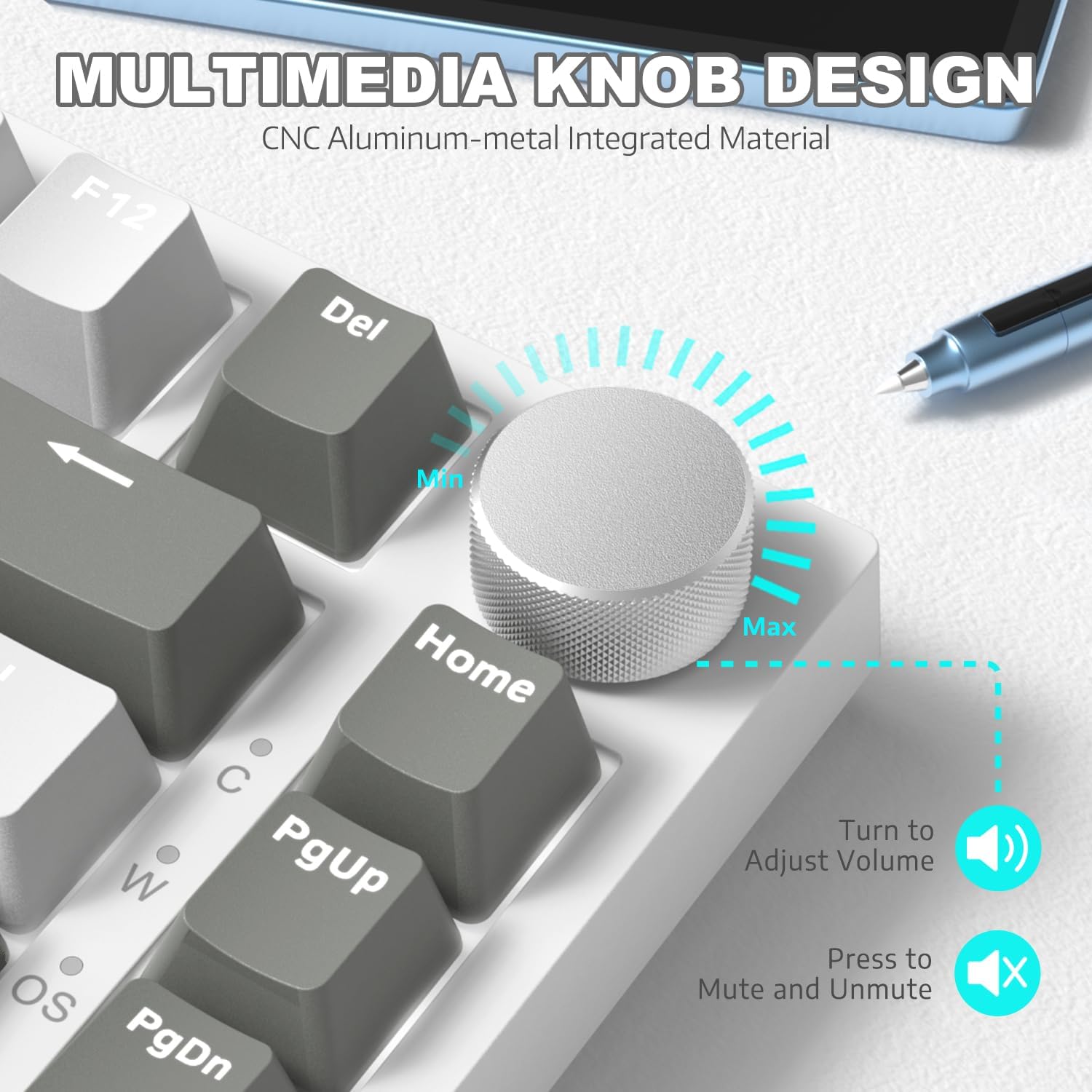
ചിത്രം 4: വിശദമായി view of the multimedia knob and its functions.
ബാക്ക്ലൈറ്റ് നിയന്ത്രണം
The AK820 features 20 white LED backlight effects. You can customize the lighting to suit your preference:
- ലൈറ്റ് ഇഫക്റ്റുകൾ മാറ്റുക: അമർത്തുക FN + | ലഭ്യമായ 20 ബാക്ക്ലൈറ്റ് ഇഫക്റ്റുകളിലൂടെ കടന്നുപോകാൻ.
- തെളിച്ചം ക്രമീകരിക്കുക: Use specific key combinations (refer to keyboard legends or software) to adjust between 5 brightness levels.
- വേഗത ക്രമീകരിക്കുക: Use specific key combinations (refer to keyboard legends or software) to adjust between 5 lighting speeds.
- Custom Gaming Lighting: അമർത്തുക FN + 1! / 2@ / 3# to access and customize 3 sets of gaming lighting effects. Choose the light recording mode and save your lighting profiles.

ചിത്രം 5: കീബോർഡ് ഷോasing its LED backlight effects.
ഹോട്ട്-സ്വാപ്പ് ചെയ്യാവുന്ന സ്വിച്ചുകൾ
The AK820's high-quality PCB supports 3/5-pin hot-swap switches, allowing you to easily change switches without soldering. This feature enables customization of your typing experience.
- Use the included 2-in-1 key extractor to carefully remove keycaps and switches.
- Align the pins of the new switch with the sockets on the PCB and gently press down until it clicks into place.
- കീക്യാപ്പ് മാറ്റിസ്ഥാപിക്കുക.
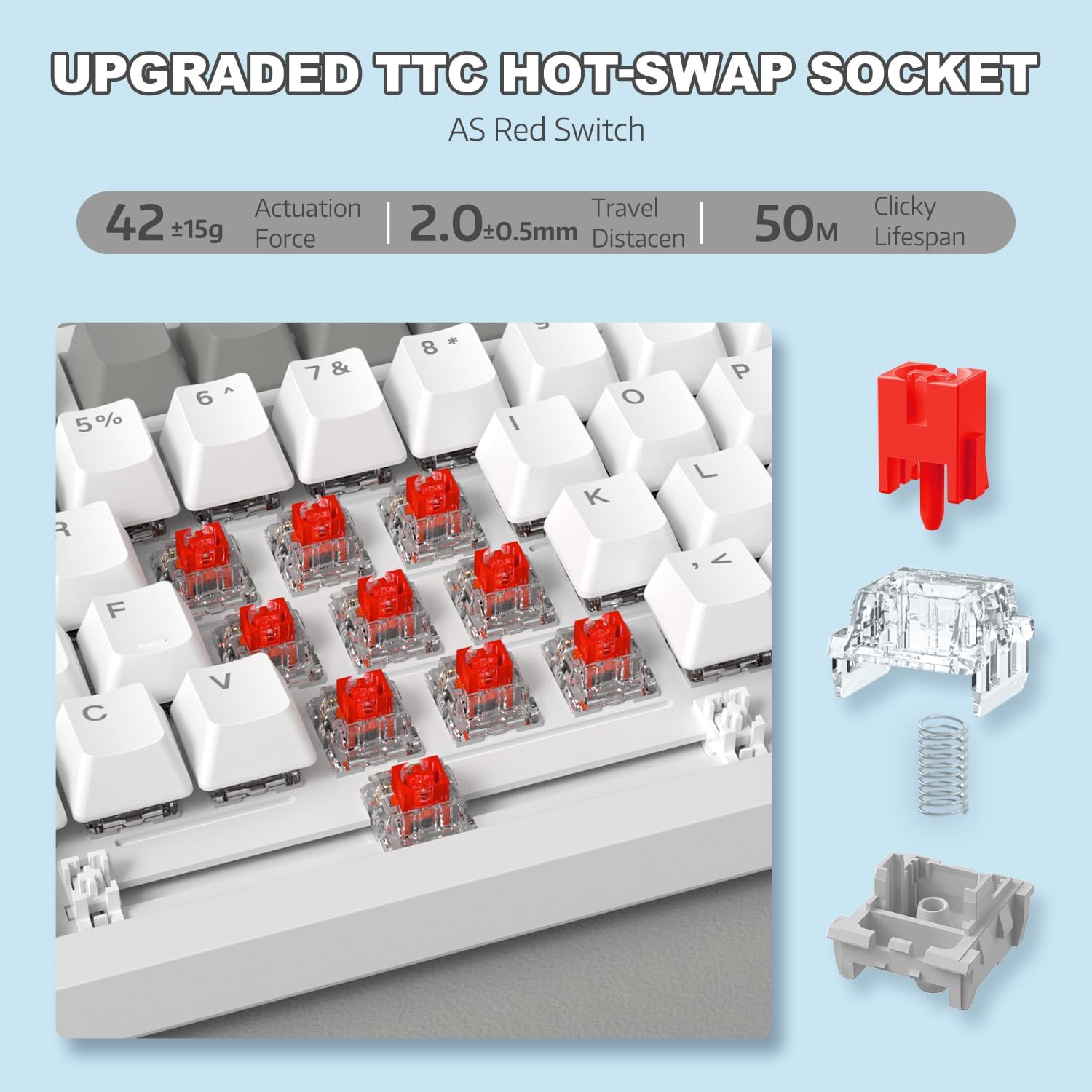
Figure 6: Illustration of the hot-swappable switch mechanism.
Video 1: Demonstrating the unboxing, features, and sound test of the ATTACK SHARK AK820 mechanical keyboard, including its hot-swappable switches and rotary knob.
എൻ-കീ റോൾഓവർ (NKRO)
The AK820 supports N-Key Rollover, meaning that every key press is registered independently, even when multiple keys are pressed simultaneously. This is crucial for fast-paced gaming and accurate typing, preventing
Ask a question about this manual
Ask about setup, troubleshooting, compatibility, parts, safety, or missing instructions. Manuals+ will review the question and use this page’s manual context to help answer it.