
EARMOR M56
EARMOR M56 DUAL PTT Tactical Headset Push-to-Talk Instruction Manual
Model: M56 DUAL PTT
ആമുഖം
This manual provides comprehensive instructions for the setup, operation, and maintenance of your EARMOR M56 DUAL PTT unit. The M56 DUAL PTT is designed to facilitate simultaneous communication with two separate radios, enhancing operational coordination for users of EARMOR tactical headsets and compatible radio systems like Kenwood and Baofeng.
പ്രധാനപ്പെട്ട സുരക്ഷാ വിവരങ്ങൾ
Please read all safety warnings before using this product to prevent damage or injury.
- അനുയോജ്യതാ മുന്നറിയിപ്പ്: The Military Connector (NATO Military Standard 7.0) on this device is specifically designed for EARMOR PTTs or TCI/Nexus PTTs. It is അല്ല compatible with Element or Z-Tactical PTTs. Using incompatible PTTs may result in malfunction or damage.
- Ensure all connections are secure before operation to prevent signal loss or intermittent communication.
- Keep the device away from extreme temperatures, moisture, and corrosive substances.
- Do not attempt to disassemble or modify the unit, as this will void the warranty and may cause damage.
ഉൽപ്പന്നം കഴിഞ്ഞുview
The EARMOR M56 DUAL PTT unit allows for seamless integration of two two-way radios with a single tactical headset. Key components include:
- Dual Radio Connectors: Two Kenwood 2-pin style jacks for connecting to compatible radios.
- ഹെഡ്സെറ്റ് കണക്റ്റർ: A NATO Military Standard 7.0 plug for EARMOR headsets.
- Dual Push-to-Talk Buttons: Separate buttons for activating transmission on each connected radio.
- Mini Jack Socket: For optional M50 Finger Push Button or other compatible accessories.
- Robust Clip: For secure attachment to gear.

Image: The EARMOR M56 DUAL PTT unit, showcasing its main body and two radio connection cables with Kenwood 2-pin style plugs.
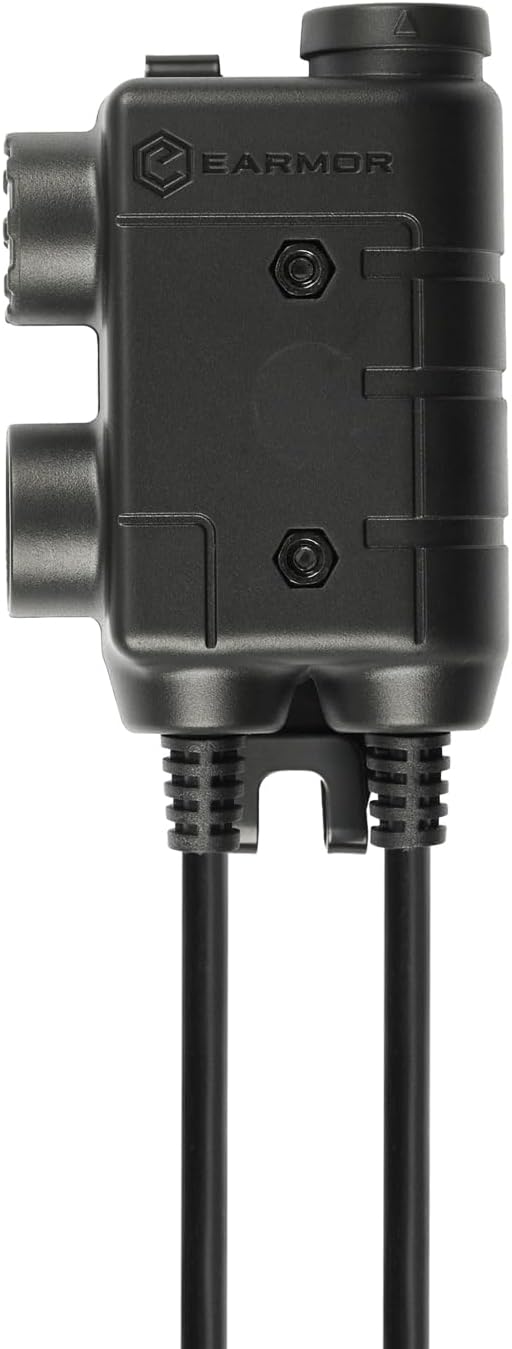
ചിത്രം: സൈഡ് പ്രോfile of the EARMOR M56 DUAL PTT unit, highlighting its robust construction and connection ports.
സജ്ജീകരണ നിർദ്ദേശങ്ങൾ
- Connect Radios:
Identify the two radio connector cables extending from the M56 DUAL PTT unit. Each cable terminates in a Kenwood 2-pin style jack. Plug these into the corresponding ports on your two compatible two-way radios (e.g., Kenwood, Baofeng). Ensure a firm connection.

Image: The M56 DUAL PTT unit connected to two separate two-way radios, illustrating the dual radio connection setup.
- ഹെഡ്സെറ്റ് ബന്ധിപ്പിക്കുക:
Locate the NATO Military Standard 7.0 plug on the M56 DUAL PTT. Connect this plug to the input port on your EARMOR tactical headset. Verify that the connection is secure and fully inserted.

Image: A complete setup showing the M56 DUAL PTT connected to two radios and an EARMOR tactical headset, ready for use.
- Secure the PTT Unit:
Utilize the integrated clip on the M56 DUAL PTT to attach it securely to your vest, clothing, or other gear. Position it in an easily accessible location for quick activation.
- Optional M50 Finger PTT:
If using the optional M50 Finger Push Button, connect it to the mini jack socket on the M56 DUAL PTT unit for additional control flexibility.
പ്രവർത്തന നിർദ്ദേശങ്ങൾ
The M56 DUAL PTT allows for independent control of two communication channels.
- Power On Radios and Headset: Ensure both connected radios and your EARMOR headset are powered on and configured for communication.
- Transmit on Radio 1: Press and hold the designated PTT button for the first radio to transmit. Release the button to stop transmitting and return to receive mode.
- Transmit on Radio 2: Press and hold the designated PTT button for the second radio to transmit. Release the button to stop transmitting.
- ഒരേസമയം സ്വീകരണം: You will receive audio from both radios through your headset simultaneously. Adjust radio volumes as needed for clarity.
- Using Optional Finger PTT: If connected, the M50 Finger Push Button will typically activate transmission on the primary radio channel. Refer to the M50 manual for specific functionality.
മെയിൻ്റനൻസ്
Proper maintenance ensures the longevity and reliable performance of your M56 DUAL PTT unit.
- വൃത്തിയാക്കൽ: Wipe the unit with a soft, dry cloth. For stubborn dirt, a slightly damp cloth can be used, ensuring no moisture enters the ports. Do not use harsh chemicals or abrasive cleaners.
- സംഭരണം: Store the PTT unit in a cool, dry place away from direct sunlight and extreme temperatures when not in use.
- കേബിൾ കെയർ: Avoid sharp bends or kinks in the cables. Do not pull on the cables to disconnect the unit; always grasp the plug itself.
- തുറമുഖ സംരക്ഷണം: The PTT button features a rubber cover to help protect against water and dust. Ensure this cover is properly seated.
ട്രബിൾഷൂട്ടിംഗ്
| പ്രശ്നം | സാധ്യമായ കാരണം | പരിഹാരം |
|---|---|---|
| ഹെഡ്സെറ്റിൽ നിന്ന് ഓഡിയോ വരുന്നില്ല. |
|
|
| Cannot transmit on a radio. |
|
|
| വികലമായ അല്ലെങ്കിൽ വ്യക്തമല്ലാത്ത ഓഡിയോ. |
|
|

Image: A diagram illustrating the difference between Military (NATO J11) and Civilian wiring for PTT plugs, emphasizing that EARMOR headsets work only with EARMOR PTTs due to specific wiring.
സ്പെസിഫിക്കേഷനുകൾ
| ഫീച്ചർ | വിശദാംശങ്ങൾ |
|---|---|
| മോഡൽ | M56 DUAL PTT |
| ബ്രാൻഡ് | EARMOR |
| Radio Connectors | Kenwood 2-pin style jacks (x2) |
| ഹെഡ്സെറ്റ് കണക്റ്റർ | NATO Military Standard 7.0 plug |
| നിയന്ത്രണ തരം | Call Control (Dual Push-to-Talk) |
| കേബിൾ സവിശേഷത | പിൻവലിക്കാവുന്ന |
| ഇനത്തിൻ്റെ ഭാരം | 4.2 ഔൺസ് |
| പാക്കേജ് അളവുകൾ | 4.25 x 2.36 x 1.18 ഇഞ്ച് |
| പ്രത്യേക ഫീച്ചർ | Lightweight, Expandable with Mini Jack Socket |
| യു.പി.സി | 671716211020 |
| ASIN | B0CQK6DTT4 |
വാറൻ്റിയും പിന്തുണയും
Specific warranty details for the EARMOR M56 DUAL PTT are not provided in this manual. For warranty information, technical support, or service inquiries, please refer to the official EARMOR website or contact your authorized dealer. Keep your purchase receipt for warranty claims.
Ask a question about this manual
Ask about setup, troubleshooting, compatibility, parts, safety, or missing instructions. Manuals+ will review the question and use this page’s manual context to help answer it.