
1. ആമുഖം
വാങ്ങിയതിന് നന്ദി.asing the Setty FOREVER P350 Retro Portable FM Radio and Bluetooth Speaker. This device combines classic 1950s vintage aesthetics with modern audio technology, offering FM radio, Bluetooth connectivity, USB, and SD card playback. This manual provides essential information for safe operation, setup, and maintenance of your device. Please read it thoroughly before use and retain it for future reference.
2 സുരക്ഷാ വിവരങ്ങൾ
- ഉപകരണത്തെ തീവ്രമായ താപനിലയിലോ, നേരിട്ടുള്ള സൂര്യപ്രകാശത്തിലോ, ഉയർന്ന ആർദ്രതയിലോ തുറന്നുകാട്ടരുത്.
- ശക്തമായ ആഘാതങ്ങൾക്ക് ഉപകരണം ഇടുകയോ ഇടുകയോ ചെയ്യുന്നത് ഒഴിവാക്കുക.
- ഉപകരണം സ്വയം ഡിസ്അസംബ്ലിംഗ് ചെയ്യുകയോ നന്നാക്കാൻ ശ്രമിക്കുകയോ ചെയ്യരുത്. എല്ലാ സേവനങ്ങളും യോഗ്യതയുള്ള ഉദ്യോഗസ്ഥരെ ഏൽപ്പിക്കുക.
- ഉപകരണം വെള്ളത്തിൽ നിന്നും മറ്റ് ദ്രാവകങ്ങളിൽ നിന്നും അകറ്റി നിർത്തുക.
- നിർദ്ദിഷ്ട ചാർജിംഗ് വോളിയം മാത്രം ഉപയോഗിക്കുകtagഇയും കറൻ്റും.
- പ്രാദേശിക നിയന്ത്രണങ്ങൾ അനുസരിച്ച് ബാറ്ററികളും ഇലക്ട്രോണിക് ഘടകങ്ങളും ഉത്തരവാദിത്തത്തോടെ നിർമാർജനം ചെയ്യുക.
3. പാക്കേജ് ഉള്ളടക്കം
പാക്കേജിൽ ഇനിപ്പറയുന്ന ഇനങ്ങൾ ഉണ്ടോ എന്ന് പരിശോധിക്കുക:
- Setty FOREVER P350 Retro Portable FM Radio and Bluetooth Speaker
- ഉപയോക്തൃ മാനുവൽ (ഈ പ്രമാണം)
- Lithium-ion battery (pre-installed or included separately)
Note: Charging cable may not be included and might need to be purchased separately.
4. ഉൽപ്പന്നം കഴിഞ്ഞുview
Familiarize yourself with the various parts and controls of your Setty FOREVER P350 radio.
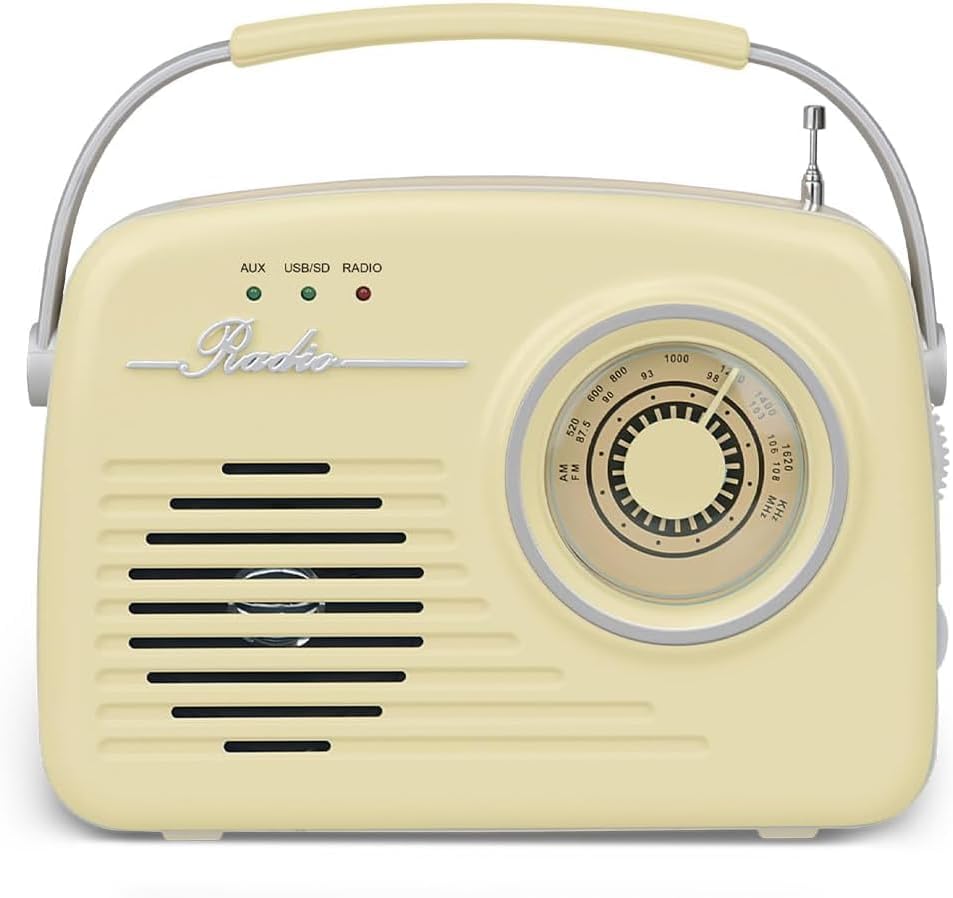
ചിത്രം 4.1: മുൻഭാഗം View - Shows the speaker grille, 'Radio' emblem, and the main tuning dial.

ചിത്രം 4.2: വശം View - Displays the various input ports and control buttons.
നിയന്ത്രണങ്ങളും തുറമുഖങ്ങളും:
- ട്യൂണിംഗ് ഡയൽ: എഫ്എം റേഡിയോ ഫ്രീക്വൻസികൾ തിരഞ്ഞെടുക്കാൻ ഉപയോഗിക്കുന്നു.
- വോളിയം നോബ്: ഓഡിയോ ഔട്ട്പുട്ട് ലെവൽ ക്രമീകരിക്കുന്നു.
- എഫ്എം ആന്റിന: Extendable antenna for improved FM radio reception.
- ഹെഡ്ഫോൺ ജാക്ക്: 3.5mm ഹെഡ്ഫോണുകൾ ഉപയോഗിച്ച് സ്വകാര്യ ശ്രവണത്തിനായി.
- AUX IN പോർട്ട്: ഒരു 3.5mm ഓഡിയോ കേബിൾ ഉപയോഗിച്ച് ബാഹ്യ ഓഡിയോ ഉപകരണങ്ങൾ ബന്ധിപ്പിക്കുക.
- SD CARD Slot: Insert an SD memory card for MP3 playback.
- USB പോർട്ട്: Insert a USB flash drive for MP3 playback. May also serve as a charging port.
- PWR ബട്ടൺ: പവർ ഓൺ/ഓഫ് ബട്ടൺ.
- പ്ലേ/പോസ് ബട്ടൺ: Controls playback for USB/SD and Bluetooth modes.
- സ്റ്റോപ്പ് ബട്ടൺ: Stops playback for USB/SD mode.
- PREV ബട്ടൺ: Skips to the previous track/station.
- അടുത്ത ബട്ടൺ: Skips to the next track/station.
- FUNC (Function) Button: Cycles through different modes (FM Radio, Bluetooth, USB/SD, AUX).
- Indicator Lights (AUX, USB/SD, RADIO): Indicate the currently selected operating mode.
5. സജ്ജീകരണം
5.1 ബാറ്ററി ചാർജ് ചെയ്യുന്നു
- റേഡിയോ ഓഫാക്കിയിട്ടുണ്ടെന്ന് ഉറപ്പാക്കുക.
- Connect a compatible USB charging cable (not included) to the USB port on the side of the radio.
- Connect the other end of the USB cable to a suitable USB power adapter (e.g., 5V/1A) or a computer's USB port.
- The charging indicator (if available, refer to product specific LED behavior) will illuminate during charging and turn off or change color when fully charged.
- സാധാരണയായി ഒരു പൂർണ്ണ ചാർജ് ഏകദേശം 3-4 മണിക്കൂർ എടുക്കും.
5.2. പവർ ഓൺ/ഓഫ്
- റേഡിയോ ഓൺ ചെയ്യാൻ, അമർത്തിപ്പിടിക്കുക Pwr button until the display or indicator lights activate.
- റേഡിയോ ഓഫ് ചെയ്യാൻ, അമർത്തിപ്പിടിക്കുക Pwr button again until the display or indicator lights turn off.
6. പ്രവർത്തന നിർദ്ദേശങ്ങൾ
6.1. മോഡുകൾ തിരഞ്ഞെടുക്കുന്നു
അമർത്തുക ജീവനക്കാരൻ button repeatedly to cycle through the available modes: FM Radio, Bluetooth, USB/SD, and AUX. The corresponding indicator light (RADIO, USB/SD, AUX) will illuminate to show the active mode.
6.2. എഫ്എം റേഡിയോ മോഡ്
- ഉപയോഗിച്ച് FM റേഡിയോ മോഡിലേക്ക് മാറുക ജീവനക്കാരൻ button. The 'RADIO' indicator light will turn on.
- ഒപ്റ്റിമൽ റിസപ്ഷനായി എഫ്എം ആന്റിന പൂർണ്ണമായും നീട്ടുക.
- തിരിക്കുക ട്യൂണിംഗ് ഡയൽ to scan for available FM radio stations.
- ക്രമീകരിക്കുക വോളിയം നോബ് to your desired listening level.
6.3. ബ്ലൂടൂത്ത് മോഡ്
- ഉപയോഗിച്ച് ബ്ലൂടൂത്ത് മോഡിലേക്ക് മാറുക ജീവനക്കാരൻ button. The radio will enter pairing mode, indicated by a flashing Bluetooth icon on the display (if applicable) or an audible prompt.
- നിങ്ങളുടെ മൊബൈൽ ഉപകരണത്തിൽ (സ്മാർട്ട്ഫോൺ, ടാബ്ലെറ്റ് മുതലായവ), ബ്ലൂടൂത്ത് പ്രവർത്തനക്ഷമമാക്കി ലഭ്യമായ ഉപകരണങ്ങൾക്കായി തിരയുക.
- Select "P350" or a similar name from the list of found devices to pair.
- Once paired, the radio will confirm with an audible sound or a solid Bluetooth indicator.
- You can now play audio from your connected device through the radio. Use the പ്ലേ/താൽക്കാലികമായി നിർത്തുക, PREV, ഒപ്പം അടുത്തത് buttons on the radio or your device to control playback.
6.4. യുഎസ്ബി/എസ്ഡി കാർഡ് പ്ലേബാക്ക്
- ഇതിലേക്ക് ഒരു USB ഫ്ലാഷ് ഡ്രൈവ് ചേർക്കുക USB പോർട്ട് അല്ലെങ്കിൽ ഒരു SD കാർഡ് SD കാർഡ് സ്ലോട്ട്. Ensure the media contains MP3 audio files.
- Switch to USB/SD mode using the ജീവനക്കാരൻ button. The 'USB/SD' indicator light will turn on, and playback should start automatically.
- ഉപയോഗിക്കുക പ്ലേ/താൽക്കാലികമായി നിർത്തുക, നിർത്തുക, PREV, ഒപ്പം അടുത്തത് പ്ലേബാക്ക് നിയന്ത്രിക്കുന്നതിനുള്ള ബട്ടണുകൾ.
6.5. AUX ഇൻപുട്ട് മോഡ്
- 3.5mm ഓഡിയോ കേബിളിന്റെ ഒരു അറ്റം (ഉൾപ്പെടുത്തിയിട്ടില്ല) ബന്ധിപ്പിക്കുക പോർട്ടിൽ ഓക്സ് റേഡിയോയിൽ.
- ഓഡിയോ കേബിളിന്റെ മറ്റേ അറ്റം ഹെഡ്ഫോൺ ജാക്കിലേക്കോ നിങ്ങളുടെ ബാഹ്യ ഉപകരണത്തിന്റെ (ഉദാ: MP3 പ്ലെയർ, സ്മാർട്ട്ഫോൺ) ഓഡിയോ ഔട്ട്പുട്ടിലേക്കോ ബന്ധിപ്പിക്കുക.
- ഉപയോഗിച്ച് AUX മോഡിലേക്ക് മാറുക ജീവനക്കാരൻ button. The 'AUX' indicator light will turn on.
- Play audio from your external device. Volume can be controlled via the radio's വോളിയം നോബ് and your external device.
7. പരിപാലനം
- വൃത്തിയാക്കൽ: റേഡിയോയുടെ പുറംഭാഗം വൃത്തിയാക്കാൻ മൃദുവായതും ഉണങ്ങിയതുമായ തുണി ഉപയോഗിക്കുക. അബ്രാസീവ് ക്ലീനറുകളോ ലായകങ്ങളോ ഉപയോഗിക്കരുത്.
- സംഭരണം: ദീർഘനേരം ഉപയോഗിക്കാത്തപ്പോൾ, നേരിട്ടുള്ള സൂര്യപ്രകാശത്തിൽ നിന്നും കടുത്ത താപനിലയിൽ നിന്നും അകന്ന്, തണുത്തതും വരണ്ടതുമായ സ്ഥലത്ത് റേഡിയോ സൂക്ഷിക്കുക.
- ബാറ്ററി കെയർ: If the radio will not be used for a long time, charge the battery at least once every three months to maintain its lifespan.
8. പ്രശ്നപരിഹാരം
| പ്രശ്നം | സാധ്യമായ കാരണം | പരിഹാരം |
|---|---|---|
| ശക്തിയില്ല | ബാറ്ററി തീർന്നു; പവർ ബട്ടൺ ശരിയായി അമർത്തിയിട്ടില്ല. | Charge the battery; Press and hold the PWR button firmly. |
| ശബ്ദമില്ല | Volume is too low; Incorrect mode selected; Device not connected properly (AUX/Bluetooth). | Increase volume; Ensure correct mode is selected; Reconnect AUX cable or re-pair Bluetooth device. |
| മോശം എഫ്എം സ്വീകരണം | ആന്റിന നീട്ടിയിട്ടില്ല; ദുർബലമായ സിഗ്നൽ ഏരിയ. | Extend the FM antenna fully; Try repositioning the radio. |
| ബ്ലൂടൂത്ത് ജോടിയാക്കുന്നില്ല | Radio not in pairing mode; Device too far; Already connected to another device. | Ensure radio is in Bluetooth pairing mode; Move device closer; Disconnect from other devices and try again. |
| USB/SD പ്ലേബാക്ക് പ്രശ്നങ്ങൾ | തെറ്റാണ് file format; Corrupted media; Media not inserted correctly. | ഉറപ്പാക്കുക files are MP3 format; Try different USB/SD media; Reinsert media firmly. |
9 സ്പെസിഫിക്കേഷനുകൾ
- ബ്രാൻഡ്: എന്നേക്കും
- മോഡൽ: P350
- ട്യൂണർ സാങ്കേതികവിദ്യ: FM
- കണക്റ്റിവിറ്റി: Wireless (Bluetooth), Wired (AUX, USB, SD)
- അനുയോജ്യമായ ഉപകരണങ്ങൾ: MP3 പ്ലെയർ, ബ്ലൂടൂത്ത് പ്രാപ്തമാക്കിയ ഉപകരണങ്ങൾ
- ഊർജ്ജ സ്രോതസ്സ്: Battery Powered (Lithium-ion battery included)
- ഡിസ്പ്ലേ തരം: LCD (if applicable)
- മെറ്റീരിയൽ: പ്ലാസ്റ്റിക്
- അളവുകൾ (L x W x H): 5 x 18 x 15 സെ.മീ
- ഭാരം: 670 ഗ്രാം
- പ്രത്യേക സവിശേഷതകൾ: വിൻtage 50s-inspired design, decorative element, practical handle
10. വാറൻ്റിയും പിന്തുണയും
This product is covered by the standard manufacturer's warranty. For detailed warranty terms and conditions, please refer to the documentation provided at the time of purchase or contact your retailer.
For technical support, troubleshooting assistance, or inquiries about replacement parts, please contact the FOREVER customer service department or your local distributor. Contact information can typically be found on the product packaging or the brand's official webസൈറ്റ്.