
1. ആമുഖവും അവസാനവുംview
The GEWA E-Violine Novita 3.0 is an innovative electric violin designed for musicians who appreciate the feel of a classic instrument combined with modern sound processing capabilities. This instrument allows for quiet practice, classic string sound amplification, and various sound processing possibilities. Its design maintains familiar dimensions while integrating advanced technology and a contemporary aesthetic.
This manual provides essential information for the proper setup, operation, and maintenance of your GEWA E-Violine Novita 3.0 to ensure optimal performance and longevity.
2. ഉൽപ്പന്ന സവിശേഷതകൾ
- High-Quality European Manufacturing: Emphasizes precision and quality in construction.
- Function-Oriented Design: Preserves classic violin dimensions with a satin varnish finish highlighting natural wood.
- ഇന്റഗ്രേറ്റഡ് പ്രീamp സിസ്റ്റം: Developed in collaboration with GEWA music R&D and a renowned US manufacturer.
- വൈവിധ്യമാർന്ന ഔട്ട്പുട്ട്: Switchable output for headphones and ampജീവൻ.
- ശബ്ദ നിയന്ത്രണം: Features a 2-band EQ and volume control.
- ഓക്സ്-ഇൻ: Allows for playalongs and practice with external audio sources.
- പ്രീമിയം ഘടകങ്ങൾ: Solid maple neck, Wittner fine tuning pegs, Wittner Zurich chinrest, Wittner tailpiece, and Larsen Aurora strings.
- Piezo Pickup System: Mounted directly on the bridge for high-quality sound transmission.
- അനുയോജ്യത: Fits into any standard GEWA violin case.
3. സജ്ജീകരണം
3.1 പായ്ക്ക് ചെയ്യലും പ്രാരംഭ പരിശോധനയും
Carefully remove the violin from its packaging. Inspect the instrument for any signs of damage during transit. Ensure all components, including the shoulder rest (if included), are present.
3.2 ബാറ്ററി ഇൻസ്റ്റാളേഷൻ
The GEWA E-Violine Novita 3.0 requires a 9V block battery for its internal preamp system. The battery is not included with the instrument.
- Locate the battery compartment, typically on the back or side of the instrument.
- കമ്പാർട്ട്മെന്റ് കവർ തുറക്കുക.
- Insert a fresh 9V block battery, ensuring correct polarity.
- ബാറ്ററി കമ്പാർട്ട്മെൻ്റ് കവർ സുരക്ഷിതമായി അടയ്ക്കുക.
3.3 Attaching the Shoulder Rest
The instrument is available with either a Wittner shoulder rest or a universal adapter. If using the Wittner shoulder rest, attach it according to its specific instructions. If using a universal adapter, attach your preferred commercially available shoulder rest to the adapter.
3.4 Tuning the Instrument
The GEWA E-Violine Novita 3.0 comes equipped with Larsen Aurora strings and Wittner fine tuning pegs. Use an electronic tuner to accurately tune the strings to standard violin pitch (G-D-A-E). Adjust the fine tuners for precise adjustments.
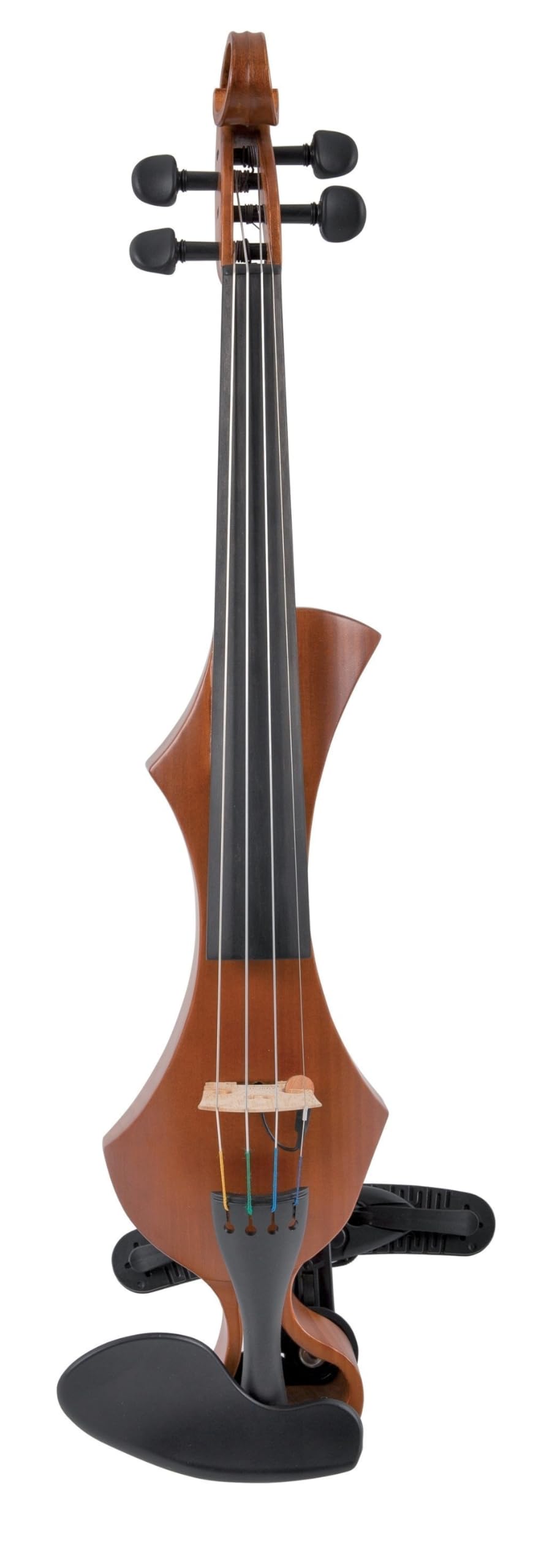
Image: The GEWA E-Violine Novita 3.0 in three available finishes. The Golden Brown model (right) is the subject of this manual.
4. പ്രവർത്തന നിർദ്ദേശങ്ങൾ
4.1 Powering On and Volume Control
Once the 9V battery is installed, the instrument's preamp system is active. Use the volume control knob, typically located on the side or back of the instrument, to adjust the output level.
4.2 ഇതിലേക്ക് ബന്ധിപ്പിക്കുന്നു Ampലൈഫയർ അല്ലെങ്കിൽ ഹെഡ്ഫോണുകൾ
The GEWA E-Violine Novita 3.0 features a switchable output. Locate the output jack and the switch (if present) to select between amplifier or headphone output.
- വേണ്ടി Ampജീവപര്യന്തം: Connect a standard instrument cable from the output jack to your ampലൈഫയറിന്റെ ഇൻപുട്ട്.
- ഹെഡ്ഫോണുകൾക്കായി: Connect headphones directly to the output jack. Ensure the output is switched to headphone mode for optimal sound and to prevent damage to headphones or ears from excessive volume.
4.3 Using the 2-Band EQ
The integrated 2-band equalizer allows you to shape the tone of your violin. Adjust the bass and treble knobs to achieve your desired sound. Experiment with different settings to find the best tone for your playing style and environment.
4.4 AUX-in for Playalongs
The AUX-in jack allows you to connect an external audio device (e.g., smartphone, MP3 player) to play along with backing tracks or practice materials. Connect your audio device to the AUX-in jack using an appropriate cable. The audio from the external device will be mixed with your violin's sound through the output.
5. പരിപാലനം
5.1 ഉപകരണം വൃത്തിയാക്കൽ
Regularly wipe down the instrument with a soft, dry, lint-free cloth after each use to remove rosin dust and fingerprints. Avoid using abrasive cleaners or solvents, as these can damage the satin varnish finish.
5.2 String Care and Replacement
Wipe the strings clean after playing to prolong their life. Replace strings when they become worn, dull-sounding, or difficult to tune. Use Larsen Aurora strings or other high-quality violin strings. When replacing strings, change them one at a time to maintain tension on the bridge and soundpost.
5.3 ബാറ്ററി മാറ്റിസ്ഥാപിക്കൽ
Replace the 9V battery when the sound becomes weak or distorted, or if the instrument fails to produce sound. Always use a fresh, high-quality alkaline 9V battery.
5.4 സംഭരണം
Store the GEWA E-Violine Novita 3.0 in a suitable violin case when not in use. The instrument is designed to fit into any standard GEWA violin case. Store it in a climate-controlled environment, away from extreme temperatures, humidity, and direct sunlight, to prevent damage to the wood and electronics.
6. പ്രശ്നപരിഹാരം
- ശബ്ദമോ കുറഞ്ഞ ഔട്ട്പുട്ടോ ഇല്ല:
- Check if the 9V battery is correctly installed and has sufficient charge. Replace if necessary.
- വോളിയം നോബ് ഉയർത്തിയിട്ടുണ്ടെന്ന് ഉറപ്പാക്കുക.
- Verify that the instrument cable is securely connected to both the violin and the amplifier/headphones.
- ഒരു ഉപയോഗിക്കുകയാണെങ്കിൽ amplifier, check its power and volume settings.
- Ensure the output switch (if present) is set correctly for ampലൈഫയർ അല്ലെങ്കിൽ ഹെഡ്ഫോണുകൾ.
- വികലമായ ശബ്ദം:
- Check the battery level; a low battery can cause distortion.
- Adjust the volume on the violin and the connected amplifier/headphones to avoid clipping.
- Experiment with the 2-band EQ settings.
- എല്ലാ കേബിളുകളും നല്ല നിലയിലാണെന്നും ശരിയായി ബന്ധിപ്പിച്ചിട്ടുണ്ടെന്നും ഉറപ്പാക്കുക.
- ട്യൂണിംഗ് അസ്ഥിരത:
- Ensure strings are properly seated in the Wittner fine tuning pegs and tailpiece.
- Check for worn or old strings; replace if necessary.
- Verify that the bridge is correctly positioned.
If you encounter issues not covered here, please contact GEWA customer support for assistance.
7 സ്പെസിഫിക്കേഷനുകൾ
| ഫീച്ചർ | വിശദാംശങ്ങൾ |
|---|---|
| ബ്രാൻഡ് | GEWA |
| മോഡൽ നമ്പർ | GS400302 |
| ഉപകരണ തരം | ഇലക്ട്രിക് വയലിൻ |
| സ്ട്രിംഗുകളുടെ എണ്ണം | 4 |
| കൈ ഓറിയൻ്റേഷൻ | വലതു കൈ |
| നിറം | Golden Brown |
| മികച്ച മെറ്റീരിയൽ തരം | Solid wood lime wood, maple |
| ബാക്ക് മെറ്റീരിയൽ തരം | Front: solid lime wood / back: solid maple wood |
| സ്ട്രിംഗ് മെറ്റീരിയൽ തരം | Nylon (Larsen Aurora) |
| ഫിനിഷ് തരം | Semi-gloss finish |
| ഇനത്തിൻ്റെ ഭാരം | 0.56 കിലോഗ്രാം |
| ഓപ്പറേഷൻ മോഡ് | ഇലക്ട്രിക് |
| പവർ ഉറവിടം | 9V Block Battery (not included) |
| ഉൾപ്പെടുത്തിയ ഘടകങ്ങൾ | Wittner shoulder rest (or universal adapter), Aubert bridge (for 4-string) |
8. വാറൻ്റിയും പിന്തുണയും
For information regarding warranty coverage, service, or technical support for your GEWA E-Violine Novita 3.0, please refer to the warranty card included with your purchase or visit the official GEWA website. You may also contact GEWA customer service directly for assistance with any product-related inquiries.