
ആമുഖം
This manual provides detailed instructions for the assembly, operation, and maintenance of your Bush Furniture Broadview 54W Computer Desk. Please read all instructions carefully before beginning assembly and retain this manual for future reference.
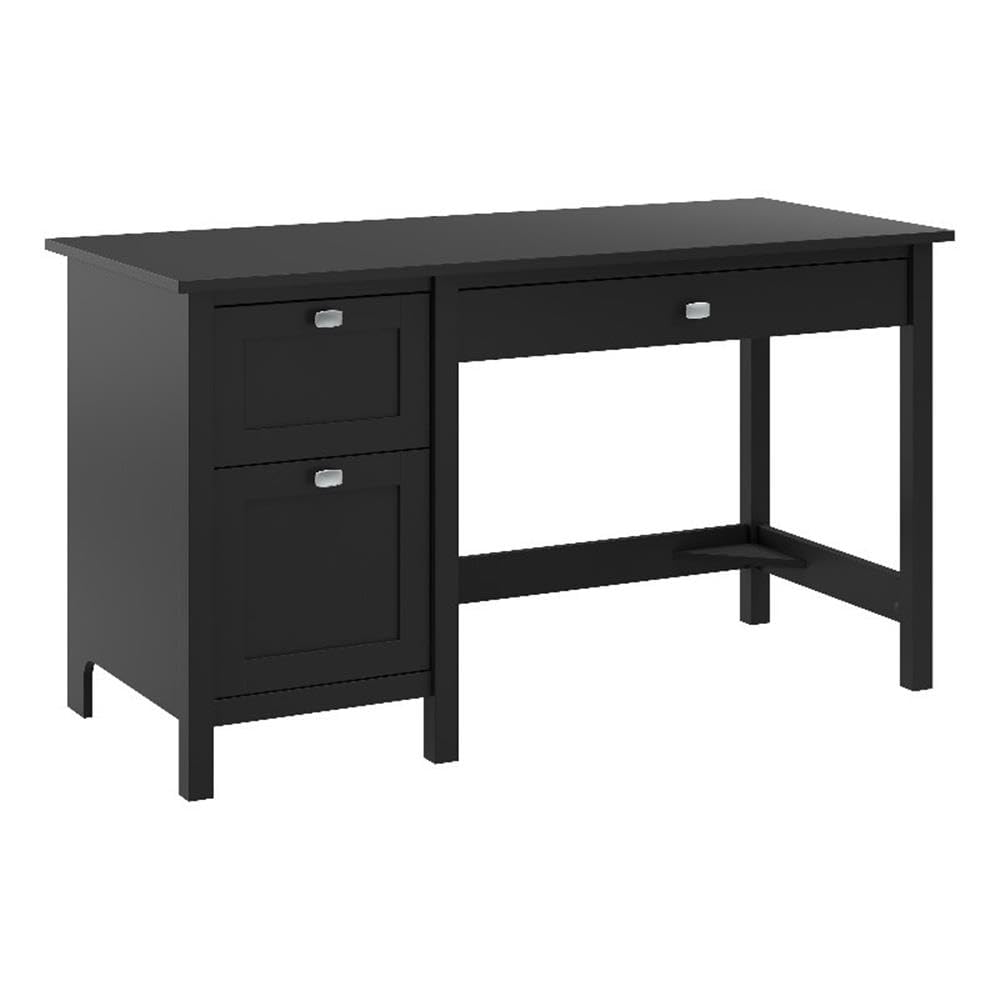
Image: The Broadview 54W Computer Desk in a typical home office environment, showcasing അതിന്റെ രൂപകൽപ്പനയും പ്രവർത്തനക്ഷമതയും.
The Broadview 54W Computer Desk is designed to offer a functional and stylish workspace. Key features include:
- Spacious 54-inch desktop surface supporting up to 200 pounds.
- Full-extension file drawer for letter-size paperwork.
- Small box drawer for office supplies.
- Large drawer with a flip-down front, suitable for a keyboard or laptop.
- Durable engineered wood construction with Satin Chrome hardware.
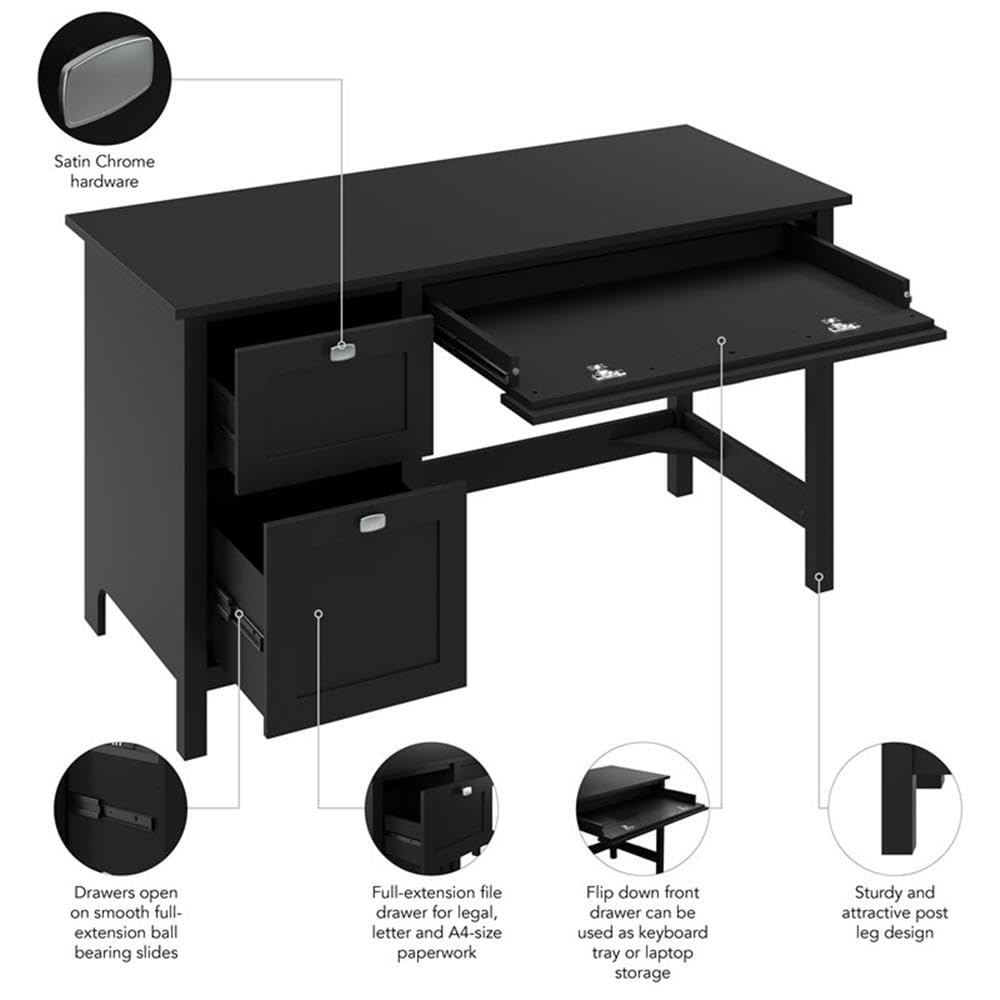
Image: A detailed diagram illustrating the desk's features, including Satin Chrome hardware, smooth full-extension ball bearing slides for drawers, a flip-down front for keyboard/laptop, and sturdy post leg design.
സജ്ജീകരണ നിർദ്ദേശങ്ങൾ
1. Unpacking and Parts Inspection
Carefully unpack all components from the packaging. Lay them out on a clean, soft surface to prevent scratches. Verify that all parts listed in the assembly guide (not included in this manual, refer to packaging) are present and undamaged. If any parts are missing or damaged, do not proceed with assembly and contact customer support.
2. ആവശ്യമായ ഉപകരണങ്ങൾ
Assembly requires a screwdriver. Ensure you have the necessary tools before starting.
3. അസംബ്ലി പ്രക്രിയ
This product requires assembly. It is recommended that രണ്ടു പേർ perform the assembly to ensure safety and ease of construction. Follow the step-by-step instructions provided in the separate assembly manual included with your product. Do not overtighten fasteners. Ensure all connections are secure before use.
The desk is designed to be finished on all sides, allowing for flexible placement in your room.
പ്രവർത്തന നിർദ്ദേശങ്ങൾ
1. Using the Keyboard/Laptop Tray
The large center drawer features a flip-down front. To use it as a keyboard or laptop tray, gently pull the drawer out and push the front panel downwards. To conceal the keyboard or laptop, push the front panel back up and close the drawer.

Image: The desk with the flip-down front drawer extended, showing a keyboard and mouse in place, ready for use.
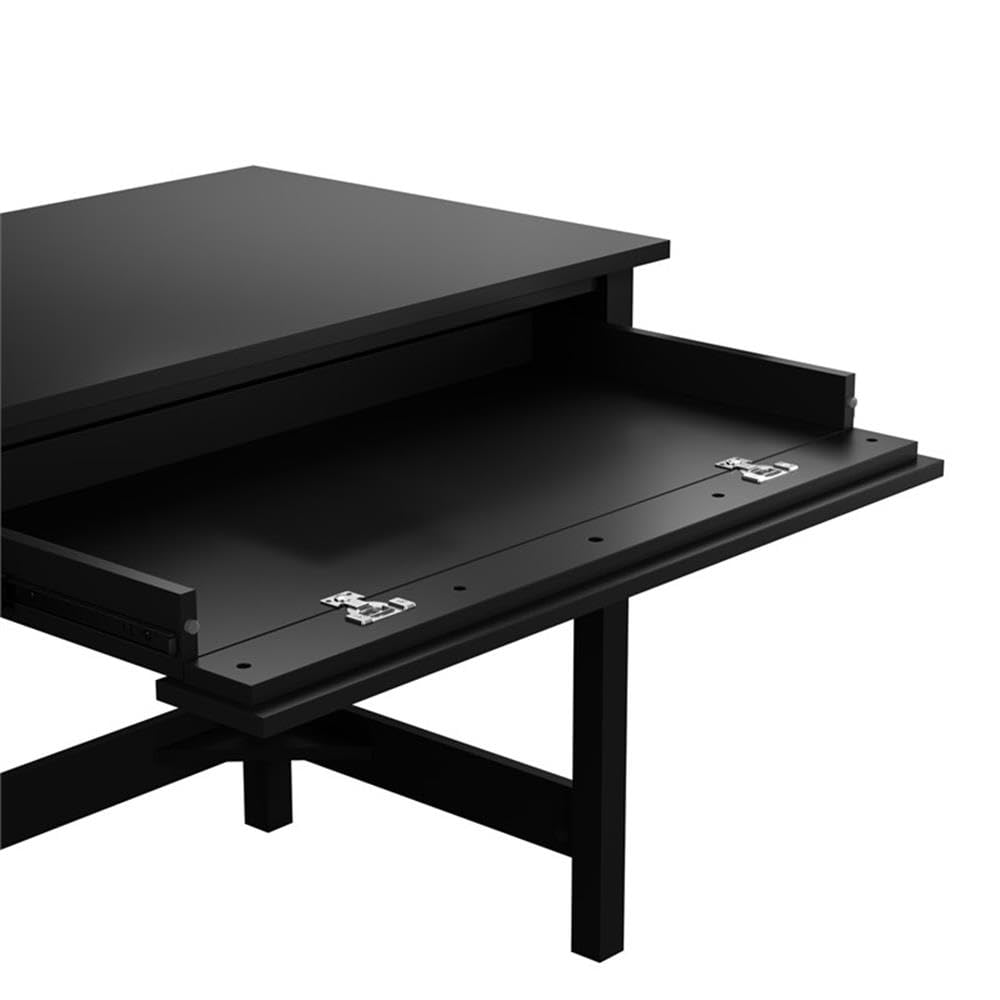
ചിത്രം: ഒരു ക്ലോസ്-അപ്പ് view of the flip-down front mechanism, illustrating how the panel pivots to create a keyboard tray.
2. ഉപയോഗിക്കുന്നത് File ഡ്രോയർ
The lower left drawer is a full-extension file drawer designed to accommodate letter-size paperwork. It operates on smooth ball-bearing slides for easy access. Organize your documents by hanging file folders within this drawer.
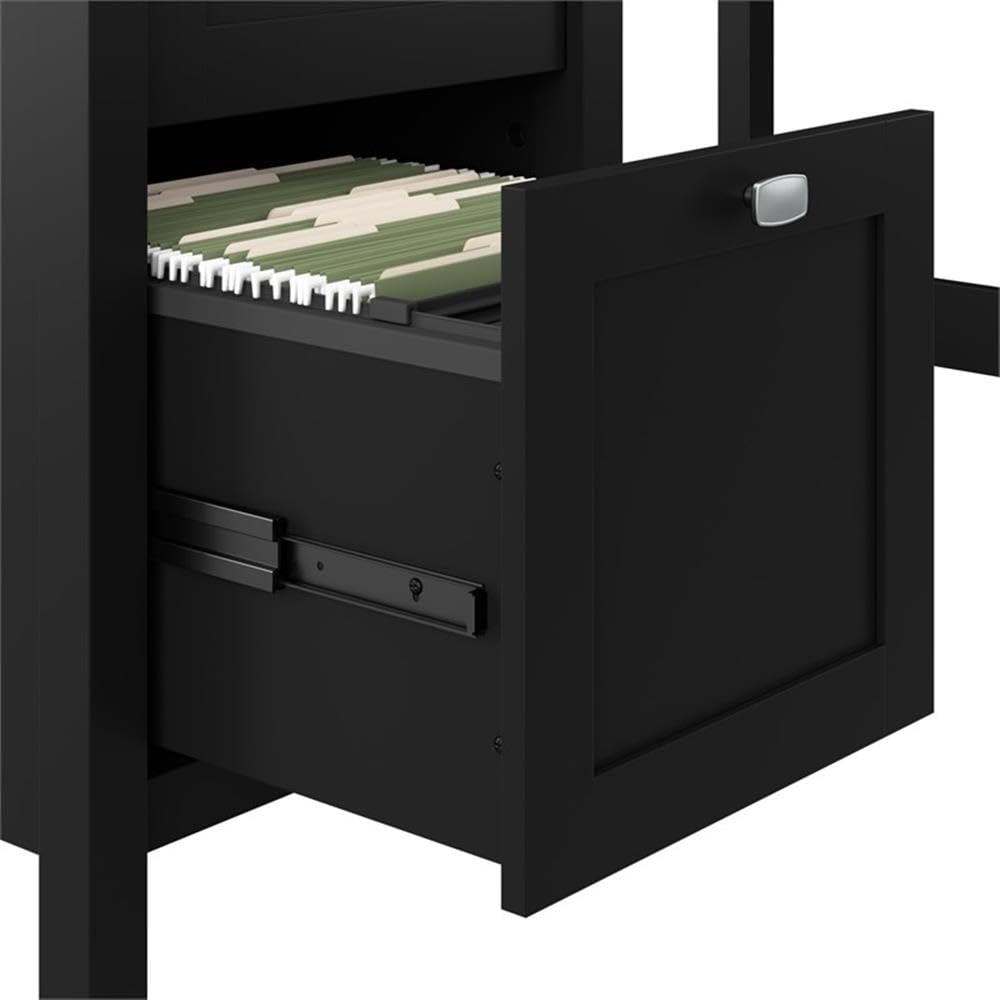
ചിത്രം: ദി file drawer fully extended, showing hanging file folders for organized document storage.
3. Using the Box Drawer
The upper left drawer is a box drawer, ideal for storing small office supplies such as pens, notepads, and other accessories. It also operates on smooth full-extension ball-bearing slides.

Image: The box drawer partially open, illustrating its capacity for small office supplies.
മെയിൻ്റനൻസ്
ക്ലീനിംഗ് നിർദ്ദേശങ്ങൾ
To clean your Bush Furniture Broadview Computer Desk, simply wipe the surfaces with a damp cloth. Avoid using harsh chemicals or abrasive cleaners, as these may damage the finish. Regularly check and tighten any loose fasteners to maintain stability.
ട്രബിൾഷൂട്ടിംഗ്
General Issues and Solutions
- ഡെസ്ക് വോബിൾസ്: Ensure all assembly screws and fasteners are securely tightened. Check that the desk is placed on a level surface.
- ഡ്രോയേഴ്സ് സ്റ്റിക്ക്: Verify that the drawer slides are properly aligned and free of obstructions. Ensure no items inside the drawer are preventing it from closing smoothly.
- കേടായ ഭാഗങ്ങൾ: If any parts were damaged during shipping or assembly, refer to the warranty information and contact customer support for replacements.
സ്പെസിഫിക്കേഷനുകൾ
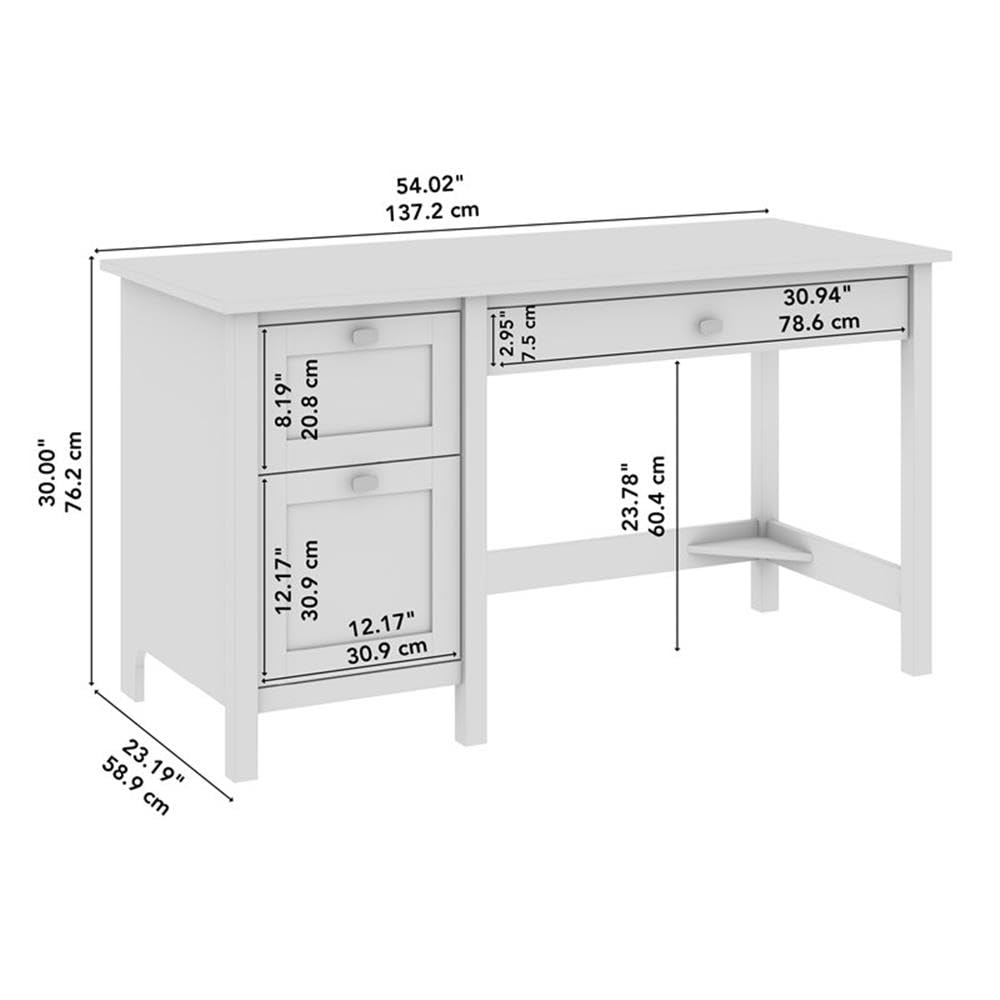
Image: A technical diagram detailing the precise dimensions of the Bush Furniture Broadview 54W Computer Desk in both inches and centimeters.
| ഫീച്ചർ | വിശദാംശങ്ങൾ |
|---|---|
| മോഡൽ നമ്പർ | BDD254CBL-03 |
| ബ്രാൻഡ് | ബുഷ് ഹോം |
| ഡെസ്ക് ഡിസൈൻ | കമ്പ്യൂട്ടർ ഡെസ്ക് |
| നിറം | ക്ലാസിക് ബ്ലാക്ക് |
| മെറ്റീരിയൽ | എഞ്ചിനീയറിംഗ് വുഡ് |
| ഉൽപ്പന്ന അളവുകൾ (D x W x H) | 158D x 105.4W x 90.8H Centimeters (58.9 x 137.2 x 76.2 Centimeters as per item dimensions) |
| ഇനത്തിൻ്റെ ഭാരം | 47.63 കി.ഗ്രാം |
| പരമാവധി ഭാരം ശുപാർശ | 200 പൗണ്ട് |
| ഡ്രോയറുകളുടെ എണ്ണം | 1 (File Drawer) + 1 (Box Drawer) + 1 (Keyboard/Laptop Tray) |
| ഡ്രോയർ ഗ്ലൈഡ് മെക്കാനിസം | ബോൾ ബെയറിംഗ് |
| അസംബ്ലി ആവശ്യമാണ് | അതെ |
| അസംബ്ലിക്ക് ശുപാർശ ചെയ്യുന്ന ആളുകൾ | 2 |
| അസംബ്ലിക്ക് ശുപാർശ ചെയ്യുന്ന ഉപകരണങ്ങൾ | സ്ക്രൂഡ്രൈവർ |
| ഉൾപ്പെടുത്തിയ ഘടകങ്ങൾ | സിംഗിൾ പെഡസ്റ്റൽ ഡെസ്ക് |
വാറൻ്റി വിവരങ്ങൾ
This Bush Furniture Broadview Computer Desk is backed by the Bush Furniture 1 വർഷത്തെ നിർമ്മാതാവിന്റെ വാറന്റി. This warranty covers defects in materials and workmanship under normal use. Please retain your proof of purchase for warranty claims. For specific terms and conditions, refer to the warranty documentation included with your product or visit the Bush Furniture official webസൈറ്റ്.
ഉപഭോക്തൃ പിന്തുണ
For assistance with assembly, missing parts, or any other inquiries regarding your Bush Furniture Broadview Computer Desk, please contact Bush Furniture customer service. Contact information can typically be found on the product packaging, the assembly manual, or the official Bush Furniture webസൈറ്റ്.
When contacting support, please have your model number (BDD254CBL-03) and proof of purchase readily available.