
1. ആമുഖം
Thank you for choosing the CONBOLA Portable Fan Rechargeable. This versatile device combines a powerful fan, an LED lantern, and a portable power bank, making it ideal for various indoor and outdoor activities such as camping, travel, home use, and office environments. This manual provides detailed instructions for safe operation, maintenance, and troubleshooting to ensure optimal performance and longevity of your fan.
2. പ്രധാന സുരക്ഷാ നിർദ്ദേശങ്ങൾ
പരിക്കുകളോ കേടുപാടുകളോ തടയാൻ ഈ ഉൽപ്പന്നം ഉപയോഗിക്കുന്നതിന് മുമ്പ് ദയവായി എല്ലാ സുരക്ഷാ മുന്നറിയിപ്പുകളും നിർദ്ദേശങ്ങളും ശ്രദ്ധാപൂർവ്വം വായിക്കുക.
- Do not insert fingers or any objects into the fan grille when the fan is operating.
- Keep the fan away from water or other liquids to avoid electric shock.
- Do not disassemble, repair, or modify the fan yourself. Contact qualified service personnel for assistance.
- Ensure the fan is placed on a stable, flat surface to prevent tipping over.
- കുട്ടികൾക്കും വളർത്തുമൃഗങ്ങൾക്കും ലഭ്യമാകാതെ സൂക്ഷിക്കുക.
- ചാർജ് ചെയ്യുന്നതിന് നൽകിയിരിക്കുന്ന USB-C കേബിളോ സാക്ഷ്യപ്പെടുത്തിയ തത്തുല്യമായതോ മാത്രം ഉപയോഗിക്കുക.
- Do not expose the battery to extreme temperatures (above 60°C/140°F) or direct sunlight.
- Unplug the fan when not in use for extended periods or during cleaning.
3. പാക്കേജ് ഉള്ളടക്കം
പാക്കേജിൽ ഇനിപ്പറയുന്ന ഇനങ്ങൾ ഉണ്ടോ എന്ന് പരിശോധിക്കുക:
- CONBOLA Portable Fan Rechargeable (Model X23-PRO)
- USB-C ചാർജിംഗ് കേബിൾ
- ഉപയോക്തൃ മാനുവൽ (ഈ പ്രമാണം)
4. ഉൽപ്പന്നം കഴിഞ്ഞുview
Familiarize yourself with the components of your CONBOLA Portable Fan.
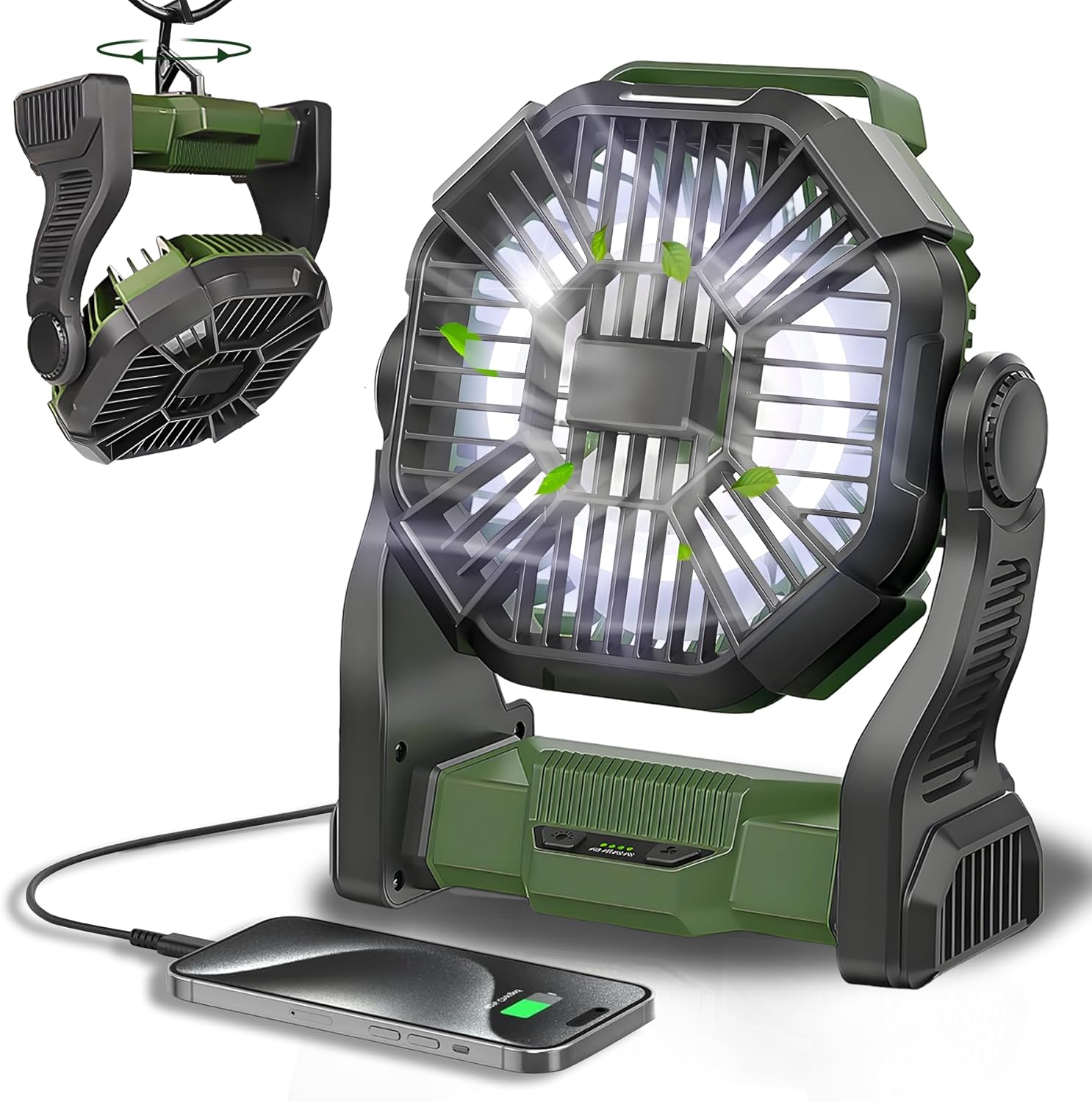
Figure 1: CONBOLA Portable Fan Rechargeable

Figure 2: Product Dimensions and Key Features (10 inches height, 8.2 inches width, 3.5 inches depth)
4.1 ഘടകം തിരിച്ചറിയൽ
- ഫാൻ ഗ്രിൽ: Protects the fan blades.
- ഫാൻ ബ്ലേഡുകൾ: Generate airflow.
- LED ലൈറ്റ് പാനൽ: പ്രകാശം നൽകുന്നു.
- നിയന്ത്രണ പാനൽ: Contains buttons for fan speed and light brightness.
- ബാറ്ററി ഇൻഡിക്കേറ്റർ ലൈറ്റുകൾ: Show remaining battery level.
- USB-C ഇൻപുട്ട് പോർട്ട്: For charging the fan.
- USB-A ഔട്ട്പുട്ട് പോർട്ട്: ബാഹ്യ ഉപകരണങ്ങൾ ചാർജ് ചെയ്യുന്നതിന് (പവർ ബാങ്ക് പ്രവർത്തനം).
- ക്രമീകരിക്കാവുന്ന സ്റ്റാൻഡ്: Allows 270° rotation for directing airflow.
- ഹാംഗിംഗ് ഹുക്ക്: Located at the bottom, allows the fan to be hung.
- കൈകാര്യം ചെയ്യുക: എളുപ്പമുള്ള പോർട്ടബിലിറ്റിക്ക്.

Figure 3: Control Panel and Battery Indicators

Figure 4: USB-A Output and USB-C Input Ports
5. സജ്ജീകരണം
5.1 പ്രാരംഭ ചാർജിംഗ്
Before first use, fully charge the fan. Connect the USB-C charging cable to the fan's USB-C input port and the other end to a 5V-2A USB power adapter (not included) or a compatible power source. The battery indicator lights will illuminate to show charging progress. All four lights will be solid when fully charged.
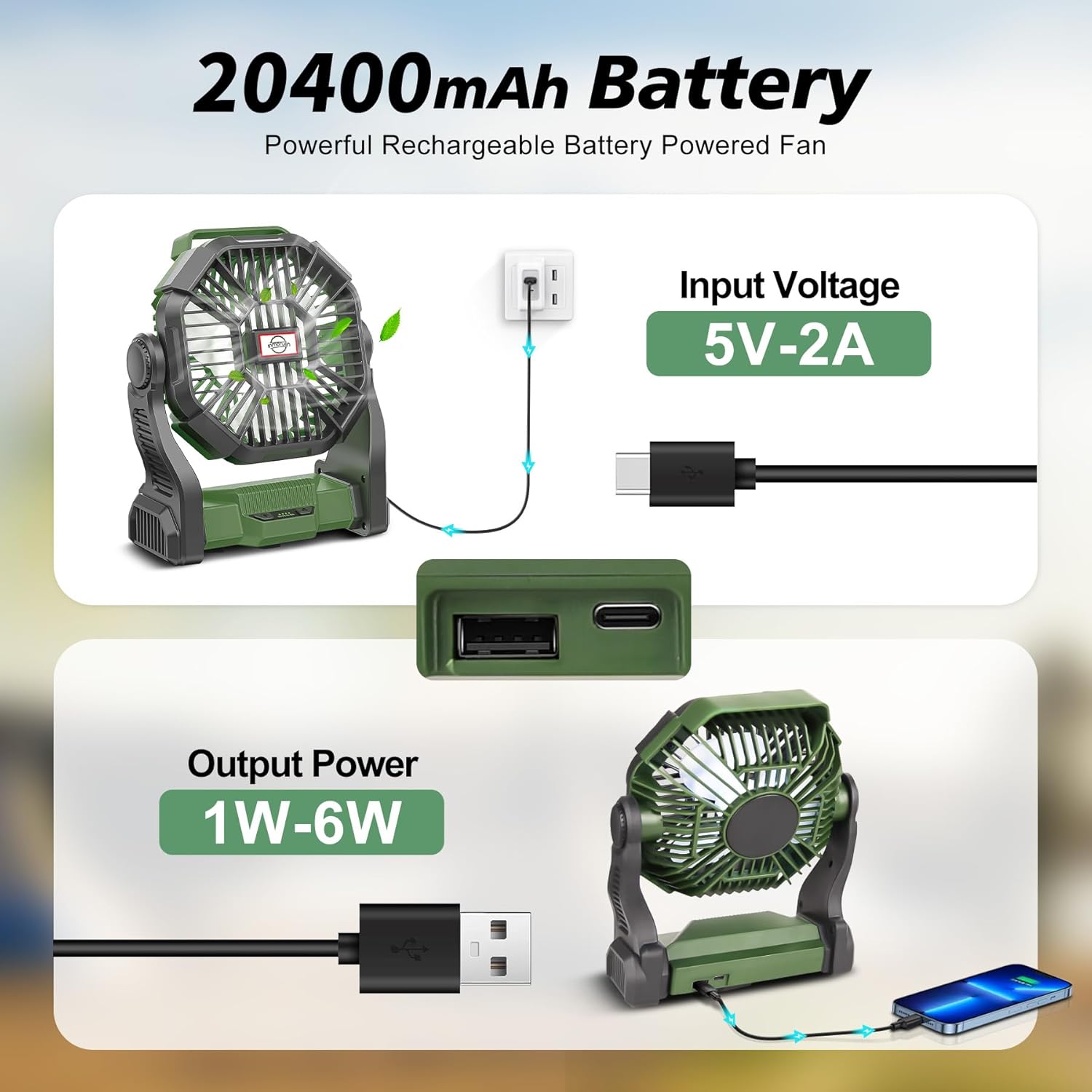
Figure 5: Charging the Fan and Using as a Power Bank
5.2 Positioning the Fan
The fan can be used in multiple positions:
- നിൽക്കുന്നത്: Place the fan on a flat, stable surface. Adjust the stand to achieve the desired angle (up to 270° rotation).
- തൂക്കിയിടുന്നത്: Utilize the integrated hook at the bottom of the fan. Rotate the hook out and hang the fan from a tent, umbrella, hammock, or other suitable structure.

Figure 8: Versatile Hanging Hook Design
6. പ്രവർത്തന നിർദ്ദേശങ്ങൾ
6.1 ഫാൻ പ്രവർത്തനം
The fan features 4 adjustable speeds controlled by a push-button on the control panel.
- Press the fan button once to turn on the fan at Low Speed.
- Press again to cycle through Medium Speed, High Speed, and Super High Speed.
- Press a fifth time to turn off the fan.
The fan operates quietly, with noise levels less than 30dB on the lowest setting.

Figure 6: Fan Speed Settings and Quiet Operation
6.2 LED ലൈറ്റ് ഓപ്പറേഷൻ
The integrated LED lantern has three adjustable brightness settings.
- Press the light button once to turn on the LED light at Low brightness.
- Press again to cycle through Medium brightness and High brightness.
- Press a fourth time to turn off the LED light.

Figure 7: LED Night Light with Adjustable Brightness
6.3 പവർ ബാങ്ക് പ്രവർത്തനം
The fan can also serve as a power bank to charge your mobile devices.
- Connect your device's charging cable to the USB-A output port on the fan.
- The fan's 20400mAh battery can provide emergency power for your phone or other small electronics.
7. Charging the Fan
To charge the fan, use the provided USB-C cable. Connect one end to the fan's USB-C input port and the other end to a 5V-2A power adapter. The battery indicator lights will show the charging status. Each light represents approximately 25% of the battery capacity. When all four lights are solid, the fan is fully charged.
The fan supports working while charging, allowing continuous operation even when the battery is low.
8. പരിപാലനം
8.1 വൃത്തിയാക്കൽ
- വൃത്തിയാക്കുന്നതിന് മുമ്പ് ഫാൻ ഓഫാക്കിയിട്ടുണ്ടെന്നും അൺപ്ലഗ് ചെയ്തിട്ടുണ്ടെന്നും ഉറപ്പാക്കുക.
- ഫാനിന്റെ പുറംഭാഗം മൃദുവായതും ഉണങ്ങിയതുമായ തുണി ഉപയോഗിച്ച് തുടയ്ക്കുക.
- അബ്രാസീവ് ക്ലീനറുകളോ ലായകങ്ങളോ ഉപയോഗിക്കരുത്, അല്ലെങ്കിൽ ഫാൻ വെള്ളത്തിൽ മുക്കരുത്.
- For dust accumulation on the fan blades, use a soft brush or compressed air to gently clean through the grille. Do not attempt to remove the grille.
8.2 സംഭരണം
When storing the fan for extended periods, ensure it is fully charged and stored in a cool, dry place away from direct sunlight and extreme temperatures. Recharge the fan every 3-6 months to maintain battery health.
9. പ്രശ്നപരിഹാരം
| പ്രശ്നം | സാധ്യമായ കാരണം | പരിഹാരം |
|---|---|---|
| ഫാൻ ഓണാകുന്നില്ല. | ബാറ്ററി തീർന്നു. | USB-C കേബിൾ ഉപയോഗിച്ച് ഫാൻ ചാർജ് ചെയ്യുക. |
| Fan is not charging. | ചാർജിംഗ് കേബിളോ അഡാപ്റ്ററോ തകരാറിലാണ്. | Try a different USB-C cable or power adapter. Ensure the adapter is 5V-2A. |
| LED ലൈറ്റ് ഓണാകുന്നില്ല. | Battery is depleted or light button not pressed correctly. | Charge the fan. Press the light button firmly to cycle through brightness settings. |
| ചെറിയ ബാറ്ററി ലൈഫ്. | Operating at high speed/brightness, or battery degradation. | Reduce fan speed or light brightness. Ensure full charge before use. Battery life naturally decreases over time. |
| ഫാൻ അസാധാരണമായ ശബ്ദമുണ്ടാക്കുന്നു. | ഫാൻ ബ്ലേഡുകളിൽ തടസ്സം അല്ലെങ്കിൽ ആന്തരിക പ്രശ്നം. | Turn off and unplug the fan. Check for any obstructions in the grille. If the noise persists, discontinue use and contact support. |
10 സ്പെസിഫിക്കേഷനുകൾ
| ഫീച്ചർ | വിശദാംശങ്ങൾ |
|---|---|
| ബ്രാൻഡ് | കോൺബോള |
| മോഡലിൻ്റെ പേര് | X23-PRO |
| നിറം | ആർമി ഗ്രീൻ |
| പവർ ഉറവിടം | ബാറ്ററി പവർ |
| ബാറ്ററി ശേഷി | 20400mAh ലിഥിയം അയൺ (ഉൾപ്പെടുത്തിയത്) |
| ഫാൻ വേഗത | 4 ലെവലുകൾ |
| ശബ്ദ നില | 30 dB (ഏറ്റവും കുറഞ്ഞ ക്രമീകരണം) |
| LED ലൈറ്റ് തെളിച്ചം | 3 ലെവലുകൾ |
| റൊട്ടേഷൻ അഡ്ജസ്റ്റ്മെന്റ് | 270° |
| ഉൽപ്പന്ന അളവുകൾ | 7"D x 3.9"W x 10"H |
| ഇനത്തിൻ്റെ ഭാരം | 1.4 പൗണ്ട് (22.4 ഔൺസ്) |
| കണക്റ്റർ തരം | യുഎസ്ബി ടൈപ്പ്-സി (ഇൻപുട്ട്), യുഎസ്ബി ടൈപ്പ്-എ (ഔട്ട്പുട്ട്) |
| വാല്യംtage | 5 വോൾട്ട് |
| വാട്ട്tage | 13.9 മില്ലിവാട്ട് |
| ബ്ലേഡ് മെറ്റീരിയൽ | പ്ലാസ്റ്റിക് |
11. വാറൻ്റിയും പിന്തുണയും
CONBOLA products are designed and manufactured to the highest quality standards. For any questions, technical support, or warranty claims, please refer to the contact information provided with your purchase or visit the official CONBOLA webസൈറ്റ്. വാറന്റി സേവനത്തിനായി നിങ്ങളുടെ വാങ്ങിയതിന്റെ തെളിവ് സൂക്ഷിക്കുക.