
ആമുഖം
This manual provides comprehensive instructions for setting up, operating, maintaining, and troubleshooting your ATTACK SHARK AKS068 Wired Mechanical Gaming Keyboard. Designed with an ergonomic Alice layout, hot-swappable switches, and customizable RGB backlighting, this keyboard offers a superior typing and gaming experience. Please read this manual carefully to ensure optimal performance and longevity of your device.
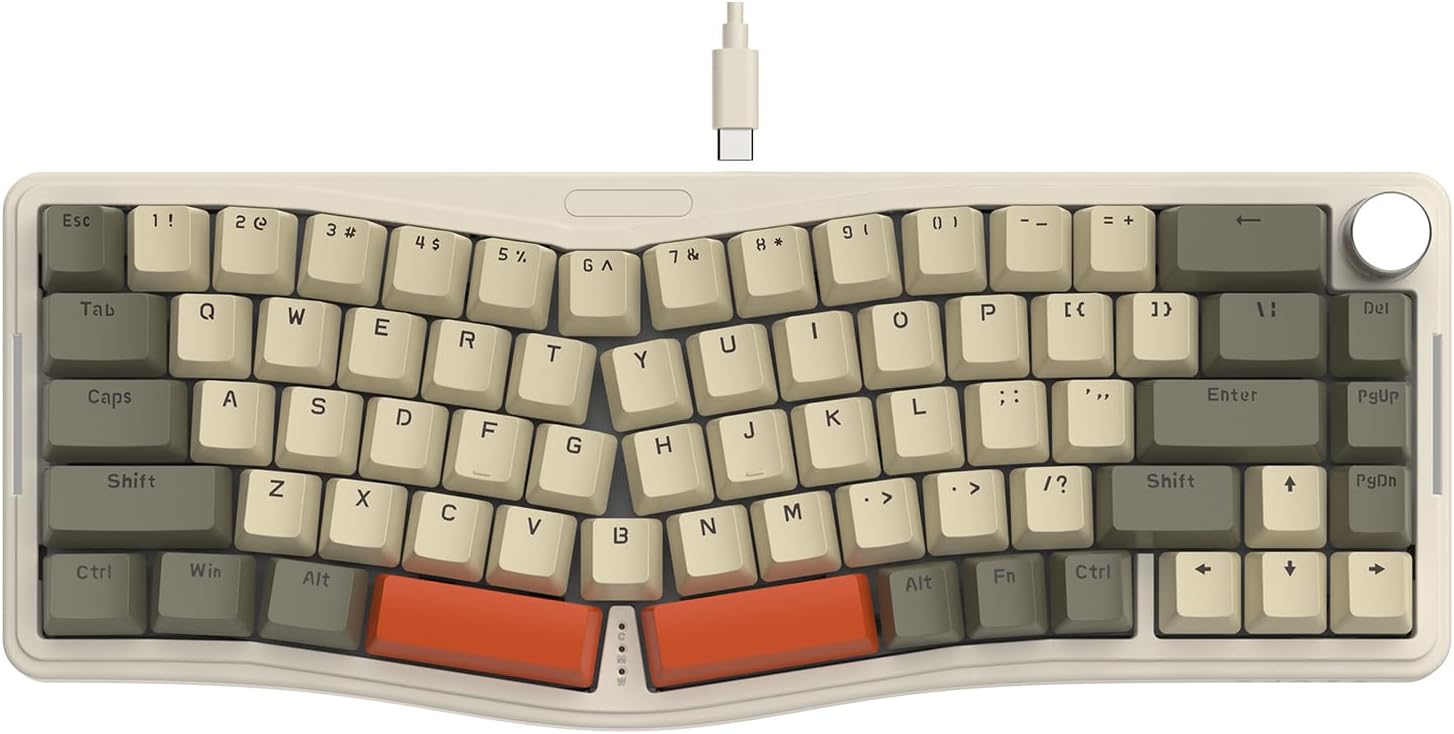
Figure 1: ATTACK SHARK AKS068 Wired Mechanical Gaming Keyboard (Gray/Red Switch variant)
1. സജ്ജീകരണം
1.1 ബോക്സിൽ എന്താണുള്ളത്
- കീബോർഡ് കിറ്റ്
- Switches (Pre-lubed AS Red Switch)
- Keycaps (Tri-color ABS OEM keycaps)
- വേർപെടുത്താവുന്ന ടൈപ്പ്-സി യുഎസ്ബി കേബിൾ
- കീക്യാപ് പുള്ളർ
- സ്വിച്ച് പുള്ളർ
- അധിക സ്വിച്ചുകൾ
1.2 ഫിസിക്കൽ അസംബ്ലി
The AKS068 keyboard comes as a kit requiring simple assembly of switches and keycaps. Follow these steps:
- Place the keyboard kit on a stable surface.
- Carefully install the attached switches into the switch holes on the PCB. Ensure the two small copper contacts on each switch align with the holes in the socket. Apply firm, even pressure until the switch clicks into place.
- Install the attached keycaps onto the corresponding switch stems. Refer to the product images for the correct layout if needed.
- Connect the detachable Type-C USB cable to the keyboard's Type-C port and to your computer.
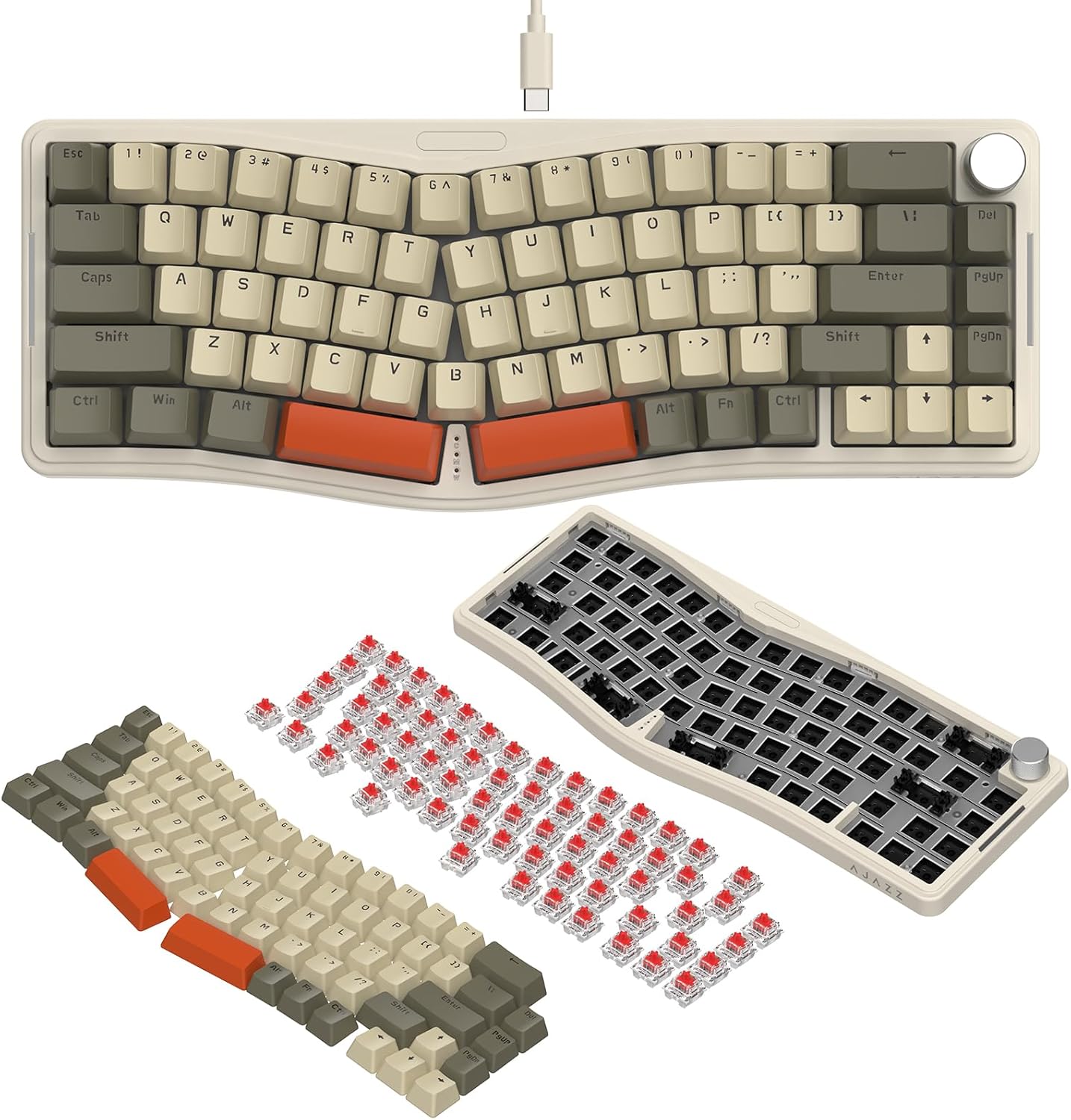
Figure 2: Step-by-step assembly of switches and keycaps onto the keyboard kit.
The keyboard features a double-layer adjustable stand on the underside, allowing you to set two levels of incline for ergonomic comfort. Simply flip out the desired stand level.

ചിത്രം 3: അടിവശം view showing the double-layer adjustable stand and Type-C port.
1.3 Software Setup (VIA Programming)
The ATTACK SHARK AKS068 keyboard supports VIA software for advanced customization, including key remapping, lighting mode adjustments, and macro creation. To use VIA, you will need to download the software and the corresponding JSON file for the AKS068 model.
- Download the VIA software and JSON file from the official link: bit.ly/4amBzF8.
- Open the VIA software and load the downloaded JSON file.
- Ensure your keyboard is connected via the Type-C cable for VIA programming.
Video 1: This video demonstrates how to program the keyboard using VIA software, including loading JSON files ഉം റീമാപ്പിംഗ് കീകളും.

Figure 4: Visual representation of the keyboard's compatibility with VIA software for customization.
2. പ്രവർത്തന നിർദ്ദേശങ്ങൾ
2.1 അടിസ്ഥാന കീബോർഡ് ഉപയോഗം
The AKS068 features a 68-key TKL Alice layout, designed for ergonomic comfort. The split layout follows the natural resting position of your hands, reducing wrist tension.
- പൂർണ്ണ കീ ആന്റി-ഗോസ്റ്റിംഗ്: All keys support anti-ghosting, ensuring every keystroke is registered accurately, even during rapid typing or complex gaming commands.
- Windows/Mac Compatibility: The keyboard is compatible with both Windows and Mac operating systems. Use the switch located on the top edge of the keyboard to toggle between Win and Mac modes. Note that FN combination key functions may differ between systems.
2.2 നോബ് പ്രവർത്തനം
The anodized metal volume knob provides convenient control over your audio:
- ഇടത്തേക്ക്/വലത്തേക്ക് തിരിയുക: സിസ്റ്റം വോളിയം ക്രമീകരിക്കുന്നു.
- അമർത്തുക: ഓഡിയോ നിശബ്ദമാക്കുകയോ അൺമ്യൂട്ടുചെയ്യുകയോ ചെയ്യുന്നു.

Figure 5: Illustration of the multi-functional metal knob and full key anti-ghosting feature.
2.3 RGB ബാക്ക്ലൈറ്റിംഗ്
The keyboard features full RGB backlighting with south-facing LEDs, offering vibrant illumination on both the top and sides of the keyboard.
- 18 Backlight Modes (Top): Adjust by pressing FN + \.
- 5 Backlight Modes (Sides): Adjust by pressing FN + DEL.
- Adjust Light Color/Brightness: ഉപയോഗിക്കുക എഫ്എൻ + ← / →.
- Turn On/Off Top/Side Backlight: ഉപയോഗിക്കുക FN + Z / X.
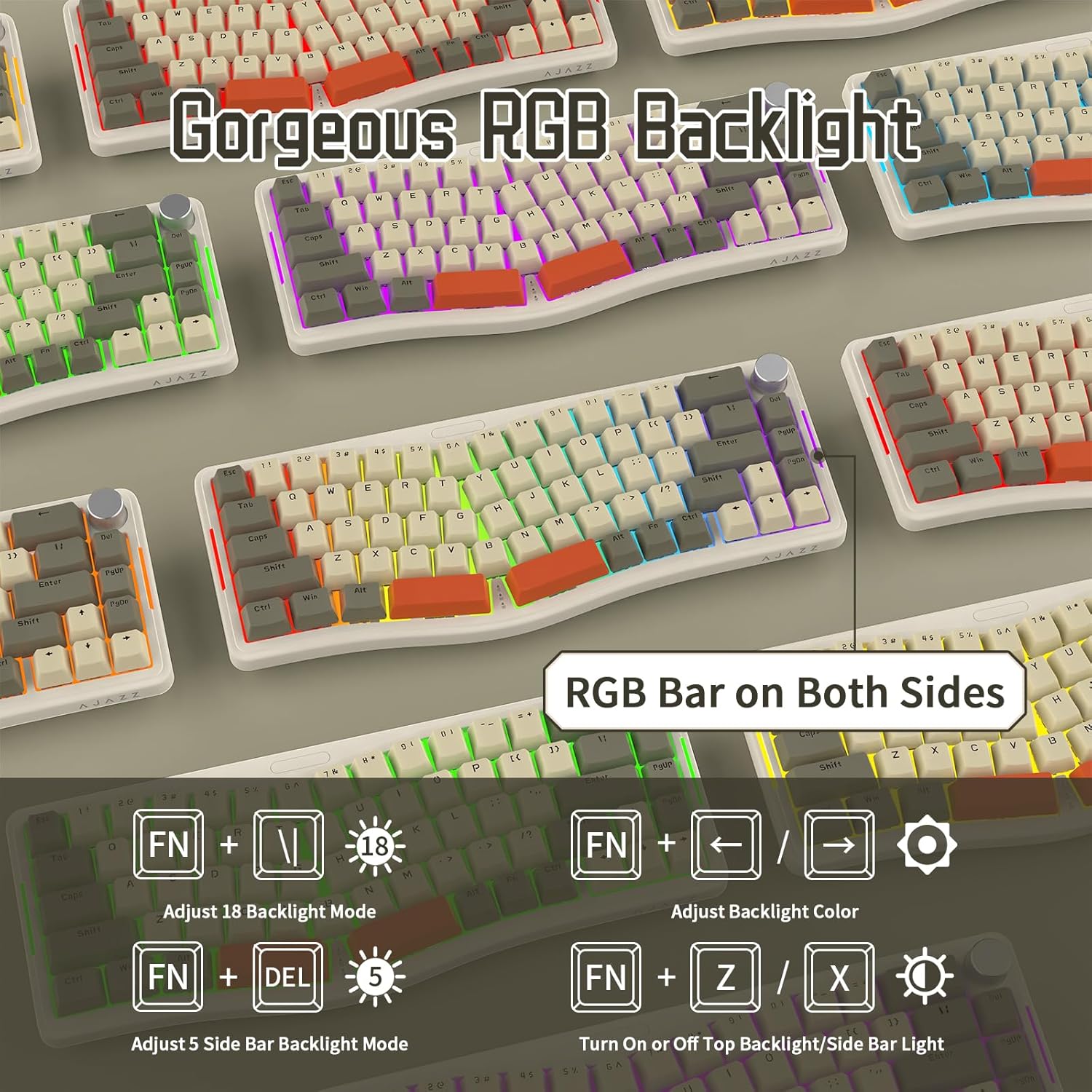
ചിത്രം 6: ഓവർview of the RGB backlighting features and control shortcuts.
3. പരിപാലനം
3.1 നിങ്ങളുടെ കീബോർഡ് വൃത്തിയാക്കൽ
കീബോർഡിന്റെ രൂപവും പ്രവർത്തനക്ഷമതയും നിലനിർത്താൻ പതിവായി വൃത്തിയാക്കൽ സഹായിക്കുന്നു:
- Use a soft, dry cloth to wipe down the keycaps and keyboard body.
- For deeper cleaning, you can remove keycaps using the provided keycap puller and use compressed air to clear debris from underneath.
- കീക്യാപ്പുകൾക്കോ ഫിനിഷിനോ കേടുവരുത്താൻ സാധ്യതയുള്ളതിനാൽ, കഠിനമായ രാസവസ്തുക്കളോ ഉരച്ചിലുകളോ ഉള്ള വസ്തുക്കൾ ഉപയോഗിക്കുന്നത് ഒഴിവാക്കുക.
3.2 ഹോട്ട്-സ്വാപ്പബിൾ സ്വിച്ചുകൾ
The AKS068 features a hot-swappable PCB, allowing you to easily change switches without soldering. This supports most 3-pin/5-pin mechanical switches (e.g., Cherry MX, Kailh Box, Gateron, Outemu, Glorious, Epomaker, AKKO).
- ഒരു സ്വിച്ച് നീക്കം ചെയ്യാൻ, നൽകിയിരിക്കുന്ന സ്വിച്ച് പുള്ളർ ഉപയോഗിച്ച് സ്വിച്ചിന്റെ മുകളിലും താഴെയുമായി സൌമ്യമായി പിടിച്ച് മുകളിലേക്ക് വലിക്കുക.
- ഒരു പുതിയ സ്വിച്ച് ഇൻസ്റ്റാൾ ചെയ്യാൻ, അതിന്റെ പിന്നുകൾ പിസിബിയിലെ ദ്വാരങ്ങളുമായി വിന്യസിക്കുക, അത് സ്ഥലത്ത് ക്ലിക്ക് ആകുന്നതുവരെ ദൃഢമായി അമർത്തുക. പിന്നുകൾ വളയുന്നില്ലെന്ന് ഉറപ്പാക്കുക.
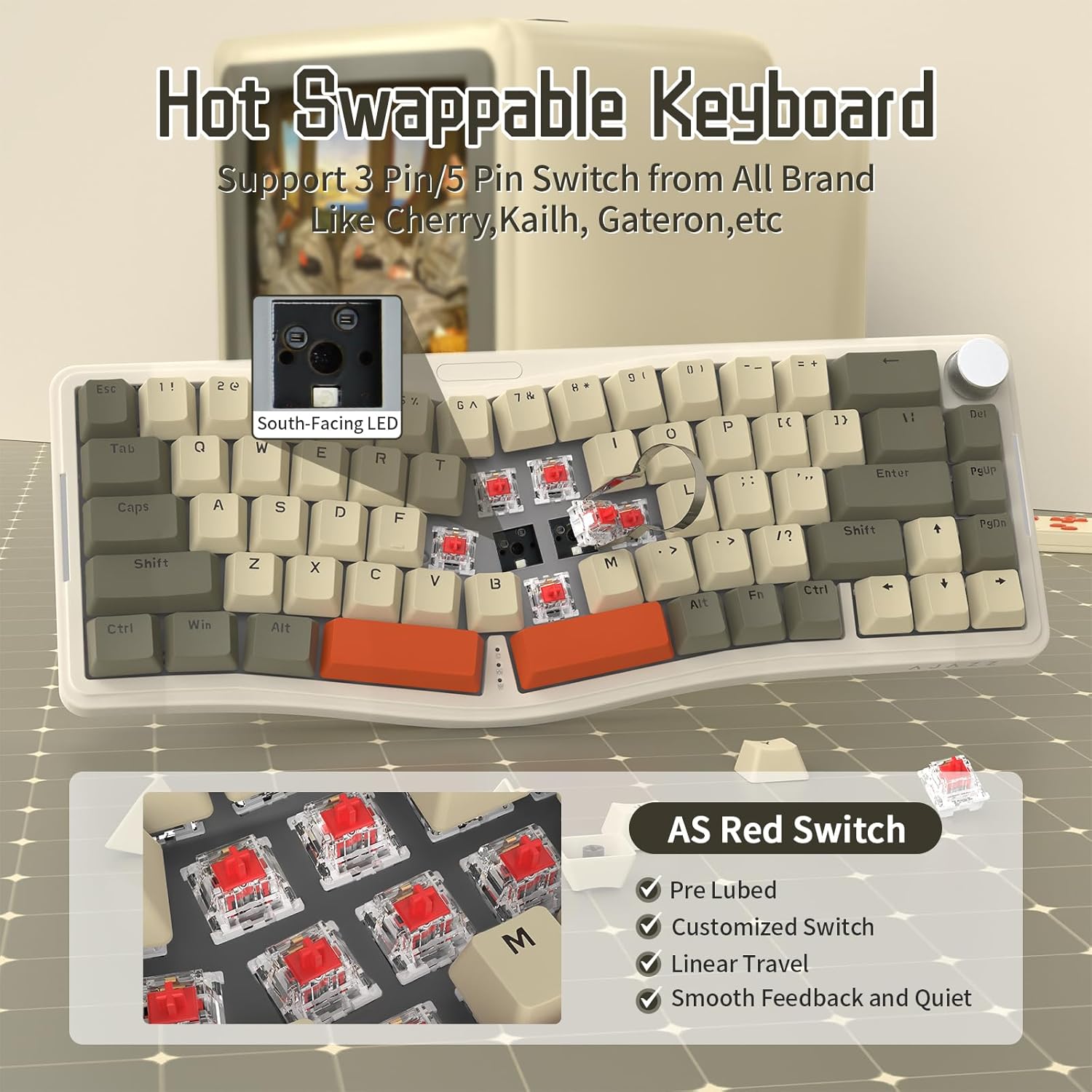
Figure 7: The hot-swappable design allows for easy replacement of mechanical switches.
The keyboard utilizes a gasket mount structure and includes 4 layers of sound absorption material to minimize sound resonance and provide a comfortable typing experience.
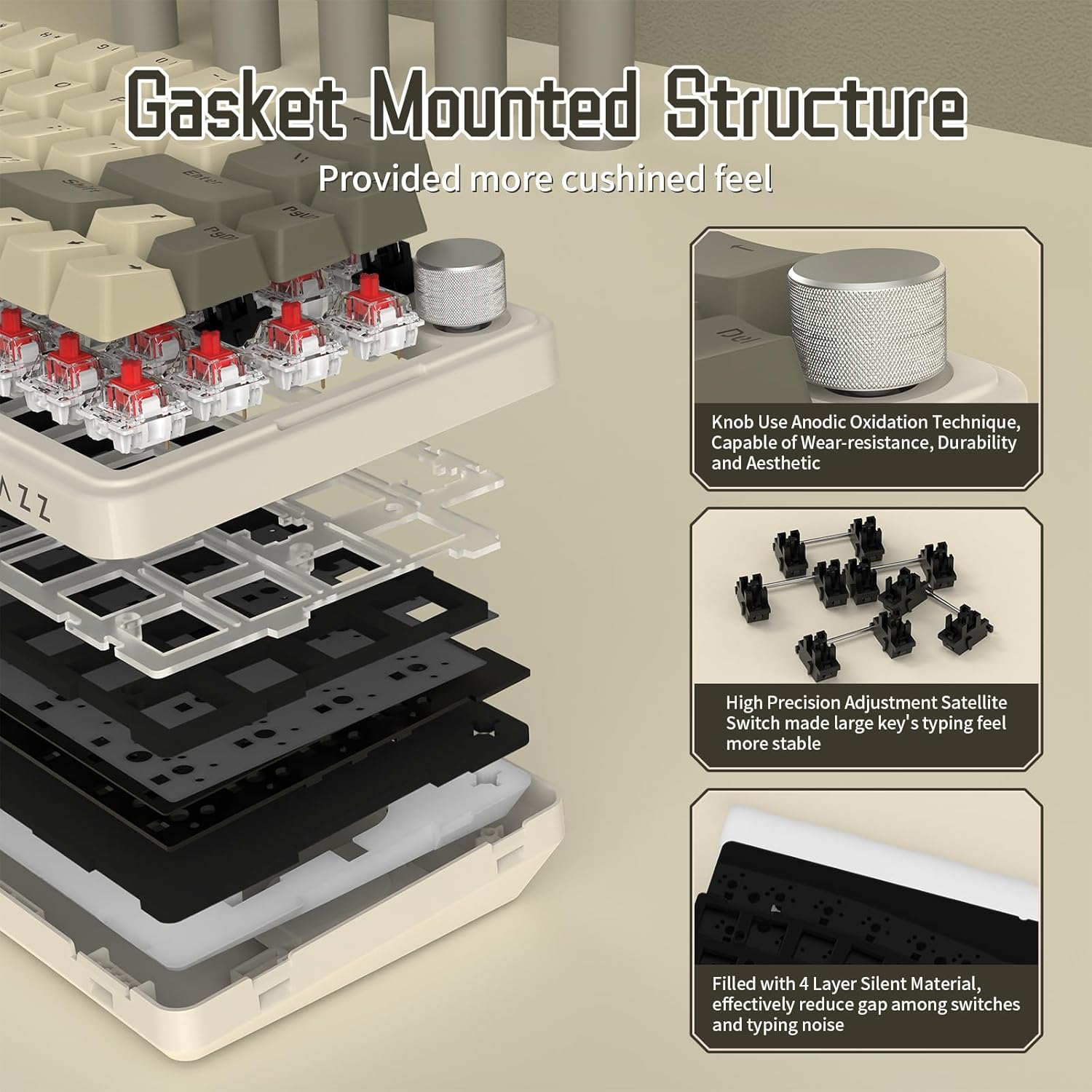
Figure 8: Diagram illustrating the gasket mount and sound absorption layers for enhanced typing feel.
4. പ്രശ്നപരിഹാരം
പൊതുവായ പ്രശ്നങ്ങളും പരിഹാരങ്ങളും
- കീബോർഡ് പ്രതികരിക്കുന്നില്ല:
- ടൈപ്പ്-സി കേബിൾ കീബോർഡിലേക്കും കമ്പ്യൂട്ടറിലേക്കും സുരക്ഷിതമായി ബന്ധിപ്പിച്ചിട്ടുണ്ടെന്ന് ഉറപ്പാക്കുക.
- നിങ്ങളുടെ കമ്പ്യൂട്ടറിലെ മറ്റൊരു USB പോർട്ടിലേക്ക് കീബോർഡ് ബന്ധിപ്പിക്കാൻ ശ്രമിക്കുക.
- നിങ്ങളുടെ കമ്പ്യൂട്ടർ പുനരാരംഭിക്കുക.
- കീകൾ രജിസ്റ്റർ ചെയ്യുന്നില്ല / ഇരട്ട ടൈപ്പിംഗ്:
- Ensure switches are fully seated in their sockets. Gently press down on any loose switches.
- If a specific switch is faulty, replace it with one of the extra switches provided or a compatible replacement.
- RGB Backlight Not Working / Incorrect Colors:
- Check the backlight control shortcuts (FN + \, FN + DEL, FN + Z / X) to ensure the backlight is enabled and set to the desired mode/brightness.
- If using VIA software, verify lighting settings within the application.
- കീബോർഡ് തിരിച്ചറിയാത്ത സോഫ്റ്റ്വെയർ വഴി:
- Ensure the keyboard is connected via the Type-C cable. VIA typically requires a wired connection.
- Verify that you have loaded the correct JSON definition file for the AKS068 model in VIA.
- Ensure "Use V2 definitions (deprecated)" is enabled in VIA settings if prompted.
5 സ്പെസിഫിക്കേഷനുകൾ
| ഫീച്ചർ | വിശദാംശങ്ങൾ |
|---|---|
| ബ്രാൻഡ് | അറ്റാക്ക് സ്രാവ് |
| മോഡൽ നമ്പർ | എകെഎസ്068 |
| ലേഔട്ട് | 65% ആലീസ് ലേഔട്ട് (68 കീകൾ) |
| കണക്റ്റിവിറ്റി | ടൈപ്പ്-സി വയർഡ് |
| സ്വിച്ച് തരം | AS Pre-lubed Linear Red Switch (Hot-Swappable) |
| കീക്യാപ് മെറ്റീരിയൽ | ABS OEM Keycaps |
| മൗണ്ടിംഗ് ശൈലി | ഗാസ്കറ്റ് മൗണ്ട് |
| ബാക്ക്ലൈറ്റിംഗ് | Full RGB (South-facing LEDs, 18 top modes, 5 side modes) |
| പ്രോഗ്രാമബിലിറ്റി | പ്രോഗ്രാം ചെയ്യാവുന്ന വഴി |
| പ്രത്യേക സവിശേഷതകൾ | Volume Roller Knob, NKRO (N-Key Rollover), Double Layer Adjustable Stand, Sound Absorption Cotton |
| അനുയോജ്യമായ ഉപകരണങ്ങൾ | ലാപ്ടോപ്പ്, പിസി, മാക് |
| ഇനത്തിൻ്റെ ഭാരം | 1.96 പൗണ്ട് |
| പാക്കേജ് അളവുകൾ | 16.02 x 7.28 x 2.32 ഇഞ്ച് |
6. വാറൻ്റിയും പിന്തുണയും
For warranty information and technical support, please refer to the official ATTACK SHARK brand store or contact their customer service directly. Details regarding product warranty and support channels are typically provided with your purchase or can be found on the manufacturer's official webസൈറ്റ്.
Visit the official ATTACK SHARK Store: അറ്റാക്ക് ഷാർക്ക് സ്റ്റോർ