
1. ആമുഖം
വാങ്ങിയതിന് നന്ദി.asing the BOOM BASS L-22 Bluetooth Speaker. This manual provides essential information for the safe and efficient operation of your new speaker. Please read this manual thoroughly before use and retain it for future reference.
2. ഉൽപ്പന്നം കഴിഞ്ഞുview
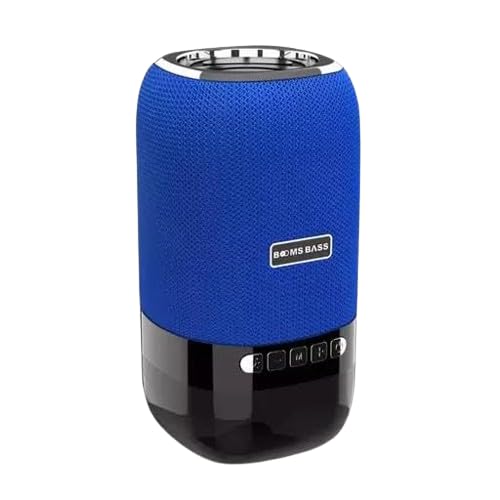
Image: The BOOM BASS L-22 Bluetooth Speaker, featuring a cylindrical design with a blue fabric mesh upper section and a black glossy base. The speaker has control buttons on the front of the black base and a silver ring at the top.
The BOOM BASS L-22 is a portable 5W Bluetooth speaker designed for wireless audio playback. It features a distinctive blue color and integrated LED lighting, enhancing your audio experience with visual effects. Its compact design makes it suitable for various environments.
3. സവിശേഷതകൾ
- ബ്ലൂടൂത്ത് കണക്റ്റിവിറ്റി: അനുയോജ്യമായ ഉപകരണങ്ങളിൽ നിന്നുള്ള തടസ്സമില്ലാത്ത വയർലെസ് ഓഡിയോ സ്ട്രീമിംഗ്.
- 5W ഓഡിയോ ഔട്ട്പുട്ട്: വ്യക്തവും ശക്തവുമായ ശബ്ദം നൽകുന്നു.
- Blue Color Design: Stylish and vibrant blue finish.
- സംയോജിത എൽഇഡി ലൈറ്റിംഗ്: Features different LED light modes for an enhanced ambiance.
- പോർട്ടബിൾ ഡിസൈൻ: Compact dimensions (10D x 10W x 10H Centimeters) for easy transport.
- വാട്ടർപ്രൂഫ്: Designed to be resistant to water.
4. ബോക്സിൽ എന്താണുള്ളത്?
അൺബോക്സിംഗ് ചെയ്യുമ്പോൾ, താഴെ ലിസ്റ്റ് ചെയ്തിരിക്കുന്ന എല്ലാ ഇനങ്ങളും ഉണ്ടെന്ന് ഉറപ്പാക്കുക:
- 1 x BOOM BASS L-22 Bluetooth Speaker
- 1 x Charging Cable (Note: Specific cable type not provided in product details, typically USB)
- 1 x User Manual (ഈ പ്രമാണം)
5. സജ്ജീകരണം
5.1 സ്പീക്കർ ചാർജ് ചെയ്യുന്നു
- സ്പീക്കറിൽ ചാർജിംഗ് പോർട്ട് കണ്ടെത്തുക.
- നൽകിയിരിക്കുന്ന ചാർജിംഗ് കേബിൾ സ്പീക്കറിന്റെ ചാർജിംഗ് പോർട്ടുമായി ബന്ധിപ്പിക്കുക.
- Connect the other end of the charging cable to a compatible USB power adapter (not included) or a computer's USB port.
- The LED indicator will typically show charging status (e.g., solid red while charging, off when fully charged).
- Allow the speaker to fully charge before first use for optimal battery life.
5.2 ബ്ലൂടൂത്ത് ജോടിയാക്കൽ
- പവർ ഓൺ: Press and hold the Power button on the speaker until you hear an audible prompt or see the LED indicator light up.
- ജോടിയാക്കൽ മോഡ് നൽകുക: The speaker should automatically enter Bluetooth pairing mode, indicated by a flashing LED light (e.g., blue). If not, press the Bluetooth pairing button (if available).
- നിങ്ങളുടെ ഉപകരണത്തിൽ ബ്ലൂടൂത്ത് പ്രവർത്തനക്ഷമമാക്കുക: On your smartphone, tablet, or other Bluetooth-enabled device, go to the Bluetooth settings and turn Bluetooth ON.
- സ്പീക്കർ തിരഞ്ഞെടുക്കുക: In the list of available devices, look for "BOOM BASS L-22" or a similar name. Tap on it to connect.
- സ്ഥിരീകരണം: Once successfully paired, the speaker will usually provide an audible confirmation, and the LED indicator will stop flashing and remain solid.
Note: If prompted for a password, enter "0000" (four zeros).
6. പ്രവർത്തന നിർദ്ദേശങ്ങൾ
6.1 അടിസ്ഥാന നിയന്ത്രണങ്ങൾ
- പവർ ഓൺ/ഓഫ്: അമർത്തിപ്പിടിക്കുക ശക്തി ബട്ടൺ.
- പ്ലേ/താൽക്കാലികമായി നിർത്തുക: അമർത്തുക പ്ലേ/താൽക്കാലികമായി നിർത്തുക button to start or pause audio playback.
- വോളിയം കൂട്ടുക: അമർത്തുക വോളിയം + വോളിയം വർദ്ധിപ്പിക്കുന്നതിനുള്ള ബട്ടൺ.
- വോളിയം താഴേക്ക്: അമർത്തുക വ്യാപ്തം - വോളിയം കുറയ്ക്കുന്നതിനുള്ള ബട്ടൺ.
- അടുത്ത ട്രാക്ക്: Press and hold or double-press the വോളിയം + ബട്ടൺ (functionality may vary by model).
- മുമ്പത്തെ ട്രാക്ക്: Press and hold or double-press the വ്യാപ്തം - ബട്ടൺ (functionality may vary by model).
- മോഡ് ബട്ടൺ (M): Press to switch between available modes (e.g., Bluetooth, AUX, TF Card, USB - if supported by the speaker).
- LED ലൈറ്റ് കൺട്രോൾ: Some models may have a dedicated button or a long press on another button to change LED light patterns or turn them off.
6.2 ഓഡിയോ പ്ലേബാക്ക്
Once paired, audio from your connected device will automatically play through the speaker. Control playback (play, pause, skip) either from your device or using the speaker's control buttons.
7. പരിപാലനം
7.1 വൃത്തിയാക്കൽ
- വൃത്തിയാക്കുന്നതിന് മുമ്പ് സ്പീക്കർ ഓഫ് ചെയ്തിട്ടുണ്ടെന്നും ഏതെങ്കിലും പവർ സ്രോതസ്സിൽ നിന്ന് വിച്ഛേദിക്കപ്പെട്ടിട്ടുണ്ടെന്നും ഉറപ്പാക്കുക.
- മൃദുവായതും ഉണങ്ങിയതും ലിന്റ് രഹിതവുമായ തുണി ഉപയോഗിച്ച് പുറംഭാഗം തുടയ്ക്കുക.
- കഠിനമായ അടയാളങ്ങൾക്ക്, നേരിയ dampതുണിയിൽ വെള്ളം ഒഴിക്കുക. കഠിനമായ രാസവസ്തുക്കളോ, ക്ലീനിംഗ് ലായകങ്ങളോ, ശക്തമായ ഡിറ്റർജന്റുകളോ ഉപയോഗിക്കരുത്.
- ഏതെങ്കിലും തുറസ്സുകളിലോ തുറമുഖങ്ങളിലോ ഈർപ്പം കയറുന്നത് ഒഴിവാക്കുക.
7.2 സംഭരണം
- നേരിട്ടുള്ള സൂര്യപ്രകാശത്തിൽ നിന്നും കടുത്ത താപനിലയിൽ നിന്നും മാറി തണുത്തതും വരണ്ടതുമായ സ്ഥലത്ത് സ്പീക്കർ സൂക്ഷിക്കുക.
- If storing for an extended period, charge the battery to approximately 50% every few months to preserve battery health.
8. പ്രശ്നപരിഹാരം
| പ്രശ്നം | സാധ്യമായ കാരണം | പരിഹാരം |
|---|---|---|
| സ്പീക്കർ ഓണാക്കുന്നില്ല. | ബാറ്ററി തീർന്നു. | സ്പീക്കർ പൂർണ്ണമായും ചാർജ് ചെയ്യുക. |
| ബ്ലൂടൂത്ത് ഉപകരണവുമായി ജോടിയാക്കാൻ കഴിയില്ല. | Bluetooth is off on device; speaker not in pairing mode; device too far. | Ensure Bluetooth is enabled on your device. Put speaker in pairing mode. Move device closer to speaker (within 10 meters). Forget speaker from device's Bluetooth list and re-pair. |
| ശബ്ദമില്ല അല്ലെങ്കിൽ കുറഞ്ഞ ശബ്ദമില്ല. | സ്പീക്കറിലോ ഉപകരണത്തിലോ ശബ്ദം വളരെ കുറവാണ്; സ്പീക്കർ കണക്റ്റുചെയ്തിട്ടില്ല. | സ്പീക്കറിലും കണക്റ്റുചെയ്ത ഉപകരണത്തിലും ശബ്ദം വർദ്ധിപ്പിക്കുക. സ്പീക്കർ ജോടിയാക്കുകയും കണക്റ്റുചെയ്യുകയും ചെയ്തിട്ടുണ്ടെന്ന് ഉറപ്പാക്കുക. |
| ശബ്ദ വികൃതത. | ശബ്ദം വളരെ കൂടുതലാണ്; തടസ്സം; ബാറ്ററി കുറവാണ്. | Reduce volume. Move speaker away from other electronic devices. Charge the speaker. |
9 സ്പെസിഫിക്കേഷനുകൾ
| ഫീച്ചർ | വിശദാംശങ്ങൾ |
|---|---|
| ബ്രാൻഡ് | ജനറിക് |
| മോഡലിൻ്റെ പേര് | L-22 (Speaker) |
| കണക്റ്റിവിറ്റി ടെക്നോളജി | ബ്ലൂടൂത്ത് |
| സ്പീക്കർ തരം | സബ് വൂഫർ |
| ഔട്ട്പുട്ട് പവർ | 5W |
| നിറം | നീല |
| ഉൽപ്പന്ന അളവുകൾ | 10D x 10W x 10H സെന്റീമീറ്ററുകൾ |
| വാട്ടർപ്രൂഫ് | അതെ |
| ശുപാർശ ചെയ്യുന്ന ഉപയോഗങ്ങൾ | Tablets, Smartphones |
10. വാറൻ്റിയും പിന്തുണയും
For warranty information and customer support, please refer to the documentation provided at the time of purchase or contact the retailer/manufacturer directly. Keep your purchase receipt as proof of purchase for warranty claims.
Manufacturer: Giga Traders


