
ആമുഖം
This user manual provides essential information for the safe and efficient operation of your DOOGEE R20 Rugged Tablet. Please read this manual thoroughly before using the device to ensure proper functionality and to prevent damage. Keep this manual for future reference.

ചിത്രം: മുന്നിലും പിന്നിലും view of the DOOGEE R20 Rugged Tablet, showcasing its robust design and display.
ബോക്സിൽ എന്താണുള്ളത്
The DOOGEE R20 Rugged Tablet package typically includes the following items:
- DOOGEE R20 പരുക്കൻ ടാബ്ലെറ്റ്
- USB-C ചാർജിംഗ് കേബിൾ
- 33W USB-C Wall Adapter (may require an adapter for US outlets)
- ഉപയോക്തൃ മാനുവൽ
- സിം എജക്ടർ ഉപകരണം
- Hand Strap and Metal Piece for attachment
- Protective Case (clear, pre-installed or included)
- 4G LTE SIM Card (for compatible regions/carriers)

Image: The DOOGEE R20 Rugged Tablet shown with its packaging and various accessories, including the charging adapter, cable, and user manual.
ഫിസിക്കൽ ഓവർview
The DOOGEE R20 features a robust design with strategically placed components for durability and functionality.
- ഡിസ്പ്ലേ: 10.4-inch 2.4K IPS display.
- മുൻ ക്യാമറ: Located at the center of the long edge.
- പിൻ ക്യാമറ: 50MP main camera on the back.
- പവർ ബട്ടൺ: മുകളിലെ അറ്റത്ത് സ്ഥിതിചെയ്യുന്നു.
- വോളിയം ബട്ടണുകൾ: Located on the top edge, adjacent to the power button.
- ഫിംഗർപ്രിന്റ് സ്കാനർ: Integrated into the side of the device.
- സ്പീക്കറുകൾ: Quad speakers for enhanced audio experience.
- ഹെഡ്ഫോൺ ജാക്ക്: Located on one side.
- യുഎസ്ബി-സി പോർട്ട്: For charging and data transfer, covered by a protective flap.
- സിം/മൈക്രോ എസ്ഡി കാർഡ് ട്രേ: Located on the opposite side of the charging port, also covered by a protective flap.
ചിത്രം: വശം view of the DOOGEE R20 Rugged Tablet, highlighting the textured edges and button placement.

ചിത്രം: പിൻഭാഗം view of the DOOGEE R20 Rugged Tablet, showing the camera module and ruggedized back panel.
സജ്ജമാക്കുക
പ്രാരംഭ പവർ ഓൺ
- Press and hold the Power button on the top edge until the DOOGEE logo appears.
- Follow the on-screen prompts to select your language (English, United States) and region.
- സജ്ജീകരണ പ്രക്രിയ പൂർത്തിയാക്കുന്നതിനും ആവശ്യമായ അപ്ഡേറ്റുകൾ ഡൗൺലോഡ് ചെയ്യുന്നതിനും ഒരു Wi-Fi നെറ്റ്വർക്കിലേക്ക് കണക്റ്റുചെയ്യുക.
Security Setup (Fingerprint & Face Unlock)
For enhanced security, you can set up fingerprint and face unlock features:
- നാവിഗേറ്റ് ചെയ്യുക ക്രമീകരണങ്ങൾ > സുരക്ഷയും സ്വകാര്യതയും > ഉപകരണം അൺലോക്ക് ചെയ്യുക.
- തിരഞ്ഞെടുക്കുക ഫിംഗർപ്രിൻ്റ് അൺലോക്ക് and follow the instructions to register your fingerprint on the side-mounted sensor.
- തിരഞ്ഞെടുക്കുക ഫേസ് അൺലോക്ക് and follow the instructions to register your face using the front-facing camera.
Mobile Network Setup (Optional)
If your model supports cellular connectivity, you can insert a SIM card:
- ടാബ്ലെറ്റിന്റെ വശത്ത് സിം/മൈക്രോ എസ്ഡി കാർഡ് ട്രേ കണ്ടെത്തുക.
- ട്രേ തുറക്കാൻ നൽകിയിരിക്കുന്ന സിം എജക്റ്റർ ഉപകരണം ഉപയോഗിക്കുക.
- Carefully place your 4G LTE SIM card into the designated slot.
- Close the tray securely. The tablet should automatically detect the network.
ഓപ്പറേറ്റിംഗ് സിസ്റ്റം
The DOOGEE R20 runs on ആൻഡ്രോയിഡ് 13, offering a near-stock Android experience with minimal bloatware. This ensures a clean and efficient user interface.
- ഉപയോക്തൃ ഇൻ്റർഫേസ്: Intuitive and easy to navigate, with most pre-installed applications being standard Google apps.
- അറിയിപ്പുകളും ദ്രുത ക്രമീകരണങ്ങളും: Swipe down from the top of the screen to access notifications and quick settings toggles for Wi-Fi, Bluetooth, Airplane Mode, Auto-rotate, Flashlight, Screen Record, Battery Saver, Do Not Disturb, Hotspot, Color Inversion, Screenshot, Location, Scan QR Code, and Nearby Share. Additional options like Dark Theme and Extra Dim are available for customization.
- സംഭരണം: The tablet comes with 256GB of internal storage, with approximately 16GB used by the system and pre-installed apps, leaving ample space for user data. Storage can be expanded up to 2TB using a MicroSD card.

Image: A close-up of the DOOGEE R20's display, showing the storage settings and available space.
പ്രകടനം
The DOOGEE R20 is powered by the MediaTek Helio G99 Octa-Core processor, built on a 6nm process technology. This processor, combined with 8GB of RAM (expandable to 20GB with virtual RAM), provides a balanced performance for everyday tasks, multitasking, and gaming.
- ഗെയിമിംഗ്: Capable of running popular games like PUBG Mobile and Asphalt 9 smoothly. While not designed for extreme high-end gaming, it offers a satisfactory experience for most users.
- മൾട്ടിടാസ്കിംഗ്: The generous RAM allows for seamless switching between applications without significant slowdowns.

Image: Visual representation of the DOOGEE R20's internal components, highlighting the Helio G99 processor and memory configurations.
ഡിസ്പ്ലേ & ഓഡിയോ
The DOOGEE R20 features a 10.4-inch Full View HD+ IPS display കൂടെ എ 2.4K resolution (1200x2000 pixels), providing vibrant colors and clear visuals. It also boasts Widevine L1 support, enabling high-definition streaming from platforms like Netflix.
- നേത്ര സംരക്ഷണം: TÜV Rheinland Low Blue Light certification helps reduce eye strain during prolonged use.
- ഓഡിയോ: കൊണ്ട് സജ്ജീകരിച്ചിരിക്കുന്നു Hi-Res Quad Speakers, delivering loud and clear audio for an immersive media consumption experience.

Image: The DOOGEE R20 display with key specifications like 2.4K resolution, 1200x2000 screen resolution, and viewകോണുകൾ.
ബാറ്ററി ലൈഫും ചാർജിംഗും
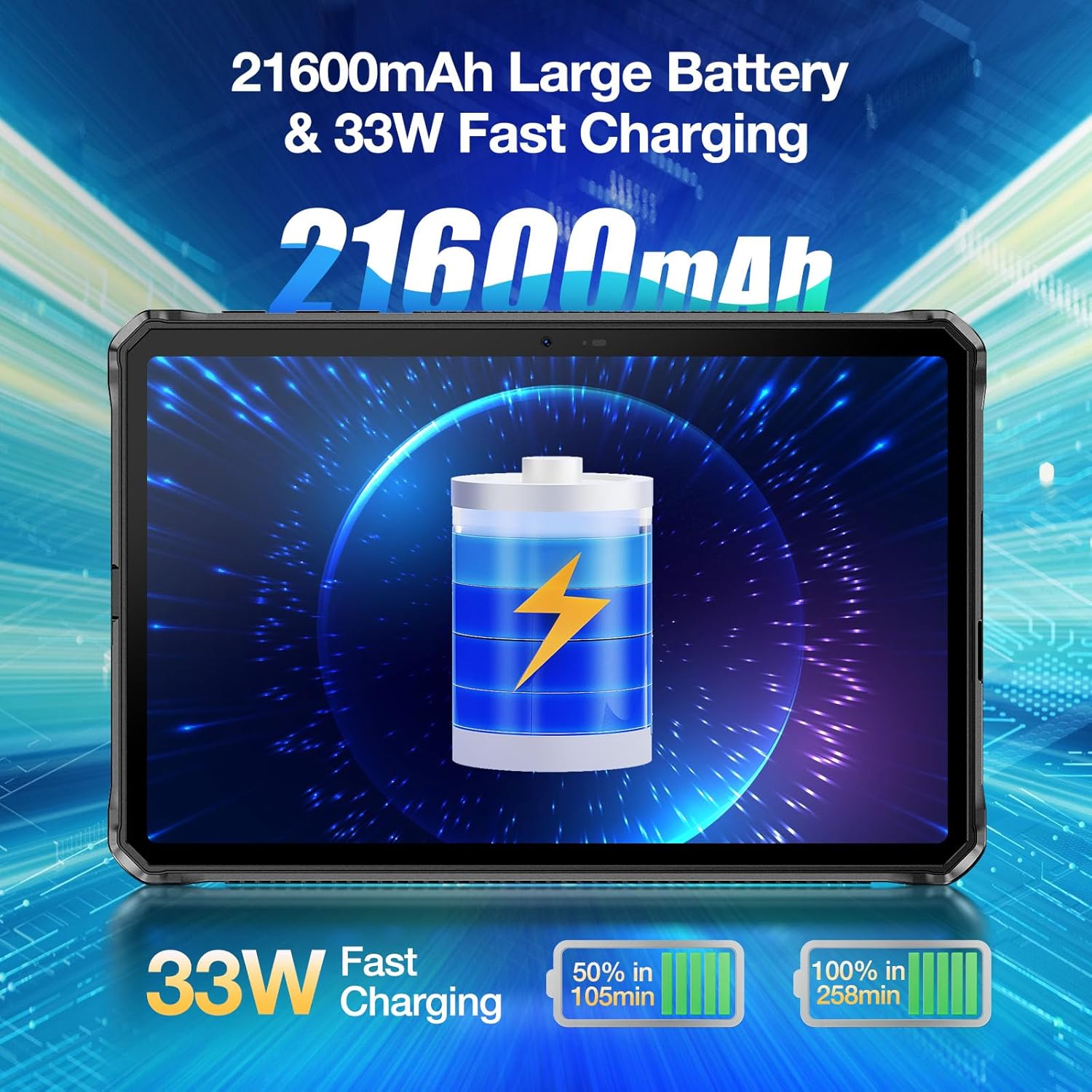
One of the standout features of the DOOGEE R20 is its massive 21600mAh ബാറ്ററി, designed for extended usage without frequent recharging. It supports 33W ഫാസ്റ്റ് ചാർജിംഗ്.
- ഉപയോഗ സമയം: Provides up to 1781 hours of standby, 125 hours of calling, 38 hours of web browsing, and 27 hours of video watching.
- ചാർജിംഗ് സമയം: Despite the large capacity, the 33W fast charger can fully charge the tablet in approximately 9 hours.

Image: The DOOGEE R20 highlighting its 21600mAh battery and 33W fast charging capability.
ക്യാമറ സവിശേഷതകൾ
The DOOGEE R20 is equipped with a 50MP PDAF Rear Camera കൂടാതെ എ 16MP ഫ്രണ്ട് ക്യാമറ, offering higher resolution photography compared to many other tablets.
- പിൻ ക്യാമറ: Features a Samsung JN1 sensor with ISOCELL 2.0 technology for improved light sensitivity and color accuracy.
- വീഡിയോ റെക്കോർഡിംഗ്: Supports video recording up to 2K (2560x1440) resolution.
- ക്യാമറ മോഡുകൾ: Includes Document, Video, Picture, Portrait, and Face Beauty modes.

Image: The DOOGEE R20 showcasing its 50MP main camera and 16MP front camera.
പരുഷത
The DOOGEE R20 is built to withstand harsh environments, certified with IP68, IP69K, and MIL-STD-810H റേറ്റിംഗുകൾ.
- വാട്ടർപ്രൂഫ്: IP68 rating allows submersion in 1.5 meters of water for up to 30 minutes.
- പൊടിപടലം: IP69K rating ensures complete protection against dust ingress.
- ഡ്രോപ്പ് സംരക്ഷണം: MIL-STD-810H certified for drops up to 1.5 meters.
- താപനില പ്രതിരോധം: Operates reliably in extreme temperatures ranging from -40°C to +70°C (-40°F to 158°F).
- സ്ക്രീൻ പരിരക്ഷണം: Features Corning Gorilla Glass to protect against scratches.

Image: The DOOGEE R20 demonstrating its waterproof, dustproof, and shockproof capabilities in various environments.
മെയിൻ്റനൻസ്
To ensure the longevity and optimal performance of your DOOGEE R20 Rugged Tablet, follow these maintenance guidelines:
- വൃത്തിയാക്കൽ: സ്ക്രീനും ബോഡിയും വൃത്തിയാക്കാൻ മൃദുവായ, ലിന്റ് രഹിത തുണി ഉപയോഗിക്കുക. കഠിനമായ പാടുകൾക്ക്, ചെറുതായി dampതുണിയിൽ വെള്ളം അല്ലെങ്കിൽ സ്ക്രീൻ ക്ലീനർ ഉപയോഗിക്കുക. കഠിനമായ രാസവസ്തുക്കളോ ഉരച്ചിലുകളോ ഉള്ള വസ്തുക്കൾ ഒഴിവാക്കുക.
- തുറമുഖ സംരക്ഷണം: Always ensure the protective flaps over the USB-C port and SIM/MicroSD card tray are securely closed when not in use to maintain water and dust resistance.
- താപനില: Avoid exposing the tablet to temperatures outside its operating range (-40°C to +70°C) for extended periods.
- സോഫ്റ്റ്വെയർ അപ്ഡേറ്റുകൾ: നിങ്ങളുടെ ഉപകരണത്തിന് ഏറ്റവും പുതിയ സുരക്ഷാ പാച്ചുകളും പ്രകടന മെച്ചപ്പെടുത്തലുകളും ഉണ്ടെന്ന് ഉറപ്പാക്കാൻ സിസ്റ്റം അപ്ഡേറ്റുകൾ പതിവായി പരിശോധിച്ച് ഇൻസ്റ്റാൾ ചെയ്യുക.
- ബാറ്ററി കെയർ: While the battery is large, avoid completely draining it frequently. For long-term storage, charge the battery to around 50-60%.
ട്രബിൾഷൂട്ടിംഗ്
നിങ്ങൾ നേരിട്ടേക്കാവുന്ന പൊതുവായ പ്രശ്നങ്ങൾക്കുള്ള പരിഹാരങ്ങൾ ഇതാ:
- ഉപകരണം ഓണാക്കുന്നില്ല: ബാറ്ററി ചാർജ്ജ് ചെയ്തിട്ടുണ്ടെന്ന് ഉറപ്പാക്കുക. ടാബ്ലെറ്റ് ചാർജറുമായി ബന്ധിപ്പിച്ച് കുറച്ച് മിനിറ്റ് കാത്തിരുന്ന് വീണ്ടും പവർ ചെയ്യാൻ ശ്രമിക്കുക.
- മന്ദഗതിയിലുള്ള പ്രകടനം: Close unused apps running in the background. Clear cache from apps or perform a factory reset if the issue persists (back up data first).
- വൈഫൈ കണക്റ്റിവിറ്റി പ്രശ്നങ്ങൾ: Restart the tablet and your Wi-Fi router. Forget the network in Wi-Fi settings and reconnect.
- ആപ്പുകൾ ക്രാഷാകുന്നു: Clear the cache and data of the problematic app (Settings > Apps > [App Name] > Storage > Clear cache/Clear data). Reinstall the app if necessary.
- ചാർജിംഗ് പ്രശ്നങ്ങൾ: Ensure the charging cable and adapter are securely connected. Try a different cable or adapter if available. Check the USB-C port for any debris.
- ഫിംഗർപ്രിന്റ്/ഫേസ് അൺലോക്ക് പ്രവർത്തിക്കുന്നില്ല: Ensure your fingers/face are clean and dry. Re-register your fingerprint/face in settings if the problem continues.
സ്പെസിഫിക്കേഷനുകൾ
| ഫീച്ചർ | സ്പെസിഫിക്കേഷൻ |
|---|---|
| ബ്രാൻഡ് | ഡോഗി |
| മോഡലിൻ്റെ പേര് | R20 |
| ഓപ്പറേറ്റിംഗ് സിസ്റ്റം | ആൻഡ്രോയിഡ് 13 |
| സ്ക്രീൻ വലിപ്പം | 10.4 ഇഞ്ച് |
| സ്ക്രീൻ റെസല്യൂഷൻ | 2000x1200 (2.4K IPS) |
| പ്രോസസ്സർ | MediaTek Helio G99 Octa Core |
| റാം | 20GB (8GB ഫിസിക്കൽ + 12GB വെർച്വൽ) |
| ആന്തരിക സംഭരണം | 256 ജിബി |
| വികസിപ്പിക്കാവുന്ന സംഭരണം | മൈക്രോ എസ്ഡി വഴി 2TB വരെ |
| ബാറ്ററി ശേഷി | 21600mAh |
| ചാർജിംഗ് | 33W ഫാസ്റ്റ് ചാർജിംഗ് |
| പിൻ ക്യാമറ | 50എംപി |
| മുൻ ക്യാമറ | 16എംപി |
| കണക്റ്റിവിറ്റി | WiFi 6, Bluetooth 5.2, 4G LTE (SIM support) |
| ഈട് റേറ്റിംഗുകൾ | IP68, IP69K, MIL-STD-810H |
| ഇനത്തിൻ്റെ ഭാരം | 3.94 പൗണ്ട് |
| ഉൽപ്പന്ന അളവുകൾ | 10.19 x 6.67 x 0.7 ഇഞ്ച് |
വാറൻ്റി & പിന്തുണ
DOOGEE tablets come with a two-year quality guarantee. For any questions or support needs, please contact DOOGEE customer service. Additionally, the product may be eligible for a 30-Day Money Back Guarantee and Free Return as per retailer policies.

Image: Information regarding DOOGEE's after-sales support, including warranty and return policies.