
1. ആമുഖം
This manual provides detailed instructions for the safe and efficient operation of your Xprinter XP-P323B Portable Thermal Printer. Please read this manual thoroughly before using the device to ensure proper functionality and to prevent damage. The XP-P323B is designed for printing receipts and labels, offering portability and high-speed capabilities for various business needs.
2 സുരക്ഷാ വിവരങ്ങൾ
- പ്രിന്ററിൽ അമിതമായ വെള്ളം കയറുകയോ ഈർപ്പമുണ്ടാകുകയോ ചെയ്യരുത്.
- പ്രിന്റർ താഴെയിടുകയോ ശക്തമായ ആഘാതങ്ങൾക്ക് വിധേയമാക്കുകയോ ചെയ്യുന്നത് ഒഴിവാക്കുക.
- Use only the specified power adapter and accessories.
- Keep the printer away from heat sources and direct sunlight.
- Do not attempt to disassemble or repair the printer yourself. Contact qualified service personnel.
- പ്രവർത്തന സമയത്ത് ശരിയായ വായുസഞ്ചാരം ഉറപ്പാക്കുക.
3. പാക്കേജ് ഉള്ളടക്കം
പാക്കേജിൽ എല്ലാ ഇനങ്ങളും ഉണ്ടെന്ന് ഉറപ്പാക്കുക:
- Xprinter XP-P323B Portable Thermal Printer
- Power Adapter (not explicitly listed but standard)
- USB Cable (not explicitly listed but standard)
- Sample Thermal Paper Roll (not explicitly listed but standard)
- ഉപയോക്തൃ മാനുവൽ (ഈ പ്രമാണം)
4. ഉൽപ്പന്നം കഴിഞ്ഞുview
The Xprinter XP-P323B is a compact and efficient thermal printer designed for various printing tasks. It supports NV logo download and picture printing (BMP format), along with concentration adjustment for print quality.
4.1. പ്രിന്റർ ഘടകങ്ങൾ

ചിത്രം 1: ഫ്രണ്ട് view of the Xprinter XP-P323B Portable Thermal Printer, showing the power button, display, and a sample label being printed.
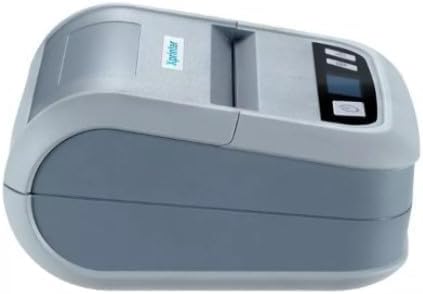
ചിത്രം 2: വശം view of the Xprinter XP-P323B, highlighting its compact design and the Xprinter logo.
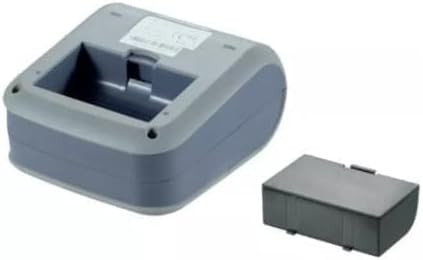
ചിത്രം 3: അടിവശം view of the Xprinter XP-P323B, showing the base and the removable battery compartment.
5. സജ്ജീകരണം
5.1 ബാറ്ററി ചാർജ് ചെയ്യുന്നു
- Connect the power adapter to the printer's charging port.
- ഒരു മതിൽ ഔട്ട്ലെറ്റിലേക്ക് പവർ അഡാപ്റ്റർ പ്ലഗ് ചെയ്യുക.
- The charging indicator light will illuminate. Allow the printer to charge fully before first use.
5.2. Loading Thermal Paper/Labels
- Open the paper compartment cover by gently pushing the release latch.
- Insert the thermal paper roll with the printing surface facing the print head. Ensure the roll is seated correctly.
- പ്രിന്റ് ഹെഡിന് അപ്പുറത്തേക്ക് ഒരു ചെറിയ അളവിലുള്ള പേപ്പർ വലിച്ചെടുക്കുക.
- പേപ്പർ കമ്പാർട്ട്മെന്റ് കവർ അതിന്റെ സ്ഥാനത്ത് ക്ലിക്കു ചെയ്യുന്നത് വരെ ദൃഢമായി അടയ്ക്കുക.
5.3. ഒരു ഉപകരണത്തിലേക്ക് ബന്ധിപ്പിക്കുന്നു
The XP-P323B supports USB and Bluetooth connectivity.
5.3.1. USB കണക്ഷൻ
- നൽകിയിരിക്കുന്ന USB കേബിൾ ഉപയോഗിച്ച് നിങ്ങളുടെ കമ്പ്യൂട്ടറിലേക്ക് പ്രിൻ്റർ ബന്ധിപ്പിക്കുക.
- Install the necessary printer drivers (available from the Xprinter website or included software).
5.3.2. Bluetooth Connection (for Smartphones/iOS)
- പ്രിൻ്റർ ഓണാണെന്ന് ഉറപ്പാക്കുക.
- On your smartphone or iOS device, go to Bluetooth settings and enable Bluetooth.
- ഇതിനായി തിരയുക available devices and select 'XP-P323B' (or similar name).
- Enter the pairing PIN if prompted (refer to printer documentation for default PIN, often '0000' or '1234').
- Once paired, you can use a compatible printing application to send print jobs.
6. പ്രിന്റർ പ്രവർത്തിപ്പിക്കൽ
6.1. അടിസ്ഥാന പ്രിന്റിംഗ്
- Ensure the printer is connected to your device and has paper loaded.
- Open the document or image you wish to print on your connected device.
- Select the print option within your application.
- Choose 'XP-P323B' as the printer.
- Adjust print settings as needed (e.g., paper size, print quality).
- പ്രിന്റ് ജോലി ആരംഭിക്കുക.
6.2. NV Logo and Picture Printing
The printer supports downloading and printing NV (Non-Volatile) logos and BMP format pictures. This functionality typically requires specific software or commands. Refer to the advanced programming guide or software documentation for detailed instructions on how to upload and print custom logos or images.
6.3. Adjusting Print Concentration
Print concentration can be adjusted to optimize print quality. This setting is usually accessible through the printer driver software on a computer or within the settings of a compatible mobile printing application. Consult your software's help section for specific steps.
7. പരിപാലനം
7.1 പ്രിന്റർ വൃത്തിയാക്കുന്നു
- പുറം: പ്രിന്ററിന്റെ പുറംഭാഗം മൃദുവായ, d തുണി ഉപയോഗിച്ച് തുടയ്ക്കുക.amp തുണി. കഠിനമായ രാസവസ്തുക്കളോ ഉരച്ചിലുകളുള്ള ക്ലീനറുകളോ ഉപയോഗിക്കരുത്.
- പ്രിന്റ് ഹെഡ്: The thermal print head should be cleaned periodically to ensure optimal print quality. Use a cotton swab lightly dampഐസോപ്രോപൈൽ ആൽക്കഹോൾ ഉപയോഗിച്ച് പൂശിയിരിക്കുന്നു. പ്രിന്റ് ഹെഡ് ഉപരിതലം സൌമ്യമായി തുടയ്ക്കുക. കവർ അടച്ച് പ്രവർത്തനം പുനരാരംഭിക്കുന്നതിന് മുമ്പ് അത് പൂർണ്ണമായും ഉണങ്ങാൻ അനുവദിക്കുക.
- പേപ്പർ പാത്ത്: മൃദുവായ ബ്രഷ് അല്ലെങ്കിൽ കംപ്രസ് ചെയ്ത വായു ഉപയോഗിച്ച് പേപ്പർ പാതയിൽ നിന്ന് ഏതെങ്കിലും പേപ്പർ പൊടി അല്ലെങ്കിൽ അവശിഷ്ടങ്ങൾ നീക്കം ചെയ്യുക.
7.2. സംഭരണം
When not in use for extended periods, store the printer in a cool, dry place, away from direct sunlight and extreme temperatures. Remove the paper roll if storing for a very long time to prevent dust accumulation.
8. പ്രശ്നപരിഹാരം
| പ്രശ്നം | സാധ്യമായ കാരണം | പരിഹാരം |
|---|---|---|
| പ്രിന്റർ പവർ ഓൺ ചെയ്യുന്നില്ല | Low battery; Power adapter not connected; Faulty power adapter | Charge the battery; Ensure power adapter is securely connected; Try a different power outlet or adapter |
| പ്രിന്റ് ഔട്ട്പുട്ട് ഇല്ല | No paper; Paper loaded incorrectly; Printer not connected; Driver issue | Load paper correctly; Re-establish connection; Reinstall printer drivers |
| മോശം പ്രിന്റ് നിലവാരം | Dirty print head; Low print concentration; Low battery | Clean the print head; Adjust print concentration in software; Charge the battery |
| ബ്ലൂടൂത്ത് കണക്ഷൻ പരാജയപ്പെടുന്നു | Bluetooth off on device; Incorrect pairing PIN; Printer out of range | Enable Bluetooth; Re-enter correct PIN; Move device closer to printer |
9 സ്പെസിഫിക്കേഷനുകൾ
| ബ്രാൻഡ് | എക്സ്പ്രിൻറർ |
| മോഡൽ നമ്പർ | XP-P323B |
| ഇനത്തിൻ്റെ അളവുകൾ (D x W x H) | 15D x 7W x 10H സെന്റീമീറ്റർ |
| കണക്റ്റിവിറ്റി ടെക്നോളജി | USB |
| പ്രിന്റർ സാങ്കേതികവിദ്യ | തെർമൽ |
| പ്രത്യേക സവിശേഷതകൾ | പോർട്ടബിൾ |
| നിറം | ചാരനിറം |
| അനുയോജ്യമായ ഉപകരണങ്ങൾ | സ്മാർട്ട്ഫോണുകൾ |
| കൺട്രോളർ തരം | ഐഒഎസ് |
| പരമാവധി മീഡിയ വലുപ്പം | 4 x 6 ഇഞ്ച് |
| അച്ചടി മാധ്യമം | ലേബലുകൾ |
| പേപ്പർ വലിപ്പം | 4 x 6 ഇഞ്ച് |
| പ്രിൻ്റർ ഔട്ട്പുട്ട് | മോണോക്രോം |
| പരമാവധി പ്രിന്റ് വേഗത (കറുപ്പും വെളുപ്പും) | 40 mm/s (estimated from context) |
| ഇനത്തിൻ്റെ ഭാരം | 300 ഗ്രാം |
10. വാറൻ്റിയും പിന്തുണയും
For warranty information and technical support, please refer to the warranty card included with your product or visit the official Xprinter webവാറന്റി ക്ലെയിമുകൾക്കുള്ള വാങ്ങലിന്റെ തെളിവായി നിങ്ങളുടെ വാങ്ങൽ രസീത് സൂക്ഷിക്കുക.