
1. ആമുഖം
This manual provides essential information for the safe and efficient use of the SPACSCO-26G A1 N55-PAC-1100W 341-415-01 Switch Power Supply. Please read this manual thoroughly before installation, operation, or maintenance to ensure proper functionality and to prevent damage or injury. This power supply is designed for specific industrial and scientific applications, providing reliable power to compatible systems.
2 സുരക്ഷാ വിവരങ്ങൾ
WARNING: Risk of electric shock. Do not open the power supply unit. Refer all servicing to qualified personnel.
- Ensure the power supply is disconnected from the main power source before installation, removal, or maintenance.
- Operate the power supply within the specified voltagഇ, നിലവിലെ റേറ്റിംഗുകൾ.
- Do not expose the unit to moisture, extreme temperatures, or corrosive environments.
- ഉപകരണങ്ങളുടെ ശരിയായ ഗ്രൗണ്ടിംഗ് ഉറപ്പാക്കുക.
- Only use compatible cables and connectors.
3. ഉൽപ്പന്നം കഴിഞ്ഞുview
The N55-PAC-1100W is a high-efficiency AC-DC power converter designed for reliable performance in demanding environments. It features robust construction and standard connectors for integration into compatible switch systems.
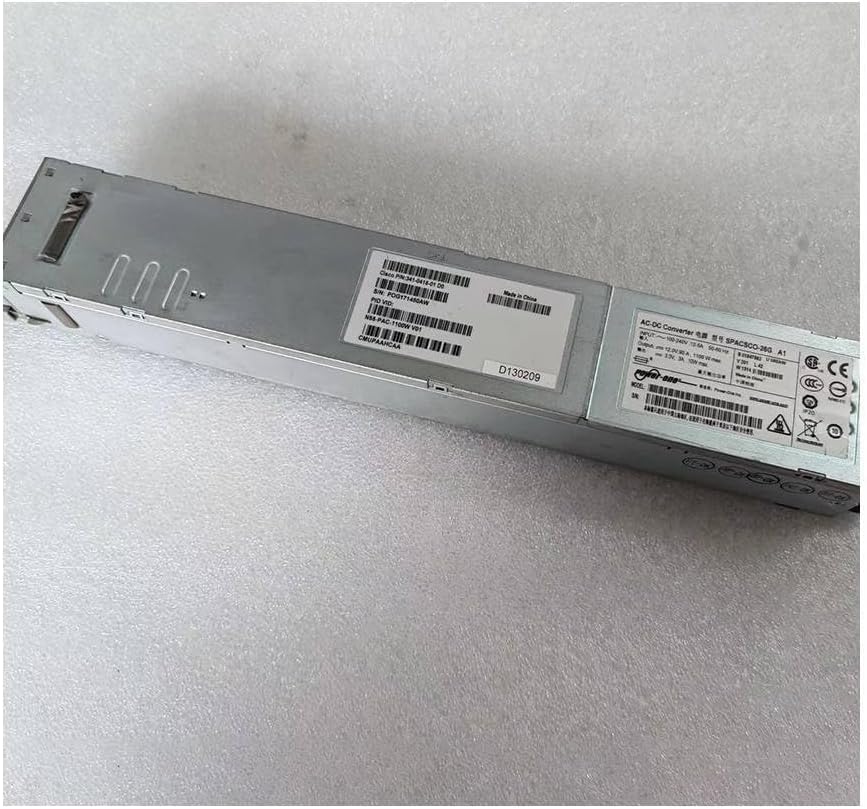
ചിത്രം 3.1: മൊത്തത്തിൽ view of the N55-PAC-1100W power supply unit, showing its elongated metallic casing.
3.1. Identification Labels
The power supply unit includes several labels providing critical information such as model number, serial number, and electrical specifications.

ചിത്രം 3.2: ക്ലോസപ്പ് view of the product label, displaying the model number N55-PAC-1100W V01, Cisco P/N: 341-0415-01 D0, and serial number POG171450AW. This label also indicates "Made in China" and various compliance marks.

ചിത്രം 3.3: വിശദമായി view of the power supply's main label, showing input voltage (100-240V), current (12.0A-6.0A), frequency (50-60Hz), and output (12.0V, 91.7A, 1100W max). It also includes safety certifications like CE, UL, and EAC.
3.2. Connectors and Indicators
The power supply features a standard AC input connector and status indicators on the front panel, along with a multi-pin DC output connector on the rear.

Figure 3.4: Front panel of the power supply, featuring the standard IEC C14 AC power inlet and two LED indicators: 'FAIL' (red) and 'OK' (green), which indicate the operational status of the unit.

Figure 3.5: Rear panel of the power supply, showing the multi-pin DC output connector designed for integration with compatible switch or server chassis. The connector features numerous gold-plated pins for power delivery and signaling.
4. സജ്ജീകരണവും ഇൻസ്റ്റാളേഷനും
Follow these steps for proper installation of the power supply unit into your compatible system chassis.
- തയ്യാറാക്കൽ: Ensure the system chassis is powered off and disconnected from all power sources.
- സ്ലോട്ട് കണ്ടെത്തുക: Identify the designated power supply slot in your system chassis.
- Insert PSU: Carefully slide the N55-PAC-1100W power supply into the slot until it is fully seated and latches securely. Ensure the DC output connector aligns correctly with the chassis backplane.
- സുരക്ഷിത യൂണിറ്റ്: If applicable, use any retaining screws or mechanisms to secure the power supply in place.
- എസി പവർ ബന്ധിപ്പിക്കുക: Connect a compatible AC power cord to the power inlet on the front of the power supply.
- ഔട്ട്ലെറ്റിലേക്ക് കണക്റ്റുചെയ്യുക: എസി പവർ കോഡിന്റെ മറ്റേ അറ്റം ഒരു ഗ്രൗണ്ടഡ് ഇലക്ട്രിക്കൽ ഔട്ട്ലെറ്റിലേക്ക് പ്ലഗ് ചെയ്യുക.
- പവർ ഓൺ: Power on the system chassis. Observe the status indicators on the power supply.

ചിത്രം 4.1: വശം view of the power supply, demonstrating its compact form factor suitable for hot-swappable installation in compatible network switches or servers.
5. ഓപ്പറേഷൻ
Once installed and connected, the power supply operates automatically to provide power to the system. Monitor the status indicators for proper operation.
5.1. സ്റ്റാറ്റസ് സൂചകങ്ങൾ
- OK LED (Green):
- കട്ടിയുള്ള പച്ച: The power supply is operating normally and providing power to the system.
- ഓഫ്: The power supply is not receiving AC input, is powered off, or has failed.
- FAIL LED (Red):
- കടും ചുവപ്പ്: The power supply has detected an internal fault or an issue with power delivery.
- ഓഫ്: The power supply is operating normally or is powered off.
6. പരിപാലനം
The N55-PAC-1100W power supply is designed for minimal maintenance. However, periodic checks can help ensure its longevity and reliable operation.
- പൊടി നീക്കം: Periodically inspect the ventilation openings for dust accumulation. If necessary, gently clean with compressed air to ensure proper airflow and prevent overheating. Ensure the unit is powered off and disconnected before cleaning.
- കേബിൾ പരിശോധന: Regularly check power cables and connectors for any signs of wear, damage, or loose connections. Replace damaged cables immediately.
- പരിസ്ഥിതി പരിശോധന: Ensure the operating environment remains within the specified temperature and humidity ranges to prevent stress on the components.
7. പ്രശ്നപരിഹാരം
This section provides solutions to common issues you might encounter with the power supply.
| പ്രശ്നം | സാധ്യമായ കാരണം | പരിഹാരം |
|---|---|---|
| Power Supply Not Powering On (OK LED Off) |
|
|
| FAIL LED is Solid Red |
|
|
| System Instability or Unexpected Shutdowns |
|
|
8 സ്പെസിഫിക്കേഷനുകൾ
Key technical specifications for the N55-PAC-1100W power supply:
| ആട്രിബ്യൂട്ട് | മൂല്യം |
|---|---|
| മോഡൽ | N55-PAC-1100W ഉൽപ്പന്ന വിവരണം |
| ഭാഗം നമ്പർ | 341-415-01 |
| ഇൻപുട്ട് വോളിയംtage | 100-240V AC |
| ഇൻപുട്ട് ഫ്രീക്വൻസി | 50-60 Hz |
| Putട്ട്പുട്ട് വോളിയംtage | 12.0V DC |
| പരമാവധി ഔട്ട്പുട്ട് പവർ | 1100W (as per label), 1500 Watts (as per specifications) |
| നിർമ്മാതാവ് | ജനറിക് |
| ASIN | B0CSJPCXWK |
| ആദ്യ തീയതി ലഭ്യമാണ് | 16 ജനുവരി 2024 |
Note: There is a discrepancy between the label's stated max output (1100W) and the product specifications (1500 Watts). Please refer to your system's power requirements for compatibility.
9. വാറൻ്റിയും പിന്തുണയും
This product is covered by the manufacturer's standard warranty. For specific warranty terms and conditions, please refer to the documentation provided with your purchase or contact the seller directly.
9.1. സാങ്കേതിക പിന്തുണ
If you encounter issues that cannot be resolved using the troubleshooting guide, or require further assistance, please contact your product vendor or the manufacturer's technical support. Have your product model number (N55-PAC-1100W) and serial number (POG171450AW) ready when contacting support.
Relevant links extracted from product images:
Note: The provided links are placeholders as specific URLs for these identifiers were not available in the input data.