
SuperFire X60-T
SuperFire X60-T Flashlight User Manual
Model: X60-T | Brand: SuperFire
1. ആമുഖം
This manual provides comprehensive instructions for the safe and effective use of your SuperFire X60-T High Lumens Rechargeable LED Flashlight. Please read this manual thoroughly before operating the device and retain it for future reference.
2. ഉൽപ്പന്ന സവിശേഷതകൾ
- High Powered Illumination: Equipped with upgraded super bright LED chips (36W), delivering a maximum of 10000 lumens in turbo mode with a maximum beam distance of 350 meters (1148 feet).
- ബഹുമുഖ ലൈറ്റിംഗ് മോഡുകൾ: Features 5 distinct lighting modes: High, Medium, Strobe, SOS, and Turbo, allowing adaptation to various lighting requirements.
- സൂം ചെയ്യാവുന്ന ഫോക്കസ്: The flashlight offers a telescopic focusing design; zoom in for a wide floodlight covering 56 square meters, or zoom out for a narrow spotlight capable of illuminating over 350 meters.
- Durable & Waterproof Construction: Constructed from aviation-grade aluminum, ensuring heavy-duty performance and resistance to extreme conditions. It boasts an IP44 waterproof rating, suitable for use in heavy rain and snow.
- റീചാർജ് ചെയ്യാവുന്ന ടൈപ്പ്-സി: Utilizes an upgraded high-capacity battery, providing approximately 6 hours of operation in high mode and 15 hours in low mode. Fast-charging via a Type-C port takes 4-6 hours for a full charge, compatible with laptops, power banks, and adapters.
- പോർട്ടബിൾ ഡിസൈൻ: Compact size (15.8 cm / 6.22 in L x 4.1 cm / 1.61 in W) with an integrated clip for easy storage and carrying in pockets or backpacks.
- പവർ ബാങ്ക് പ്രവർത്തനം: Can function as a portable power bank to charge smartphones or tablets in emergency situations.
3. പാക്കേജ് ഉള്ളടക്കം
പാക്കേജ് തുറക്കുമ്പോൾ എല്ലാ ഇനങ്ങളും നിലവിലുണ്ടെന്നും നല്ല നിലയിലാണെന്നും ദയവായി പരിശോധിക്കുക:
- SuperFire X60-T Flashlight
- USB-C ചാർജിംഗ് കേബിൾ
- Belt Clip (pre-attached or included separately)
- ഉപയോക്തൃ മാനുവൽ (ഈ പ്രമാണം)
4. സജ്ജീകരണം
4.1 പ്രാരംഭ ചാർജിംഗ്
Before first use, fully charge the flashlight. The charging port is a Type-C port located on the side of the flashlight, typically protected by a rubber cover.
- Locate the Type-C charging port on the flashlight.
- Gently lift the rubber cover to expose the port.
- Connect the provided USB-C charging cable to the flashlight's port.
- Connect the other end of the USB-C cable to a compatible USB power source (e.g., wall adapter, computer USB port, power bank).
- The indicator light on the flashlight will show charging status. It typically glows red while charging and turns blue when fully charged.
- Charging usually takes 4-6 hours for a full charge.
- പൂർണ്ണമായി ചാർജ് ചെയ്തുകഴിഞ്ഞാൽ, കേബിൾ വിച്ഛേദിച്ച് റബ്ബർ കവർ സുരക്ഷിതമായി അടയ്ക്കുക, അങ്ങനെ ജല പ്രതിരോധം നിലനിർത്താൻ കഴിയും.
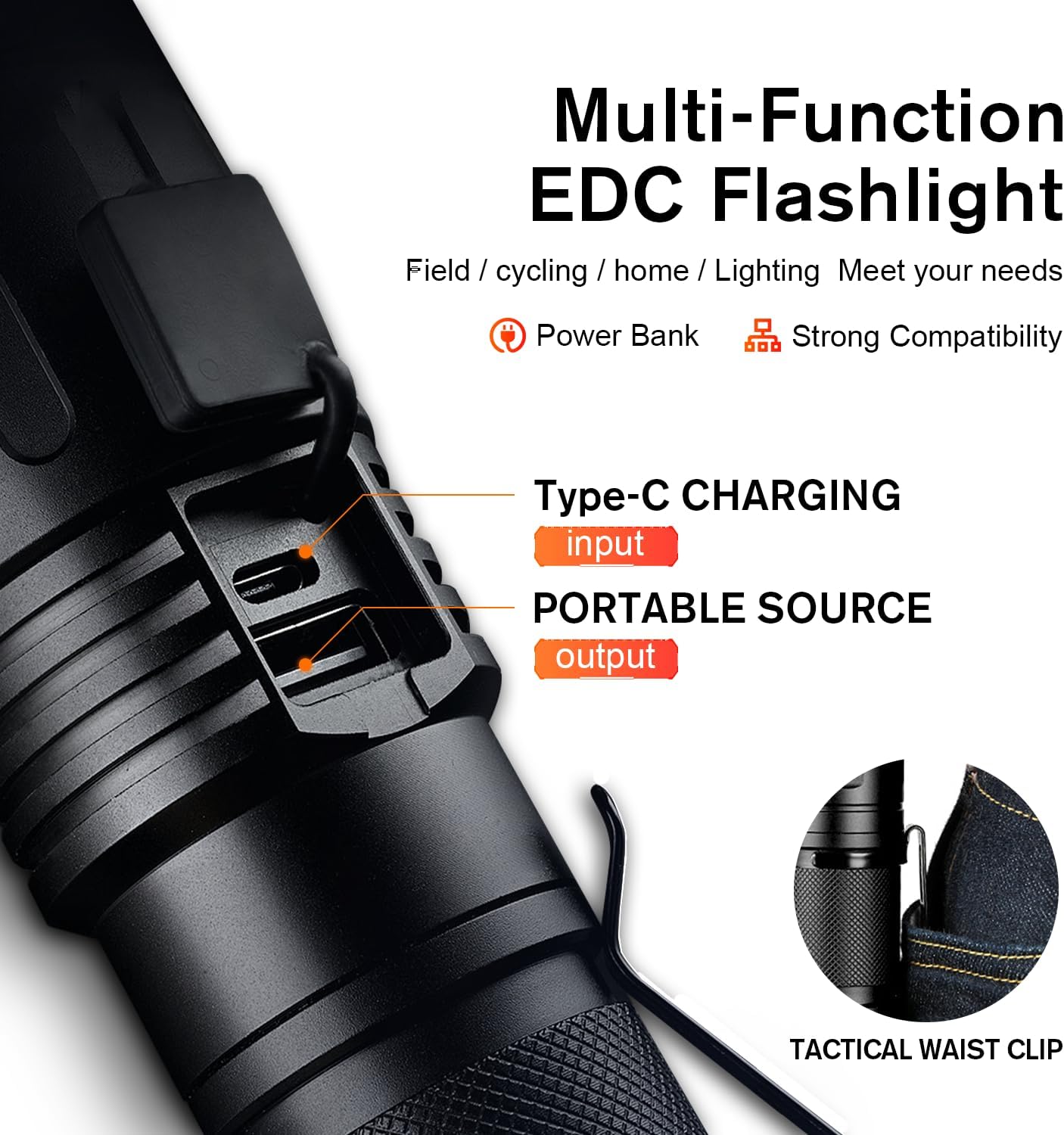
Figure 1: Type-C Charging Port and Tactical Waist Clip. The image displays a close-up of the flashlight's body, highlighting the Type-C input and USB output ports, along with a visual of the tactical waist clip.
5. പ്രവർത്തന നിർദ്ദേശങ്ങൾ
5.1 പവർ ഓൺ/ഓഫ്
ഫ്ലാഷ്ലൈറ്റ് ഓണാക്കാനോ ഓഫാക്കാനോ അതിൻ്റെ വശത്തുള്ള പവർ ബട്ടൺ അമർത്തുക.
5.2 ലൈറ്റിംഗ് മോഡുകൾ മാറ്റുന്നു
With the flashlight powered on, short press the power button repeatedly to cycle through the 5 lighting modes:
- ഉയർന്നത്: Maximum brightness for general illumination.
- ഇടത്തരം: Moderate brightness for extended battery life.
- താഴ്ന്നത്: Minimal brightness for close-range tasks or preserving night vision.
- സ്ട്രോബ്: Rapid flashing light for signaling or disorientation.
- SOS: International Morse code signal for emergencies (three short, three long, three short flashes).
- ടർബോ: (If applicable, usually a double-click from off or on) Provides the absolute maximum lumen output for a short burst. Refer to product specifications for activation.

Figure 2: Five Lighting Modes. This image illustrates the different light output levels and special modes (Strobe, SOS) of the flashlight in various outdoor scenarios.
5.3 സൂം പ്രവർത്തനം
The SuperFire X60-T features a telescopic focusing design to adjust the beam from a wide floodlight to a narrow spotlight.
- To adjust the beam, gently slide the head of the flashlight forward or backward.
- Sliding the head forward will narrow the beam, creating a focused spotlight for long-distance illumination.
- Sliding the head backward will widen the beam, creating a broad floodlight for illuminating a larger area.

Figure 3: Telescopic Focusing. The image shows the flashlight's zoomable design, illustrating the wide beam (floodlight) and narrow beam (spotlight) capabilities.
5.4 പവർ ബാങ്കായി ഉപയോഗിക്കുന്നത്
The flashlight can serve as a portable power bank to charge other devices.
- Locate the USB output port, usually next to the Type-C input port, under the same rubber cover.
- Connect your device's charging cable (e.g., smartphone, tablet) to the USB output port on the flashlight.
- The flashlight will begin charging your device. Monitor your device's charging indicator.
- Disconnect when charging is complete or when the flashlight's battery is low.
6. പരിപാലനം
- വൃത്തിയാക്കൽ: ഫ്ലാഷ്ലൈറ്റ് ഒരു സോഫ്റ്റ് ഉപയോഗിച്ച് തുടയ്ക്കുക, ഡിamp തുണി. ഉരച്ചിലുകളുള്ള ക്ലീനറുകളോ ലായകങ്ങളോ ഉപയോഗിക്കരുത്.
- സംഭരണം: Store the flashlight in a cool, dry place away from direct sunlight and extreme temperatures. If storing for extended periods, charge the battery every 3-6 months to maintain its lifespan.
- ജല പ്രതിരോധം: Ensure the rubber cover for the charging ports is always securely closed to maintain the IP44 water resistance rating. Avoid submerging the flashlight in water.
- ബാറ്ററി കെയർ: Use only the provided charging cable or a compatible Type-C cable. Do not attempt to replace the internal battery.
7. പ്രശ്നപരിഹാരം
| പ്രശ്നം | സാധ്യമായ കാരണം | പരിഹാരം |
|---|---|---|
| ടോർച്ച് ഓണാകുന്നില്ല. | ബാറ്ററി തീർന്നു. | Charge the flashlight fully using the provided Type-C cable. |
| പ്രകാശ ഔട്ട്പുട്ട് മങ്ങിയതാണ്. | കുറഞ്ഞ ബാറ്ററി അല്ലെങ്കിൽ തെറ്റായ മോഡ്. | Charge the battery. Cycle through modes to ensure High or Turbo mode is selected. |
| ടോർച്ച് ചാർജ് ചെയ്യുന്നില്ല. | Cable or adapter issue; port not connected properly. | Ensure the Type-C cable is securely connected to both the flashlight and the power source. Try a different USB port or adapter. |
| സൂം പ്രവർത്തനം കഠിനമാണ്. | മെക്കാനിസത്തിൽ പൊടി അല്ലെങ്കിൽ അവശിഷ്ടങ്ങൾ. | സ്ലൈഡിംഗ് മെക്കാനിസം സൌമ്യമായി വൃത്തിയാക്കുക. സൂം നിർബന്ധിക്കുന്നത് ഒഴിവാക്കുക. |
8 സ്പെസിഫിക്കേഷനുകൾ
| ഫീച്ചർ | വിശദാംശങ്ങൾ |
|---|---|
| മോഡൽ | X60-T |
| ബ്രാൻഡ് | SuperFire |
| പ്രകാശ സ്രോതസ്സ് തരം | എൽഇഡി |
| തെളിച്ചം (പരമാവധി) | 10000 Lumens (Turbo Mode) / 2100 Lumens (Standard) |
| ബീം ദൂരം (പരമാവധി) | 350 മീറ്റർ (1148 അടി) |
| പവർ ഉറവിടം | ബാറ്ററി പവർ (1 ലിഥിയം അയൺ ബാറ്ററി ഉൾപ്പെടുത്തിയിരിക്കുന്നു) |
| ചാർജിംഗ് പോർട്ട് | ടൈപ്പ്-സി |
| ചാർജിംഗ് സമയം | 4-6 മണിക്കൂർ |
| Runtime (High Mode) | 6 മണിക്കൂർ |
| റൺടൈം (ലോ മോഡ്) | 15 മണിക്കൂർ |
| മെറ്റീരിയൽ | ഏവിയേഷൻ-ഗ്രേഡ് അലുമിനിയം |
| ജല പ്രതിരോധ നില | IP44 (ജലപ്രൂഫ്) |
| ഉൽപ്പന്ന അളവുകൾ | 2.1"D x 2.1"W x 6.7"H (15.8 cm L x 4.1 cm W) |
| ഇനത്തിൻ്റെ ഭാരം | 1.01 പൗണ്ട് |
| പ്രത്യേക സവിശേഷതകൾ | Adjustable Focus, Durable, High Power, Portable, Weatherproof, Power Bank Functionality |

Figure 4: Size and Performance Comparison. This image provides a visual comparison of the X60-T's size relative to a smartphone and another model (X60), along with a table detailing their respective runtimes and lumen outputs.
9. വാറണ്ടിയും പിന്തുണയും
For warranty information, technical support, or any inquiries regarding your SuperFire X60-T flashlight, please refer to the contact information provided on the product packaging or visit the official SuperFire webവാറന്റി ക്ലെയിമുകൾക്കുള്ള വാങ്ങലിന്റെ തെളിവായി നിങ്ങളുടെ വാങ്ങൽ രസീത് സൂക്ഷിക്കുക.
Ask a question about this manual
Ask about setup, troubleshooting, compatibility, parts, safety, or missing instructions. Manuals+ will review the question and use this page’s manual context to help answer it.