
1. ഉൽപ്പന്നം കഴിഞ്ഞുview
The Vari ComfortEdge Adjustable Electric Standing Desk is designed to enhance your workspace by allowing seamless transitions between sitting and standing positions. Featuring a sloped front edge for wrist comfort and a robust dual-motor system, this desk supports a healthier and more productive work environment.
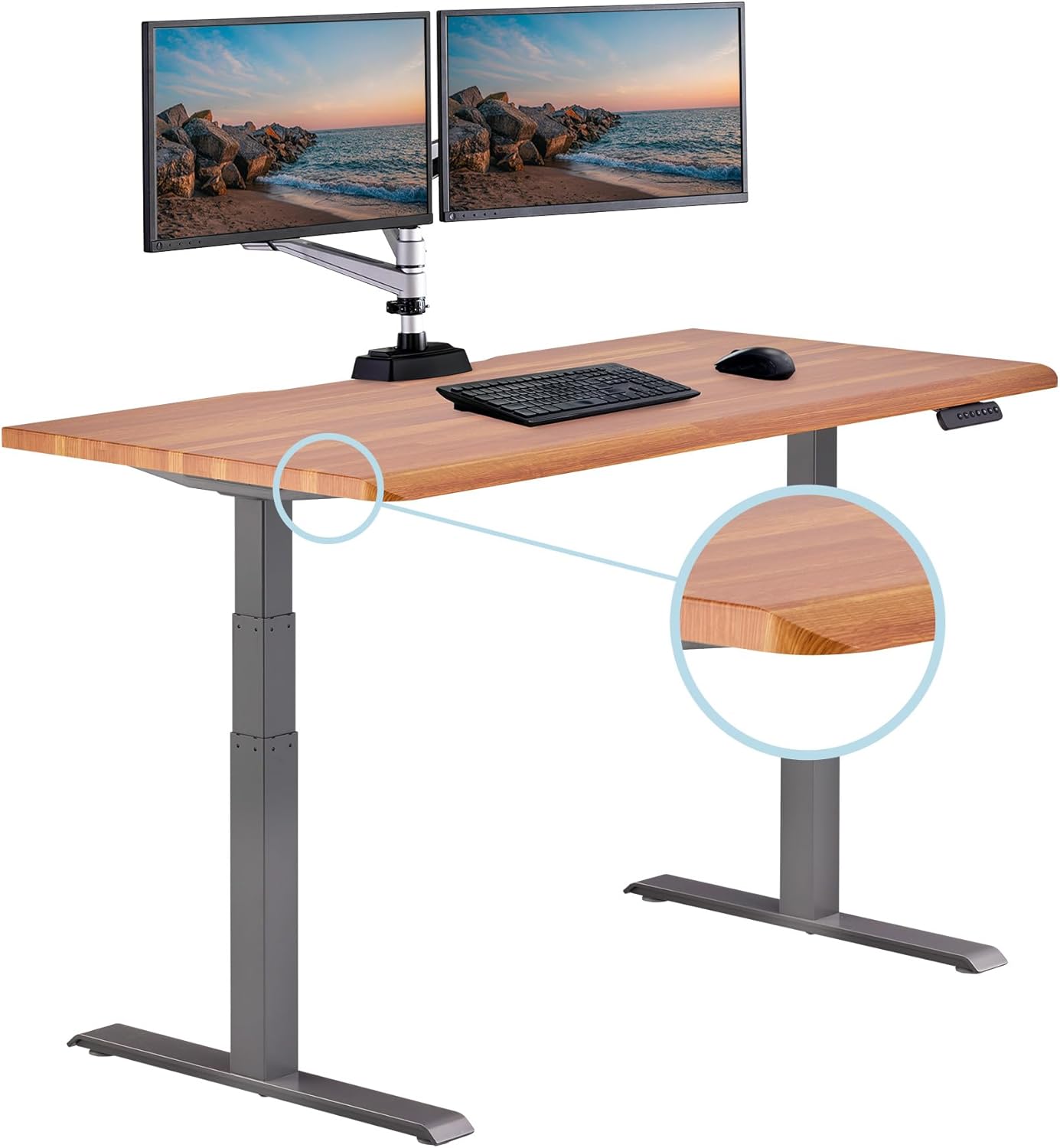
Image: The Vari ComfortEdge 60x30 Inch Adjustable Electric Standing Desk in a home office setting with dual monitors.
2 പ്രധാന സവിശേഷതകൾ
- ComfortEdge Wrist Relief: Sloped front edge reduces pressure on wrists and forearms, providing lasting comfort during long work sessions.
- Dual Motor Height Range: Quiet electric lift system adjusts from 25 inches to 50.5 inches with smooth transitions.
- മെമ്മറി പ്രീസെറ്റുകൾ: Includes 4 programmable presets for quick height adjustments.
- വിശാലമായ ഉപരിതലം: 60 inch by 30 inch surface fits dual monitors comfortably.
- Office-Grade Build Quality: 1.25 inch thick scratch-resistant laminate top with premium finish.
- Durable Steel T-style Legs: Provides stability and supports up to 200 lbs for reliable daily use.
- ടൂൾ-ഫ്രീ അസംബ്ലി: Patented slide-lock legs snap into the pre-installed frame for quick setup.

ചിത്രം: ഒരു ക്ലോസ്-അപ്പ് view highlighting the ComfortEdge sloped front edge of the desk.
3. അസംബ്ലി നിർദ്ദേശങ്ങൾ
The Vari ComfortEdge desk is designed for swift and tool-free assembly. The desktop and T-style legs are shipped in two separate boxes. One box contains all hardware required for assembly, along with two complimentary desk hooks and two coasters.
3.1 അൺപാക്കിംഗ്
- Carefully open both packages and remove all components.
- Verify all parts are present against the packing list provided in the hardware box.
3.2 കാലുകൾ ഘടിപ്പിക്കുന്നു
- Place the desktop upside down on a soft, clean surface to prevent scratches.
- Align the patented slide-lock legs with the pre-installed frame on the underside of the desktop.
- Snap the legs into place. Ensure they are securely locked.
- Fasten any additional screws provided to secure the legs to the frame.

Image: Hands demonstrating the swift setup process by snapping the desk legs into the pre-assembled frame.
4. ഡെസ്ക് പ്രവർത്തിപ്പിക്കൽ
The Vari ComfortEdge desk features a quiet electric lift system and a user-friendly control panel for effortless height adjustments.
4.1 അടിസ്ഥാന ഉയര ക്രമീകരണം
- ഉപയോഗിക്കുക മുകളിലേക്ക് (^) ഒപ്പം താഴേക്ക് (v) arrow buttons on the control panel to raise or lower the desk to your desired height.
- The digital display will show the current height in inches.
4.2 മെമ്മറി പ്രീസെറ്റുകൾ
The desk includes 4 programmable memory presets (1, 2, 3, 4) to save your preferred sitting and standing heights.
- മുകളിലേക്കും താഴേക്കുമുള്ള അമ്പടയാളങ്ങൾ ഉപയോഗിച്ച് നിങ്ങൾക്ക് ആവശ്യമുള്ള ഉയരത്തിലേക്ക് ഡെസ്ക് ക്രമീകരിക്കുക.
- അമർത്തുക 'എം' button. The display will show 'S-'.
- Within 3 seconds, press the desired preset number (1, 2, 3, or 4). The display will confirm the setting.
- To use a saved preset, simply press the corresponding number button. The desk will automatically adjust to that height.

Image: A close-up of the desk's control panel, showing the digital height display and memory preset buttons.
4.3 Stability and Smoothness
The dual-motor system ensures smooth and quiet transitions between heights, minimizing disruption. The durable steel T-style legs provide excellent stability, even at the maximum height of 50.5 inches, supporting up to 200 lbs.

Image: The Vari ComfortEdge desk in a modern office, showcasing അതിന്റെ രൂപകൽപ്പനയും പ്രവർത്തനക്ഷമതയും.
Video: Official product video demonstrating the Vari ComfortEdge Electric Standing Desk's features and smooth operation.
5. പരിപാലനം
To ensure the longevity and optimal performance of your Vari ComfortEdge desk, follow these simple maintenance guidelines:
- വൃത്തിയാക്കൽ: ഒരു സോഫ്റ്റ് ഉപയോഗിക്കുക, ഡിamp cloth to wipe down the scratch-resistant laminate top. Avoid harsh chemicals or abrasive cleaners.
- കേബിൾ മാനേജുമെന്റ്: Regularly check and organize cables to prevent tangling or damage, especially during height adjustments.
- ഭാര പരിധി: Adhere to the maximum weight recommendation of 200 lbs to prevent strain on the motors and frame.
- മോട്ടോർ കെയർ: The electric motors are designed for durability. Avoid obstructing the desk's movement during operation.

ചിത്രം: ഒരു ഓവർഹെഡ് view of the desk surface, highlighting the premium laminate finish.
6. പ്രശ്നപരിഹാരം
If you encounter any issues with your Vari ComfortEdge desk, please refer to the following general advice. For specific error codes or persistent problems, contact Vari Customer Support.
- ഡെസ്ക് നീങ്ങുന്നില്ല: Check if the power cord is securely plugged into both the desk and a working wall outlet. Ensure no objects are obstructing the desk's movement.
- അസമമായ ചലനം: Perform a reset procedure (refer to the full manual or contact support for specific steps). Ensure the desk is on a level surface.
- പിശക് കോഡുകൾ: If an error code appears on the digital display, note the code and contact customer support for assistance.
7 സ്പെസിഫിക്കേഷനുകൾ
| ഫീച്ചർ | വിശദാംശങ്ങൾ |
|---|---|
| ബ്രാൻഡ് | വാരി |
| മോഡൽ നമ്പർ | 402374 |
| ഉൽപ്പന്ന അളവുകൾ (D x W x H) | 30"D x 60"W x 50.5"H |
| കുറഞ്ഞ ഉയരം | 25 ഇഞ്ച് |
| പരമാവധി ഉയരം | 50.5 ഇഞ്ച് |
| ടേബിൾടോപ്പ് കനം | 1.25 ഇഞ്ച് |
| പരമാവധി ഭാരം ശുപാർശ | 200 പൗണ്ട് |
| മികച്ച മെറ്റീരിയൽ തരം | Engineered Wood (Laminate) |
| അടിസ്ഥാന മെറ്റീരിയൽ | ഉരുക്ക് |
| ഇനത്തിൻ്റെ ഭാരം | 121.7 പൗണ്ട് |
| പ്രത്യേക ഫീച്ചർ | കേബിൾ മാനേജ്മെൻ്റ് |

Image: The Vari ComfortEdge desk with key dimensions (width, depth, height range) labeled.