

1. ആമുഖം
Thank you for choosing the ieGeek ZY-C1 5MP Outdoor Solar Security Camera. This manual provides essential information for the proper installation, operation, and maintenance of your new security camera. Please read it thoroughly before use and retain it for future reference.
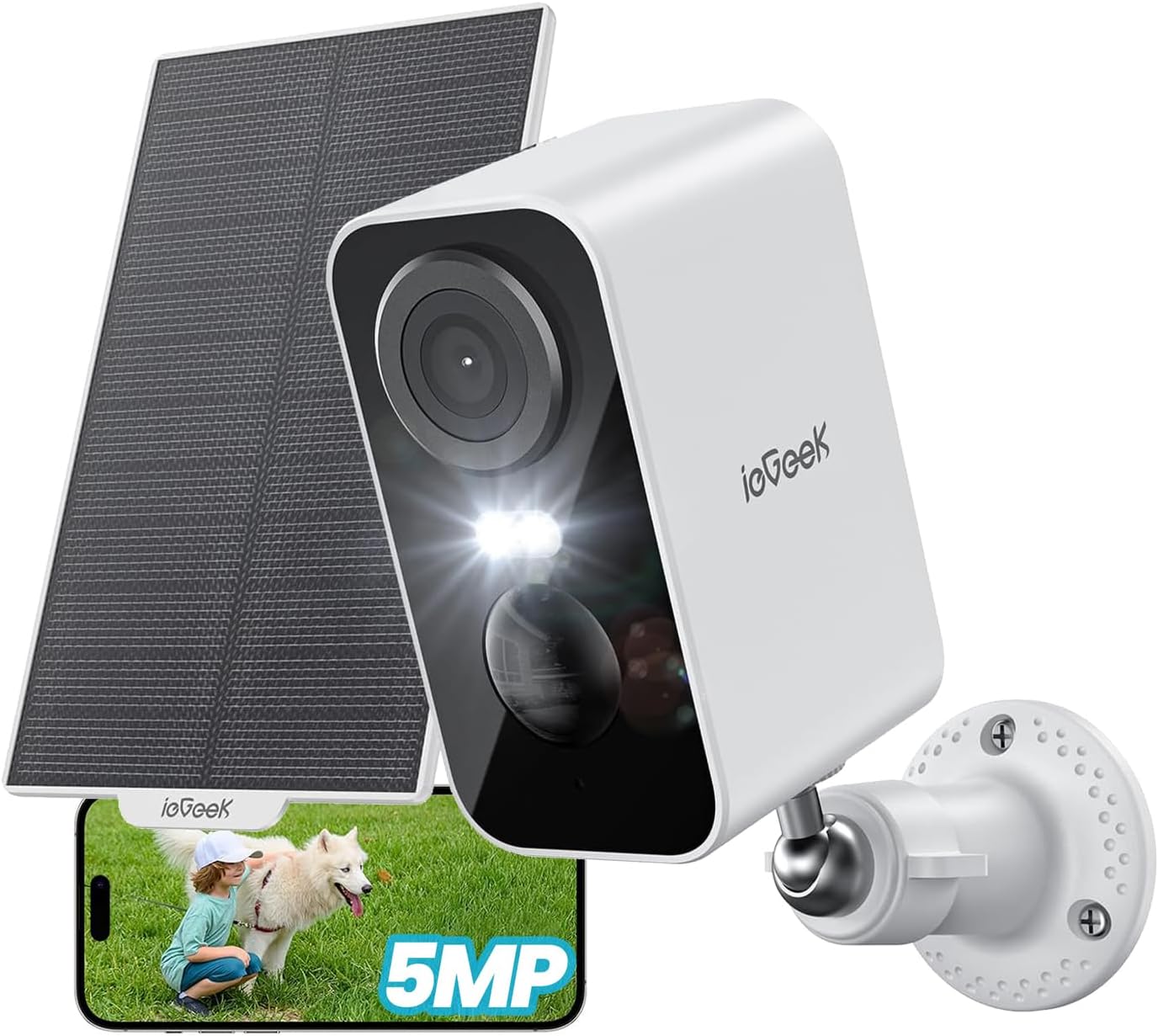
Figure 1: ieGeek ZY-C1 Camera with Solar Panel and App Interface
The ieGeek ZY-C1 is a high-resolution, wireless outdoor security camera designed for reliable surveillance. It features solar and USB charging, advanced motion detection, color night vision, two-way audio, and remote monitoring capabilities, ensuring comprehensive protection for your property.
2. പാക്കേജ് ഉള്ളടക്കം
എല്ലാ ഇനങ്ങളും ഉണ്ടെന്ന് ഉറപ്പാക്കാൻ പാക്കേജ് പരിശോധിക്കുക:
- Battery Security Camera x 1
- സോളാർ പാനൽ x 1
- Mounting Stands x 2
- സ്ക്രൂകൾ x 6
- ആങ്കറുകൾ x 6
- Power Cable (USB) x 1
- ഉപയോക്തൃ മാനുവൽ x 1

ചിത്രം 2: ഉൾപ്പെടുത്തിയ ഘടകങ്ങൾ
3. സജ്ജീകരണവും ഇൻസ്റ്റാളേഷനും
3.1 ക്യാമറ ചാർജ് ചെയ്യുന്നു
Before initial use, fully charge the camera's built-in 5200mAh battery using the provided USB power cable. This ensures optimal performance and a stable connection during setup.
3.2 ആപ്പ് ഡൗൺലോഡും അക്കൗണ്ട് രജിസ്ട്രേഷനും
- Download the "ieGeek Cam" app from your smartphone's app store (iOS or Android).
- ഒരു പുതിയ അക്കൗണ്ടിനായി രജിസ്റ്റർ ചെയ്യുക അല്ലെങ്കിൽ നിങ്ങൾക്ക് ഇതിനകം ഒന്ന് ഉണ്ടെങ്കിൽ ലോഗിൻ ചെയ്യുക.
3.3 ക്യാമറ വൈഫൈയിലേക്ക് ബന്ധിപ്പിക്കുന്നു
- പുതിയൊരു ഉപകരണം ചേർക്കാൻ ieGeek Cam ആപ്പ് തുറന്ന് "+" ഐക്കണിൽ ടാപ്പ് ചെയ്യുക.
- Follow the on-screen instructions to connect the camera to your 2.4GHz Wi-Fi network. Ensure your camera is within 15 meters of your Wi-Fi router for a stable connection.
- ക്യാമറ ലെൻസ് ഉപയോഗിച്ച് നിങ്ങളുടെ ഫോണിൽ പ്രദർശിപ്പിച്ചിരിക്കുന്ന QR കോഡ് സ്കാൻ ചെയ്യുക. കണക്റ്റ് ചെയ്തുകഴിഞ്ഞാൽ നിങ്ങൾക്ക് ഒരു സ്ഥിരീകരണ ശബ്ദം കേൾക്കാനാകും.
3.4 ക്യാമറയും സോളാർ പാനലും സ്ഥാപിക്കൽ
The camera and solar panel are designed for outdoor use and can be wall-mounted. Choose a location with optimal sunlight exposure for the solar panel and a clear view ക്യാമറയ്ക്ക് വേണ്ടി.
- Mark the drilling points using the mounting stands as a template.
- Drill holes and insert the anchors.
- Secure the mounting stands to the wall using the provided screws.
- Attach the camera and solar panel to their respective stands.
- Adjust the angle of the solar panel to maximize direct sunlight exposure.

ചിത്രം 3: ക്യാമറയും സോളാർ പാനലും സ്ഥാപിക്കൽ
4. പ്രവർത്തന നിർദ്ദേശങ്ങൾ
4.1 തത്സമയം View റിമോട്ട് മോണിറ്ററിംഗും
Access real-time video feed from your camera via the ieGeek Cam app on your smartphone or tablet. You can monitor your property from anywhere with an internet connection.

Figure 4: Remote Monitoring via Smartphone
4.2 മോഷൻ ഡിറ്റക്ഷനും അലേർട്ടുകളും
The camera features a PIR motion sensor with an advanced human detection algorithm to minimize false alarms. When motion is detected, the camera will:
- Send push notifications to your smartphone.
- Initiate recording (6-second free cloud storage for 1 week, or to an inserted SD card).
- Activate sound and light deterrence (siren alarm and spotlight) if configured.

Figure 5: Motion Detection and Instant Alarm
4.3 നൈറ്റ് വിഷൻ
The ZY-C1 camera provides clear surveillance even in low-light conditions with its color night vision capability. It utilizes both white and infrared LEDs.
- ഇൻഫ്രാറെഡ് നൈറ്റ് വിഷൻ: Provides black and white video in complete darkness, with a range of up to 15 meters.
- കളർ നൈറ്റ് വിഷൻ: When motion is detected, the white LEDs can illuminate the area, providing full-color video footage.

Figure 6: Color Night Vision in Action
4.4 ടു-വേ ഓഡിയോ
Communicate with visitors or deter intruders using the built-in microphone and speaker. Simply tap the microphone icon in the app to speak.

Figure 7: Two-Way Audio Control
4.5 സംഭരണ ഓപ്ഷനുകൾ
റെക്കോർഡ് ചെയ്ത foo-യ്ക്കായി ക്യാമറ ലോക്കൽ, ക്ലൗഡ് സംഭരണത്തെ പിന്തുണയ്ക്കുന്നുtage.
- മൈക്രോ എസ്ഡി കാർഡ്: Insert a microSD card (up to 128GB, not included) for local storage. The camera supports automatic overwriting of old footage.
- ക്ലൗഡ് സംഭരണം: Enjoy free 6-second cloud storage for 1 week. Paid cloud storage plans may also be available for extended storage.

Figure 8: Local and Cloud Storage
4.6 അലക്സാ ഇന്റഗ്രേഷൻ
The ieGeek ZY-C1 is compatible with Alexa. You can use voice commands to view അനുയോജ്യമായ Alexa- പ്രാപ്തമാക്കിയ ഉപകരണങ്ങളിൽ നിങ്ങളുടെ ക്യാമറ ഫീഡ്.
- Example command: "Alexa, show me the front door."

ചിത്രം 9: അലക്സാ വോയ്സ് കൺട്രോൾ
5. പരിപാലനം
5.1 ബാറ്ററി ചാർജിംഗ്
The camera is equipped with a 5200mAh rechargeable battery. It can be charged via the integrated solar panel or the provided USB cable.
- സോളാർ ചാർജിംഗ്: Ensure the solar panel is positioned to receive at least 2 hours of direct sunlight daily for continuous operation. Adjust the panel's angle as needed.
- USB ചാർജിംഗ്: If solar charging is insufficient (e.g., during prolonged cloudy weather or heavy snow), you can charge the camera using the USB cable and a standard 5V/2A USB power adapter (not included).

Figure 10: Solar Power and Internal Battery
5.2 കാലാവസ്ഥാ പ്രതിരോധം
The ieGeek ZY-C1 camera has an IP65 rating, making it waterproof and dustproof. It is designed to withstand various weather conditions, including rain, sun, and snow, with an operating temperature range of -10°C to 55°C.

Figure 11: IP65 Weatherproof Design
5.3 വൃത്തിയാക്കൽ
ക്യാമറ ലെൻസും സോളാർ പാനലും ഇടയ്ക്കിടെ മൃദുവായ, ഡി-ടച്ച് ഉപയോഗിച്ച് വൃത്തിയാക്കുക.amp വ്യക്തമായ ചിത്ര ഗുണനിലവാരവും കാര്യക്ഷമമായ സോളാർ ചാർജിംഗും ഉറപ്പാക്കാൻ തുണി ഉപയോഗിക്കുക. കഠിനമായ രാസവസ്തുക്കളോ ഉരച്ചിലുകളോ ഉള്ള വസ്തുക്കൾ ഉപയോഗിക്കരുത്.
6. പ്രശ്നപരിഹാരം
- ക്യാമറ വൈഫൈയിലേക്ക് കണക്റ്റ് ചെയ്യുന്നില്ല: Ensure the camera is within 15 meters of your 2.4GHz Wi-Fi router. Check that your Wi-Fi password is correct.
- പതിവ് തെറ്റായ അലാറങ്ങൾ: Adjust the motion detection sensitivity to "Medium" in the app settings. Ensure the detection area is configured to avoid irrelevant zones.
- Weak detection sensitivity: Increase the motion detection sensitivity in the app settings.
- Camera not detecting vehicles: If you want to detect vehicles, ensure that human detection is turned OFF in the app settings, as the human detection algorithm may filter out non-human motion.
- ബാറ്ററി വേഗത്തിൽ തീർന്നു: Ensure the solar panel receives adequate direct sunlight daily. Reduce the frequency of motion detection events or live view access if possible.
- മോശം ചിത്ര നിലവാരം: ക്യാമറ ലെൻസ് വൃത്തിയാക്കുക. ക്യാമറയുടെ ലെൻസ് ഫീൽഡിൽ തടസ്സങ്ങളൊന്നുമില്ലെന്ന് ഉറപ്പാക്കുക. view. Check your Wi-Fi signal strength.
7 സ്പെസിഫിക്കേഷനുകൾ
| ഫീച്ചർ | സ്പെസിഫിക്കേഷൻ |
|---|---|
| മോഡൽ | ZY-C1 |
| നിറം | വെള്ള |
| വീഡിയോ റെസല്യൂഷൻ | 5എംപി (2560പി) |
| ഫ്രെയിം റേറ്റ് | 15 fps |
| നൈറ്റ് വിഷൻ റേഞ്ച് | 15 മീറ്റർ |
| കണക്റ്റിവിറ്റി | 2.4GHz വൈ-ഫൈ |
| പവർ ഉറവിടം | Solar, Battery Powered (5200mAh) |
| മെറ്റീരിയൽ | ABS, PC |
| ജല പ്രതിരോധം | IP65 |
| ഓപ്പറേറ്റിംഗ് വോളിയംtage | 3.7 വോൾട്ട് |
| വാട്ട്tage | 5 W |
| ഉൽപ്പന്ന അളവുകൾ | 47 x 54 x 90 മിമി |
| ഭാരം | 320 ഗ്രാം |
| സ്റ്റോറേജ് ഓപ്ഷനുകൾ | മൈക്രോഎസ്ഡി (128 ജിബി വരെ), ക്ലൗഡ് സ്റ്റോറേജ് |
| പ്രത്യേക സവിശേഷതകൾ | Video recording, automatic overwrite, 5MP image sensor, human detection, two-way audio, IP65 weather resistance, 15M night vision range, night vision, siren alarm, Alexa compatible |
8. വാറൻ്റിയും പിന്തുണയും
8.1 വാറൻ്റി വിവരങ്ങൾ
The ieGeek ZY-C1 security camera comes with a 24 മാസത്തെ ഗുണനിലവാര വാറന്റി from the date of purchase. This warranty covers manufacturing defects and ensures the product meets its specified quality standards. Please retain your proof of purchase for warranty claims.
8.2 സാങ്കേതിക പിന്തുണ
For any technical assistance, troubleshooting, or inquiries regarding your ieGeek ZY-C1 camera, please contact ieGeek customer support. Our team is dedicated to providing the best support to ensure your satisfaction.
- Refer to the ieGeek official webബന്ധപ്പെടാനുള്ള വിശദാംശങ്ങൾക്കുള്ള സൈറ്റ്.
- Check the ieGeek Cam app for in-app support options.

Figure 12: Support Options