
pTron Dynamo Arc
pTron Dynamo Arc 10000mAh Power Bank User Manual
Model: Dynamo Arc
1. ആമുഖം
Thank you for choosing the pTron Dynamo Arc 10000mAh Power Bank. This device is designed to provide portable and efficient charging for your electronic devices, featuring both wired and wireless charging capabilities. Please read this manual carefully before using the product to ensure safe and optimal performance.
2 സുരക്ഷാ വിവരങ്ങൾ
ഉൽപ്പന്നത്തിന് കേടുപാടുകൾ സംഭവിക്കാതിരിക്കാനോ നിങ്ങൾക്കും മറ്റുള്ളവർക്കും പരിക്കേൽക്കാതിരിക്കാനോ, ദയവായി ഇനിപ്പറയുന്ന സുരക്ഷാ മുൻകരുതലുകൾ പാലിക്കുക:
- പവർ ബാങ്കിനെ തീവ്രമായ താപനിലയിലോ (60°C/140°F-ന് മുകളിൽ) നേരിട്ടുള്ള സൂര്യപ്രകാശത്തിലോ തുറന്നുകാട്ടരുത്.
- പവർ ബാങ്ക് വേർപെടുത്തുകയോ തുറക്കുകയോ നന്നാക്കാൻ ശ്രമിക്കുകയോ ചെയ്യരുത്.
- വെള്ളം, ഈർപ്പം, കത്തുന്ന വസ്തുക്കൾ എന്നിവയിൽ നിന്ന് പവർ ബാങ്ക് അകറ്റി നിർത്തുക.
- പവർ ബാങ്ക് താഴെയിടുകയോ, അടിക്കുകയോ, ശക്തമായ ആഘാതങ്ങൾക്ക് വിധേയമാക്കുകയോ ചെയ്യരുത്.
- Ensure proper ventilation when charging the power bank or devices.
- കുട്ടികൾക്ക് ലഭ്യമാകാതെ സൂക്ഷിക്കുക.
- പ്രാദേശിക നിയന്ത്രണങ്ങൾ അനുസരിച്ച് പവർ ബാങ്ക് ഉത്തരവാദിത്തത്തോടെ സംസ്കരിക്കുക.
3. ഉൽപ്പന്നം കഴിഞ്ഞുview
Familiarize yourself with the components of your pTron Dynamo Arc Power Bank:

ചിത്രം 3.1: മുൻവശവും വശവും View of the Power Bank. Shows the digital display, wireless charging pad on the front, and integrated charging cables (Type-C, Lightning, Micro USB) on the side.

ചിത്രം 3.2: വിശദമായി View of Ports and Controls. Indicates the Power On/Off button, Digital Display, Type-C Input/Output port, USB Output 1, USB Output 2, and Micro USB Input port.
പ്രധാന സവിശേഷതകൾ:
- 10000mAh Li-Polymer Battery: High capacity for multiple charges.
- 22.5W Fast Charging (USB): അനുയോജ്യമായ ഉപകരണങ്ങൾക്ക് വേഗത്തിലുള്ള ചാർജിംഗ് നൽകുന്നു.
- 20W PD (Power Delivery) Charging (Type-C): Fast charging for PD-compatible devices.
- 15W Qi വയർലെസ് ചാർജിംഗ്: Convenient wireless charging for Qi-enabled devices.
- ഒന്നിലധികം ഔട്ട്പുട്ടുകൾ: 2 x USB-A, 1 x Type-C, and integrated cables (Type-C, Lightning, Micro USB) for versatile charging.
- ഒന്നിലധികം ഇൻപുട്ടുകൾ: Type-C and Micro USB for recharging the power bank.
- ഡിജിറ്റൽ ഡിസ്പ്ലേ: ബാറ്ററി ശതമാനം കാണിക്കുന്നുtagഇ, ചാർജിംഗ് സ്റ്റാറ്റസ്.
- Multi-Protection Chipset: Built-in safeguards against overcharge, over-discharge, overcurrent, overvoltagഇ, ഷോർട്ട് സർക്യൂട്ട്.
4. സജ്ജീകരണം
Before first use, it is recommended to fully charge your pTron Dynamo Arc Power Bank.
പ്രാരംഭ ചാർജിംഗ്:
- Connect the power bank to a power source (e.g., wall adapter, computer USB port) using either a Type-C cable (via the Type-C input port) or a Micro USB cable (via the Micro USB input port).
- The digital display will show the charging progress, indicating the battery percentage.
- Once the display shows "100%", the power bank is fully charged and ready for use. This typically takes 4-5 hours.
5. പ്രവർത്തന നിർദ്ദേശങ്ങൾ
5.1. പവർ ബാങ്കിൽ നിന്ന് നിരക്ക് ഈടാക്കുന്നു
പവർ ബാങ്ക് റീചാർജ് ചെയ്യാൻ:
- Use a compatible USB wall adapter (not included) and connect it to the power bank via the Type-C input or Micro USB input port.
- The digital display will illuminate and show the current battery percentage, ചാർജിംഗ് പുരോഗമിക്കുന്നുവെന്ന് സൂചിപ്പിക്കുന്നു.
5.2. Charging Devices (Wired)
The power bank offers multiple wired output options:
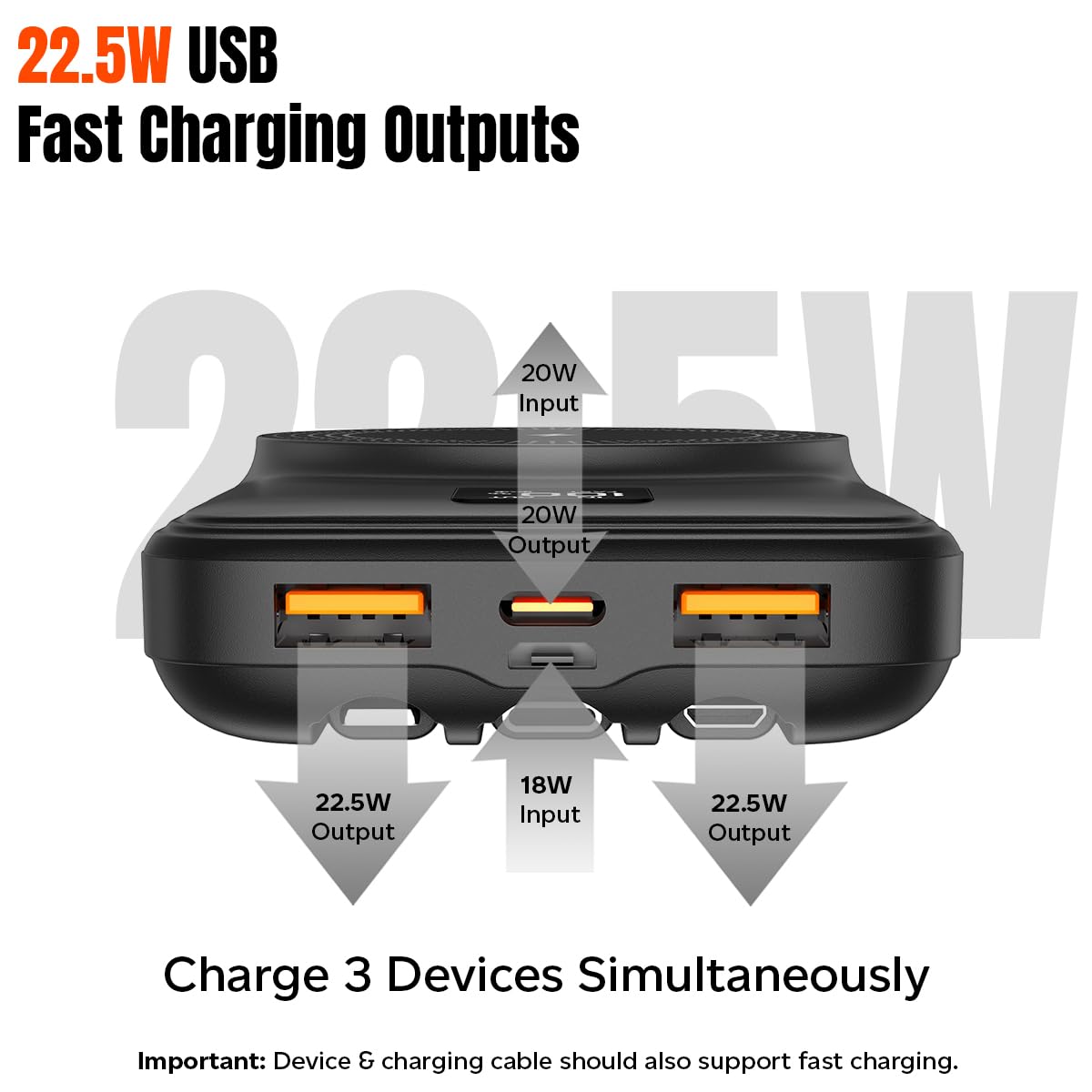
Figure 5.1: Wired Charging Outputs. Illustrates the two USB-A outputs (22.5W max each) and the Type-C output (20W PD) for simultaneous charging.
- Using USB-A Outputs: Connect your device's charging cable to either USB Output 1 or USB Output 2 on the power bank.
- Using Type-C Output: Connect your device's Type-C charging cable to the Type-C port on the power bank.
- ബിൽറ്റ്-ഇൻ കേബിളുകൾ ഉപയോഗിക്കുന്നു: Select the appropriate integrated cable (Type-C, Lightning, or Micro USB) and connect it directly to your device.
- The power bank will automatically begin charging your device. The digital display will show "OUT" and the battery percentage.
5.3. Charging Devices (Wireless)
The power bank supports 15W Qi wireless charging:
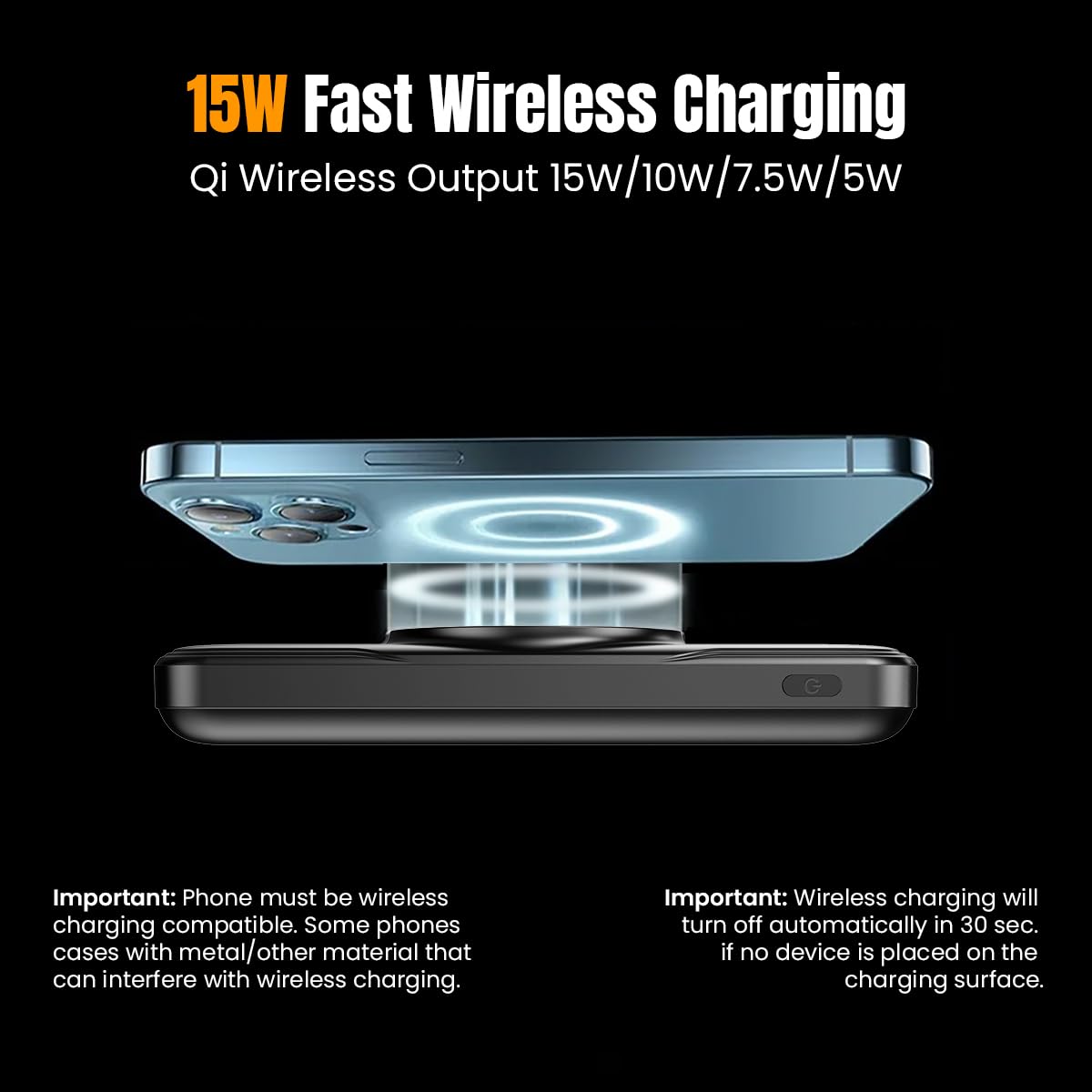
Figure 5.2: Wireless Charging. Shows a smartphone being wirelessly charged on the power bank's charging pad.
- Ensure your device is Qi wireless charging enabled.
- Place your Qi-enabled device centrally on the wireless charging pad of the power bank.
- The power bank will automatically detect your device and begin wireless charging. The digital display will show a wireless charging icon.
- കുറിപ്പ്: Wireless charging will turn off automatically in 30 seconds if no device is placed on the charging surface. Phone cases with metal or excessive thickness (more than 4mm) may interfere with wireless charging.
5.4. ഡിജിറ്റൽ ഡിസ്പ്ലേ മനസ്സിലാക്കൽ
ഡിജിറ്റൽ ഡിസ്പ്ലേ തത്സമയ വിവരങ്ങൾ നൽകുന്നു:
- ബാറ്ററി ശതമാനംtage: Shows the remaining charge of the power bank (0-100%).
- "IN" Indicator: Appears when the power bank is being recharged.
- "OUT" Indicator: Appears when the power bank is charging an external device via wired connection.
- "FAST" Indicator: Appears when fast charging is active (both input and output).
- Wireless Charging Icon: Appears when a device is being wirelessly charged.
6. പരിപാലനം
Proper care will extend the life of your power bank:
- മൃദുവായതും ഉണങ്ങിയതുമായ തുണി ഉപയോഗിച്ച് പവർ ബാങ്ക് വൃത്തിയാക്കുക. കഠിനമായ രാസവസ്തുക്കളോ ഉരച്ചിലുകളോ ഉള്ള വസ്തുക്കൾ ഉപയോഗിക്കരുത്.
- നേരിട്ടുള്ള സൂര്യപ്രകാശവും കടുത്ത താപനിലയും ഏൽക്കാത്ത തണുത്തതും വരണ്ടതുമായ സ്ഥലത്ത് പവർ ബാങ്ക് സൂക്ഷിക്കുക.
- ദീർഘനേരം ഉപയോഗിച്ചിട്ടില്ലെങ്കിൽ, ബാറ്ററിയുടെ ആരോഗ്യം നിലനിർത്താൻ കുറഞ്ഞത് മൂന്ന് മാസത്തിലൊരിക്കലെങ്കിലും പവർ ബാങ്ക് ചാർജ് ചെയ്യുക.
7. പ്രശ്നപരിഹാരം
നിങ്ങളുടെ പവർ ബാങ്കിൽ പ്രശ്നങ്ങൾ നേരിടുകയാണെങ്കിൽ, താഴെപ്പറയുന്ന പൊതുവായ പ്രശ്നങ്ങളും പരിഹാരങ്ങളും പരിശോധിക്കുക:
| പ്രശ്നം | സാധ്യമായ കാരണം | പരിഹാരം |
|---|---|---|
| പവർ ബാങ്ക് ചാർജ് ചെയ്യുന്നില്ല | Charging cable or adapter faulty; Power bank fully charged; Input port issue. | Try a different charging cable and adapter. Ensure the power bank is not already at 100%. Check if the input port is clean and undamaged. |
| പവർ ബാങ്കിൽ നിന്ന് ഉപകരണം ചാർജ് ചെയ്യുന്നില്ല | Power bank battery empty; Cable faulty; Device not compatible; Loose connection. | Recharge the power bank. Try a different charging cable. Ensure your device is compatible. Check for secure connections. |
| വയർലെസ് ചാർജിംഗ് പ്രവർത്തിക്കുന്നില്ല | Device not Qi-enabled; Misalignment; Phone case interference; Foreign objects on pad. | Ensure device supports Qi. Realign device on the center of the pad. Remove thick or metallic phone cases. Remove any objects from the charging pad. |
| സ്ലോ ചാർജിംഗ് | Cable not fast-charge compatible; Device not supporting fast charge; Multiple devices charging simultaneously. | Use a fast-charge compatible cable. Ensure your device supports fast charging. Charging multiple devices may reduce individual charging speeds. |
| ഡിജിറ്റൽ ഡിസ്പ്ലേ പ്രവർത്തിക്കുന്നില്ല | പവർ ബാങ്ക് ഓഫാണ്; തകരാറ്. | Press the power button to activate the display. If it remains unresponsive, contact customer support. |
8 സ്പെസിഫിക്കേഷനുകൾ
| ഫീച്ചർ | സ്പെസിഫിക്കേഷൻ |
|---|---|
| മോഡൽ നമ്പർ | Dynamo Arc |
| ബാറ്ററി തരം | ലി-പോളിമർ |
| ബാറ്ററി ശേഷി | 10000mAh |
| മൈക്രോ യുഎസ്ബി ഇൻപുട്ട് | 5V/2A, 9V/2A, 12V/1.5A |
| ടൈപ്പ്-സി ഇൻപുട്ട് | 5V/3A, 9V/2.22A, 12V/1.5A |
| ടൈപ്പ്-സി ഔട്ട്പുട്ട് | 5V/3A, 9V/2.22A, 12V/1.67A |
| USB 1 or USB 2 Output | 5V/3A, 9V/2.2A, 5V/4.5A, 12V/1.67A (22.5W max.) |
| വയർലെസ് ഔട്ട്പുട്ട് | പരമാവധി 5W, 7.5W, 10W, 15W. |
| പ്രത്യേക സവിശേഷതകൾ | Digital Display, Fast Charging, Over Charging Protection, Short Circuit Protection, Wireless Charging, Built-in Cables |
| അളവുകൾ | 15.7 x 10.7 x 3.3 സെ.മീ |
| ഇനത്തിൻ്റെ ഭാരം | 230 ഗ്രാം |
| നിറം | കറുപ്പ് |
9. വാറൻ്റിയും പിന്തുണയും
The pTron Dynamo Arc Power Bank comes with a 1-year manufacturer warranty from the date of purchase, covering manufacturing defects only.
ഉപഭോക്തൃ പിന്തുണയ്ക്കായി, ദയവായി ബന്ധപ്പെടുക:
- ഫോൺ: 040 - 67138888
- ഇമെയിൽ: support@ptron.in
Ask a question about this manual
Ask about setup, troubleshooting, compatibility, parts, safety, or missing instructions. Manuals+ will review the question and use this page’s manual context to help answer it.