
ആമുഖം
Thank you for choosing ENEGON EN-EL15C USB C Direct Charging Replacement Batteries. This manual provides essential information for the safe and efficient use of your new batteries. These 2100mAh, 7.2V/15.1Wh lithium-ion batteries are designed to provide extended power for compatible Nikon cameras, featuring convenient direct USB-C charging capabilities.

Image: Two ENEGON EN-EL15C batteries and the included 2-in-1 USB-C charging cable, showcasing the product contents.
സജ്ജമാക്കുക
പ്രാരംഭ ചാർജിംഗ്
Before first use, fully charge both batteries. The batteries feature a built-in USB-C port for direct charging. Use the provided 2-in-1 USB-C charging cable or any compatible USB-C cable with a power source such as a USB wall charger, power bank, or laptop USB port.
- Connect the USB-C end of the cable to the battery's USB-C port.
- Connect the USB-A or other USB-C end of the cable to a power source.
- The LED indicator on the battery will show red during charging and turn green when fully charged.

Image: An ENEGON EN-EL15C battery connected to a power bank via its USB-C port, illustrating direct charging convenience.
Inserting into Camera
Ensure your camera is powered off before inserting or removing the battery. Open the battery compartment cover on your Nikon camera, align the battery according to the polarity indicators, and gently push it in until it locks into place. Close the battery compartment cover securely.
പ്രവർത്തന നിർദ്ദേശങ്ങൾ
ബാറ്ററികൾ ചാർജ് ചെയ്യുന്നു
The ENEGON EN-EL15C batteries offer versatile charging options:
- നേരിട്ടുള്ള USB-C ചാർജിംഗ്: Connect a USB-C cable directly to the battery's USB-C port. This allows charging from various sources like laptops, power banks, car USB ports, and wall chargers. The LED indicator will be red during charging and green when complete.
- ഒരേസമയം ചാർജിംഗ്: The included 2-in-1 USB-C cable allows you to charge two ENEGON EN-EL15C batteries or one battery and another USB-C device (e.g., a smartphone) simultaneously.
- Traditional Charger: These batteries are also compatible with original Nikon MH-25/MH-25a chargers and other third-party EN-EL15 compatible chargers.
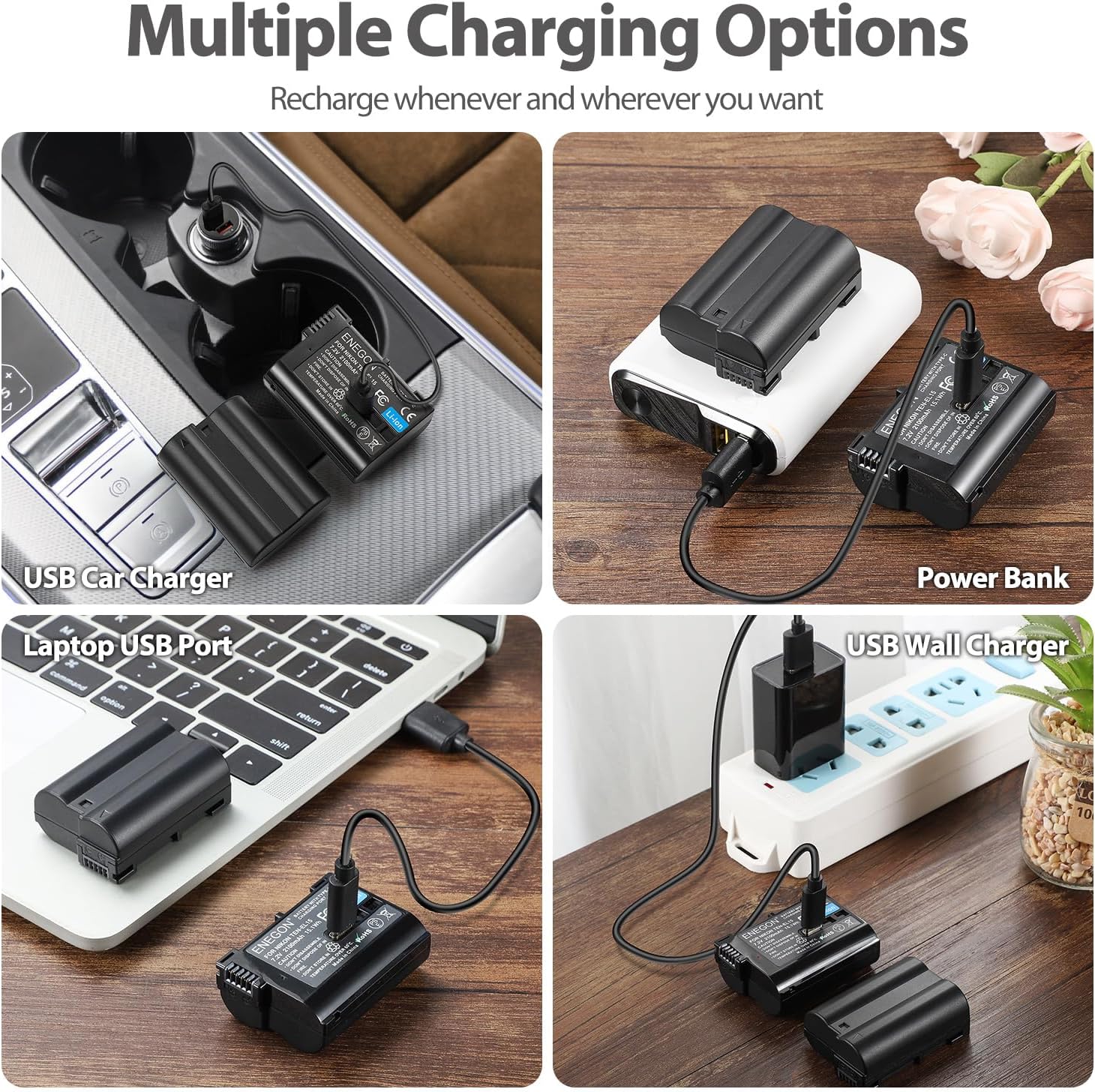
Image: A collage demonstrating multiple charging options for the ENEGON EN-EL15C batteries, including car, power bank, laptop, and wall charging.
ബാറ്ററി ലെവൽ സൂചന
The LED indicator on the battery provides charging status:
- ചുവന്ന LED: ബാറ്ററി നിലവിൽ ചാർജ് ചെയ്യുന്നു.
- പച്ച LED: ബാറ്ററി പൂർണ്ണമായി ചാർജ്ജ് ചെയ്തു.
മെയിൻ്റനൻസ്
പരിപാലനവും സംഭരണവും
- നേരിട്ടുള്ള സൂര്യപ്രകാശത്തിൽ നിന്നും ഉയർന്ന താപനിലയിൽ നിന്നും അകലെ തണുത്തതും വരണ്ടതുമായ സ്ഥലത്ത് ബാറ്ററികൾ സൂക്ഷിക്കുക.
- ബാറ്ററി ടെർമിനലുകളുടെ ഷോർട്ട് സർക്യൂട്ട് ഒഴിവാക്കുക.
- ബാറ്ററി ഡിസ്അസംബ്ലിംഗ് ചെയ്യരുത്, തകർക്കരുത്, അല്ലെങ്കിൽ പഞ്ചർ ചെയ്യരുത്.
- If storing for extended periods, charge the batteries to approximately 50% capacity every 3-6 months to maintain optimal performance and lifespan.
- കുട്ടികളിൽ നിന്നും വളർത്തുമൃഗങ്ങളിൽ നിന്നും ബാറ്ററികൾ സൂക്ഷിക്കുക.
സുരക്ഷാ സവിശേഷതകൾ
ENEGON EN-EL15C batteries are equipped with multiple protection features to ensure safe operation:
- ഓവർ-വോളിയംtagഇ സംരക്ഷണം
- ഓവർ കറൻ്റ് സംരക്ഷണം
- ഷോർട്ട് സർക്യൂട്ട് സംരക്ഷണം
- അമിത താപനില സംരക്ഷണം
- അമിത ചാർജ് സംരക്ഷണം
- അമിത ഡിസ്ചാർജ് സംരക്ഷണം

Image: A visual representation of the intelligent protection systems integrated into ENEGON batteries for safe and long-lasting performance.
ട്രബിൾഷൂട്ടിംഗ്
- ബാറ്ററി ചാർജുചെയ്യുന്നില്ല:
- USB-C കേബിൾ ബാറ്ററിയിലേക്കും പവർ സ്രോതസ്സിലേക്കും സുരക്ഷിതമായി ബന്ധിപ്പിച്ചിട്ടുണ്ടെന്ന് ഉറപ്പാക്കുക.
- പവർ സ്രോതസ്സ് സജീവമാണെന്നും പവർ നൽകുന്നുണ്ടെന്നും ഉറപ്പാക്കുക.
- മറ്റൊരു USB-C കേബിളോ പവർ സ്രോതസ്സോ പരീക്ഷിച്ചുനോക്കൂ.
- Check if the battery's LED indicator is red during charging. If not, the battery may not be receiving power.
- Camera Does Not Recognize Battery:
- Ensure the battery is fully inserted and the compartment door is closed.
- Power off the camera, remove the battery, and reinsert it.
- Clean the battery contacts on both the battery and the camera with a dry, soft cloth.
- Some camera firmware updates may occasionally affect third-party battery recognition. Ensure your camera's firmware is up to date, or consult your camera's manual for compatibility with third-party batteries.
- ഹ്രസ്വ ബാറ്ററി ലൈഫ്:
- Ensure the battery is fully charged before use (green LED).
- Extreme temperatures (very hot or very cold) can reduce battery performance.
- Frequent use of power-intensive camera features (e.g., live view, video recording, continuous shooting, Wi-Fi) will consume battery faster.
- Battery capacity naturally degrades over time and with many charge cycles.
സ്പെസിഫിക്കേഷനുകൾ
| ബ്രാൻഡ് | ENEGON |
| മോഡൽ | EN-EL15C |
| ബാറ്ററി സെൽ കോമ്പോസിഷൻ | ലിഥിയം അയോൺ |
| ബാറ്ററി ശേഷി | 2100 mAh |
| വാല്യംtage | 7.2V |
| ഊർജ്ജം | 15.1 Wh |
| പുനരുപയോഗം | റീചാർജ് ചെയ്യാവുന്നത് |
| അനുയോജ്യമായ ക്യാമറ മോഡലുകൾ | Nikon D500, D600, D610, D750, D800, D800e, D810, D810a, D850, D7000, D7100, D7200, D7500, 1 v1, Z5, Z6, Z7 |
| അനുയോജ്യമായ ചാർജറുകൾ | Nikon MH-25, MH-25a, and USB-C power sources |
| യൂണിറ്റ് എണ്ണം | 2.0 Count (Batteries) |
| ബാറ്ററി ഭാരം | 29 Grams (per battery) |
| യു.പി.സി | 721295890984 |

Image: An ENEGON EN-EL15C battery displayed with a Nikon camera, highlighting its wide compatibility with various Nikon DSLR and mirrorless models.
വാറൻ്റിയും പിന്തുണയും
ENEGON products are designed for reliability and performance. For any questions, technical support, or warranty claims, please contact ENEGON customer service through the retailer where the product was purchased or visit the official ENEGON website for contact information. Please retain your proof of purchase for warranty purposes.