
WalkerFit SW205-A1PRO
WalkerFit Smart Watch for Men User Manual
Model: SW205-A1PRO
1. ആമുഖം
Thank you for choosing the WalkerFit Smart Watch for Men. This 1.84-inch big screen fitness watch is designed to enhance your daily life with features like heart rate monitoring, sleep tracking, stress management, and a wide array of sports modes. It offers seamless connectivity with Android phones and iPhones, ensuring you stay connected and informed. This manual provides detailed instructions to help you get the most out of your new smartwatch.

Image: The WalkerFit Smart Watch displaying its main interface and call functions.
2. പാക്കേജ് ഉള്ളടക്കം
എല്ലാ ഇനങ്ങളും ഉണ്ടെന്ന് ഉറപ്പാക്കാൻ ദയവായി ബോക്സ് ചെക്ക് ചെയ്യുക:
- സ്മാർട്ട് വാച്ച് x 1
- ഉപയോക്തൃ മാനുവൽ x 1
- ചാർജിംഗ് കേബിൾ x 1
3. ആരംഭിക്കുന്നു
3.1 ഉപകരണം ചാർജ് ചെയ്യുന്നു
ആദ്യമായി ഉപയോഗിക്കുന്നതിന് മുമ്പ്, നിങ്ങളുടെ സ്മാർട്ട് വാച്ച് പൂർണ്ണമായും ചാർജ് ചെയ്യുക. വാച്ചിന്റെ പിൻഭാഗത്തുള്ള ചാർജിംഗ് പോയിന്റുകളുമായി മാഗ്നറ്റിക് ചാർജിംഗ് കേബിൾ ബന്ധിപ്പിച്ച് യുഎസ്ബി എൻഡ് ഒരു പവർ അഡാപ്റ്ററിലേക്കോ (ഉൾപ്പെടുത്തിയിട്ടില്ല) കമ്പ്യൂട്ടറിന്റെ യുഎസ്ബി പോർട്ടിലേക്കോ പ്ലഗ് ചെയ്യുക.
- ചാർജിംഗ് സമയം: ഏകദേശം 2.5 മണിക്കൂർ
- Active Usage: Up to 7 days
- സ്റ്റാൻഡ്ബൈ സമയം: 25 ദിവസം വരെ

Image: The WalkerFit Smart Watch being charged, highlighting its fast charging and extended battery life.
3.2 ആപ്പ് ഇൻസ്റ്റാളേഷനും ജോടിയാക്കലും
- Scan the QR code in the manual or search for the companion app (e.g., 'FitCloudPro' or similar, check manual for exact name) on your smartphone's app store (Google Play Store for Android, Apple App Store for iOS).
- ആവശ്യപ്പെടുകയാണെങ്കിൽ ആപ്പ് ഇൻസ്റ്റാൾ ചെയ്ത് ഒരു അക്കൗണ്ട് സൃഷ്ടിക്കുക.
- നിങ്ങളുടെ സ്മാർട്ട്ഫോണിൽ ബ്ലൂടൂത്ത് പ്രവർത്തനക്ഷമമാക്കുക.
- Open the app, navigate to 'Device' or 'My Device', and select 'Add Device'.
- Select 'SW205-A1PRO' or the corresponding device name from the list to pair. Follow the on-screen prompts to complete the pairing process.
3.3 വാച്ച് ധരിക്കുന്നു
Wear the watch comfortably on your wrist, about one finger's width from your wrist bone. Ensure the sensor on the back of the watch is in contact with your skin for accurate health monitoring.
4. അടിസ്ഥാന പ്രവർത്തനം
4.1 ഇന്റർഫേസ് നാവിഗേറ്റ് ചെയ്യൽ
The WalkerFit Smart Watch features a vibrant 1.84-inch touchscreen. Swipe left, right, up, or down to access different functions and menus. The side button typically serves as a power button or a return-to-home button.
4.2 കോളുകൾ ചെയ്യലും സ്വീകരിക്കലും
The watch is equipped with a built-in speaker and microphone, allowing you to handle calls directly from your wrist via Bluetooth 5.3 connection to your smartphone.
- കോളുകൾ ചെയ്യുന്നു: Access the phone function on the watch to view recent calls, use a dial pad, or access contacts (synced from your phone).
- കോളുകൾ സ്വീകരിക്കുന്നു: When a call comes in, the watch will display the caller ID. You can answer, reject, or mute the call directly from the watch screen.

Image: Bluetooth 5.3 connectivity features, including call handling and notifications.
4.3 അറിയിപ്പുകൾ
Stay synchronized with your iPhone or Android phone for real-time notifications from social media, texts, and apps like Facebook, WhatsApp, and Twitter. Ensure notification permissions are enabled in the companion app and your phone settings.
4.4 വാച്ച് ഫെയ്സുകൾ ഇഷ്ടാനുസൃതമാക്കൽ
Personalize your watch by changing the watch face. Long press on the current watch face to access available options. You can also customize styles through the smartphone app, with numerous digital and analog options available.
5. ആരോഗ്യ നിരീക്ഷണ സവിശേഷതകൾ
The WalkerFit Smart Watch provides continuous 24/7 health monitoring to help you track your well-being.

Image: The watch's health sensors and examples of health data graphs.
5.1 ഹൃദയമിടിപ്പ് ട്രാക്കിംഗ്
Monitor your heart rate throughout the day. The watch provides real-time heart rate data, which can be viewed on the watch or in the app for historical trends.
5.2 സ്ലീപ്പ് മോണിറ്ററിംഗ്
ഗാഢനിദ്ര, നേരിയ ഉറക്കം, ഉണർന്നിരിക്കുന്ന സമയങ്ങൾ എന്നിവയുൾപ്പെടെ നിങ്ങളുടെ ഉറക്ക പാറ്റേണുകൾ വാച്ച് യാന്ത്രികമായി ട്രാക്ക് ചെയ്യുന്നു. വീണ്ടുംview your sleep quality and duration in the app to improve your rest.
5.3 Stress Tracking
The watch can help monitor your stress levels, providing insights into your mental well-being. Refer to the app for detailed stress data and trends.
5.4 Pedometer and Activity Tracking
The built-in pedometer accurately tracks your daily walking steps and miles. It also monitors calories burned and active time, serving as an indispensable health companion.
5.5 Female Health Tracking
The watch supports period tracking, allowing users to log and predict menstrual cycles through the companion app.
6. സ്പോർട്സ് മോഡുകൾ
Pursue your fitness goals with over 120 sports modes available on this activity tracker. The watch can track various metrics depending on the sport, including calories, steps, time, and distances.
- Setting Workout Targets: Set specific goals for your workouts within the watch or app.
- വാട്ടർപ്രൂഫ് ഡിസൈൻ: The watch's waterproof design makes it suitable for various exercise routines, including those involving sweat or light water exposure.

Image: The watch's sports tracking interface and various sport mode icons.
7. Additional Smart Functions
The WalkerFit Smart Watch offers several convenient functions to enhance your daily experience.
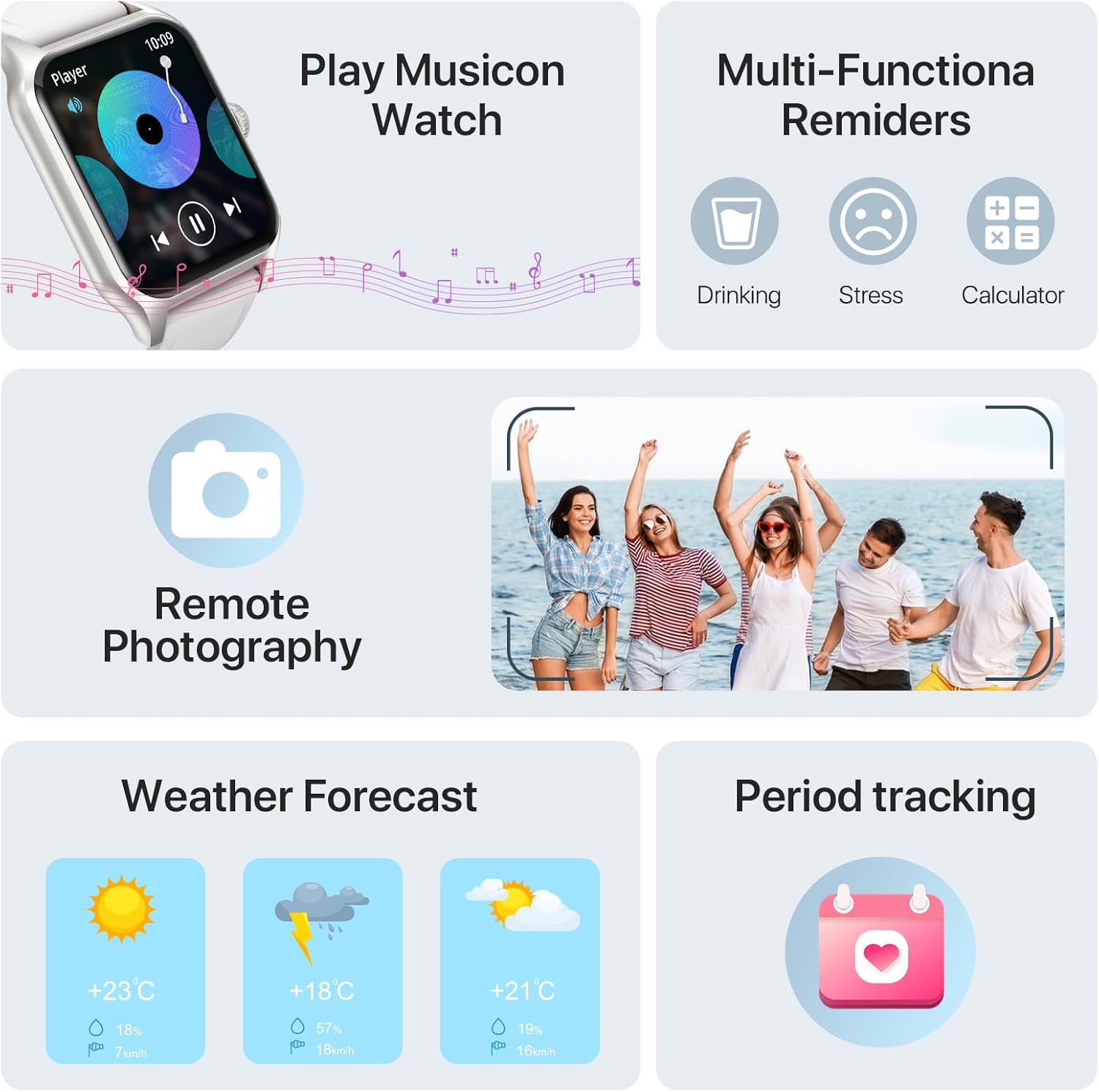
Image: Various smart functions including music control, reminders, remote camera, weather, and period tracking.
7.1 സംഗീത നിയന്ത്രണം
Control music playback on your smartphone directly from your watch. Play, pause, skip tracks, and adjust volume without needing to take out your phone.
7.2 റിമോട്ട് ക്യാമറ
Use your watch as a remote shutter for your smartphone's camera. Open the remote camera function on the watch and shake your wrist to take a photo.
7.3 കാലാവസ്ഥാ പ്രവചനം
Check the current weather conditions and forecast directly on your smartwatch by raising your wrist.
7.4 Alarms and Reminders
Set alarms on your watch to wake up or for important reminders. The watch also supports multi-functional reminders such as drinking water reminders and stress reminders.
7.5 AI Voice Recognition
Utilize AI voice recognition for quick commands and information, such as asking about the weather or initiating calls.
8 സ്പെസിഫിക്കേഷനുകൾ
| ഫീച്ചർ | വിശദാംശങ്ങൾ |
|---|---|
| മോഡൽ നമ്പർ | SW205-A1PRO |
| സ്ക്രീൻ വലിപ്പം | 1.83 Inches (visible screen diagonal: 2" / 5 cm) |
| കണക്റ്റിവിറ്റി ടെക്നോളജി | ബ്ലൂടൂത്ത് 5.3 |
| ബാറ്ററി ശേഷി | 260mAh ലിഥിയം പോളിമർ |
| ചാർജിംഗ് സമയം | ഏകദേശം 2.5 മണിക്കൂർ |
| Active Usage Time | 7 ദിവസം വരെ |
| സ്റ്റാൻഡ്ബൈ സമയം | 25 ദിവസം വരെ |
| ഓപ്പറേറ്റിംഗ് സിസ്റ്റം | Android compatible |
| പ്രത്യേക സവിശേഷതകൾ | Cycle Tracking, Multisport Tracker, Activity Tracker, Notifications, Music Player, Heart Rate Monitor, Sleep Monitor, Stress Monitor, Pedometer |
| ഇനത്തിൻ്റെ ഭാരം | 160 ഗ്രാം (5.6 ഔൺസ്) |
| അളവുകൾ (വാച്ച് ഫെയ്സ്) | 37mm (1.45in) width, 52mm (2.04in) height, 10mm (0.39in) thickness |
| Total Length (Watch + Strap) | 250 മിമി (9.8in) |

Image: Detailed product dimensions of the WalkerFit Smart Watch.
9. പ്രശ്നപരിഹാരം
9.1 വാച്ച് ഓണാക്കുന്നില്ല
- വാച്ച് പൂർണ്ണമായും ചാർജ് ചെയ്തിട്ടുണ്ടെന്ന് ഉറപ്പാക്കുക. കുറഞ്ഞത് 30 മിനിറ്റെങ്കിലും ചാർജിംഗ് കേബിളിലേക്കും പവർ സ്രോതസ്സിലേക്കും അത് ബന്ധിപ്പിക്കുക.
- Press and hold the side button for several seconds to power on.
9.2 Unable to Pair with Smartphone
- നിങ്ങളുടെ സ്മാർട്ട്ഫോണിൽ ബ്ലൂടൂത്ത് പ്രവർത്തനക്ഷമമാക്കിയിട്ടുണ്ടെന്ന് ഉറപ്പാക്കുക.
- വാച്ച് നിങ്ങളുടെ ഫോണിന്റെ ബ്ലൂടൂത്ത് പരിധിക്കുള്ളിലാണെന്ന് ഉറപ്പാക്കുക.
- നിങ്ങളുടെ വാച്ചും സ്മാർട്ട്ഫോണും പുനരാരംഭിക്കുക.
- Check if the companion app has necessary permissions (location, Bluetooth, notifications).
- If previously paired, try unpairing the device from your phone's Bluetooth settings and re-pairing through the app.
9.3 കൃത്യമല്ലാത്ത ആരോഗ്യ ഡാറ്റ
- Ensure the watch is worn snugly on your wrist, with the sensors in proper contact with your skin.
- വാച്ചിന്റെ പിൻഭാഗത്തുള്ള സെൻസർ ഭാഗം പതിവായി വൃത്തിയാക്കുക.
- അളക്കുമ്പോൾ അമിതമായ ചലനം ഒഴിവാക്കുക.
9.4 അറിയിപ്പുകൾ ദൃശ്യമാകുന്നില്ല
- കമ്പാനിയൻ ആപ്പിൽ അറിയിപ്പുകൾ പ്രവർത്തനക്ഷമമാക്കിയിട്ടുണ്ടെന്ന് ഉറപ്പാക്കുക.
- Check your smartphone's notification settings to ensure the app is allowed to send notifications.
- വാച്ച് ബ്ലൂടൂത്ത് വഴി ബന്ധിപ്പിച്ചിട്ടുണ്ടെന്ന് ഉറപ്പാക്കുക.
10. വാറൻ്റിയും പിന്തുണയും
At WalkerFit, we are committed to providing high-quality products and excellent customer service. Your WalkerFit Smart Watch undergoes rigorous quality checks before leaving the factory.
- വാറൻ്റി: All WalkerFit smartwatches carry a two-year warranty from the date of purchase.
- വിൽപ്പനാനന്തര പിന്തുണ: If you encounter any issues upon receiving or using your smartwatch, please contact our 24/7 after-sales team immediately. We are committed to swift issue resolution.
Thank you for choosing WalkerFit.
Ask a question about this manual
Ask about setup, troubleshooting, compatibility, parts, safety, or missing instructions. Manuals+ will review the question and use this page’s manual context to help answer it.