
1. ആമുഖം
This manual provides essential information for the safe and efficient operation of your Sharp GX-BT190 Portable Bluetooth Speaker. Please read it thoroughly before using the device and retain it for future reference.
2 സുരക്ഷാ വിവരങ്ങൾ
- സ്പീക്കറിനെ തീവ്രമായ താപനിലയിലോ, നേരിട്ടുള്ള സൂര്യപ്രകാശത്തിലോ, ഉയർന്ന ആർദ്രതയിലോ തുറന്നുകാട്ടരുത്.
- സ്പീക്കർ ഡിസ്അസംബ്ലിംഗ് ചെയ്യുകയോ നന്നാക്കുകയോ പരിഷ്കരിക്കുകയോ ചെയ്യരുത്. ഇത് വാറന്റി അസാധുവാക്കുകയും സുരക്ഷാ അപകടങ്ങൾ ഉണ്ടാക്കുകയും ചെയ്തേക്കാം.
- Ensure the charging port cover is securely closed when using the speaker near water to maintain its IP67 rating.
- നൽകിയിരിക്കുന്ന ചാർജിംഗ് കേബിളോ സാക്ഷ്യപ്പെടുത്തിയ തത്തുല്യമായതോ മാത്രം ഉപയോഗിക്കുക.
- കുട്ടികളിൽ നിന്നും വളർത്തുമൃഗങ്ങളിൽ നിന്നും സ്പീക്കർ അകറ്റി നിർത്തുക.
- കേൾവിക്ക് കേടുപാടുകൾ സംഭവിക്കുന്നത് തടയാൻ ദീർഘനേരം ഉയർന്ന ശബ്ദത്തിൽ കേൾക്കുന്നത് ഒഴിവാക്കുക.
3. പാക്കേജ് ഉള്ളടക്കം
- Sharp GX-BT190 Portable Bluetooth Speaker
- യുഎസ്ബി ചാർജിംഗ് കേബിൾ
- ലാനിയാർഡ്
- ഇൻസ്ട്രക്ഷൻ മാനുവൽ
4. ഉൽപ്പന്നം കഴിഞ്ഞുview

ഫ്രണ്ട് view of the Sharp GX-BT190 speaker, showing the central speaker grille with the Sharp logo and the LED light ring.

വശം view of the Sharp GX-BT190 speaker, highlighting the textured speaker grille and the integrated lanyard.
പിൻഭാഗം view of the Sharp GX-BT190 speaker, showing the control buttons and the sealed charging port cover.
നിയന്ത്രണങ്ങളും സൂചകങ്ങളും:
- പവർ ബട്ടൺ: ഓൺ/ഓഫ് ചെയ്യാൻ അമർത്തിപ്പിടിക്കുക.
- വോളിയം കൂട്ടുക / അടുത്ത ട്രാക്ക് ബട്ടൺ (+): വോളിയം കൂട്ടാൻ ഷോർട്ട് പ്രസ്സ് ചെയ്യുക, അടുത്ത ട്രാക്കിനായി ദീർഘനേരം പ്രസ്സ് ചെയ്യുക.
- വോളിയം കുറയ്ക്കൽ / മുമ്പത്തെ ട്രാക്ക് ബട്ടൺ (-): വോളിയം കുറയ്ക്കാൻ ഷോർട്ട് പ്രസ്സ് ചെയ്യുക, മുമ്പത്തെ ട്രാക്കിനായി ദീർഘനേരം അമർത്തുക.
- Play/Pause / Call Button (►||): Short press to play/pause, answer/end calls. Long press to reject calls.
- Mode / Light Button (M): Short press to cycle through LED light modes. Long press to turn off LED lights.
- USB-C ചാർജിംഗ് പോർട്ട്: For charging the speaker. Ensure the rubber cover is sealed when not charging.
- LED സൂചകം: ചാർജിംഗ് സ്റ്റാറ്റസും ബ്ലൂടൂത്ത് ജോടിയാക്കൽ സ്റ്റാറ്റസും പ്രദർശിപ്പിക്കുന്നു.
5. സജ്ജീകരണം
5.1 സ്പീക്കർ ചാർജ് ചെയ്യുന്നു
- Open the rubber cover on the back of the speaker to access the USB-C charging port.
- നൽകിയിരിക്കുന്ന USB ചാർജിംഗ് കേബിൾ സ്പീക്കറിന്റെ USB-C പോർട്ടുമായി ബന്ധിപ്പിക്കുക.
- USB കേബിളിന്റെ മറ്റേ അറ്റം ഒരു USB പവർ അഡാപ്റ്ററുമായി (ഉൾപ്പെടുത്തിയിട്ടില്ല) അല്ലെങ്കിൽ ഒരു കമ്പ്യൂട്ടറിന്റെ USB പോർട്ടുമായി ബന്ധിപ്പിക്കുക.
- The LED indicator will illuminate during charging and turn off once fully charged.
- Close the rubber cover securely after charging to maintain the speaker's waterproof rating.
5.2 പവർ ഓൺ/ഓഫ്
- പവർ ഓണാക്കാൻ: പവർ ബട്ടൺ ഏകദേശം 3 സെക്കൻഡ് അമർത്തിപ്പിടിക്കുക. ഒരു കേൾക്കാവുന്ന പ്രോംപ്റ്റ് നിങ്ങൾ കേൾക്കും, LED ഇൻഡിക്കേറ്റർ മിന്നിമറയും.
- പവർ ഓഫ് ചെയ്യാൻ: പവർ ബട്ടൺ ഏകദേശം 3 സെക്കൻഡ് അമർത്തിപ്പിടിക്കുക. ഒരു കേൾക്കാവുന്ന നിർദ്ദേശം നിങ്ങൾ കേൾക്കും, LED ഇൻഡിക്കേറ്റർ ഓഫാകും.
5.3 ബ്ലൂടൂത്ത് ജോടിയാക്കൽ
- Ensure the speaker is powered on and the LED indicator is flashing, indicating it is in pairing mode.
- നിങ്ങളുടെ മൊബൈൽ ഉപകരണത്തിൽ, ബ്ലൂടൂത്ത് പ്രവർത്തനക്ഷമമാക്കി ലഭ്യമായ ഉപകരണങ്ങൾക്കായി തിരയുക.
- Select "GX-BT190" from the list of devices.
- ജോടിയാക്കിക്കഴിഞ്ഞാൽ, LED ഇൻഡിക്കേറ്റർ മിന്നുന്നത് നിർത്തുകയും ദൃഢമായി തുടരുകയും ചെയ്യും, കൂടാതെ നിങ്ങൾ ഒരു സ്ഥിരീകരണ ടോൺ കേൾക്കുകയും ചെയ്യും.
- ഉപകരണം പരിധിക്കുള്ളിലായിരിക്കുകയും ബ്ലൂടൂത്ത് പ്രവർത്തനക്ഷമമാക്കുകയും ചെയ്താൽ, സ്പീക്കർ ഓണാക്കുമ്പോൾ അവസാനം ജോടിയാക്കിയ ഉപകരണത്തിലേക്ക് യാന്ത്രികമായി വീണ്ടും കണക്റ്റുചെയ്യും.
5.4 ട്രൂ വയർലെസ് സ്റ്റീരിയോ (TWS) ജോടിയാക്കൽ
TWS allows you to pair two GX-BT190 speakers together for a stereo audio experience.

Two Sharp GX-BT190 speakers, one red and one blue, positioned together, illustrating the True Wireless Stereo (TWS) pairing feature.
- രണ്ട് GX-BT190 സ്പീക്കറുകളും ഓണാക്കിയിട്ടുണ്ടെന്നും ഏതെങ്കിലും ബ്ലൂടൂത്ത് ഉപകരണവുമായി ബന്ധിപ്പിച്ചിട്ടില്ലെന്നും ഉറപ്പാക്കുക.
- On one of the speakers (this will be the primary speaker), double-press the Power button. The speaker will enter TWS pairing mode.
- The two speakers will automatically search for and connect to each other. You will hear a confirmation tone once TWS pairing is successful.
- Once TWS paired, connect your mobile device to the primary speaker via Bluetooth as described in section 5.3.
- TWS വിച്ഛേദിക്കാൻ, ഏതെങ്കിലും സ്പീക്കറിലെ പവർ ബട്ടൺ രണ്ടുതവണ അമർത്തുക.
6. പ്രവർത്തിക്കുന്നു
6.1 ഓഡിയോ പ്ലേ ചെയ്യുന്നു
- പ്ലേ/താൽക്കാലികമായി നിർത്തുക: പ്ലേ/പോസ് ബട്ടൺ ഹ്രസ്വമായി അമർത്തുക.
- വോളിയം കൂട്ടുക: '+' ബട്ടൺ ചുരുക്കി അമർത്തുക.
- വോളിയം താഴേക്ക്: '-' ബട്ടൺ ചുരുക്കി അമർത്തുക.
- അടുത്ത ട്രാക്ക്: '+' ബട്ടൺ ദീർഘനേരം അമർത്തുക.
- മുമ്പത്തെ ട്രാക്ക്: '-' ബട്ടൺ ദീർഘനേരം അമർത്തുക.
6.2 ഹാൻഡ്സ്-ഫ്രീ കോളിംഗ്
- മറുപടി കോൾ: ഒരു ഇൻകമിംഗ് കോൾ റിംഗ് ചെയ്യുമ്പോൾ പ്ലേ/പോസ് ബട്ടൺ ഹ്രസ്വമായി അമർത്തുക.
- കോൾ അവസാനിപ്പിക്കുക: ഒരു കോൾ സമയത്ത് പ്ലേ/പോസ് ബട്ടൺ ഹ്രസ്വമായി അമർത്തുക.
- കോൾ നിരസിക്കുക: ഒരു ഇൻകമിംഗ് കോൾ റിംഗ് ചെയ്യുമ്പോൾ പ്ലേ/പോസ് ബട്ടൺ ദീർഘനേരം അമർത്തുക.
6.3 LED Mood Lights
- Short press the 'M' (Mode/Light) button to cycle through the 6 available LED mood light modes.
- Long press the 'M' button to turn off the LED lights.
6.4 Waterproof and Dustproof Usage (IP67)

The Sharp GX-BT190 speaker partially submerged in water, demonstrating its IP67 waterproof and dustproof capabilities.
The GX-BT190 speaker is rated IP67, meaning it is protected from dust ingress and can withstand immersion in water up to 1 meter for 30 minutes. To ensure this protection:
- Always ensure the rubber cover for the charging port is fully and securely sealed before exposing the speaker to water or dust.
- സ്പീക്കർ ദീർഘനേരം അല്ലെങ്കിൽ നിർദ്ദിഷ്ട ആഴത്തിൽ കൂടുതൽ നേരം മനഃപൂർവ്വം വെള്ളത്തിൽ മുക്കരുത്.
- വെള്ളത്തിൽ സമ്പർക്കം പുലർത്തിയ ശേഷം, ചാർജ് ചെയ്യുന്നതിന് മുമ്പ് സ്പീക്കർ മൃദുവായ തുണി ഉപയോഗിച്ച് തുടയ്ക്കുക.
7. പരിപാലനം
7.1 വൃത്തിയാക്കൽ
- മൃദുവായ സ്പീക്കർ തുടയ്ക്കുക, ഡിamp തുണി.
- അബ്രാസീവ് ക്ലീനറുകൾ, ആൽക്കഹോൾ, കെമിക്കൽ ലായകങ്ങൾ എന്നിവ ഉപയോഗിക്കരുത്.
- Ensure the speaker is dry before charging or storing.
7.2 സംഭരണം
- നേരിട്ടുള്ള സൂര്യപ്രകാശത്തിൽ നിന്നും കടുത്ത താപനിലയിൽ നിന്നും മാറി തണുത്തതും വരണ്ടതുമായ സ്ഥലത്ത് സ്പീക്കർ സൂക്ഷിക്കുക.
- ദീർഘനേരം സൂക്ഷിക്കുകയാണെങ്കിൽ, ബാറ്ററിയുടെ ആരോഗ്യം നിലനിർത്താൻ ഇടയ്ക്കിടെ (ഉദാഹരണത്തിന്, ഓരോ 3 മാസത്തിലും) ബാറ്ററി ചാർജ് ചെയ്യുക.
8. പ്രശ്നപരിഹാരം
| പ്രശ്നം | പരിഹാരം |
|---|---|
| സ്പീക്കർ പവർ ഓൺ ചെയ്യുന്നില്ല. | ബാറ്ററി ചാർജ്ജ് ചെയ്തിട്ടുണ്ടെന്ന് ഉറപ്പാക്കുക. USB കേബിൾ ഉപയോഗിച്ച് സ്പീക്കർ ഒരു പവർ സ്രോതസ്സുമായി ബന്ധിപ്പിക്കുക. |
| ബ്ലൂടൂത്ത് വഴി ജോടിയാക്കാൻ കഴിയില്ല. | Ensure the speaker is in pairing mode (LED flashing). Turn off and on Bluetooth on your device. Move the speaker closer to your device. Clear previous Bluetooth connections on your device. |
| ശബ്ദമില്ല അല്ലെങ്കിൽ കുറഞ്ഞ ശബ്ദമില്ല. | Increase the volume on both the speaker and your connected device. Ensure the speaker is properly paired. |
| മോശം ശബ്ദ നിലവാരം. | Move the speaker closer to your device. Ensure there are no obstructions between the speaker and your device. Try playing a different audio source. |
| TWS ജോടിയാക്കൽ പരാജയപ്പെടുന്നു. | Ensure both speakers are GX-BT190 models and are not connected to any other Bluetooth device. Try powering both speakers off and on, then re-attempt TWS pairing. |
9 സ്പെസിഫിക്കേഷനുകൾ

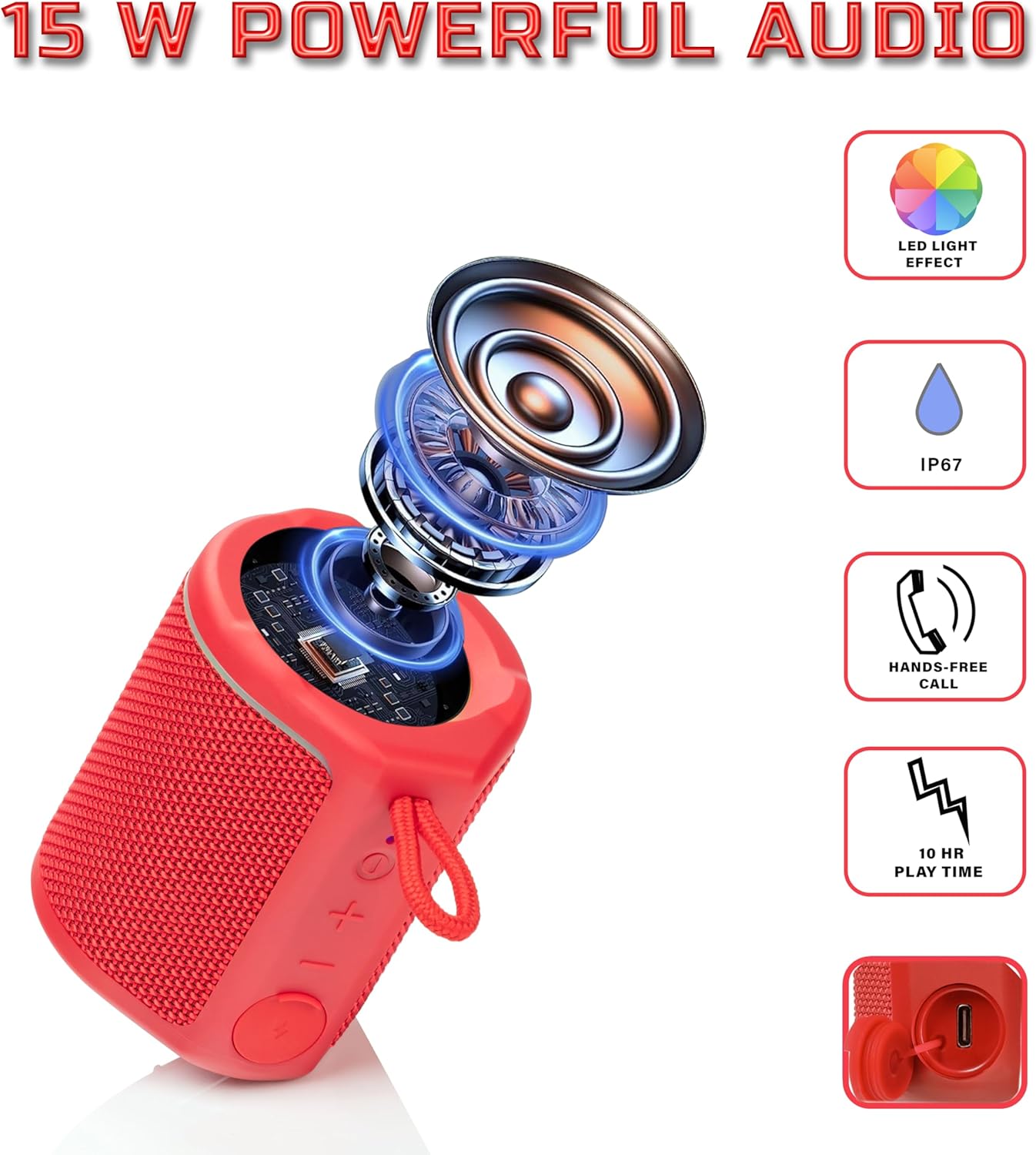
Diagram illustrating the internal components of the Sharp GX-BT190 speaker, including the speaker driver, and highlighting features like LED light effect, IP67 rating, hands-free call function, and battery life.
| ഫീച്ചർ | വിശദാംശങ്ങൾ |
|---|---|
| മോഡൽ നമ്പർ | GX-BT190 |
| കണക്റ്റിവിറ്റി ടെക്നോളജി | ബ്ലൂടൂത്ത് |
| സ്പീക്കർ പരമാവധി ഔട്ട്പുട്ട് പവർ | 10 വാട്ട്സ് |
| വാട്ടർപ്രൂഫ് റേറ്റിംഗ് | IP67 |
| ബാറ്ററി ലൈഫ് | 15 മണിക്കൂർ വരെ |
| ബാറ്ററി തരം | 1 ലിഥിയം അയോൺ (ഉൾപ്പെടുത്തിയിരിക്കുന്നു) |
| ബാറ്ററി ശേഷി | 1200 mAh |
| ഉൽപ്പന്ന അളവുകൾ (D x W x H) | 7.5 x 7.5 x 7.5 സെ.മീ (ഏകദേശം) |
| ഇനത്തിൻ്റെ ഭാരം | 226.8 ഗ്രാം (8 ഔൺസ്) |
| വയർലെസ് ശ്രേണി | 33 അടി വരെ |
| അധിക സവിശേഷതകൾ | LED Light, True Wireless Stereo (TWS), Hands-Free Calling |
10. വാറൻ്റി
The Sharp GX-BT190 Portable Bluetooth Speaker comes with a 1-Year Limited Warranty from the date of purchase. This warranty covers manufacturing defects under normal use. It does not cover damage caused by misuse, accidents, unauthorized modifications, or normal wear and tear. Please retain your proof of purchase for warranty claims.
11. പിന്തുണ
For technical assistance, warranty inquiries, or further information regarding your Sharp GX-BT190 speaker, please contact Sharp Inc. customer support:
- നിർമ്മാതാവിനെ ബന്ധപ്പെടുക: Sharp Inc
- ഫോൺ: 1-800-BE-SHARP