
1. ആമുഖം
This manual provides essential information for the safe and efficient use of your Google TV 7000 Series 4K Ultra HD LED Television. Please read these instructions thoroughly before operating the device and retain them for future reference.
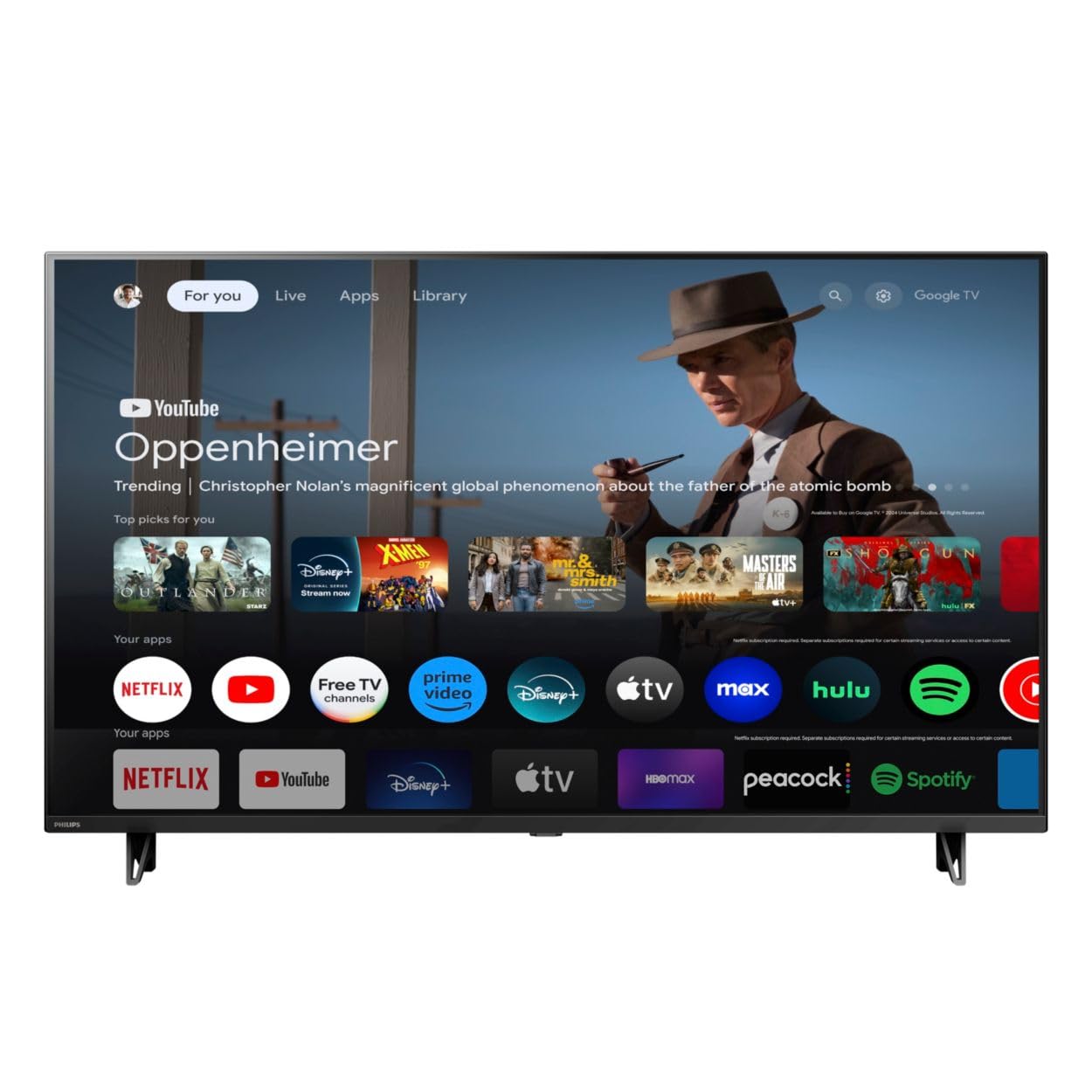
ഫ്രണ്ട് view of the Google TV 7000 Series 4K Ultra HD LED Television, showcasing its slim bezel and display.
2. സജ്ജീകരണം
2.1 അൺബോക്സിംഗും പാക്കേജ് ഉള്ളടക്കങ്ങളും
പാക്കേജിംഗിൽ നിന്ന് എല്ലാ ഇനങ്ങളും ശ്രദ്ധാപൂർവ്വം നീക്കം ചെയ്യുക. എല്ലാ ഘടകങ്ങളും ഉണ്ടെന്ന് ഉറപ്പാക്കുക:
- Google TV 7000 Series Television
- വിദൂര നിയന്ത്രണം
- വിദൂര നിയന്ത്രണത്തിനുള്ള ബാറ്ററികൾ
- ടേബിൾടോപ്പ് സ്റ്റാൻഡ്
- Screws for tabletop stand
- ദ്രുത ആരംഭ ഗൈഡ്
- ഉപയോക്തൃ മാനുവൽ (ഈ പ്രമാണം)
2.2 ബന്ധിപ്പിക്കുന്ന പവർ
Connect the power cord to the TV's power input, then plug the other end into a wall outlet. Ensure the power outlet is easily accessible.
2.3 ബാഹ്യ ഉപകരണങ്ങൾ ബന്ധിപ്പിക്കുന്നു
Your television supports various connectivity options:
- എച്ച്ഡിഎംഐ: Connect devices like Blu-ray players, game consoles, or set-top boxes to the HDMI ports. This model features Audio Return Channel (HDMI 2).
- USB: Use the USB port for media playback or connecting compatible accessories.
- ഇഥർനെറ്റ്: സ്ഥിരതയുള്ള വയർഡ് ഇന്റർനെറ്റ് കണക്ഷന്, ലാൻ പോർട്ടിലേക്ക് ഒരു ഇതർനെറ്റ് കേബിൾ ബന്ധിപ്പിക്കുക.
- ഹെഡ്ഫോൺ ഔട്ട്: സ്വകാര്യ ശ്രവണത്തിനായി ഹെഡ്ഫോണുകൾ ബന്ധിപ്പിക്കുക.
- ഡിജിറ്റൽ ഓഡിയോ ഔട്ട്പുട്ട് (ഒപ്റ്റിക്കൽ): ബാഹ്യ ഓഡിയോ സിസ്റ്റങ്ങളുമായി ബന്ധിപ്പിക്കുന്നതിന്.
- CVBS+Audio L/R In: പഴയ അനലോഗ് ഉപകരണങ്ങൾ ബന്ധിപ്പിക്കുന്നതിന്.
2.4 പ്രാരംഭ സജ്ജീകരണം
ആദ്യമായി പവർ-ഓൺ ചെയ്യുമ്പോൾ, പ്രാരംഭ സജ്ജീകരണ പ്രക്രിയയിലൂടെ ടിവി നിങ്ങളെ നയിക്കും. ഇതിൽ ഇവ ഉൾപ്പെടുന്നു:
- ഭാഷ തിരഞ്ഞെടുക്കൽ
- Connecting to a Wi-Fi network or using Ethernet
- Signing in with your Google account to access Google TV features and apps
- Scanning for available channels (ATSC, NTSC)
2.5 മൗണ്ടിംഗ് ഓപ്ഷനുകൾ
You can place your TV on a tabletop using the included stand or mount it on a wall.
- ടാബ്ലെറ്റ് സ്റ്റാൻഡ്: Attach the tabletop stand using the provided screws as per the quick start guide.
- വാൾ മൗണ്ട്: For wall mounting, use a VESA compatible mount (600 x 400 mm). Consult a professional for wall mounting to ensure safety and proper installation.
3. പ്രവർത്തന നിർദ്ദേശങ്ങൾ
3.1 റിമോട്ട് കൺട്രോൾ ഓവർview
The remote control allows you to navigate the Google TV interface, adjust settings, and control playback. It supports voice control for Google Assistant.
3.2 അടിസ്ഥാന പ്രവർത്തനങ്ങൾ
- ശക്തി: ടിവി ഓണാക്കാനോ ഓഫാക്കാനോ പവർ ബട്ടൺ അമർത്തുക.
- വോളിയം: ശബ്ദ നില ക്രമീകരിക്കാൻ വോളിയം ബട്ടണുകൾ ഉപയോഗിക്കുക.
- ചാനലുകൾ: Use the channel buttons to switch between TV channels.
- ഇൻപുട്ട്: Select the desired input source (HDMI, USB, etc.).
3.3 ഗൂഗിൾ ടിവി ഇന്റർഫേസ് നാവിഗേഷൻ
Use the directional pad and 'OK' button on your remote to navigate the Google TV home screen. The home screen provides access to your installed apps, recommended content, and settings.
3.4 സ്മാർട്ട് സവിശേഷതകൾ
- Chromecast ബിൽറ്റ്-ഇൻ: Cast content from your compatible mobile devices or computer directly to your TV.
- ഗൂഗിൾ അസിസ്റ്റന്റ് ബിൽറ്റ്-ഇൻ: Press the Google Assistant button on your remote to use voice commands for searching content, controlling smart home devices, getting information, and more.
- സ്ട്രീമിംഗ് ആപ്പുകൾ: Access popular streaming services like Netflix, YouTube, Discovery+, Tubi TV, and Prime Video directly from the Google TV interface.
3.5 ചിത്ര, ശബ്ദ ക്രമീകരണങ്ങൾ
നിങ്ങളുടെ ഇഷ്ടാനുസൃതമാക്കുക viewടിവിയുടെ ക്രമീകരണ മെനുവിലൂടെ ഡൗൺലോഡ് ചെയ്യാനും കേൾക്കാനുമുള്ള അനുഭവം:
- Picture Style: Choose from various preset picture modes or customize settings like brightness, contrast, color, and sharpness. Features include Dynamic contrast, Film mode, Blue stretch, and Custom Color management.
- HDR പിന്തുണ: The TV supports HDR10 and HLG for enhanced contrast and color with compatible content.
- ഗെയിം മോഡ്: Optimize picture settings for gaming to reduce input lag.
- ശബ്ദ ശൈലി: Select sound presets or adjust bass and treble. Features include Dolby Audio and Auto Volume Leveling.
- വീക്ഷണ അനുപാതം: Adjust the screen aspect ratio (e.g., Automatic, 4:3, Movie Expand, Full).
3.6 കണക്റ്റിവിറ്റി
Your TV offers various ways to connect to networks and devices:
- വൈഫൈ: Connect wirelessly to your home network for internet access.
- ബ്ലൂടൂത്ത്: Connect compatible Bluetooth devices such as headphones or game controllers.
- ഇഥർനെറ്റ്: സ്ഥിരമായ ഒരു വയർഡ് ഇന്റർനെറ്റ് കണക്ഷൻ നൽകുന്നു.
4. പരിപാലനം
4.1 Cleaning the Screen and TV Body
- വൃത്തിയാക്കുന്നതിന് മുമ്പ് എപ്പോഴും ടിവി അൺപ്ലഗ് ചെയ്യുക.
- Use a soft, dry, lint-free cloth to gently wipe the screen and TV body.
- കഠിനമായ അടയാളങ്ങൾക്ക്, നേരിയ dampവെള്ളം അല്ലെങ്കിൽ ഒരു പ്രത്യേക സ്ക്രീൻ ക്ലീനർ ഉപയോഗിച്ച് തുണിയിൽ തളിക്കുക. ഒരിക്കലും ക്ലീനർ നേരിട്ട് സ്ക്രീനിൽ സ്പ്രേ ചെയ്യരുത്.
- അബ്രാസീവ് ക്ലീനറുകൾ, മെഴുക് അല്ലെങ്കിൽ ലായകങ്ങൾ ഉപയോഗിക്കുന്നത് ഒഴിവാക്കുക.
4.2 സോഫ്റ്റ്വെയർ അപ്ഡേറ്റുകൾ
Your Google TV may receive automatic software updates to improve performance and add new features. Ensure your TV is connected to the internet to receive these updates. You can also manually check for updates in the settings menu.
4.3 റിമോട്ട് കൺട്രോൾ കെയർ
Replace batteries when the remote control's response becomes sluggish. Do not mix old and new batteries or different types of batteries. Keep the remote control away from moisture and direct sunlight.
5. പ്രശ്നപരിഹാരം
നിങ്ങളുടെ ടെലിവിഷനിൽ പ്രശ്നങ്ങൾ നേരിടുകയാണെങ്കിൽ, ഇനിപ്പറയുന്ന പൊതുവായ പരിഹാരങ്ങൾ പരിശോധിക്കുക:
| പ്രശ്നം | സാധ്യമായ പരിഹാരം |
|---|---|
| ശക്തിയില്ല | പവർ കോർഡ് ടിവിയിലും വാൾ ഔട്ട്ലെറ്റിലും സുരക്ഷിതമായി പ്ലഗ് ചെയ്തിട്ടുണ്ടോയെന്ന് പരിശോധിക്കുക. ഔട്ട്ലെറ്റ് പ്രവർത്തനക്ഷമമാണെന്ന് ഉറപ്പാക്കുക. |
| ചിത്രമില്ല, പക്ഷേ ശബ്ദം ഉണ്ട് | ശരിയായ ഇൻപുട്ട് ഉറവിടം തിരഞ്ഞെടുത്തിട്ടുണ്ടെന്ന് ഉറപ്പാക്കുക. ബാഹ്യ ഉപകരണ കണക്ഷനുകൾ പരിശോധിക്കുക. |
| ശബ്ദമില്ല, പക്ഷേ ചിത്രം ഉണ്ട് | വോളിയം ലെവലും മ്യൂട്ട് സ്റ്റാറ്റസും പരിശോധിക്കുക. ബാഹ്യ ഓഡിയോ സിസ്റ്റങ്ങൾ ശരിയായി ബന്ധിപ്പിച്ചിട്ടുണ്ടെന്നും പവർ ഓൺ ചെയ്തിട്ടുണ്ടെന്നും ഉറപ്പാക്കുക. |
| റിമോട്ട് കൺട്രോൾ പ്രവർത്തിക്കുന്നില്ല | ബാറ്ററികൾ മാറ്റിസ്ഥാപിക്കുക. റിമോട്ടിനും ടിവിയുടെ ഐആർ സെൻസറിനും ഇടയിൽ തടസ്സങ്ങളൊന്നുമില്ലെന്ന് ഉറപ്പാക്കുക. |
| നെറ്റ്വർക്ക് കണക്ഷൻ പ്രശ്നങ്ങൾ | നിങ്ങളുടെ റൂട്ടറും മോഡവും പുനരാരംഭിക്കുക. വൈഫൈ നെറ്റ്വർക്കിലേക്ക് വീണ്ടും കണക്റ്റുചെയ്യുക അല്ലെങ്കിൽ ഇതർനെറ്റ് കേബിൾ കണക്ഷൻ പരിശോധിക്കുക. |
| Picture quality issues (e.g., pixelation) | Check the signal strength for broadcast channels. For streaming content, ensure a stable internet connection. Adjust picture settings. |
5.1 ഫാക്ടറി റീസെറ്റ്
If problems persist, a factory reset may resolve them. This will erase all personal settings and installed apps, returning the TV to its original factory state. Consult the on-screen menu for the factory reset option, usually found under System or Device Preferences in Settings.
6 സ്പെസിഫിക്കേഷനുകൾ
Key technical specifications for the Google TV 7000 Series 4K Ultra HD LED Television:
| ഫീച്ചർ | സ്പെസിഫിക്കേഷൻ |
|---|---|
| സ്ക്രീൻ വലിപ്പം | 43 ഇഞ്ച് |
| ഡിസ്പ്ലേ ടെക്നോളജി | LCD UltraHD Display, LED Backlight |
| റെസലൂഷൻ | 4K (2160p) |
| പുതുക്കിയ നിരക്ക് | 120 PMR (Picture Motion Rate) |
| HDR ഫോർമാറ്റ് പിന്തുണയ്ക്കുന്നു | HDR10, HLG |
| ഓപ്പറേറ്റിംഗ് സിസ്റ്റം | Android 11 (Google TV) |
| കണക്റ്റിവിറ്റി ടെക്നോളജി | ബ്ലൂടൂത്ത്, ഇതർനെറ്റ്, യുഎസ്ബി, വൈ-ഫൈ |
| ഓഡിയോ സവിശേഷതകൾ | Dolby Audio, Auto Volume Leveling |
| പ്രത്യേക സവിശേഷതകൾ | Chromecast Built-in, Google Assistant Built-in, Game Mode, Digital Noise Reduction, MPEG artifact reduction, Dynamic contrast |
| ഉൽപ്പന്ന അളവുകൾ (D x W x H) | 9.8"D x 37.9"W x 23.9"H |
| ഇനത്തിൻ്റെ ഭാരം | 14.99 പൗണ്ട് |
| VESA മൗണ്ട് സ്റ്റാൻഡേർഡ് | 600 x 400 മി.മീ |
| നിർമ്മാതാവ് | ഫിലിപ്സ് |
| മോഡൽ നമ്പർ | 43PUL7652/F7 |
| യു.പി.സി | 609585254893 |
7. വാറൻ്റിയും പിന്തുണയും
7.1 വാറൻ്റി വിവരങ്ങൾ
This product comes with a Limited Warranty. Please refer to the warranty card included in your package or contact the manufacturer for specific terms and conditions regarding coverage and duration.
7.2 ഉപഭോക്തൃ പിന്തുണ
For technical assistance, troubleshooting beyond this manual, or warranty claims, please contact the manufacturer, Philips, or your retailer. Have your model number (43PUL7652/F7) and serial number ready when contacting support.