
ZOOZ ZEN37
സൂസ് 800 സീരീസ് ഇസഡ്-വേവ് ലോംഗ് റേഞ്ച് വാൾ റിമോട്ട് & സീൻ കൺട്രോളർ ZEN37 യൂസർ മാനുവൽ
മോഡൽ: ZEN37
ആമുഖം
This manual provides comprehensive instructions for the installation, operation, and maintenance of your Zooz 800 Series Z-Wave Long Range Wall Remote & Scene Controller, model ZEN37. Please read this manual thoroughly before use to ensure proper functionality and safety.
പ്രധാന കുറിപ്പ്: This is an advanced Z-Wave device. Verify compatibility with your Z-Wave hub before installation.
ഉൽപ്പന്നം കഴിഞ്ഞുview
The Zooz ZEN37 Wall Remote is a battery-powered Z-Wave 800 Series device designed for controlling smart home scenes and devices. It features four programmable buttons, offering flexible control options for your Z-Wave network.
പ്രധാന സവിശേഷതകൾ:
- 4 Remote Buttons: Each button can be programmed to activate up to 24 scenes or control other devices.
- ഫ്ലെക്സിബിൾ ഇൻസ്റ്റലേഷൻ: Can be placed in a standard Decora box, mounted to a wall, or used as a portable remote. Includes a magnetic base and screwless wallplate.
- റീചാർജ് ചെയ്യാവുന്ന ബാറ്ററി: Equipped with a LIR2032 rechargeable battery for convenience.
- Z-Wave 800 Series Chip: Provides enhanced signal coverage and Z-Wave Long Range capabilities (up to 1300 feet with a compatible hub).
- S2 Authenticated Security & SmartStart: Ensures secure and effortless pairing.
ബോക്സിൽ എന്താണുള്ളത്:
- Wall Remote (ZEN37)
- മാഗ്നെറ്റിക് ബേസ്
- Screwless Wallplate

Image: The Zooz ZEN37 Wall Remote, its magnetic base, and the product packaging.
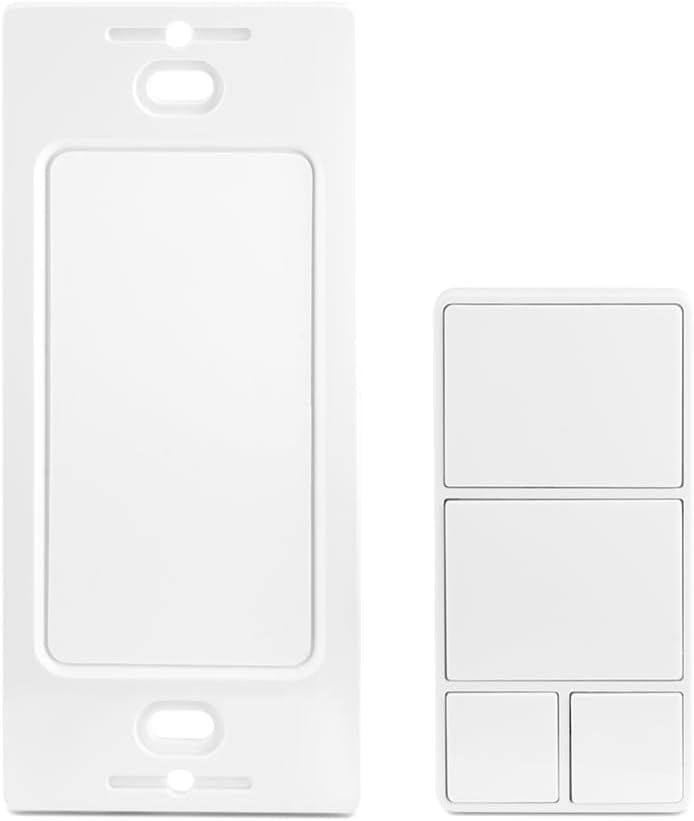
Image: The ZEN37 Wall Remote shown alongside its screwless wall plate, illustrating its design.
സ്പെസിഫിക്കേഷനുകൾ
| മോഡൽ നമ്പർ | ZEN37 800LR |
| ഇസഡ്-വേവ് മേഖല | US/CA/MX |
| ശക്തി | 1 x LIR2032 rechargeable battery (included) |
| പ്രവർത്തന താപനില | 32-104° F (0-40° C) |
| ഇൻസ്റ്റലേഷനും ഉപയോഗവും | ഇൻഡോർ മാത്രം |
| ഇനത്തിൻ്റെ ഭാരം | 4.9 ഔൺസ് |
| പാക്കേജ് അളവുകൾ | 4.92 x 3.27 x 1.73 ഇഞ്ച് |
| നിറം | വെള്ള |

Image: The back of the ZEN37 Wall Remote, displaying model number, Z-Wave region, battery type, and FCC ID.
സജ്ജീകരണവും ഇൻസ്റ്റാളേഷനും
1 ബാറ്ററി ചാർജ് ചെയ്യുന്നു
The ZEN37 Wall Remote comes with a rechargeable LIR2032 battery. Before initial use, ensure the battery is fully charged. Use a standard USB-C cable (not included) to connect the remote to a power source.

Image: The ZEN37 Wall Remote connected to a USB-C charging cable, demonstrating its rechargeable feature.
2. Pairing with a Z-Wave Hub
The ZEN37 is an advanced Z-Wave device and requires a compatible Z-Wave hub for operation. Ensure your hub supports scene control programming.
- Place the ZEN37 remote near your Z-Wave hub during the pairing process.
- Initiate the inclusion (pairing) mode on your Z-Wave hub. Refer to your hub's instruction manual for specific steps.
- Follow the remote's specific pairing instructions (typically a series of button presses) to add it to your network.
- Confirm successful pairing on your Z-Wave hub interface.
For hubs supporting SmartStart, scan the QR code on the back of the device or its packaging to simplify the inclusion process.
3 മൗണ്ടിംഗ് ഓപ്ഷനുകൾ
The ZEN37 offers versatile installation:
- Standard Decora Box: Install the magnetic base into a standard electrical box. The remote can then be magnetically attached.
- മതിൽ മൗണ്ടിംഗ്: Use the included screwless wallplate and magnetic base to fix the remote to any wall surface.
- പോർട്ടബിൾ ഉപയോഗം: The remote can be used handheld and placed on a nightstand or table.
പ്രവർത്തന നിർദ്ദേശങ്ങൾ
The ZEN37 Wall Remote features four distinct buttons, each capable of multiple actions (tap, hold, multi-tap) to trigger scenes or control individual devices within your Z-Wave network.

Image: A visual representation of the ZEN37's four buttons, illustrating how each button supports single taps, holds, and up to five multi-taps for scene activation.

Image: A hand demonstrating a single tap on the ZEN37 remote, with examples of controlled devices such as a ceiling fan, office lighting, and outdoor lights.

Image: A diagram illustrating various actions that can be programmed to the four buttons, such as turning off all lights, sending alerts, dimming lights, and locking doors.

Image: A hand holding the ZEN37 Wall Remote, highlighting its portable and "always handy" design.
Programming Scenes and Actions:
The specific programming of button actions (e.g., single tap to turn off all lights, long press to dim lights) is performed within your Z-Wave hub's interface. Consult your hub's documentation for detailed instructions on creating scenes and assigning actions to Z-Wave devices.
- ഒറ്റ ടാപ്പ്: A quick press and release of a button.
- പിടിക്കുക: Press and hold a button for a specified duration.
- Multi-Tap: Rapidly press a button multiple times (e.g., double-tap, triple-tap, up to five taps).
Example actions you can program:
- എല്ലാ ലൈറ്റുകളും ഓഫ് ചെയ്യുക.
- Dim lights for movie night.
- Lock all doors.
- Activate "Away" mode.
മെയിൻ്റനൻസ്
ബാറ്ററി ചാർജിംഗ്
The ZEN37 Wall Remote uses a rechargeable LIR2032 battery. When the battery level is low, connect the remote to a USB-C power source for charging. The battery life will vary depending on usage frequency.
വൃത്തിയാക്കൽ
മൃദുവായതും ഉണങ്ങിയതുമായ തുണി ഉപയോഗിച്ച് ഉപകരണം തുടയ്ക്കുക. അബ്രാസീവ് ക്ലീനറുകൾ ഉപയോഗിക്കരുത് അല്ലെങ്കിൽ ഉപകരണം വെള്ളത്തിൽ മുക്കരുത്.
ട്രബിൾഷൂട്ടിംഗ്
- ഉപകരണം ജോടിയാക്കുന്നില്ല:
- Ensure the remote is within close proximity to your Z-Wave hub during pairing.
- Verify your Z-Wave hub is in inclusion mode.
- Try excluding the device first, then re-including it.
- ബാറ്ററി ചാർജ്ജ് ചെയ്തിട്ടുണ്ടെന്ന് ഉറപ്പാക്കുക.
- Commands not responding:
- റിമോട്ടിന്റെ ബാറ്ററി ലെവൽ പരിശോധിക്കുക.
- Verify the remote is within range of your Z-Wave hub or a Z-Wave repeater.
- Confirm that scenes and actions are correctly programmed in your Z-Wave hub.
- Smart speaker not controlling the remote:
Smart speakers are not Z-Wave controllers. The ZEN37 requires a compatible Z-Wave hub to function. Your smart speaker can then interact with the Z-Wave hub.
Z-Wave Hub Compatibility
The ZEN37 Wall Remote is an advanced Z-Wave device. Most basic Z-Wave systems may not support advanced scene control programming. The following hubs are known to be compatible:
- Z-Box Hub: Recommended for Zooz products.
- സ്മാർട്ട് കാര്യങ്ങൾ: Requires a custom driver (instructions included with the product).
- ആവാസ കേന്ദ്രം: Requires a custom driver.
- ഹോം അസിസ്റ്റൻ്റ്: അനുയോജ്യം.
- HomeSeer: അനുയോജ്യം.
If your hub is not listed, it may not be recognized correctly or support the full functionality of this device. Please verify compatibility before purchase.
വാറൻ്റിയും പിന്തുണയും
This product includes a 5-year extended warranty upon registration. Lifetime technical support is also provided.
For support and warranty registration, please visit the official Zooz support webസൈറ്റ്: www.support.getzooz.com
Ask a question about this manual
Ask about setup, troubleshooting, compatibility, parts, safety, or missing instructions. Manuals+ will review the question and use this page’s manual context to help answer it.