
1. ആമുഖം
This manual provides comprehensive instructions for the Kalobee GW9 MAX Smart Watch, featuring a 2.06-inch AMOLED display and wireless charging capabilities. It covers setup, operation, maintenance, and troubleshooting to ensure optimal use of your device. Please read this manual carefully before using your smartwatch.
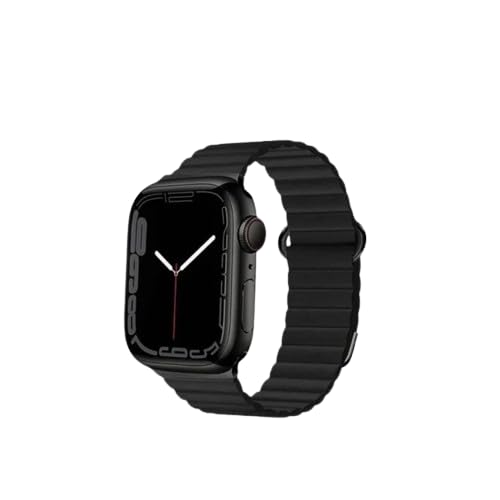
Image 1: Kalobee GW9 MAX Smart Watch
2. ബോക്സിൽ എന്താണുള്ളത്?
നിങ്ങളുടെ ഉൽപ്പന്ന പാക്കേജിംഗിൽ എല്ലാ ഇനങ്ങളും ഉണ്ടെന്ന് ഉറപ്പാക്കുക:
- Kalobee GW9 MAX Smart Watch
- 2X Straps (one pre-attached, one spare)
- വയർലെസ് ചാർജിംഗ് കേബിൾ
- ഉപയോക്തൃ മാനുവൽ (ഈ പ്രമാണം)
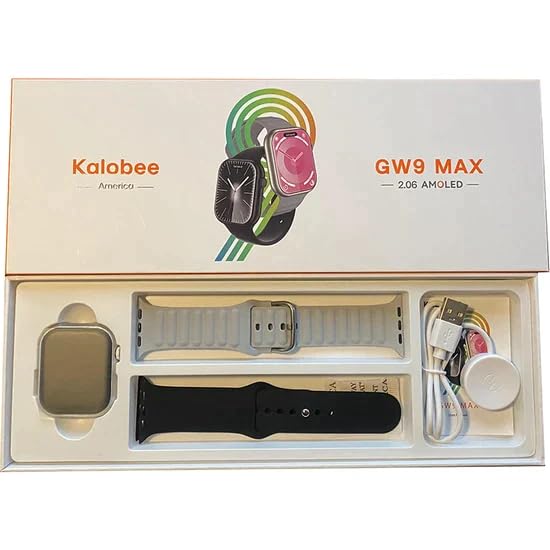
Image 2: Box Contents of Kalobee GW9 MAX Smart Watch
3. സജ്ജീകരണം
3.1 സ്മാർട്ട് വാച്ച് ചാർജ് ചെയ്യുന്നു
Before first use, fully charge your GW9 MAX Smart Watch using the provided wireless charging cable. Connect the USB end of the cable to a compatible power adapter (not included) or a computer USB port. Place the watch on the charging pad, ensuring proper alignment. The watch display will indicate the charging status. A full charge typically takes approximately 2 hours.
3.2 നിങ്ങളുടെ സ്മാർട്ട്ഫോണുമായി ജോടിയാക്കൽ
To unlock the full functionality of your smartwatch, pair it with your smartphone:
- നിങ്ങളുടെ സ്മാർട്ട്ഫോണിന്റെ ബ്ലൂടൂത്ത് പ്രവർത്തനക്ഷമമാക്കിയിട്ടുണ്ടെന്ന് ഉറപ്പാക്കുക.
- Download the companion application for the Kalobee GW9 MAX (refer to the watch screen or included quick start guide for app name/QR code).
- Open the application on your smartphone and follow the on-screen instructions to create an account or log in.
- Within the app, navigate to the device pairing section and select your GW9 MAX from the list of available devices.
- നിങ്ങളുടെ വാച്ചിലും സ്മാർട്ട്ഫോണിലും ജോടിയാക്കൽ അഭ്യർത്ഥന സ്ഥിരീകരിക്കുക.
The GW9 MAX is compatible with Android 4.4 and above, and iOS 10.0 or above.
4. പ്രവർത്തന നിർദ്ദേശങ്ങൾ
4.1 അടിസ്ഥാന നാവിഗേഷൻ
The GW9 MAX features a touch screen and a side button/crown for navigation. Swipe gestures allow you to access different menus, notifications, and quick settings. Press the side button to return to the home screen or access the app menu.
4.2 ആശയവിനിമയ സവിശേഷതകൾ
- ബ്ലൂടൂത്ത് കോൾ: Once paired, you can make and receive calls directly from your watch. Access the call log and dial pad through the phone icon on the watch.
- അറിയിപ്പുകൾ: Receive real-time notifications for calls, messages, and app alerts from your paired smartphone. Manage notification settings via the companion app.
4.3 ആരോഗ്യ, ഫിറ്റ്നസ് ട്രാക്കിംഗ്
- ഹൃദയമിടിപ്പ് നിരീക്ഷണം: വാച്ച് നിങ്ങളുടെ ഹൃദയമിടിപ്പ് തുടർച്ചയായി നിരീക്ഷിക്കുന്നു. View your current heart rate on the watch or detailed historical data in the app.
- ഉറക്ക ട്രാക്കിംഗ്: Automatically tracks your sleep patterns, including deep sleep, light sleep, and wake times.
- മൾട്ടി-സ്പോർട്ട് മോഡ്: Select from various sports modes (e.g., walking, running, cycling) to track specific workout data such as steps, distance, calories burned, and duration.
- ശ്വസന പരിശീലനം: Follow guided breathing exercises to help reduce stress and improve relaxation.
4.4 Utility and Smart Features
- Remote Photo Taking: Control your smartphone's camera remotely from your watch.
- വിദൂര സംഗീത നിയന്ത്രണം: Play, pause, skip tracks, and adjust volume for music playing on your paired phone.
- വോയ്സ് അസിസ്റ്റന്റ്: വാച്ചിൽ നിന്ന് നേരിട്ട് നിങ്ങളുടെ ഫോണിന്റെ വോയ്സ് അസിസ്റ്റന്റിലേക്ക് ആക്സസ് നേടുക.
- ഫോൺ കണ്ടെത്തുക: Use this feature to make your paired smartphone ring, helping you locate it.
- പാസ്വേഡ് സംരക്ഷണം: Set a password for your watch to protect your data and privacy.
- മറ്റ് ഉപകരണങ്ങൾ: Access built-in stopwatch, calculator, alarm clock, flashlight, and voice recorder.
- കാലാവസ്ഥ: View current weather conditions and forecasts (requires internet connection on paired phone).
5 സ്പെസിഫിക്കേഷനുകൾ
- മോഡൽ: GW9 MAX
- സ്ക്രീൻ വലിപ്പം: 2.06 ഇഞ്ച്
- ഡിസ്പ്ലേ തരം: അമോലെഡ്
- കേസ് വ്യാസം: 47 മി.മീ
- അനുയോജ്യമായ സിസ്റ്റം: Android 4.4-ഉം അതിനുമുകളിലും, iOS 10.0-ഉം അതിനുമുകളിലും
- വയർലെസ് തരം: ബ്ലൂടൂത്ത്
- പ്രത്യേക സവിശേഷതകൾ: Wireless Charging, Bluetooth Call, Heart Rate, Sleep Tracking, Multi-sport Mode, Voice Assistant, Password Protection
- ഇനത്തിൻ്റെ ഭാരം: 242 ഗ്രാം
- പാക്കേജ് അളവുകൾ: 28 x 10 x 2 സെ.മീ
6. പരിപാലനം
6.1 വൃത്തിയാക്കൽ
Regularly clean your smartwatch to ensure optimal performance and hygiene. Wipe the watch screen and body with a soft, lint-free cloth. For the straps, use a damp cloth and mild soap if necessary, then dry thoroughly. Avoid using harsh chemicals, abrasive materials, or strong detergents, as these can damage the watch's finish or components.
6.2 ജല പ്രതിരോധം
The Kalobee GW9 MAX Smart Watch is designed for daily wear and is resistant to splashes and sweat. However, it is not waterproof. Avoid submerging the watch in water, wearing it while swimming or showering, or exposing it to high-pressure water jets. Damage due to water immersion is not covered under warranty.
6.3 സംഭരണം
When not in use for extended periods, store the watch in a cool, dry place away from direct sunlight and extreme temperatures. Ensure the watch has some charge to prevent battery degradation.
7. പ്രശ്നപരിഹാരം
7.1 Watch Not Turning On or Charging
- Ensure the wireless charging cable is properly connected to a working power source (e.g., USB wall adapter, computer USB port).
- Verify that the watch is correctly placed on the charging pad and aligned for wireless charging.
- മറ്റൊരു USB പോർട്ട് അല്ലെങ്കിൽ പവർ അഡാപ്റ്റർ ഉപയോഗിക്കാൻ ശ്രമിക്കുക.
- If the watch has been completely discharged, it may take a few minutes for the charging indicator to appear.
7.2 Unable to Pair with Smartphone
- Confirm that Bluetooth is enabled on both your GW9 MAX Smart Watch and your smartphone.
- Ensure the companion application is installed and open on your smartphone.
- Move the watch closer to your smartphone to ensure they are within Bluetooth range.
- Try restarting both your watch and smartphone, then attempt the pairing process again.
- If previously paired, try unpairing the device from your phone's Bluetooth settings and then re-pairing.
7.3 അറിയിപ്പുകൾ ദൃശ്യമാകുന്നില്ല
- Check that your watch is successfully paired and connected to your smartphone via Bluetooth.
- Verify notification permissions for the companion app in your smartphone's settings. Ensure the app has access to notifications.
- Check the notification settings within the companion app itself to ensure desired apps are enabled for watch notifications.
- Ensure 'Do Not Disturb' mode is not active on either your watch or smartphone.
7.4 Inaccurate Health Data Readings
- Ensure the watch is worn snugly on your wrist, not too tight or too loose. It should be about one finger's width above your wrist bone.
- Clean the sensor area on the back of the watch regularly to remove dirt or debris that might interfere with readings.
- Avoid excessive movement during readings, especially for heart rate.
8. വാറൻ്റിയും പിന്തുണയും
The Kalobee GW9 MAX Smart Watch comes with a 3-month warranty from the date of purchase. This warranty covers manufacturing defects under normal use. It does not cover damage caused by misuse, accidents, unauthorized modifications, or failure to follow the instructions in this manual.
For warranty claims, technical support, or any inquiries regarding your product, please contact your original retailer or the manufacturer's customer service. Please have your proof of purchase and product model number (GW9 MAX) ready when contacting support.