1. ആമുഖം
Thank you for choosing the Vortex T10M Pro+ Tablet. This manual will guide you through the features and functions of your new device, ensuring a smooth and enjoyable user experience. Please read this manual carefully before using your tablet.
ബോക്സിൽ എന്താണുള്ളത്
Upon unboxing your Vortex T10M Pro+ Tablet, please verify that all the following items are present:
- Vortex T10M Pro+ Tablet
- ചാർജർ
- സ്ക്രീൻ പ്രൊട്ടക്ടർ
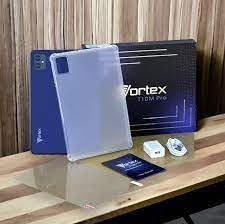
Image: Contents of the Vortex T10M Pro+ Tablet box. This includes the tablet, a clear protective case, the power adapter, and a screen protector, all neatly arranged on a wooden surface.
2. ഉൽപ്പന്നം കഴിഞ്ഞുview
Familiarize yourself with the physical components and key features of your Vortex T10M Pro+ Tablet.
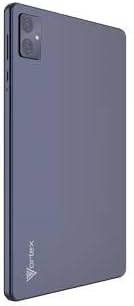
ചിത്രം: പിൻഭാഗം view of the Vortex T10M Pro+ Tablet. The tablet has a sleek, dark finish with the 'Vortex' logo subtly placed at the bottom. The camera module is visible in the upper left corner.

ചിത്രം: വിശദമായത് view of the back of the Vortex T10M Pro+ Tablet, highlighting its specifications. Printed details include '10.1-inch Brilliant Display', '5MP Front Camera', '8MP Rear Camera', 'MTK6766 Processor', 'Quad-Core, 4GB+64GB', '5000mAh Mega Battery', and 'Android 12'.
3. സജ്ജീകരണം
3.1 ഉപകരണം ചാർജ് ചെയ്യുന്നു
Before first use, fully charge your tablet. Connect the provided charger to the tablet's charging port and plug it into a power outlet. The battery indicator on the screen will show charging progress.
3.2. സിം/മൈക്രോ എസ്ഡി കാർഡ് ചേർക്കുന്നു
The Vortex T10M Pro+ supports 4G LTE connectivity and expandable storage. To insert a SIM card (for mobile data) or a microSD card (for additional storage):
- ടാബ്ലെറ്റിന്റെ വശത്ത് സിം/മൈക്രോ എസ്ഡി കാർഡ് ട്രേ കണ്ടെത്തുക.
- ട്രേ തുറക്കാൻ നൽകിയിരിക്കുന്ന സിം എജക്റ്റർ ഉപകരണം ഉപയോഗിക്കുക.
- Carefully place the SIM card(s) and/or microSD card into the designated slots, ensuring correct orientation.
- ട്രേ അതിന്റെ സ്ഥാനത്ത് ക്ലിക്കു ചെയ്യുന്നത് വരെ ടാബ്ലെറ്റിലേക്ക് പതുക്കെ തിരികെ തള്ളുക.
3.3. പ്രാരംഭ പവർ ഓൺ
Press and hold the Power button located on the side of the tablet until the Vortex logo appears. Follow the on-screen prompts to complete the initial setup, including language selection, Wi-Fi connection, and Google account setup.
4. പ്രവർത്തന നിർദ്ദേശങ്ങൾ
4.1. അടിസ്ഥാന നാവിഗേഷൻ
Your tablet runs on Android 13.0. Use touch gestures for navigation:
- ടാപ്പ് ചെയ്യുക: ഒരു ഇനം തിരഞ്ഞെടുക്കുകയോ ഒരു ആപ്പ് തുറക്കുകയോ ചെയ്യുക.
- സ്വൈപ്പ്: സ്ക്രീനുകളിലൂടെയോ ലിസ്റ്റുകളിലൂടെയോ സ്ക്രോൾ ചെയ്യുക.
- പിഞ്ച്-ടു-സൂം: ഫോട്ടോകളിൽ സൂം ഇൻ ചെയ്യുകയോ സൂം ഔട്ട് ചെയ്യുകയോ ചെയ്യുക, web പേജുകൾ.
- ദീർഘനേരം അമർത്തുക: സന്ദർഭോചിത മെനുകൾ ആക്സസ് ചെയ്യുക അല്ലെങ്കിൽ ഐക്കണുകൾ നീക്കുക.
4.2. Wi-Fi-ലേക്ക് ബന്ധിപ്പിക്കുന്നു
ഒരു Wi-Fi നെറ്റ്വർക്കിലേക്ക് കണക്റ്റുചെയ്യാൻ:
- പോകുക ക്രമീകരണങ്ങൾ > നെറ്റ്വർക്കും ഇൻ്റർനെറ്റും > ഇൻ്റർനെറ്റ്.
- Wi-Fi ഓണാക്കുക.
- ലിസ്റ്റിൽ നിന്ന് നിങ്ങൾക്ക് ആവശ്യമുള്ള നെറ്റ്വർക്ക് തിരഞ്ഞെടുത്ത് ആവശ്യപ്പെടുകയാണെങ്കിൽ പാസ്വേഡ് നൽകുക.
4.3. Using Mobile Data (4G LTE)
If you have inserted a valid SIM card with an active data plan:
- പോകുക ക്രമീകരണങ്ങൾ > നെറ്റ്വർക്കും ഇൻ്റർനെറ്റും > സിമ്മുകൾ.
- Ensure Mobile data is enabled for your SIM.
4.4. ക്യാമറ പ്രവർത്തനം
The tablet features an 8MP rear camera and a 5MP front camera.
- ക്യാമറ ആപ്പ് തുറക്കുക.
- ഒരു ഫോട്ടോ എടുക്കാൻ ഷട്ടർ ബട്ടൺ ടാപ്പ് ചെയ്യുക.
- ക്യാമറ ടോഗിൾ ഐക്കൺ ഉപയോഗിച്ച് മുൻ ക്യാമറയും പിൻ ക്യാമറയും തമ്മിൽ മാറുക.
4.5. സംഭരണം കൈകാര്യം ചെയ്യൽ
Your tablet comes with 64GB of internal storage. You can expand this using a microSD card up to 128GB. To view സംഭരണ ഉപയോഗം, പോകുക ക്രമീകരണങ്ങൾ > സംഭരണം.
5. പരിപാലനം
5.1. വൃത്തിയാക്കൽ
ടാബ്ലെറ്റിന്റെ സ്ക്രീനും ബോഡിയും വൃത്തിയാക്കാൻ മൃദുവായ, ലിന്റ് രഹിത തുണി ഉപയോഗിക്കുക. കഠിനമായ രാസവസ്തുക്കളോ ഉരച്ചിലുകളോ ഉള്ള വസ്തുക്കൾ ഉപയോഗിക്കുന്നത് ഒഴിവാക്കുക.
5.2. സോഫ്റ്റ്വെയർ അപ്ഡേറ്റുകൾ
നിങ്ങളുടെ ടാബ്ലെറ്റിൽ ഏറ്റവും പുതിയ സവിശേഷതകളും സുരക്ഷാ പാച്ചുകളും ഉണ്ടെന്ന് ഉറപ്പാക്കാൻ ഇടയ്ക്കിടെ സോഫ്റ്റ്വെയർ അപ്ഡേറ്റുകൾക്കായി പരിശോധിക്കുക. പോകുക ക്രമീകരണങ്ങൾ > സിസ്റ്റം > സിസ്റ്റം അപ്ഡേറ്റ്.
5.3. ബാറ്ററി പരിചരണം
ബാറ്ററി ആയുസ്സ് വർദ്ധിപ്പിക്കാൻ:
- തീവ്രമായ താപനില ഒഴിവാക്കുക.
- ബാറ്ററി ഇടയ്ക്കിടെ പൂർണ്ണമായും ഡിസ്ചാർജ് ചെയ്യാൻ അനുവദിക്കരുത്.
- ബാറ്ററി നിറഞ്ഞു കഴിഞ്ഞാൽ ചാർജർ ഊരിവയ്ക്കുക.
6. പ്രശ്നപരിഹാരം
നിങ്ങളുടെ ടാബ്ലെറ്റിൽ നിങ്ങൾ നേരിട്ടേക്കാവുന്ന സാധാരണ പ്രശ്നങ്ങൾ ഈ വിഭാഗം അഭിസംബോധന ചെയ്യുന്നു.
| ഇഷ്യൂ | സാധ്യമായ പരിഹാരം |
|---|---|
| ടാബ്ലെറ്റ് ഓണാക്കുന്നില്ല | ബാറ്ററി ചാർജ്ജ് ചെയ്തിട്ടുണ്ടെന്ന് ഉറപ്പാക്കുക. റീസ്റ്റാർട്ട് ചെയ്യാൻ പവർ ബട്ടൺ കുറഞ്ഞത് 10-15 സെക്കൻഡ് അമർത്തിപ്പിടിക്കുക. |
| Wi-Fi കണക്ഷൻ പ്രശ്നങ്ങൾ | ടാബ്ലെറ്റും നിങ്ങളുടെ വൈഫൈ റൂട്ടറും പുനരാരംഭിക്കുക. ക്രമീകരണങ്ങളിൽ നെറ്റ്വർക്ക് മറന്ന് വീണ്ടും കണക്റ്റുചെയ്യുക. |
| ആപ്പുകൾ മന്ദഗതിയിലാണ് അല്ലെങ്കിൽ ക്രാഷാകുന്നു | Close background apps. Clear app cache (Settings > Apps > [App Name] > Storage > Clear cache). Restart the tablet. |
| Storage full message | അനാവശ്യമായി ഇല്ലാതാക്കുക files or apps. Move media to a microSD card. |
7 സ്പെസിഫിക്കേഷനുകൾ
Detailed technical specifications for the Vortex T10M Pro+ Tablet.
| ഫീച്ചർ | സ്പെസിഫിക്കേഷൻ |
|---|---|
| മോഡലിൻ്റെ പേര് | T10M Pro+ Tablet (Unlocked) Blue 10.1" 64GB 4GB GSM 4G LTE + Wifi 8MP |
| ഡിസ്പ്ലേ വലിപ്പം | 10.1 ഇഞ്ച് |
| പരമാവധി സ്ക്രീൻ റെസല്യൂഷൻ | 1280 x 800 പിക്സലുകൾ |
| പുതുക്കിയ നിരക്ക് | 120 Hz |
| പ്രോസസ്സർ | MediaTek, 2 GHz |
| റാം | 4 ജിബി |
| ആന്തരിക സംഭരണം | 64 ജിബി |
| വികസിപ്പിക്കാവുന്ന സംഭരണം | മൈക്രോഎസ്ഡി (128 ജിബി വരെ) |
| ഓപ്പറേറ്റിംഗ് സിസ്റ്റം | ആൻഡ്രോയിഡ് 13.0 |
| പിൻ ക്യാമറ | 8 എം.പി |
| മുൻ ക്യാമറ | 5 എം.പി |
| കണക്റ്റിവിറ്റി | 4G LTE, വൈ-ഫൈ, ബ്ലൂടൂത്ത്, GPS |
| ബാറ്ററി തരം | ലിഥിയം-അയൺ |
| ശരാശരി ബാറ്ററി ലൈഫ് | 18 മണിക്കൂർ |
| ഉൽപ്പന്ന അളവുകൾ | 10.1 x 5 x 3 ഇഞ്ച് |
| നിറം | കറുപ്പ് |
8. വാറൻ്റി വിവരങ്ങൾ
This product is covered by a manufacturer's warranty. Please refer to the warranty card included with your purchase or visit the manufacturer's official webവാറന്റി കവറേജ്, ദൈർഘ്യം, ക്ലെയിം പ്രക്രിയ എന്നിവയെക്കുറിച്ചുള്ള വിശദമായ നിബന്ധനകൾക്കും വ്യവസ്ഥകൾക്കും സൈറ്റ് സന്ദർശിക്കുക.
9. പിന്തുണ
For further assistance, technical support, or service inquiries, please contact the manufacturer's customer support. Contact information can typically be found on the product packaging, the manufacturer's website, or the warranty documentation.


