
HONOR CHOICE BOT-WB01
ഓണർ ചോയ്സ് വാച്ച് ഉപയോക്തൃ മാനുവൽ
Model: BOT-WB01
ആമുഖം
Welcome to your new HONOR CHOICE Watch. This manual provides essential information for setting up, operating, and maintaining your device, ensuring you get the most out of its advanced features.

ചിത്രം: മുൻഭാഗം view of the HONOR CHOICE Watch, showcasing its 1.95-inch AMOLED display and black silicone strap.
പ്രധാന സവിശേഷതകൾ
- 1.95-ഇഞ്ച് AMOLED ഡിസ്പ്ലേ: Vibrant colors and high resolution (410*502) with a smooth 60Hz refresh rate.
- ബ്ലൂടൂത്ത് കോളിംഗ്: നിങ്ങളുടെ കണങ്കൈയിൽ നിന്ന് നേരിട്ട് കോളുകൾ വിളിക്കുകയും സ്വീകരിക്കുകയും ചെയ്യുക.
- 120 Workout Modes: Comprehensive tracking for a wide range of physical activities.
- 5ATM Swim-Ready: Water resistance suitable for swimming and water sports.
- Up to 12 Days Battery Life: Extended usage on a single charge.
- Built-in Multi-System GNSS: Precise outdoor activity tracking with GPS, GLONASS, GALILEO, BDS, and QZSS.
- ആരോഗ്യ നിരീക്ഷണം: SpO2, Heart Rate, and Sleep Tracking for comprehensive health insights.

Image: Infographic highlighting the 1.95-inch AMOLED display, outdoor workout satellite positioning, Bluetooth calling, ultra-long battery life, all-day health monitoring, and 5ATM water resistance.
സജ്ജമാക്കുക
പ്രാരംഭ പവർ ഓൺ
To power on your HONOR CHOICE Watch, press and hold the side button for 3 seconds. The watch will display a QR code for pairing. If not connected within 5 minutes, it will shut down to conserve power.
Downloading the HONOR Health App
The HONOR Health app is essential for managing your watch and viewനിങ്ങളുടെ ആരോഗ്യ ഡാറ്റ അപ്ലോഡ് ചെയ്യുന്നു.
- ഇതിനായി തിരയുക "HONOR Health" on your phone's Play Store (Android) or App Store (iOS).
- Alternatively, scan the QR code displayed on the watch using your phone's browser to download the app or navigate to the app store page.
നിങ്ങളുടെ വാച്ച് ജോടിയാക്കുന്നു
Follow these steps to pair your HONOR CHOICE Watch with your Android or iOS device:
- Access your phone's Bluetooth settings.
- Locate the corresponding device name (e.g., "HONOR CHOICE Watch") and click on it to initiate pairing.
- Open the "HONOR Health" App on your phone.
- Navigate to the device interface and click "Add Device" or scan the QR code.
- Select the corresponding device name or choose "Scan Code to Add" and scan the QR code on the watch to initiate the binding process.
- Confirm device pairing on the watch to complete the binding.

Image: Step-by-step guide illustrating how to initiate the watch, download the HONOR Health app, and pair the watch with a smartphone.
Download the HONOR Health App from: ഗൂഗിൾ പ്ലേ | ആപ്പ് സ്റ്റോർ
പ്രവർത്തന നിർദ്ദേശങ്ങൾ
നാവിഗേഷൻ
The HONOR CHOICE Watch features a responsive 1.95-inch AMOLED touchscreen and a side button for navigation.
- മുകളിലേക്കും താഴേക്കും സ്വൈപ്പ് ചെയ്യുക: അറിയിപ്പുകൾ, ദ്രുത ക്രമീകരണങ്ങൾ അല്ലെങ്കിൽ മെനു ഓപ്ഷനുകൾ എന്നിവയിലൂടെ സ്ക്രോൾ ചെയ്യുക.
- ഇടത്തേക്ക്/വലത്തേക്ക് സ്വൈപ്പ് ചെയ്യുക: ഹൃദയമിടിപ്പ്, കാലാവസ്ഥ, പ്രവർത്തന സംഗ്രഹം മുതലായ വിജറ്റുകൾ ആക്സസ് ചെയ്യുക.
- ടാപ്പ് ചെയ്യുക: ഒരു ഇനം തിരഞ്ഞെടുക്കുക അല്ലെങ്കിൽ ഒരു പ്രവർത്തനം സ്ഥിരീകരിക്കുക.
- സൈഡ് ബട്ടൺ അമർത്തുക: Return to the watch face, or open the app list from the watch face.
- Press and Hold Side Button: Power on/off or restart the watch.
അടിസ്ഥാന പ്രവർത്തനങ്ങൾ
Your watch includes several handy tools accessible from the app list:
- കാലാവസ്ഥ: Get live weather updates.
- ഫ്ലാഷ്ലൈറ്റ്: Use the screen as a light source.
- അലാറം: നിങ്ങളുടെ കൈത്തണ്ടയിൽ നിന്ന് നേരിട്ട് അലാറങ്ങൾ സജ്ജമാക്കുക.
- സംഗീത നിയന്ത്രണം: Control music playback on your paired phone.
- റിമോട്ട് ഷട്ടർ: നിങ്ങളുടെ ഫോണിന്റെ ക്യാമറ വിദൂരമായി പ്രവർത്തനക്ഷമമാക്കുക.
- സ്റ്റോപ്പ് വാച്ച്/ടൈമർ: സമയക്രമീകരണ പ്രവർത്തനങ്ങൾക്ക്.
- ഫോൺ കണ്ടെത്തുക: Locate your misplaced phone.
- കാൽക്കുലേറ്റർ: അടിസ്ഥാന കണക്കുകൂട്ടലുകൾ നടത്തുക.
- വോയ്സ് മെമ്മോ: Record short voice notes.
- Vibration Drainage: Expel water after swimming.
- കോമ്പസ്: For navigation.

Image: Icons representing various thoughtful wrist assistant features such as Weather, Flashlight, Alarm, Music control, Remote shutter, Stopwatch, Timer, and Find phone.
ആരോഗ്യ നിരീക്ഷണം
The HONOR CHOICE Watch provides comprehensive health tracking features:
- ഹൃദയമിടിപ്പ് നിരീക്ഷണം: ദിവസം മുഴുവൻ തുടർച്ചയായ ഹൃദയമിടിപ്പ് ട്രാക്കിംഗ്.
- SpO2 നിരീക്ഷണം: നിങ്ങളുടെ രക്തത്തിലെ ഓക്സിജൻ സാച്ചുറേഷൻ അളവ് അളക്കുക.
- സ്ട്രെസ് മോണിറ്ററിംഗ്: Track your stress levels and receive guidance for relaxation.
- ഉറക്ക ട്രാക്കിംഗ്: ഉറക്കം നിരീക്ഷിക്കുകtagഗുണമേന്മയും.
- Menstrual Tracking: For female users to track cycles.
എല്ലാ ആരോഗ്യ ഡാറ്റയും ആകാം viewed and analyzed in detail within the HONOR Health app.

Image: Visual representation of Heart Rate, SpO2, and Stress monitoring icons, indicating the watch's health tracking capabilities.
Workout Modes and GPS
The watch supports 120 workout modes to track various physical activities.
- Indoor/Outdoor Workouts: Track activities like running, cycling, swimming, and more.
- Multi-System GNSS: Built-in GPS, GLONASS, GALILEO, BDS, and QZSS for precise outdoor activity tracking and route mapping.
- 5ATM ജല പ്രതിരോധം: Suitable for swimming and water sports.

Image: A visual demonstrating the watch's outdoor workout satellite positioning feature, showing a mapped exercise path.

Image: A person engaged in a workout, wearing the HONOR CHOICE Watch, illustrating its use during physical activity.
കണക്റ്റിവിറ്റി
ബ്ലൂടൂത്ത് കോളിംഗ്
Make and receive calls directly from your watch when connected to your smartphone via Bluetooth 5.3.

Image: A person using the HONOR CHOICE Watch for Bluetooth calling, demonstrating the convenience of hands-free communication.
HONOR Health App Sync
The HONOR Health app serves as your central hub for all watch data. It records and syncs health and fitness data, providing personalized guidance.
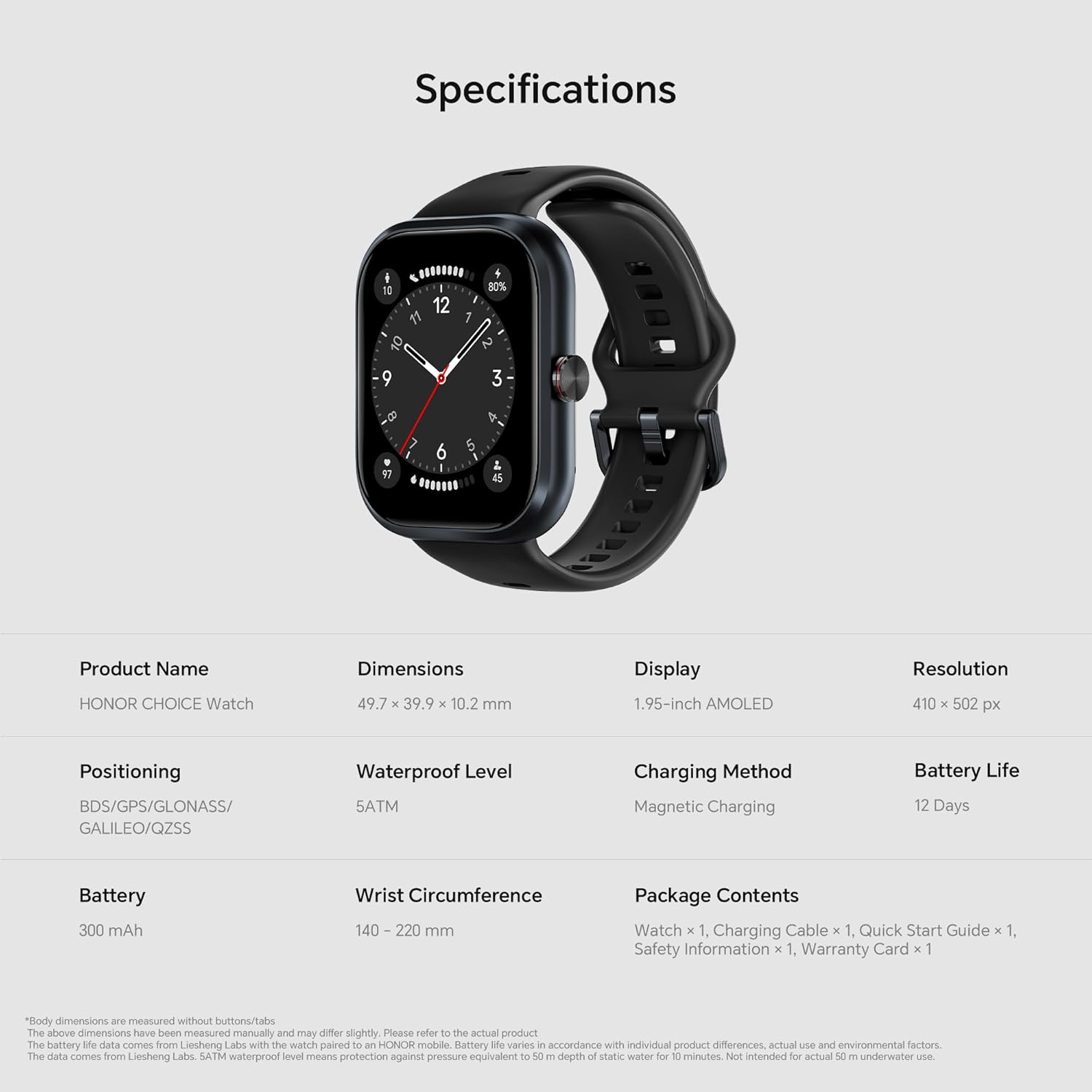
Image: A smartphone screen displaying the HONOR Health app interface alongside the HONOR CHOICE Watch, illustrating data synchronization and health insights.
ബാറ്ററി ലൈഫ്
The HONOR CHOICE Watch is equipped with a 300mAh battery, offering impressive endurance:
- Up to 12 days of typical usage on a single charge.
- Up to 9 days of intense functionality (e.g., with continuous sleep monitoring and frequent GPS use).
Charging is done via the provided magnetic charging cable.

Image: A visual emphasizing the 12-day battery life of the HONOR CHOICE Watch, with a charging animation on the watch screen.
മെയിൻ്റനൻസ്
വൃത്തിയാക്കൽ
Regularly clean your watch and strap to ensure optimal performance and hygiene.
- മൃദുവായ, ലിന്റ് രഹിത തുണി ഉപയോഗിച്ച് സ്ക്രീനും വാച്ച് ബോഡിയും തുടയ്ക്കുക.
- For the silicone strap, use mild soap and water, then rinse thoroughly and dry.
- കഠിനമായ രാസവസ്തുക്കളോ ഉരച്ചിലുകളോ ഉപയോഗിക്കുന്നത് ഒഴിവാക്കുക.
ജല പ്രതിരോധം
The watch is 5ATM water-resistant, meaning it can withstand pressures equivalent to a depth of 50 meters. It is suitable for swimming and showering but not for diving or high-pressure water activities. After exposure to water, especially saltwater, rinse the watch with fresh water and dry it thoroughly.
ചാർജിംഗ്
നൽകിയിരിക്കുന്ന മാഗ്നറ്റിക് ചാർജിംഗ് കേബിൾ മാത്രം ഉപയോഗിക്കുക. ചാർജ് ചെയ്യുന്നതിന് മുമ്പ് വാച്ചിലെയും കേബിളിലെയും ചാർജിംഗ് കോൺടാക്റ്റുകൾ വൃത്തിയുള്ളതും വരണ്ടതുമാണെന്ന് ഉറപ്പാക്കുക.
ട്രബിൾഷൂട്ടിംഗ്
വാച്ച് ഓണാകുന്നില്ല
- വാച്ച് പൂർണ്ണമായും ചാർജ് ചെയ്തിട്ടുണ്ടെന്ന് ഉറപ്പാക്കുക. അത് മാഗ്നറ്റിക് ചാർജറുമായി ബന്ധിപ്പിച്ച് കുറച്ച് മിനിറ്റ് കാത്തിരിക്കുക.
- Press and hold the side button for at least 10 seconds to force a restart.
കണക്റ്റിവിറ്റി പ്രശ്നങ്ങൾ (ബ്ലൂടൂത്ത്)
- നിങ്ങളുടെ ഫോണിലും വാച്ചിലും ബ്ലൂടൂത്ത് പ്രവർത്തനക്ഷമമാക്കിയിട്ടുണ്ടെന്ന് ഉറപ്പാക്കുക.
- വാച്ച് നിങ്ങളുടെ ഫോണിന്റെ പരിധിയിലാണെന്ന് ഉറപ്പാക്കുക.
- നിങ്ങളുടെ ഫോണും വാച്ചും പുനരാരംഭിക്കുക.
- If issues persist, unpair the watch from your phone's Bluetooth settings and re-pair it through the HONOR Health app.
കൃത്യമല്ലാത്ത ആരോഗ്യ ഡാറ്റ
- വാച്ച് നിങ്ങളുടെ കൈത്തണ്ടയിൽ, കൈത്തണ്ട എല്ലിന് മുകളിൽ ഒരു വിരൽ വീതിയിൽ, നന്നായി ധരിച്ചിട്ടുണ്ടെന്ന് ഉറപ്പാക്കുക.
- സെൻസർ ഏരിയ വൃത്തിയായി സൂക്ഷിക്കുക.
- അളക്കുമ്പോൾ അമിതമായ ചലനം ഒഴിവാക്കുക.
App Sync Problems
- Ensure the HONOR Health app is updated to the latest version.
- നിങ്ങളുടെ ഫോണിന്റെ ഇന്റർനെറ്റ് കണക്ഷൻ പരിശോധിക്കുക.
- ആപ്പ് അടച്ച് വീണ്ടും തുറക്കുക.
- Clear the app's cache (Android) or reinstall the app (iOS/Android as a last resort).
സ്പെസിഫിക്കേഷനുകൾ
| ഫീച്ചർ | വിശദാംശങ്ങൾ |
|---|---|
| ഉൽപ്പന്നത്തിൻ്റെ പേര് | HONOR CHOICE Watch |
| മോഡൽ നമ്പർ | BOT-WB01 |
| അളവുകൾ | 49.7 x 39.9 x 10.2 മിമി |
| പ്രദർശിപ്പിക്കുക | 1.95-inch AMOLED, 410 x 502 px |
| ബാറ്ററി | 300 mAh, Up to 12 Days Battery Life |
| ചാർജിംഗ് രീതി | മാഗ്നറ്റിക് ചാർജിംഗ് |
| വാട്ടർപ്രൂഫ് ലെവൽ | 5എടിഎം |
| സ്ഥാനനിർണ്ണയം | BDS/GPS/GLONASS/GALILEO/QZSS |
| കൈത്തണ്ട ചുറ്റളവ് | 140 - 220 മി.മീ. |
| ഉൾപ്പെടുത്തിയ ഘടകങ്ങൾ | Watch, Charging Cable, Quick Start Guide, Safety Information, Warranty Card |
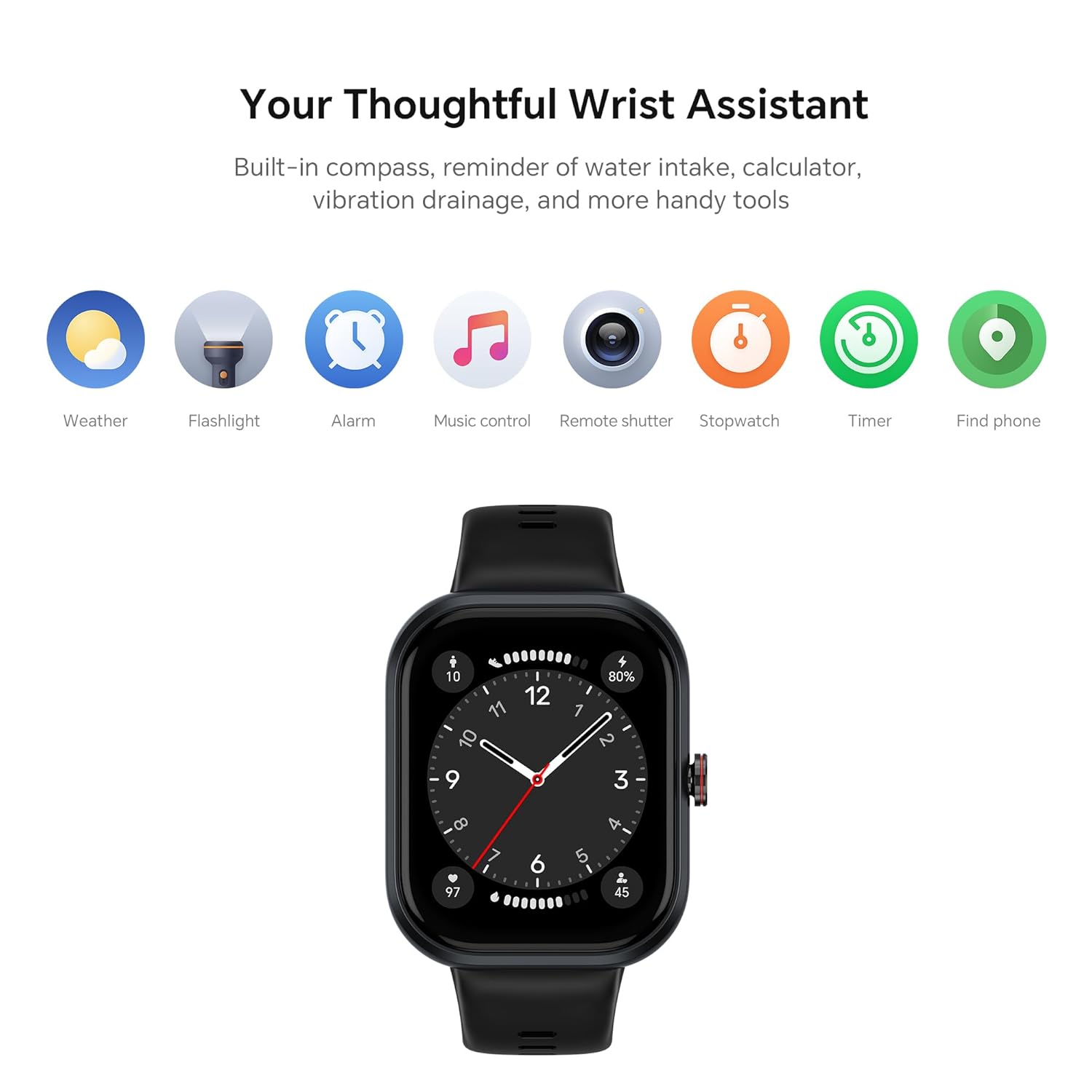
Image: A visual summary of the HONOR CHOICE Watch specifications, including dimensions, display type, resolution, battery life, and included components.
വാറൻ്റിയും പിന്തുണയും
വാറൻ്റി വിവരങ്ങൾ
Your HONOR CHOICE Watch comes with a limited warranty. Please refer to the included Warranty Card for detailed terms and conditions.
ഉപഭോക്തൃ പിന്തുണ
For technical assistance, troubleshooting, or warranty claims, please contact HONOR CHOICE customer support:
- കസ്റ്റമർ കെയർ നമ്പർ: 1800-309-8970
- WhatsApp Chat No.: 9990466166
- ഇ-മെയിൽ: customersupport@psavglobaltech.com & feedback@honortech.com
- ഓൺലൈൻ പിന്തുണ: Visit the official HONOR webകൂടുതൽ വിഭവങ്ങൾക്കായുള്ള സൈറ്റ്: explorehonor.com
നിർമ്മാതാവ്: Dongguan Zhengrong Electronics Co. Ltd.
ഇറക്കുമതിക്കാരൻ: PSAV Global Tech Private Limited, BR - 12, Sector - 45, Noida, Gautam Buddh Nagar, Uttar Pradesh (India) - 201301
Ask a question about this manual
Ask about setup, troubleshooting, compatibility, parts, safety, or missing instructions. Manuals+ will review the question and use this page’s manual context to help answer it.