
1. ഉൽപ്പന്നം കഴിഞ്ഞുview
The Generic Wireless Bluetooth Headphones AH-806 are designed to provide a high-fidelity audio experience with the convenience of wireless connectivity. Featuring a foldable design for portability and a built-in microphone for calls, these headphones are suitable for various uses including gaming, music, and sports.
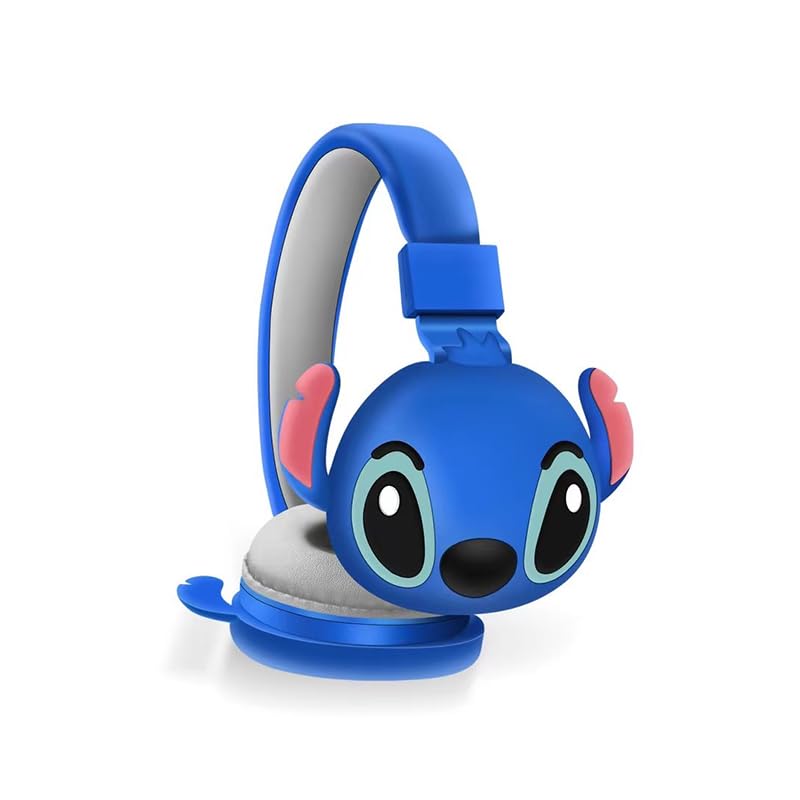
ചിത്രം 1.1: മുൻഭാഗം view of the AH-806 Wireless Bluetooth Headphones, featuring a blue color and a Stitch character design on the earcups.
പ്രധാന സവിശേഷതകൾ:
- ഫോൾഡിംഗ് ഡിസൈൻ: Conveniently folds for easy portability and storage in bags or suitcases, making it an ideal companion for travel.
- HIFI Stereo Sound: Equipped with a 13mm driver diameter for high-fidelity stereo sound, suitable for various audio content.
- ബിൽറ്റ്-ഇൻ മൈക്രോഫോൺ: Enables hands-free calling and communication.
- നിഷ്ക്രിയ ശബ്ദ റദ്ദാക്കൽ: Oversize earcups provide passive noise reduction for an immersive listening experience.
- ബഹുമുഖ ഉപയോഗം: Designed for video games, general audio listening, HiFi audio, and sports activities.
2. പാക്കേജ് ഉള്ളടക്കം
താഴെ പറയുന്ന ഇനങ്ങൾക്കായി ബോക്സ് ചെക്ക് ചെയ്യുക:
- 1 x Wireless Bluetooth Headphones AH-806
- 1 x ഉപയോക്തൃ മാനുവൽ (ഈ പ്രമാണം)
- 1 x Charging Cover
- 1 x യുഎസ്ബി ടൈപ്പ്-സി അഡാപ്റ്റർ

Image 2.1: Packaging of the AH-806 Headphones, illustrating the product and its accessories.
3. സജ്ജീകരണ ഗൈഡ്
3.1. ഹെഡ്ഫോണുകൾ ചാർജ് ചെയ്യുന്നു
- Locate the USB Type-C charging port on the headphones.
- Connect the provided USB Type-C adapter to the charging port.
- Plug the other end of the USB cable into a compatible USB power source (e.g., computer USB port, wall adapter).
- The LED indicator on the headphones will illuminate to show charging status. It will typically turn off or change color once fully charged.
Note: For optimal battery life, fully charge the headphones before first use.
3.2. ബ്ലൂടൂത്ത് ജോടിയാക്കൽ
- ഹെഡ്ഫോണുകൾ പൂർണ്ണമായും ചാർജ്ജ് ചെയ്തിട്ടുണ്ടെന്ന് ഉറപ്പാക്കുക.
- പവർ ഓൺ: ജോടിയാക്കൽ മോഡ് സൂചിപ്പിക്കുന്ന LED ഇൻഡിക്കേറ്റർ മിന്നുന്നതുവരെ ഹെഡ്ഫോണുകളിലെ പവർ ബട്ടൺ അമർത്തിപ്പിടിക്കുക.
- ബ്ലൂടൂത്ത് സജീവമാക്കുക: നിങ്ങളുടെ ഉപകരണത്തിൽ (സ്മാർട്ട്ഫോൺ, ടാബ്ലെറ്റ്, ലാപ്ടോപ്പ്), ബ്ലൂടൂത്ത് ക്രമീകരണങ്ങളിലേക്ക് പോയി ബ്ലൂടൂത്ത് ഓണാക്കിയിട്ടുണ്ടെന്ന് ഉറപ്പാക്കുക.
- ഇതിനായി തിരയുക ഉപകരണങ്ങൾ: Your device will scan for available Bluetooth devices. Look for "AH-806" or a similar name in the list.
- ബന്ധിപ്പിക്കുക: Select "AH-806" from the list to initiate the connection. Once connected, the LED indicator on the headphones may change to a solid light or flash slowly.
- You are now ready to use your headphones.
പാസ്വേഡ് ആവശ്യപ്പെടുകയാണെങ്കിൽ, "0000" (നാല് പൂജ്യങ്ങൾ) നൽകുക.
4. പ്രവർത്തന നിർദ്ദേശങ്ങൾ
4.1. പവർ ഓൺ/ഓഫ്
- പവർ ഓൺ: LED ഇൻഡിക്കേറ്റർ പ്രകാശിക്കുന്നത് വരെ ഏകദേശം 3 സെക്കൻഡ് നേരത്തേക്ക് പവർ ബട്ടൺ അമർത്തിപ്പിടിക്കുക.
- പവർ ഓഫ്: LED ഇൻഡിക്കേറ്റർ ഓഫാകുന്നതുവരെ ഏകദേശം 5 സെക്കൻഡ് നേരത്തേക്ക് പവർ ബട്ടൺ അമർത്തിപ്പിടിക്കുക.
4.2. സംഗീതം പ്ലേബാക്ക്
- പ്ലേ/താൽക്കാലികമായി നിർത്തുക: മൾട്ടി-ഫംഗ്ഷൻ ബട്ടൺ (പലപ്പോഴും പവർ ബട്ടൺ അല്ലെങ്കിൽ ഒരു പ്രത്യേക പ്ലേ/പോസ് ബട്ടൺ) ഒരിക്കൽ അമർത്തുക.
- അടുത്ത ട്രാക്ക്: വോളിയം അപ്പ് ബട്ടൺ അല്ലെങ്കിൽ ഒരു പ്രത്യേക നെക്സ്റ്റ് ട്രാക്ക് ബട്ടൺ അമർത്തിപ്പിടിക്കുക.
- മുമ്പത്തെ ട്രാക്ക്: വോളിയം ഡൗൺ ബട്ടൺ അല്ലെങ്കിൽ ഒരു പ്രത്യേക മുൻ ട്രാക്ക് ബട്ടൺ അമർത്തിപ്പിടിക്കുക.
- വോളിയം കൂട്ടുക: വോളിയം അപ്പ് ബട്ടൺ ചുരുക്കി അമർത്തുക.
- വോളിയം താഴേക്ക്: വോളിയം ഡൗൺ ബട്ടൺ ചുരുക്കി അമർത്തുക.
4.3. കോൾ മാനേജ്മെന്റ്
- ഉത്തരം/അവസാന കോൾ: Press the Multi-function button once during an incoming call to answer, and once again to end the call.
- കോൾ നിരസിക്കുക: Press and hold the Multi-function button for approximately 2 seconds during an incoming call to reject it.
- അവസാന നമ്പർ വീണ്ടും ഡയൽ ചെയ്യുക: മൾട്ടി-ഫംഗ്ഷൻ ബട്ടൺ ഇരട്ട-അമർത്തുക.
4.4. Folding Design
The headphones feature a foldable design for enhanced portability. Gently fold the earcups inwards towards the headband until they are compact. This reduces the overall size of the headphones, making them easier to store and carry.
5. പരിപാലനവും പരിചരണവും
- വൃത്തിയാക്കൽ: Use a soft, dry, lint-free cloth to clean the headphones. Do not use abrasive cleaners, alcohol, or chemical solvents, as these may damage the surface.
- സംഭരണം: When not in use, store the headphones in a cool, dry place, away from direct sunlight and extreme temperatures. Utilize the folding feature to save space.
- വെള്ളം ഒഴിവാക്കുക: ഈ ഹെഡ്ഫോണുകൾ വാട്ടർപ്രൂഫ് അല്ല. വെള്ളം, ഈർപ്പം അല്ലെങ്കിൽ അമിതമായ ഈർപ്പം എന്നിവയുമായി സമ്പർക്കം പുലർത്തുന്നത് ഒഴിവാക്കുക.
- ശ്രദ്ധയോടെ കൈകാര്യം ചെയ്യുക: ഹെഡ്ഫോണുകൾ താഴെയിടുകയോ, ഡിസ്അസംബ്ലിംഗ് ചെയ്യുകയോ, സ്വയം നന്നാക്കാൻ ശ്രമിക്കുകയോ ചെയ്യരുത്. ഇത് വാറന്റി അസാധുവാക്കുകയും കേടുപാടുകൾ വരുത്തുകയും ചെയ്തേക്കാം.
6. പ്രശ്നപരിഹാരം
| പ്രശ്നം | സാധ്യമായ പരിഹാരം |
|---|---|
| ഹെഡ്ഫോണുകൾ പവർ ഓൺ ചെയ്യുന്നില്ല. | Ensure the headphones are fully charged. Connect them to a power source using the provided USB Type-C adapter. |
| ബ്ലൂടൂത്ത് ഉപകരണവുമായി ജോടിയാക്കാൻ കഴിയില്ല. |
|
| ശബ്ദമില്ല അല്ലെങ്കിൽ കുറഞ്ഞ ശബ്ദമില്ല. |
|
| ശബ്ദം വികലമായോ ഇടവിട്ടുള്ളതോ ആണ്. |
|
7 സ്പെസിഫിക്കേഷനുകൾ
| ഫീച്ചർ | വിശദാംശങ്ങൾ |
|---|---|
| മോഡലിൻ്റെ പേര് | എഎച്ച്-806 |
| കണക്റ്റിവിറ്റി ടെക്നോളജി | വയർലെസ് |
| വയർലെസ് കമ്മ്യൂണിക്കേഷൻ ടെക്നോളജി | ബ്ലൂടൂത്ത് |
| മെറ്റീരിയൽ | പ്ലാസ്റ്റിക്, തുണി |
| ഉൽപ്പന്നത്തിൻ്റെ പ്രത്യേക ഉപയോഗങ്ങൾ | Gaming, Music, Sport |
| അനുയോജ്യമായ ഉപകരണങ്ങൾ | Smartphones, Tablets, Laptops, Desktops, Gaming Consoles |
| കേബിൾ സവിശേഷത | കേബിൾ ഇല്ലാതെ |
| നിയന്ത്രണ രീതി | റിമോട്ട് |
| ഇനങ്ങളുടെ എണ്ണം | 1 |
| ഓഡിയോ ഡ്രൈവർ തരം | ഡൈനാമിക് ഡ്രൈവർ (13mm) |
| ഇയർപീസ് ആകൃതി | ചെവിക്ക് മുകളിൽ |
| നിർമ്മാതാവ് | MOPIKI |
| പ്രത്യേക സവിശേഷതകൾ | Noise Cancellation (Passive) |
| നിറം | ആർ.ബ്ലൂ |
| ചെവി പ്ലേസ്മെൻ്റ് | ചെവിക്ക് മുകളിൽ |
| ഫോം ഫാക്ടർ | ചെവിക്ക് മുകളിൽ |
8. വാറൻ്റിയും പിന്തുണയും
This product is manufactured by MOPIKI. For specific warranty information, please refer to the documentation provided at the time of purchase or contact your retailer.
For technical support or inquiries, please contact the retailer or manufacturer directly. Keep your purchase receipt as proof of purchase.
Note: As per the provided product information, specific warranty details are not available in this manual.