
പിസി-32654921147-003
Instruction Manual for MediaTek T906 Tablet Touch Screen Panel
Model: PC-32654921147-003
ആമുഖം
This manual provides essential information for the installation, operation, maintenance, and troubleshooting of the Generic replacement touch screen panel for MediaTek T906 tablets. Please read this manual carefully before proceeding with any repair or replacement to ensure proper functionality and to avoid damage.
ഉൽപ്പന്നം കഴിഞ്ഞുview
The touch screen panel is a capacitive screen designed for MediaTek T906 tablets, specifically for repair and replacement purposes. It measures 237 x 167 mm and is available in type B black. This component is crucial for the tablet's interactive functionality.
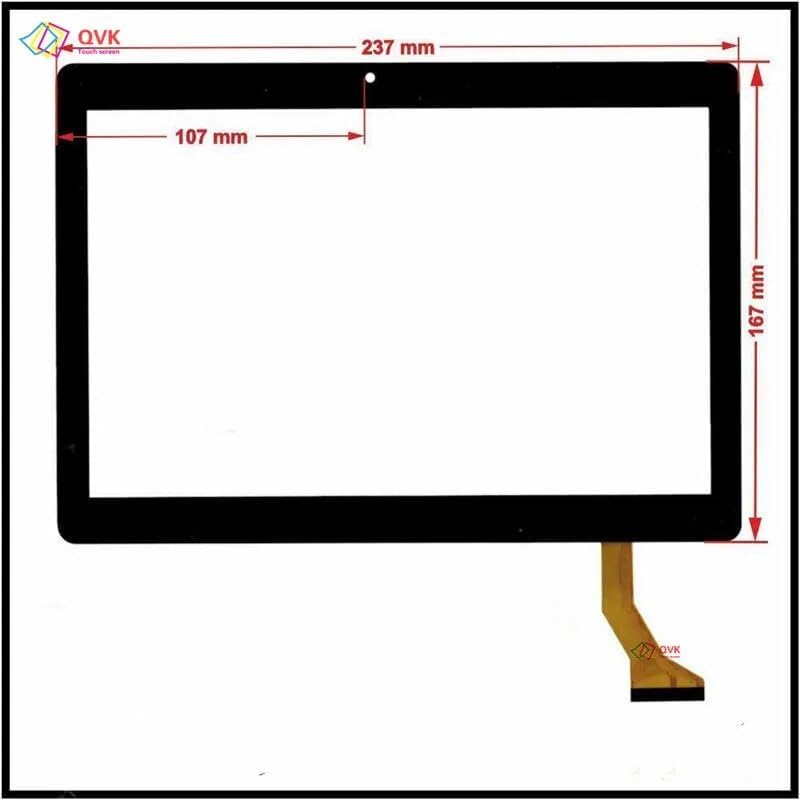
ചിത്രം: മുൻഭാഗം view of the touch screen panel with indicated dimensions of 237 mm in width and 167 mm in height, and a flex cable connector at the bottom right.
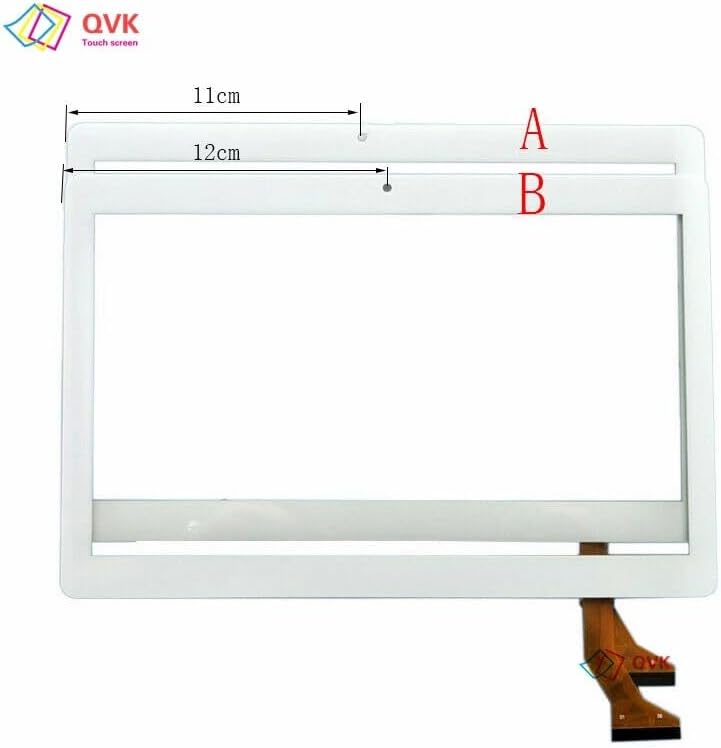
Image: Comparison of two touch screen panel types, labeled A and B, highlighting different internal dimensions or design variations. This product is Type B.

ചിത്രം: വിശദമായത് view of touch screen panel types A and B, showing specific internal measurements of 110 mm for A and 120 mm for B, confirming the precise fit for different tablet models.
സജ്ജീകരണവും ഇൻസ്റ്റാളേഷനും
Replacing a tablet touch screen requires technical proficiency and appropriate tools. If you are not confident in your ability to perform this repair, it is recommended to seek professional assistance.
നിങ്ങൾ ആരംഭിക്കുന്നതിന് മുമ്പ്:
- പവർ ഓഫ്: Ensure the tablet is completely powered off and disconnected from any power source.
- ബാറ്ററി വിച്ഛേദിക്കുക: If possible, disconnect the tablet's internal battery to prevent accidental short circuits during the repair.
- സ്റ്റാറ്റിക് മുൻകരുതലുകൾ: Use an anti-static wrist strap or work on an anti-static mat to prevent electrostatic discharge (ESD) damage to sensitive electronic components.
- ഉപകരണങ്ങൾ: Gather necessary tools such as small screwdrivers, plastic prying tools, heat gun/hair dryer (for adhesive), and adhesive strips for reassembly.
- ജോലി ഏരിയ: Work in a clean, well-lit, and organized environment.
ഇൻസ്റ്റലേഷൻ ഘട്ടങ്ങൾ (പൊതു ഗൈഡ്):
- Carefully remove the damaged touch screen panel from the tablet. This often involves heating the edges to soften adhesive and gently prying the screen away.
- Disconnect the flex cable of the old touch screen from the tablet's motherboard.
- Clean any remaining adhesive or glass fragments from the tablet frame. Ensure the surface is smooth and free of debris.
- Connect the flex cable of the new touch screen panel to the corresponding connector on the tablet's motherboard. Ensure it is seated correctly and securely.
- Test the new touch screen functionality (if possible before full reassembly) by temporarily powering on the tablet. Check for touch response across the entire screen.
- Apply new adhesive strips around the perimeter of the tablet frame where the screen will sit.
- Carefully align the new touch screen panel with the tablet frame and gently press it into place, ensuring even pressure to secure the adhesive.
- Reassemble any other components that were removed during disassembly.
- Reconnect the battery (if disconnected) and fully power on the tablet.
ടച്ച് സ്ക്രീൻ പ്രവർത്തിക്കുന്നു
Once installed, the touch screen panel functions as the primary input interface for your MediaTek T906 tablet. It is a capacitive screen, meaning it responds to the electrical properties of your finger or a compatible stylus.
- സ്പർശന ആംഗ്യങ്ങൾ: Utilize standard touch gestures such as tap, double-tap, swipe, pinch-to-zoom, and long-press for navigation and interaction within the tablet's operating system and applications.
- പ്രതികരണശേഷി: The screen is designed for high responsiveness. If you experience delayed or inaccurate responses, refer to the Troubleshooting section.
- മൾട്ടി-ടച്ച്: The capacitive screen supports multi-touch input, allowing for gestures involving multiple fingers simultaneously.
മെയിൻ്റനൻസ്
Proper maintenance can extend the lifespan and maintain the performance of your touch screen panel.
- വൃത്തിയാക്കൽ: സ്ക്രീൻ മൃദുവായി തുടയ്ക്കാൻ മൃദുവായ, ലിന്റ് രഹിത മൈക്രോഫൈബർ തുണി ഉപയോഗിക്കുക. കഠിനമായ പാടുകൾക്ക്, ചെറുതായി dampen the cloth with water or a screen-specific cleaning solution. Avoid harsh chemicals, abrasive materials, or excessive moisture.
- സംരക്ഷണം: പോറലുകളിൽ നിന്നും ചെറിയ ആഘാതങ്ങളിൽ നിന്നും സംരക്ഷിക്കാൻ ഒരു സ്ക്രീൻ പ്രൊട്ടക്ടർ ഉപയോഗിക്കുന്നത് പരിഗണിക്കുക.
- കൈകാര്യം ചെയ്യൽ: Avoid applying excessive pressure to the screen, especially with sharp objects, as this can damage the digitizer.
- താപനില: Do not expose the tablet to extreme temperatures, as this can affect the screen's adhesive and electronic components.
ട്രബിൾഷൂട്ടിംഗ്
If you encounter issues with your new touch screen panel, refer to the following common problems and solutions:
| പ്രശ്നം | സാധ്യമായ കാരണം | പരിഹാരം |
|---|---|---|
| Touch screen unresponsive or erratic |
|
|
| Screen not displaying anything |
|
|
| Bubbles or uneven adhesion |
|
|
ഈ പരിഹാരങ്ങൾ പരീക്ഷിച്ചതിനുശേഷവും പ്രശ്നം നിലനിൽക്കുകയാണെങ്കിൽ, ദയവായി ഉപഭോക്തൃ പിന്തുണയുമായി ബന്ധപ്പെടുക.
സ്പെസിഫിക്കേഷനുകൾ
| ഫീച്ചർ | വിശദാംശങ്ങൾ |
|---|---|
| ഉൽപ്പന്ന തരം | Tablet Touch Panel (Replacement Part) |
| മോഡൽ അനുയോജ്യത | For MediaTek T906 Tablet |
| സ്ക്രീൻ തരം | കപ്പാസിറ്റീവ് സ്ക്രീൻ |
| ഡിസ്പ്ലേ വലിപ്പം | 7~10 Inch (Specific dimensions: 237 x 167 mm) |
| നിറം | Type B Black |
| മെറ്റീരിയൽ | Other (Standard touch screen materials) |
| ഇനത്തിൻ്റെ പാക്കേജ് അളവ് | 1 |
| നിർമ്മാതാവ് | ജനറിക് |
| ഭാഗം നമ്പർ | പിസി-32654921147-003 |
| ആദ്യ തീയതി ലഭ്യമാണ് | 15 ഫെബ്രുവരി 2024 |
വാറൻ്റിയും പിന്തുണയും
Your Generic touch screen panel comes with a commitment to customer satisfaction.
- വാറൻ്റി: We commit to a 12-month warranty for all products. This includes full refund or replacement for quality issues.
- ഉപഭോക്തൃ പിന്തുണ: If you encounter any issues with the product, such as receiving a damaged or incorrect item, please send us a message through the Amazon page where you purchased the product. Our customer service team is ready to assist you.
Ask a question about this manual
Ask about setup, troubleshooting, compatibility, parts, safety, or missing instructions. Manuals+ will review the question and use this page’s manual context to help answer it.