
1. ആമുഖം
The Aubess Mini Smart Wi-Fi Switch 16A (Model WSM02) is designed to integrate seamlessly into your smart home ecosystem. This device enables remote control of connected appliances via your smartphone or tablet, offering convenience and enhanced energy management. It features an integrated energy monitor that provides real-time consumption data, helping you make informed decisions about your energy usage.
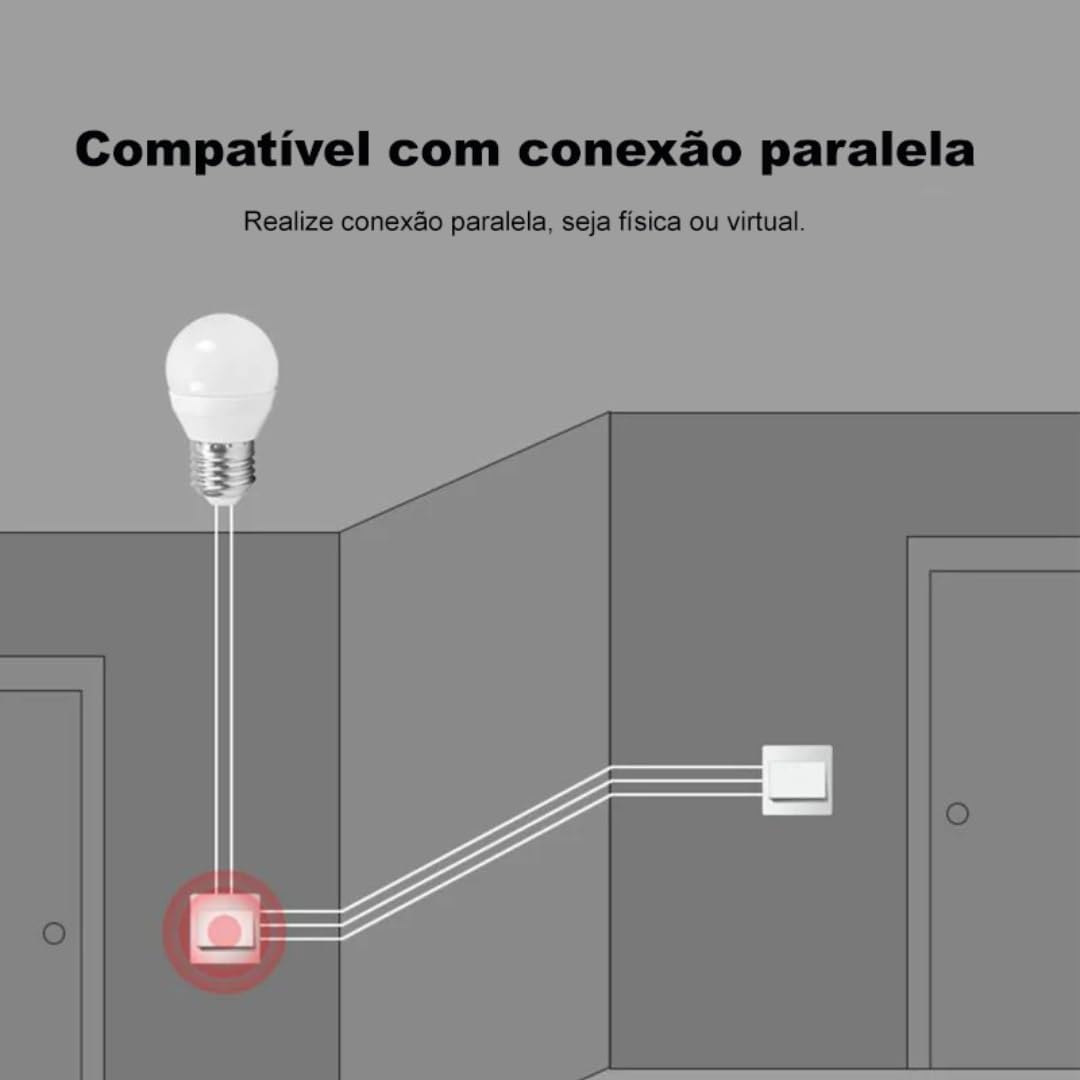
The switch is compatible with popular voice assistants such as Amazon Alexa and Google Home, and works with smart home platforms like Tuya Smart, Smart Life, and Home Assistant. Its compact design allows for simple and quick installation, including parallel installation with existing switches.
2 സുരക്ഷാ വിവരങ്ങൾ
മുന്നറിയിപ്പ്: Electrical installation should only be performed by a qualified electrician to ensure safety and compliance with local electrical codes. Incorrect installation can lead to electric shock, fire, or device damage.
- ഇൻസ്റ്റാളേഷൻ അല്ലെങ്കിൽ അറ്റകുറ്റപ്പണികൾക്ക് മുമ്പ് സർക്യൂട്ട് ബ്രേക്കറിലെ വൈദ്യുതി ബന്ധം എല്ലായ്പ്പോഴും വിച്ഛേദിക്കുക.
- ഉപകരണം അതിന്റെ നിർദ്ദിഷ്ട വോള്യത്തിനുള്ളിൽ ഉപയോഗിക്കുന്നുണ്ടെന്ന് ഉറപ്പാക്കുക.tage and current ratings (110V, 16A, 1600W).
- ഈർപ്പം അല്ലെങ്കിൽ അങ്ങേയറ്റത്തെ താപനിലയിലേക്ക് ഉപകരണം തുറന്നുകാട്ടരുത്.
- ഈ ഉപകരണം ഇൻഡോർ ഉപയോഗത്തിനായി മാത്രം രൂപകൽപ്പന ചെയ്തിട്ടുള്ളതാണ്.
3. പാക്കേജ് ഉള്ളടക്കം
- 1 x Aubess Mini Smart Wi-Fi Switch
- 1 x ഉപയോക്തൃ മാനുവൽ
4. ഉൽപ്പന്ന സവിശേഷതകൾ
- വൈഫൈ കണക്റ്റിവിറ്റി: Operates on 2.4GHz Wi-Fi networks for remote control.
- ഊർജ്ജ നിരീക്ഷണം: Provides real-time and historical energy consumption data.
- ശബ്ദ നിയന്ത്രണം: ഹാൻഡ്സ്-ഫ്രീ പ്രവർത്തനത്തിനായി ആമസോൺ അലക്സ, ഗൂഗിൾ ഹോം എന്നിവയുമായി പൊരുത്തപ്പെടുന്നു.
- ആപ്പ് നിയന്ത്രണം: Works with Tuya Smart and Smart Life applications for comprehensive management.
- High Power Rating: 16 വരെ പിന്തുണയ്ക്കുന്നു Amperes and 1600 Watts.
- സമാന്തര ഇൻസ്റ്റാളേഷൻ: Designed to facilitate parallel wiring with existing traditional switches.
- കോംപാക്റ്റ് ഡിസൈൻ: Small form factor for easy integration into electrical boxes.


5 സ്പെസിഫിക്കേഷനുകൾ
| സ്പെസിഫിക്കേഷൻ | മൂല്യം |
|---|---|
| ഓപ്പറേഷൻ മോഡ് | ഓൺ-ഓഫ് |
| നിലവിലെ റേറ്റിംഗ് | 16 Ampഈറസ് |
| ഓപ്പറേറ്റിംഗ് വോളിയംtage | 110 വോൾട്ട് |
| ബന്ധപ്പെടാനുള്ള തരം | സാധാരണയായി അടച്ചിരിക്കുന്നു |
| കണക്റ്റർ തരം | Clamp |
| സ്വിച്ച് തരം | സ്ലൈഡ് |
| അതിതീവ്രമായ | സ്ക്രൂ |
| സർക്യൂട്ട് തരം | 1-വഴി |
| മൗണ്ടിംഗ് തരം | മതിൽ മൗണ്ട് |
| സ്ഥാനങ്ങളുടെ എണ്ണം | 2 |
| പരമാവധി താപനില റേറ്റിംഗ് | 55 ഡിഗ്രി സെൽഷ്യസ് |
| നിയന്ത്രണ തരം | Amazon Alexa, Push Button, Google Assistant |
| നിയന്ത്രണ രീതി | Application, Remote, Touch, Voice |
| കണക്റ്റിവിറ്റി തരം | വൈഫൈ (2.4GHz) |
| ശക്തി | 1600 വാട്ട്സ് |
| നിറം | വെള്ള |
| ഇനത്തിൻ്റെ അളവുകൾ | 41 x 20 x 41 മില്ലിമീറ്റർ |
| യൂണിറ്റ് എണ്ണം | 1 യൂണിറ്റ് |
| ഇനങ്ങളുടെ അളവ് | 1 |
| മെറ്റീരിയൽ | പ്ലാസ്റ്റിക് |
| കോൺടാക്റ്റ് മെറ്റീരിയൽ | ലോഹം |
| അന്താരാഷ്ട്ര സംരക്ഷണ റേറ്റിംഗ് | IP00 |
| Compliant Specification | CE, RoHS |
| നിർമ്മാതാവ് | ഓബസ് |
| ഭാഗം നമ്പർ | WSM02 |
6. സജ്ജീകരണവും ഇൻസ്റ്റാളേഷനും
6.1 വയറിംഗ് നിർദ്ദേശങ്ങൾ
പ്രധാനപ്പെട്ടത്: Ensure power is disconnected at the circuit breaker before proceeding with any wiring. Professional installation is highly recommended.
- വയറുകൾ തിരിച്ചറിയുക: Locate the Live (L), Neutral (N), and Load (L1, L2, etc.) wires in your electrical box. The Aubess switch requires a Neutral wire for operation.
- വയറുകൾ ബന്ധിപ്പിക്കുക: Connect the Live wire from your power source to the 'L' terminal on the switch. Connect the Neutral wire to the 'N' terminal. Connect the Load wire(s) (to your light fixture or appliance) to the 'L1' (and 'L2' if applicable) terminal(s).
- സുരക്ഷിത കണക്ഷനുകൾ: എല്ലാ വയർ കണക്ഷനുകളും സുരക്ഷിതമാണെന്നും ശരിയായി ഇൻസുലേറ്റ് ചെയ്തിട്ടുണ്ടെന്നും ഉറപ്പാക്കുക.
- മൗണ്ട് സ്വിച്ച്: Carefully place the switch into the electrical box and secure it.
- പവർ പുന ore സ്ഥാപിക്കുക: ഇൻസ്റ്റാളേഷൻ പൂർത്തിയായി പരിശോധിച്ചുറപ്പിച്ചുകഴിഞ്ഞാൽ, സർക്യൂട്ട് ബ്രേക്കറിൽ പവർ പുനഃസ്ഥാപിക്കുക.
6.2 അപ്ലിക്കേഷൻ ജോടിയാക്കൽ
To control your Aubess Mini Smart Wi-Fi Switch, you need to pair it with the Tuya Smart or Smart Life application.
- അപ്ലിക്കേഷൻ ഡൗൺലോഡുചെയ്യുക: നിങ്ങളുടെ സ്മാർട്ട്ഫോണിന്റെ ആപ്പ് സ്റ്റോറിൽ (iOS അല്ലെങ്കിൽ Android) നിന്ന് 'Tuya Smart' അല്ലെങ്കിൽ 'Smart Life' ആപ്പ് ഡൗൺലോഡ് ചെയ്യുക.
- രജിസ്റ്റർ ചെയ്യുക/ലോഗിൻ ചെയ്യുക: ആപ്പ് തുറന്ന് പുതിയൊരു അക്കൗണ്ടിനായി രജിസ്റ്റർ ചെയ്യുക അല്ലെങ്കിൽ നിങ്ങൾക്ക് ഇതിനകം ഒരു അക്കൗണ്ട് ഉണ്ടെങ്കിൽ ലോഗിൻ ചെയ്യുക.
- ഉപകരണം ചേർക്കുക: ഒരു പുതിയ ഉപകരണം ചേർക്കാൻ ആപ്പിന്റെ മുകളിൽ വലത് കോണിലുള്ള '+' ഐക്കണിൽ ടാപ്പ് ചെയ്യുക.
- ഉപകരണ തരം തിരഞ്ഞെടുക്കുക: Choose 'Electrical Switch' or 'Switch (Wi-Fi)'.
- വൈഫൈ വിശദാംശങ്ങൾ നൽകുക: Ensure your phone is connected to a 2.4GHz Wi-Fi network. Enter your Wi-Fi password in the app.
- ഉപകരണം ജോടിയാക്കൽ മോഡിൽ ഇടുക: Power on the switch. If the indicator light is not blinking rapidly, press and hold the reset button on the switch for 5-10 seconds until it blinks rapidly.
- മിന്നിമറയുന്നത് സ്ഥിരീകരിക്കുക: In the app, confirm that the indicator light is blinking rapidly.
- ബന്ധിപ്പിക്കുക: The app will begin searching for the device. Once found, you can rename it and complete the setup.
7. പ്രവർത്തന നിർദ്ദേശങ്ങൾ
7.1 ആപ്പ് നിയന്ത്രണം
Once paired, you can control the switch from anywhere using the Tuya Smart or Smart Life app:
- ഓൺ/ഓഫ്: Tap the switch icon in the app to turn the connected appliance on or off.
- ഷെഡ്യൂളിംഗ്: Set schedules or timers for automatic operation.
- രംഗങ്ങൾ: ഒന്നിലധികം ഉപകരണങ്ങൾ ഒരേസമയം നിയന്ത്രിക്കാൻ ഇഷ്ടാനുസൃത രംഗങ്ങൾ സൃഷ്ടിക്കുക.
7.2 Voice Control (Alexa/Google Home)
To enable voice control, link your Tuya Smart/Smart Life account with Amazon Alexa or Google Home:
- Alexa അല്ലെങ്കിൽ Google Home ആപ്പ് തുറക്കുക.
- Navigate to 'Skills & Games' (Alexa) or 'Works with Google' (Google Home).
- ഇതിനായി തിരയുക 'Tuya Smart' or 'Smart Life'.
- Enable the skill/service and link your account using your app credentials.
- Discover devices. You can now control your switch using voice commands like: "Alexa, turn on the living room light" or "Hey Google, turn off the fan."
7.3 ഊർജ്ജ നിരീക്ഷണം
The integrated energy monitor allows you to track power consumption:
- In the Tuya Smart/Smart Life app, select your Aubess switch.
- Look for the 'Energy Monitoring' or 'Power Statistics' section.
- View real-time power usage (Watts), current (Amperes), and voltagഇ (വോൾട്ട്).
- Access historical data, including daily, weekly, or monthly consumption graphs.

8. പരിപാലനം
- വൃത്തിയാക്കൽ: Use a soft, dry cloth to clean the device. Do not use harsh chemicals or abrasive cleaners.
- ഫേംവെയർ അപ്ഡേറ്റുകൾ: Periodically check the Tuya Smart/Smart Life app for available firmware updates to ensure optimal performance and security.
- പരിസ്ഥിതി വ്യവസ്ഥകൾ: Ensure the device is kept within its operating temperature range (max 55°C) and away from excessive humidity.
9. പ്രശ്നപരിഹാരം
- ഉപകരണം പ്രതികരിക്കുന്നില്ല:
- ഉപകരണത്തിന് പവർ ഉണ്ടോയെന്ന് പരിശോധിക്കുക.
- Verify your Wi-Fi network is active and stable (2.4GHz).
- നിങ്ങളുടെ സ്മാർട്ട്ഫോണിൽ ഇന്റർനെറ്റ് കണക്ഷൻ ഉണ്ടെന്ന് ഉറപ്പാക്കുക.
- Try restarting the switch by cycling its power at the circuit breaker.
- ജോടിയാക്കാൻ കഴിയുന്നില്ല:
- Make sure the switch's indicator light is blinking rapidly (pairing mode). If not, reset it by holding the button for 5-10 seconds.
- Confirm your Wi-Fi network is 2.4GHz. 5GHz networks are not supported.
- നിങ്ങളുടെ വൈഫൈ പാസ്വേഡ് ശരിയായി നൽകിയിട്ടുണ്ടെന്ന് ഉറപ്പാക്കുക.
- Move the switch closer to your Wi-Fi router during pairing.
- ശബ്ദ നിയന്ത്രണം പ്രവർത്തിക്കുന്നില്ല:
- Verify that the Tuya Smart/Smart Life skill/service is enabled and linked correctly in your Alexa/Google Home app.
- Ensure the device name in the smart home app matches the name you are using in voice commands.
- Try rediscovering devices in your Alexa/Google Home app.
10. വാറൻ്റിയും പിന്തുണയും
For warranty information, technical support, or service inquiries, please contact Aubess customer support through their official website or the contact information provided at the point of purchase. Please have your product model (WSM02) and purchase details ready when contacting support.