
1 സുരക്ഷാ വിവരങ്ങൾ
For safe use, please observe the following guidelines:
- Keep the device away from high temperatures and humidity to prevent damage.
- Handle lithium-ion batteries with care. Do not disassemble, puncture, or expose to extreme heat.
- Be aware of potential interference with other wireless devices.
- Do not operate the device while driving if it distracts you from safe driving.
2. ഉൽപ്പന്നം കഴിഞ്ഞുview
The SONRU Bluetooth 5.3 Aux Adapter is a versatile wireless audio receiver designed to upgrade your car, home stereo, wired headphones, or speakers with Bluetooth connectivity. Featuring advanced Bluetooth 5.3 technology, it ensures a faster, more stable, and smarter connection with minimal sound quality loss.
പ്രധാന സവിശേഷതകൾ:
- വിപുലമായ ബ്ലൂടൂത്ത് 5.3 സാങ്കേതികവിദ്യ: Provides improved transmission delay and connection stability compared to older versions.
- Clear Sounds: Equipped with high-quality microphones and upgraded CVC8.0 technology for echo and noise cancellation, ensuring clear conversations.
- നീണ്ട ബാറ്ററി ലൈഫ്: Offers up to 16 hours of use on a single 1.5-hour charge, with support for charging while in use.
- പോർട്ടബിൾ ഡിസൈൻ: Compact and lightweight, ideal for various audio setups.
- ഇരട്ട ഉപകരണ കണക്ഷൻ: Connects to two Bluetooth devices simultaneously, allowing for convenient switching between calls and music.
- വിശാലമായ അനുയോജ്യത: Supports AUX and RCA outputs, making it suitable for car stereos, home audio systems, wired headphones, and more.
പാക്കേജ് ഉള്ളടക്കം:
- 1 x SONRU Bluetooth Jack Adapter
- 1 x 3.5 mm Aux Plug to Plug Adapter
- 1 x 3.5 എംഎം ഓഡിയോ കേബിൾ
- 1 x RCA ഓഡിയോ കേബിൾ
- 1 x ടൈപ്പ്-സി ചാർജിംഗ് കേബിൾ
- 1 x ഉപയോക്തൃ മാനുവൽ

Figure 2.1: The SONRU Bluetooth Aux Adapter, showcasing its compact design and integrated 3.5mm audio jack.
3. സജ്ജീകരണം
3.1 ഉപകരണം ചാർജ് ചെയ്യുന്നു
Before first use, fully charge the adapter using the provided Type-C charging cable. Connect the Type-C end to the adapter's charging port and the USB-A end to a compatible USB power source (e.g., car charger, wall adapter, computer USB port).
The device features a digital display that shows the battery percentage. A full charge takes approximately 1.5 hours.
3.2 പ്രാരംഭ ജോടിയാക്കലും കണക്ഷനും
- ഓൺ ചെയ്യുക: Press and hold the multifunction button (usually the main central button) for approximately 3 seconds until the device powers on and the display lights up.
- പ്ലഗ് ഇൻ: Connect the adapter to your audio system (car stereo, home stereo, wired headphones, or speaker) using the appropriate cable:
- For 3.5mm AUX input: Use the integrated 3.5mm jack or the provided 3.5mm Aux Plug to Plug adapter/Audio Cable.
- For RCA input: Use the provided RCA audio cable.
- ജോടിയാക്കൽ മോഡ്: The device will automatically enter pairing mode when powered on for the first time or if no previously paired device is found. The Bluetooth icon on the display will flash.
- ബ്ലൂടൂത്ത് വഴി ബന്ധിപ്പിക്കുക: On your mobile device (smartphone, tablet, laptop), go to Bluetooth settings. ഇതിനായി തിരയുക available devices and select "J48" or "SONRU" (device name may vary slightly).
- സ്ഥിരീകരണം: Once successfully paired, the Bluetooth icon on the adapter's display will stop flashing and remain solid. A voice prompt may also confirm the connection.

Figure 3.1: Visual guide for turning on, plugging in, pairing, and playing audio with the SONRU Bluetooth adapter.
3.3 ഡ്യുവൽ ഡിവൈസ് കണക്ഷൻ
The adapter supports connecting to two Bluetooth devices simultaneously. After connecting the first device, enable Bluetooth on the second device and connect to the adapter. The adapter will manage connections, allowing you to switch between audio sources (e.g., music from one phone, calls from another).
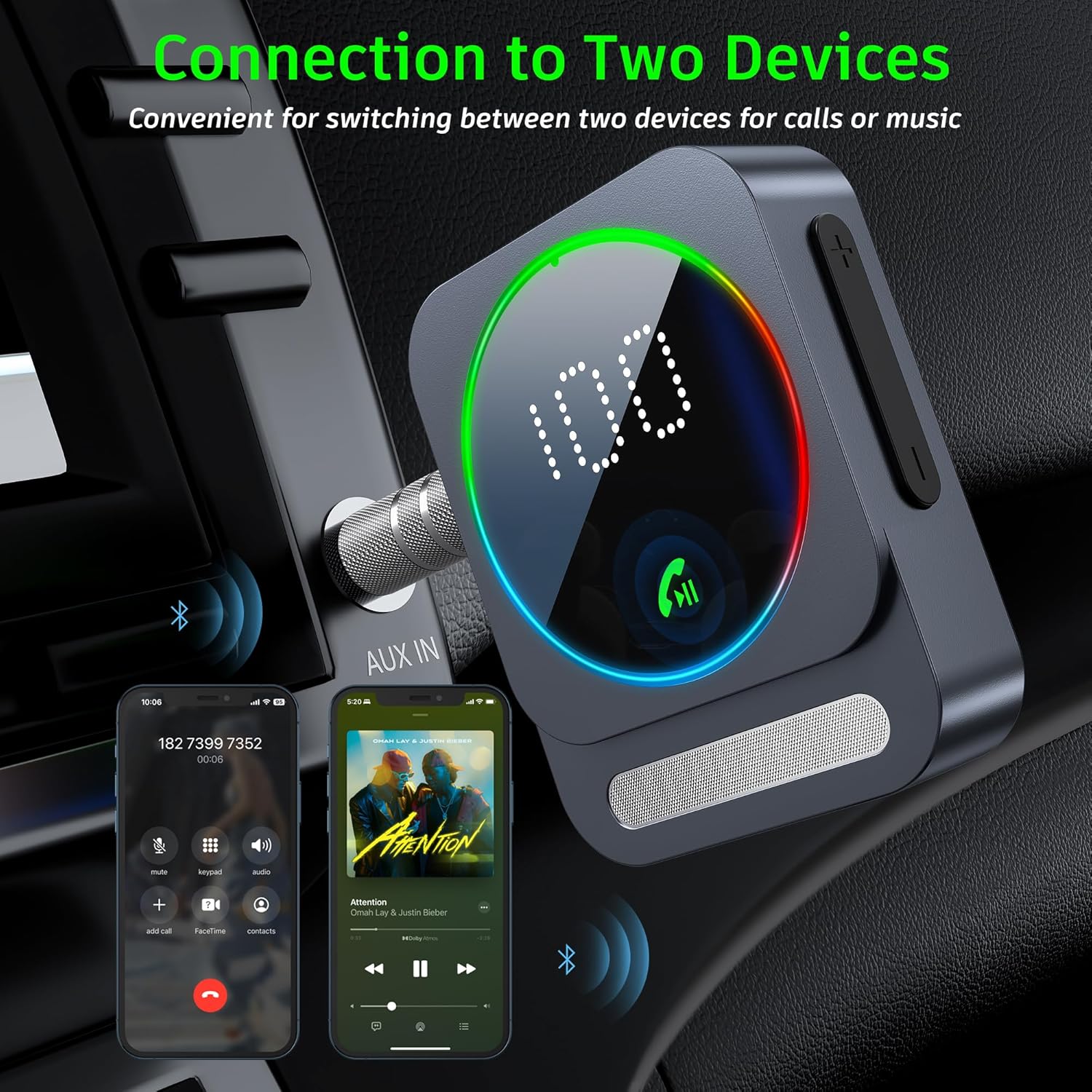
Figure 3.2: The adapter's ability to connect to two devices, enabling seamless switching between music and calls.
4. പ്രവർത്തന നിർദ്ദേശങ്ങൾ
4.1 ബട്ടൺ പ്രവർത്തനങ്ങൾ
The SONRU Bluetooth adapter features a multifunction button and volume buttons for easy control:

Figure 4.1: Detailed button functions for the SONRU Bluetooth adapter.
| ബട്ടൺ | ആക്ഷൻ | ഫംഗ്ഷൻ |
|---|---|---|
| മൾട്ടിഫങ്ഷൻ ബട്ടൺ | സിംഗിൾ പ്രസ്സ് | Answer calls / Play/Pause music |
| മൾട്ടിഫങ്ഷൻ ബട്ടൺ | ഇരട്ട പ്രസ്സ് | അവസാന നമ്പറിലേക്ക് തിരികെ വിളിക്കുക |
| മൾട്ടിഫങ്ഷൻ ബട്ടൺ | Long Press (approx. 3s) | Reject call / Power On/Off |
| "+" ബട്ടൺ | സിംഗിൾ പ്രസ്സ് | അടുത്ത പാട്ട് |
| "+" ബട്ടൺ | ലോംഗ് പ്രസ്സ് | വോളിയം കൂട്ടുക |
| "-" ബട്ടൺ | സിംഗിൾ പ്രസ്സ് | മുൻ ഗാനം |
| "-" ബട്ടൺ | ലോംഗ് പ്രസ്സ് | Volume down / Clear pairing (when not connected) |
4.2 ഹാൻഡ്സ്-ഫ്രീ കോളിംഗ്
The adapter supports hands-free calling with its built-in microphone and CVC8.0 noise cancellation technology.
- കോളുകൾക്ക് ഉത്തരം നൽകുന്നു: മൾട്ടിഫംഗ്ഷൻ ബട്ടൺ ഒരിക്കൽ അമർത്തുക.
- അവസാനിക്കുന്ന കോളുകൾ: ഒരു കോൾ സമയത്ത് മൾട്ടിഫംഗ്ഷൻ ബട്ടൺ ഒരിക്കൽ അമർത്തുക.
- കോളുകൾ നിരസിക്കുന്നു: ഒരു കോൾ വരുമ്പോൾ മൾട്ടിഫംഗ്ഷൻ ബട്ടൺ ദീർഘനേരം അമർത്തുക.
- വോയ്സ് അസിസ്റ്റന്റ്: The device supports voice assistants (e.g., Siri). Consult your phone's manual for activating voice assistant features.

Figure 4.2: Hands-free calling functionality in a car environment.
4.3 മ്യൂസിക് പ്ലേബാക്ക്
- പ്ലേ/താൽക്കാലികമായി നിർത്തുക: മൾട്ടിഫംഗ്ഷൻ ബട്ടൺ ഒരിക്കൽ അമർത്തുക.
- അടുത്ത ട്രാക്ക്: "+" ബട്ടൺ ഒരിക്കൽ അമർത്തുക.
- മുമ്പത്തെ ട്രാക്ക്: "-" ബട്ടൺ ഒരിക്കൽ അമർത്തുക.
- വോളിയം ക്രമീകരണം: Long press the "+" button to increase volume, and long press the "-" button to decrease volume.

Figure 4.3: Enjoying music wirelessly with the adapter connected to a speaker.
5. പരിപാലനം
- വൃത്തിയാക്കൽ: ഉപകരണം വൃത്തിയാക്കാൻ മൃദുവായതും ഉണങ്ങിയതുമായ തുണി ഉപയോഗിക്കുക. അബ്രസീവ് ക്ലീനറുകളോ ലായകങ്ങളോ ഉപയോഗിക്കരുത്.
- സംഭരണം: ഉപയോഗത്തിലില്ലാത്തപ്പോൾ ഉപകരണം തണുത്തതും വരണ്ടതുമായ സ്ഥലത്ത് സൂക്ഷിക്കുക. കടുത്ത താപനില ഒഴിവാക്കുക.
- ബാറ്ററി കെയർ: ബാറ്ററി ലൈഫ് വർദ്ധിപ്പിക്കാൻ, ബാറ്ററി ഇടയ്ക്കിടെ പൂർണ്ണമായും ഡിസ്ചാർജ് ചെയ്യുന്നത് ഒഴിവാക്കുക. തുടർച്ചയായ ഉപയോഗത്തിലല്ലെങ്കിൽ പോലും ഉപകരണം പതിവായി ചാർജ് ചെയ്യുക.
- കേബിൾ മാനേജുമെന്റ്: കേടുപാടുകൾ സംഭവിക്കാതിരിക്കാൻ കേബിളുകൾ വളയുകയോ ആയാസപ്പെടുകയോ ചെയ്തിട്ടില്ലെന്ന് ഉറപ്പാക്കുക.
6. പ്രശ്നപരിഹാരം
| പ്രശ്നം | സാധ്യമായ കാരണം | പരിഹാരം |
|---|---|---|
| ഉപകരണം പവർ ഓണാക്കുന്നില്ല. | കുറഞ്ഞ ബാറ്ററി. | ഉപകരണം പൂർണ്ണമായും ചാർജ് ചെയ്യുക. |
| എന്റെ ഉപകരണവുമായി ജോടിയാക്കാൻ കഴിയില്ല. | Bluetooth not enabled on source device; adapter not in pairing mode; too many paired devices. | Ensure Bluetooth is on. Long press the '-' button to clear previous pairings. Restart both devices. Move closer to the adapter. |
| ബന്ധിപ്പിച്ചതിനുശേഷം ശബ്ദമില്ല. | Volume too low; incorrect input selected on stereo; cable not fully inserted. | Increase volume on both adapter and audio system. Ensure correct AUX/RCA input is selected. Check cable connections. |
| Sound quality is poor/intermittent. | Interference; distance from source device; low battery. | Reduce distance between adapter and source. Avoid obstacles. Charge the device. Avoid strong electromagnetic interference. |
| Calls are not clear. | Microphone obstructed; background noise. | Ensure microphone is clear. CVC8.0 technology reduces noise, but extreme noise may still affect clarity. |
7 സ്പെസിഫിക്കേഷനുകൾ
| ഫീച്ചർ | വിശദാംശങ്ങൾ |
|---|---|
| ബ്ലൂടൂത്ത് പതിപ്പ് | 5.3 |
| ബാറ്ററി ലൈഫ് | 16 മണിക്കൂർ വരെ (പ്ലേബാക്ക്) |
| ചാർജിംഗ് സമയം | ഏകദേശം 1.5 മണിക്കൂർ |
| ചാർജിംഗ് പോർട്ട് | ടൈപ്പ്-സി |
| ഔട്ട്പുട്ട് ഇൻ്റർഫേസുകൾ | 3.5mm AUX, RCA |
| പ്രവർത്തന ശ്രേണി | Up to 33ft (10m) without obstacles |
| അളവുകൾ | 6.38 x 2.78 x 0.83 ഇഞ്ച് (16.2 x 7.06 x 2.1 സെ.മീ) |
| ഇനത്തിൻ്റെ ഭാരം | 2.89 ഔൺസ് (81.9 ഗ്രാം) |
| മെറ്റീരിയൽ | ലോഹം |
8. ഉൽപ്പന്ന വീഡിയോകൾ
Watch these official videos for a visual guide on using your SONRU Bluetooth Aux Adapter.
SONRU Aux Bluetooth Adapter Overview
ഈ വീഡിയോ ഒരു സമഗ്രമായ ഓവർ നൽകുന്നുview of the SONRU Aux Bluetooth adapter, demonstrating its features and functionality.
9. വാറൻ്റിയും പിന്തുണയും
SONRU provides a warranty policy for this product. If you encounter any problems or are not satisfied with your purchase, please contact us at any time. We are committed to providing a satisfactory solution.
For support, please refer to the contact information provided in your product packaging or visit the official SONRU webസൈറ്റ്.